Ìwé Ìtọ́sọ́nà Olùlò DrayTek VigorAP 905 Ìṣiṣẹ́ Gíga WiFi 6 Wiwọle
Model: VAP905-K
1. Ọja Ipariview
The DrayTek VigorAP 905 is a high-performance WiFi 6 Mesh Wireless Access Point designed for efficient network management in demanding environments. It delivers robust wireless connectivity and flexible wired options.
Awọn ẹya pataki:
- Fast Wi-Fi 6 Access Point: Experience lightning-fast speeds with a combined speed of up to 3000Mbps, ideal for businesses requiring efficient networks for demanding applications.
- Strong WPA3 Connection Encryption: Ensures robust wireless security with the latest WPA3-Personal or 802.1x Enterprise. Supports mixed WPA3/WPA2 and different SSIDs with varying security levels.
- Rọrun lati tunto ati ṣakoso: Effortlessly manage up to 8 compatible mesh VigorAPs and up to 20 APs using the Wireless Virtual Controller module. Features auto-provisioning and AP monitoring.
- Flexible 2.5 Gigabit Ethernet Uplink & 4 x GbE Connectivity: Connects to the network via its 2.5Gb Ethernet interface. Additional Gigabit Ethernet interfaces provide wired connectivity for devices like laptops or printers.
- High Density Performance: Capable of linking up to 256 clients with 802.11ax dual-band antennas and Wi-Fi 6 2x2 Multi-User MIMO technology, suitable for high-density environments.
- Wall/Desk Form Factor Design: A versatile design that complements both business and home interiors. LED indicators can be scheduled or disabled.

olusin 1: Iwaju view of the DrayTek VigorAP 905 Access Point, showcasing apẹrẹ kekere rẹ ati awọn eriali ita meji.
2. Eto
2.1 Package Awọn akoonu
Ṣaaju ki o to bẹrẹ, rii daju pe gbogbo awọn nkan wa ninu package:
- DrayTek VigorAP 905 Access Point
2.2 Fifi sori ti ara
The VigorAP 905 can be mounted on a wall or placed on a desk.
- Yan Ibi kan: Select a central location for optimal Wi-Fi coverage, away from obstructions and sources of interference.
- Asopọ agbara: Connect the power adapter to the AP's PWR port and plug it into an electrical outlet. Alternatively, if using Power over Ethernet (PoE), connect an Ethernet cable from a PoE-enabled switch or injector to the 2.5G Ethernet port (P1/PoE).
- Isopọ nẹtiwọki: Connect an Ethernet cable from your router or network switch to the 2.5G Ethernet port (P1/PoE) on the VigorAP 905.
- Optional Wired Devices: Use the additional Gigabit Ethernet ports (P2, P3, P4, P5) to connect wired devices such as computers or printers.

olusin 2: Apa view of the VigorAP 905, illustrating the power input, reset button, WPS button, 2.5G Ethernet port (P1/PoE), and four Gigabit Ethernet ports (P2-P5).
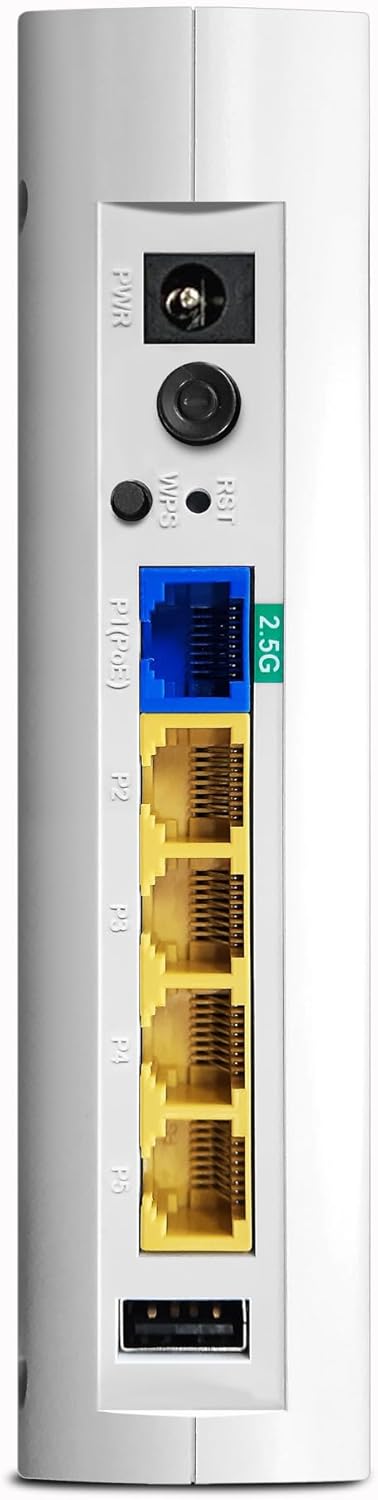
Nọmba 3: Alaye view of the VigorAP 905's rear panel, highlighting the power port, reset/WPS buttons, 2.5G Ethernet port, and four standard Gigabit Ethernet ports.
2.3 Iṣeto ni ibẹrẹ
After physical installation, the VigorAP 905 requires initial configuration. Refer to the DrayTek official website or the included quick start guide for detailed instructions on accessing the web interface and setting up your Wi-Fi network (SSID, password, security settings).
- Iwọle si awọn Web Ni wiwo: Typically, you connect a computer directly to one of the AP's LAN ports or connect wirelessly to its default SSID (usually printed on the device). Then, open a web browser and enter the default IP address (e.g., 192.168.1.1).
- Awọn iwe-ẹri Iwọle: Use the default username and password (also usually printed on the device or in the quick start guide) to log in.
- Eto Oluṣeto: Follow the on-screen wizard to configure basic settings such as Wi-Fi name (SSID), password, and security type (WPA3 recommended).
3. Operating the VigorAP 905
3.1 LED Atọka
The VigorAP 905 features LED indicators on its front panel to provide status information:
- LED agbara: Ṣe afihan ipo agbara ti ẹrọ naa.
- WLAN LEDs: Indicate Wi-Fi activity for 2.4GHz and 5GHz bands.
- Awọn LED LAN: Indicate activity on the Ethernet ports.
- Refer to the full user manual for a detailed explanation of each LED's behavior (e.g., solid, blinking, color).

olusin 4: Angled view of the VigorAP 905, highlighting the front panel with its array of LED indicators for various statuses.
3.2 Asopọmọra Alailowaya
Once configured, devices can connect to the VigorAP 905 wirelessly using the configured SSIDs and passwords. The device supports Wi-Fi 6 (802.11ax) for enhanced performance and efficiency.
- Awọn ẹrọ Asopọmọra: On your wireless device (smartphone, laptop, tablet), search for available Wi-Fi networks, select your configured SSID, and enter the password.
- Nẹ́tíwọ́ọ̀kì àsopọ: If you have multiple compatible VigorAPs, you can set up a mesh network for seamless roaming and extended coverage. Consult the DrayTek documentation for mesh setup procedures.
3.3 Ti firanṣẹ Asopọmọra
The VigorAP 905 provides five Ethernet ports for wired connections:
- P1 (2.5G Ethernet/PoE): Primary uplink to your network, supporting 2.5 Gigabit speeds and Power over Ethernet.
- P2-P5 (Gigabit Ethernet): Standard Gigabit Ethernet ports for connecting wired devices.
4. Itọju
Regular maintenance ensures optimal performance and longevity of your VigorAP 905.
- Awọn imudojuiwọn famuwia: Lojoojumọ ṣayẹwo DrayTek website for new firmware versions. Updating firmware can provide new features, performance improvements, and security patches.
- Ninu: Keep the device clean and free from dust. Use a soft, dry cloth. Do not use liquid cleaners.
- Afẹfẹ: Ensure the device has adequate ventilation to prevent overheating. Do not block ventilation holes.
- Iṣeto Afẹyinti: Regularly back up your device's configuration settings through the web interface. This allows for quick restoration in case of a reset or replacement.
5. Laasigbotitusita
This section addresses common issues you might encounter with your VigorAP 905.
5.1 Kò sí Agbára / Àwọn LED Tí A Pa
- Ṣayẹwo Asopọ agbara: Ensure the power adapter is securely connected to the AP and the electrical outlet.
- Jẹrisi Ijade: Ṣe idanwo iṣan itanna pẹlu ẹrọ miiran lati jẹrisi pe o n ṣiṣẹ.
- PoE Check: If using PoE, ensure your PoE switch or injector is powered on and providing power.
5.2 Ko le Sopọ si Wi-Fi
- Check SSID and Password: Verify that you are selecting the correct Wi-Fi network name (SSID) and entering the correct password. Passwords are case-sensitive.
- AP Status: Check the WLAN LEDs on the AP. If they are off, the Wi-Fi might be disabled or the AP is not functioning correctly.
- Reboot AP: Power cycle the VigorAP 905 by unplugging and re-plugging the power adapter.
- Distance/Interference: Move closer to the AP or check for sources of interference (e.g., microwaves, cordless phones).
5.3 Iyara Wi-Fi Lọra
- Ìdènà Ìkànnì: Use the AP's web interface to perform a site survey and select a less congested Wi-Fi channel.
- Agbara ifihan agbara: Ensure your device has a strong Wi-Fi signal. Obstacles like walls can degrade performance.
- Nọmba Awọn Ẹrọ: Too many devices connected to the AP can impact performance.
- Firmware: Ensure the AP is running the latest firmware.
5.4 Ko le Wiwọle Web Ni wiwo
- Adirẹsi IP: Confirm you are using the correct IP address for the AP. If the AP is connected to a router, it might have received a dynamic IP address.
- Isopọ nẹtiwọki: Ensure your computer is connected to the same network as the AP (either directly via Ethernet or wirelessly).
- Ogiriina/Agbodiyan: Paarẹ fun igba diẹ eyikeyi ogiriina tabi sọfitiwia antivirus lori kọnputa rẹ ti o le dina wiwọle.
- Idapada si Bose wa tele: As a last resort, perform a factory reset by pressing and holding the reset button for several seconds (refer to the full manual for exact duration). Note: This will erase all configurations.
6. Awọn pato
| Ẹya ara ẹrọ | Ẹ̀kúnrẹ́rẹ́ |
|---|---|
| Brand | DrayTek |
| Orukọ awoṣe | VAP905 |
| Nọmba Awoṣe Nkan | VAP905-K |
| Asopọmọra Technology | Wi-Fi |
| Alailowaya Ibaraẹnisọrọ Alailowaya | 802.11ax (Wi-Fi 6) |
| Igbohunsafẹfẹ Band Class | Meji-Band |
| Pataki Awọn ẹya ara ẹrọ | WPA3 Security, Easy Management, High Density Performance, Versatile Design |
| Awọn ẹrọ ibaramu | Laptop, Printer, Mobile Devices |
| Niyanju Lilo | Iṣowo |
| Iwọn Nkan | 330 giramu |
| Package Mefa | 15 x 6 x 4 cm |
| Ilu isenbale | Taiwan |
7. Atilẹyin ọja ati Support
7.1 atilẹyin ọja Alaye
DrayTek products typically come with a manufacturer's warranty. Please refer to the warranty card included with your product or visit the official DrayTek website for specific warranty terms and conditions applicable to the VigorAP 905.
7.2 Imọ Support
For technical assistance, product registration, or to download the latest drivers and firmware, please visit the official DrayTek support website. You may also find helpful resources, FAQs, and community forums there.
DrayTek Official Webojula: www.draytek.com


