1. Ifihan
The Kratos K13 is an AI-powered auto face tracking tripod designed for mobile phones. It features 360-degree rotation, gesture control, and operates without the need for a dedicated application. This device is suitable for hands-free video calls, live streaming, vlogging, and video recording, providing stable and dynamic camera movement.
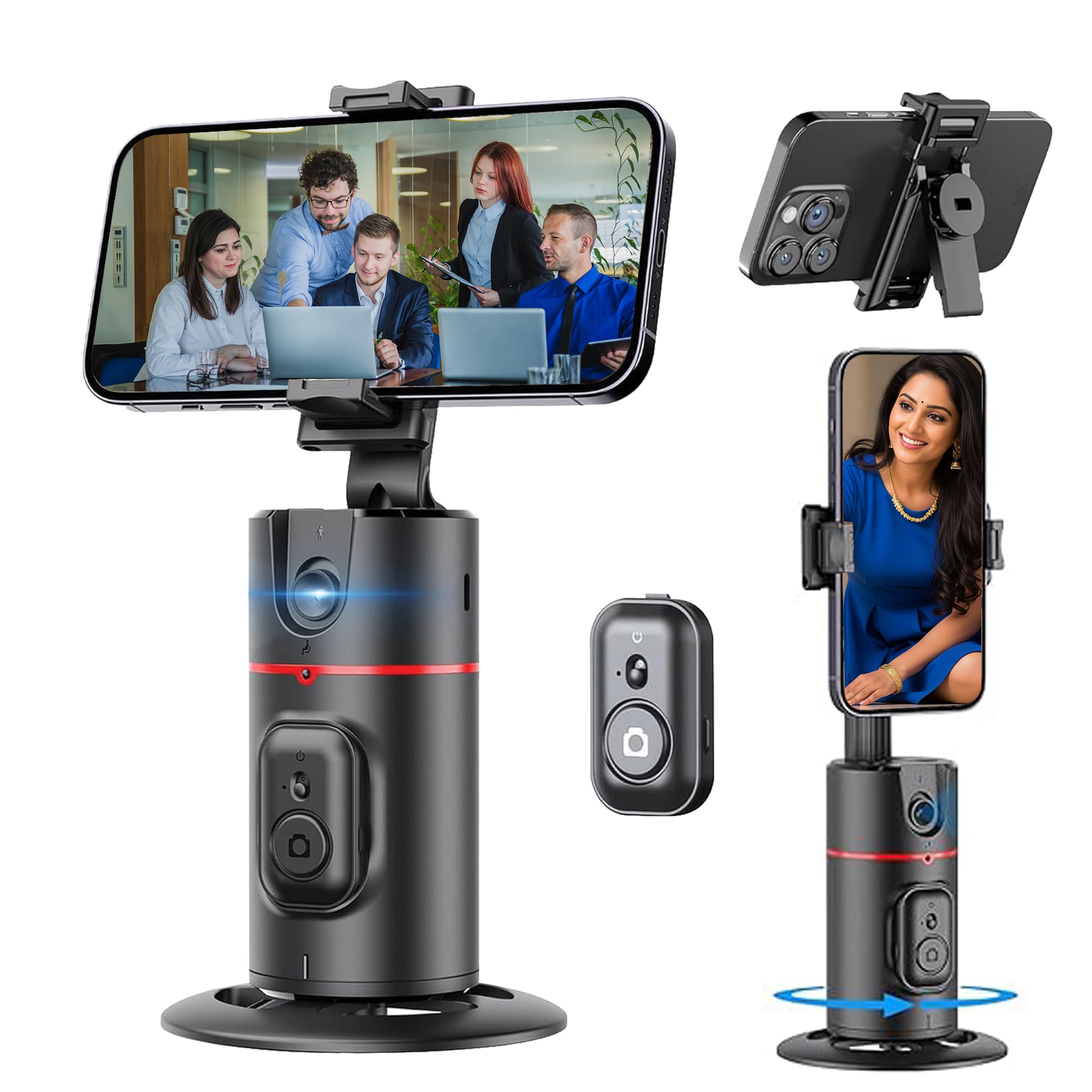
Figure 1: Kratos K13 in use, demonstrating app-free operation.
2. Ohun ti o wa ninu Apoti
- Kratos K13 AI Powered Auto Face Tracking Tripod
- Isakoṣo latọna jijin
- Kaadi atilẹyin ọja
3. Ọja Ipariview
Awọn ẹya pataki:
- Itọpa Oju oju AI: Automatically tracks your face or body with 360-degree rotation.
- No App Required: Operates independently without the need for Bluetooth pairing or a mobile application.
- 360° Rotatable Phone Holder: Allows for versatile camera mode selection, supporting both portrait and landscape orientations.
- Standard 1/4" Interface: Equipped with a 1/4-inch screw thread at the bottom for mounting on external tripods.
- Ibamu foonu gbooro: The phone holder securely fits mobile phones ranging from 7 cm to 10.5 cm in width.
- Batiri Gbigba agbara ti a ṣe sinu: Features a 2200 mAh battery with a Type-C charging port, providing 8-9 hours of operation on a full charge.
- Iṣakoso Ifarahan Ọlọgbọn: Use specific hand gestures to initiate and pause tracking.
- Detachable Remote: Pẹlu iṣakoso latọna jijin fun iṣẹ irọrun.

Figure 2: Kratos K13 product components.
4. Eto
4.1 Attaching Your Mobile Phone
- Gently expand the phone holder clamps.
- Insert your mobile phone into the holder, ensuring it is securely gripped. The holder accommodates phones between 7 cm and 10.5 cm wide.
- Adjust the phone's position for optimal balance and camera alignment.

Figure 3: Phone attachment and tripod compatibility.
4.2 Mounting on an External Tripod (Optional)
The Kratos K13 features a standard 1/4-inch screw thread at its base. To mount it on an external tripod:
- Align the 1/4-inch screw of your external tripod with the thread on the Kratos K13 base.
- Rotate the Kratos K13 clockwise until it is securely fastened to the tripod.
- Adjust the angle and height as needed using your external tripod's controls.
4.3 Eto Iṣakoso latọna jijin
The Kratos K13 includes a detachable remote control. To use the remote:
- Ensure the remote control has a working CR1632 battery installed.
- Press and hold the button on the remote to power it on.
- The remote connects automatically to the Kratos K13.

Figure 4: Detachable remote control for the Kratos K13.
5. Awọn ilana Iṣiṣẹ
5.1 Titan / Pa a
Press and hold the power button on the Kratos K13 unit for a few seconds to turn it on or off. An indicator light will confirm the power status.
5.2 Activating Auto Face Tracking
Once powered on, the Kratos K13 automatically enters tracking mode. Position yourself in front of the device, and it will begin to track your face or body, rotating 360 degrees to keep you in frame.

Figure 5: Auto tracking mode in action.
5.3 Yiyi iwọn 360-360
The Kratos K13 offers continuous 360-degree horizontal rotation. The phone holder can also be flipped 180 degrees to achieve various perspectives, including portrait and landscape orientations.
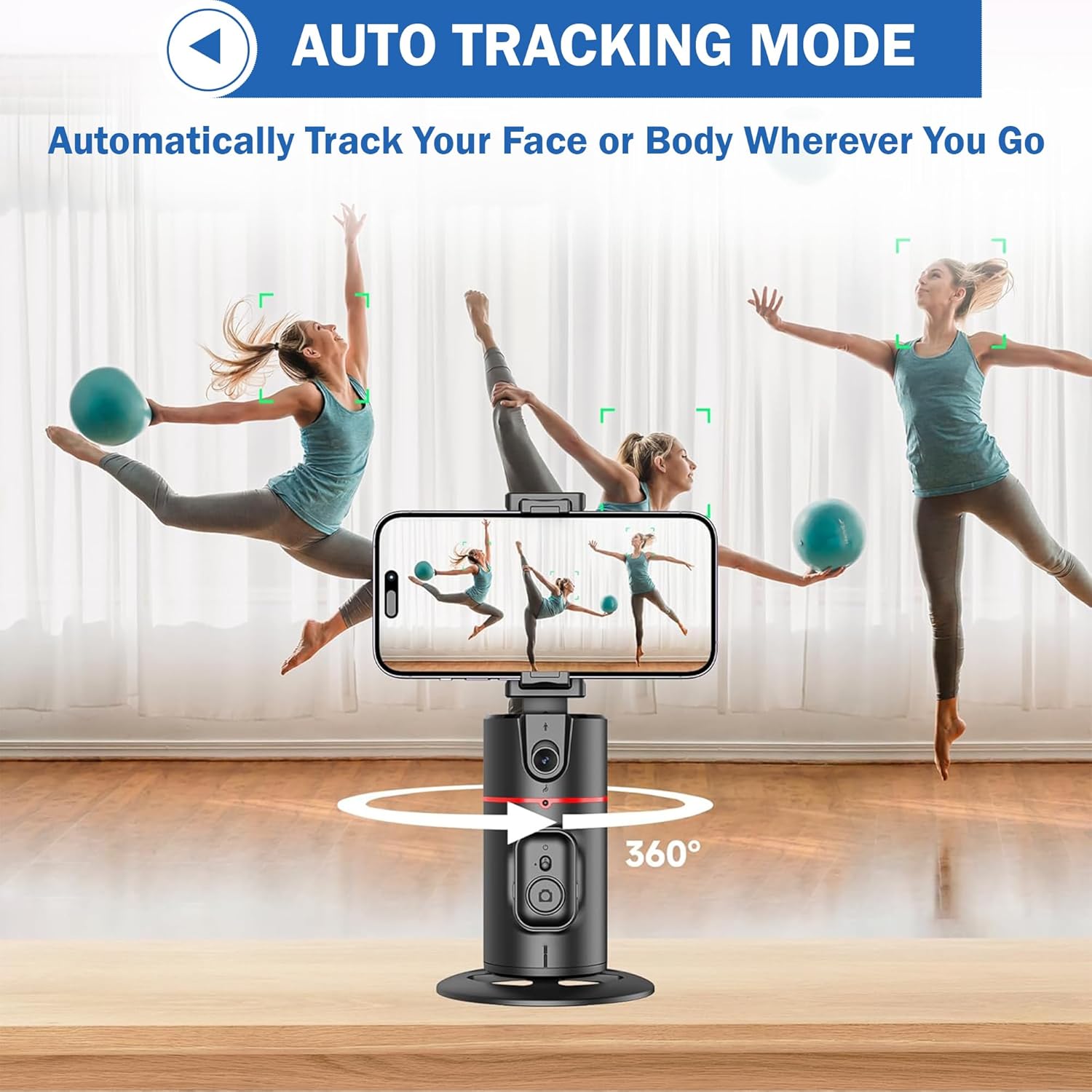
Figure 6: 360-degree rotation and holder adjustment.
5.4 Detachable Clip Functionality
The phone clip can be detached from the main unit, allowing for flexible use cases or easier storage.

Figure 7: Detachable phone clip.
6. Ìṣàkóso Ìfarahàn
The Kratos K13 supports smart gesture control for convenient operation:
- "OK" Gesture: Make an "OK" hand gesture in front of the camera to initiate tracking or recording.
- Open Palm Gesture: Present an open palm hand gesture to the camera to pause tracking or recording.

Figure 8: Gesture control for starting and stopping tracking.
7. Gbigba agbara
The Kratos K13 is equipped with a built-in 2200 mAh rechargeable battery. To charge the device:
- Connect the provided Type-C charging cable to the charging port on the Kratos K13.
- So opin keji okun naa pọ mọ adapter agbara USB ti o yẹ (ko si ninu rẹ).
- The charging indicator light will illuminate during charging and turn off once the battery is fully charged.
A full charge typically provides 8-9 hours of continuous operation.
8. Itọju
To ensure the longevity and optimal performance of your Kratos K13:
- Ninu: Fi aṣọ rírọrùn àti gbígbẹ nu ẹ̀rọ náà. Yẹra fún lílo àwọn ohun ìfọṣọ tàbí àwọn ohun èlò ìfọṣọ.
- Ibi ipamọ: Tọ́jú tripod náà sí ibi gbígbẹ tí ó tutù, tí kò sí ìmọ́lẹ̀ oòrùn tààrà àti igbóná tí ó le koko.
- Itọju Batiri: For prolonged storage, charge the battery to approximately 50% every three months to maintain battery health.
- Yago fun Omi: The device is not waterproof. Keep it away from water and high humidity.
9. Laasigbotitusita
If you encounter issues with your Kratos K13, refer to the following common solutions:
- Ẹrọ ti ko ni agbara: Rii daju pe batiri ti gba agbara. So ẹrọ pọ mọ orisun agbara nipa lilo okun Iru-C.
- Ìtẹ̀lé Kò Ṣiṣẹ́: Ensure you are within the optimal tracking range and lighting conditions. Make sure no obstructions are blocking the sensor. Re-attempt the gesture control.
- Iṣakoso Latọna jijin Ko Dahun: Check if the remote control battery (CR1632) needs replacement. Ensure the remote is powered on.
- Foonu ko baamu daradara: Verify that your phone's width is between 7 cm and 10.5 cm. Adjust the phone carefully within the clamps.
Ti awọn iṣoro ba wa, jọwọ kan si atilẹyin alabara.
10. Awọn pato
| Brand | Kratos |
| Awoṣe | K13 |
| Ọja Mefa | 30 x 5.5 x 5 cm |
| Iwọn Nkan | 200 g |
| Ohun elo | Aluminiomu |
| Awọn ẹrọ ibaramu | Cellphone, iPhone (7 cm to 10.5 cm width) |
| Pataki Ẹya | Auto Face Tracking, Gesture Control, 360° Rotation, No App Needed |
| Agbara Batiri | 2200 mAh |
| Igbesi aye batiri | Awọn wakati 8-9 (isunmọ) |
| Gbigba agbara Port | Iru-C |
| Tripod Asopọmọra | Standard 1/4 inch screw thread |
11. Atilẹyin ọja ati Support
11.1 atilẹyin ọja Alaye
The Kratos K13 AI Powered Auto Face Tracking Tripod comes with a 1-odun atilẹyin ọja from the date of purchase. This warranty covers manufacturing defects and malfunctions under normal use. Please retain your purchase receipt for warranty claims.
11.2 Onibara Support
For technical assistance, warranty claims, or any other inquiries, please contact Kratos customer support:
- Foonu: 81482 73270
- Imeeli: help@gokratos.com
Please provide your model number (K13) and a detailed description of the issue when contacting support.


