Ọrọ Iṣaaju
Thank you for choosing the Fisher Pro Active Noise Cancelling Headphones. This manual provides essential information for setting up, operating, and maintaining your headphones. Please read it thoroughly to ensure optimal performance and longevity of your device.
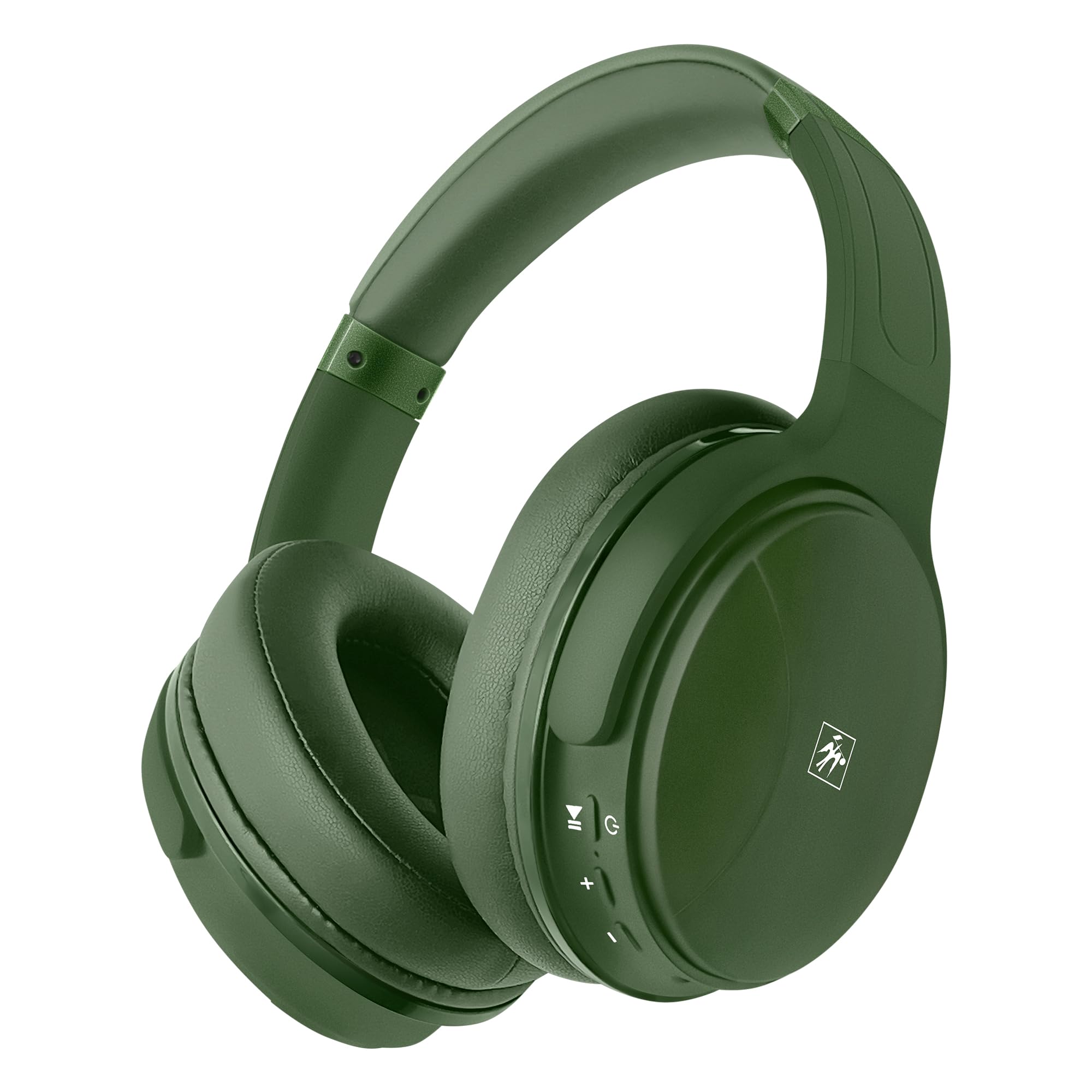
Aworan: Iwaju view of the Fisher Pro Active Noise Cancelling Headphones in dark green.
Package Awọn akoonu
Rii daju pe gbogbo awọn nkan wa ninu package:
- Fisher Pro Active Noise Cancelling Headphones
- USB-C Ngba agbara Cable
- 3.5mm Stereo AUX Cable
- Afowoyi Olumulo (iwe-ipamọ yii)
- Kaadi atilẹyin ọja
Awọn iṣakoso ati Awọn ẹya ara ẹrọ
Familiarize yourself with the headphone controls and key features:

Image: Right earcup showing control buttons for power, volume, and ANC.
- Bọtini agbara: Tẹ mọlẹ lati fi agbara tan/pa a.
- Iwọn didun Up/Orin atẹle: Tẹ kukuru fun iwọn didun soke, tẹ gun fun orin atẹle.
- Iwọn didun isalẹ/Orin ti tẹlẹ: Tẹ kukuru fun iwọn didun isalẹ, gun tẹ fun orin iṣaaju.
- Bọtini iṣẹ-ọpọlọpọ (MFB): Mu orin ṣiṣẹ/daduro, dahun/pari awọn ipe, mu oluranlọwọ ohun ṣiṣẹ.
- Bọtini ANC: Yipada Ifagile Ariwo Ti nṣiṣe lọwọ tan/pa.
- Ibudo USB-C: Fun gbigba agbara awọn agbekọri.
- Jack Audio 3.5mm: Fun asopọ onirin.
- Gbohungbohun: Fun awọn ipe laisi ọwọ.

Aworan: Pariview of headphone features including Active Noise Cancellation, 16-hour battery life, voice assistant support, premium sound, device compatibility, foldable design, adjustable headband, easy-access buttons, hands-free microphone, and comfort cushions.
Ṣeto
1. Ngba agbara si awọn Agbekọri
Ṣaaju lilo akọkọ, gba agbara si awọn agbekọri ni kikun.
- Connect the provided USB-C charging cable to the headphone's USB-C port.
- So opin okun miiran pọ si orisun agbara USB (fun apẹẹrẹ, ohun ti nmu badọgba ogiri, ibudo USB kọnputa).
- Atọka LED yoo ṣe afihan ipo gbigba agbara (fun apẹẹrẹ, pupa fun gbigba agbara, buluu fun gbigba agbara ni kikun).
A full charge provides up to 16 hours of playback. Quick charging is supported.

Image: Visual representation of the 16-hour battery life feature.
2. Agbara Tan / Paa
- Lati Fi agbara: Tẹ bọtini agbara ki o si dimu fun bii iṣẹju-aaya mẹta titi ti ifihan LED yoo fi tan bulu.
- Lati Paarẹ: Tẹ mọlẹ bọtini agbara fun isunmọ awọn aaya 3 titi ti itọkasi LED yoo wa ni pipa.
3. Sisopọ Bluetooth
So agbekọri rẹ pọ mọ ẹrọ ti o ṣiṣẹ pẹlu Bluetooth:
- Rii daju pe awọn agbekọri ti wa ni pipa.
- Tẹ bọtini agbara ki o si di mu fun awọn aaya 5-7 titi ti ifihan LED yoo fi tan pupa ati buluu ni ọna miiran, ti o fihan ipo isopọmọ.
- Lórí ẹ̀rọ rẹ (fóònù alágbékalẹ̀, kọ̀ǹpútà alágbèéká, tablet), mu Bluetooth ṣiṣẹ́ kí o sì wá àwọn ẹ̀rọ tó wà.
- Select "Fisher Pro" from the list of devices.
- Ni kete ti o sopọ, Atọka LED yoo tan buluu laiyara.
Awọn agbekọri yoo gbiyanju laifọwọyi lati tun sopọ si ẹrọ ti o so pọ to kẹhin nigbati o ba wa ni tan-an.

Image: Illustration showing the headphones' compatibility with various devices via Bluetooth 5.3.
4. Asopọ onirin (Ipo AUX)
Use the included 3.5mm AUX cable for a wired connection:
- Plug one end of the 3.5mm AUX cable into the headphone's audio jack.
- Plug the other end into your audio source's 3.5mm audio output.
- The headphones will automatically switch to AUX mode. Bluetooth functionality is disabled in this mode.
Awọn ilana Iṣiṣẹ
1. Ifagile Ariwo Nṣiṣẹ (ANC)
The Fisher Pro headphones feature Active Noise Cancellation to reduce ambient sounds.
- To Activate/Deactivate ANC: Press the dedicated ANC button. The LED indicator for ANC will illuminate when active.

Image: Diagram illustrating how Active Noise Cancellation works by generating anti-phase sound waves to cancel ambient noise.
2. Sisisẹsẹhin Orin
- Ṣiṣẹ/Daduro: Tẹ MFB lẹẹkan.
- Orin t’okan: Gun tẹ bọtini didun Up.
- Tẹlẹ Orin: Gun tẹ bọtini Iwọn didun isalẹ.
- Iwọn didun Up: Kukuru tẹ bọtini Iwọn didun Up.
- Iwọn didun isalẹ: Kukuru tẹ bọtini Iwọn didun isalẹ.
3. Iṣakoso ipe
- Idahun/Ipe Ipari: Tẹ MFB lẹẹkan.
- Kọ Ipe: Tẹ mọlẹ MFB fun iṣẹju-aaya 2.
- Nọmba Ikẹhin Tun Tun: Tẹ MFB lẹẹmeji.

Image: Icon indicating the presence of a hands-free microphone for calls.
4. Oluranlọwọ ohun
Mu oluranlọwọ ohun ẹrọ rẹ ṣiṣẹ (Siri, Google Assistant, ati bẹbẹ lọ):
- Mu Oluranlọwọ Ohun ṣiṣẹ: Tẹ MFB lẹẹmẹta.
Itoju
To ensure the longevity and optimal performance of your headphones, follow these maintenance guidelines:
- Ninu: Lo asọ asọ ti o gbẹ lati nu agbekọri naa. Ma ṣe lo abrasive ose tabi epo.
- Ibi ipamọ: Nigbati o ko ba wa ni lilo, tọju awọn agbekọri naa ni itura, aye gbigbẹ, kuro lati orun taara ati awọn iwọn otutu to gaju. Apẹrẹ ti a ṣe pọ gba laaye fun ibi ipamọ iwapọ.
- Yago fun Ọrinrin: Ma ṣe fi awọn agbekọri han si omi tabi ọrinrin pupọ.
- Mu pẹlu Itọju: Yago fun sisọ tabi tẹriba awọn agbekọri si awọn ipa to lagbara.

Image: Detail of the earcup, showing the comfortable memory foam cushions and foldable design for easy storage.
Laasigbotitusita
Ti o ba pade awọn ọran pẹlu awọn agbekọri rẹ, tọka si awọn solusan ti o wọpọ wọnyi:
| Isoro | Owun to le Solusan |
|---|---|
| Awọn agbekọri ko ni ṣiṣẹ. | Rii daju pe awọn agbekọri ti gba agbara ni kikun. Sopọ si orisun agbara nipa lilo okun USB-C. |
| Ko le so pọ nipasẹ Bluetooth. | Ensure headphones are in pairing mode (flashing red/blue). Turn off and on Bluetooth on your device. Move closer to the device. |
| Ko si ohun tabi iwọn kekere. | Check volume levels on both headphones and connected device. Ensure headphones are properly paired or AUX cable is fully inserted. |
| ANC ko ṣiṣẹ daradara. | Ensure ANC is activated via the ANC button. Adjust headphone fit to ensure a good seal around your ears. |
| Gbohungbohun ko ṣiṣẹ. | Ensure headphones are connected via Bluetooth (microphone functionality is not available in AUX mode). Check device settings for microphone input. |
Awọn pato
| Ẹya ara ẹrọ | Ẹ̀kúnrẹ́rẹ́ |
|---|---|
| Orukọ awoṣe | SBHP550ADG |
| Asopọmọra Technology | Alailowaya (Bluetooth 5.3), Ti firanṣẹ (3.5mm AUX) |
| Ẹya Bluetooth | 5.3 |
| Ariwo Iṣakoso | Fagilee Ariwo Ti nṣiṣe lọwọ (ANC) |
| Audio Driver Type | Ìmúdàgba Driver, 40mm |
| Idahun Igbohunsafẹfẹ | 15Hz – 20kHz |
| Ipalara | 32 ohms |
| Igbesi aye batiri | Titi di wakati 16 |
| Gbigba agbara Port | USB-C |
| Gbohungbohun | Ti a ṣe sinu fun awọn ipe laisi ọwọ |
| Ọna Iṣakoso | Fọwọkan / Bọtini |
| Apẹrẹ Akọti | Lori-Eti |
| Awọn iwọn | 8.1 x 7.5 x 3.15 inches |
| Iwọn Nkan | 6.6 iwon |
| Ohun elo | Ṣiṣu |

Aworan: Alaye view of the 40mm Hi-Res Audio driver, responsible for clear and immersive sound.
Atilẹyin ọja ati Support
Alaye atilẹyin ọja
Your Fisher Pro Active Noise Cancelling Headphones come with a limited warranty. Please refer to the included Warranty Card for detailed terms and conditions, including coverage period and how to make a claim.
Onibara Support
For technical assistance, troubleshooting beyond this manual, or warranty inquiries, please contact Fisher customer support. Contact details can be found on the Warranty Card or the official Fisher webojula.


