1. Ifihan
This manual provides detailed instructions for the setup, operation, and maintenance of your boAt Aavante 5.2.4 Prime 6250DA Dolby Atmos Soundbar. This system is designed to deliver an immersive audio experience with its 5.2.4 channel configuration, dual subwoofers, wireless satellite speakers, and Dolby Atmos technology.
2. Package Awọn akoonu
Daju pe gbogbo awọn nkan ti a ṣe akojọ rẹ si isalẹ wa ninu package rẹ:
- Pẹpẹ ohun
- Subwoofer (x2)
- Àwọn Agbọrọsọ Sátẹ́láìtì (x2)
- Okun agbara
- Isakoṣo latọna jijin
- AA Batteries (x2) for Remote
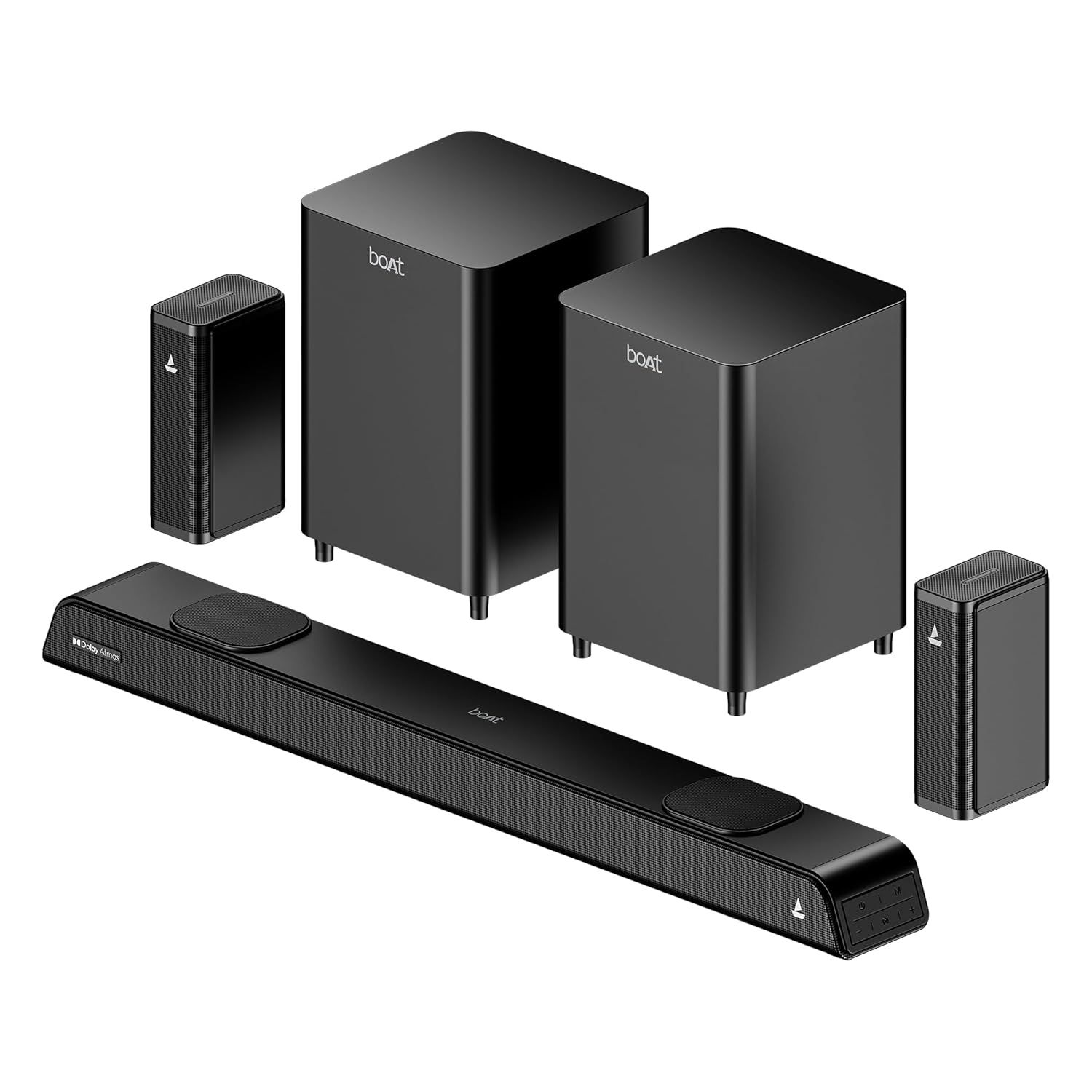
Image: The complete boAt Aavante 5.2.4 Prime 6250DA soundbar system, including the main soundbar unit, two subwoofers, and two satellite speakers, all in a premium black finish.
3. Ọja Ipariview
3.1 System irinše
The boAt Aavante 5.2.4 Prime 6250DA system consists of the following main components:
- Pẹpẹ ohun: The central unit housing multiple speakers for front and height channels.
- Dual Wired Subwoofers: Two dedicated units for powerful bass reproduction.
- Àwọn Agbọrọsọ Satẹlaiti Ẹ̀yìn Aláìlókùn: Two compact speakers that connect wirelessly to the main system for surround sound.
3.2 Awọn iṣakoso ati awọn Atọka
The soundbar features onboard controls and an LED display. A master remote control is included for comprehensive system management.

Image: The master remote control for the boAt Aavante 5.2.4 Prime 6250DA, showing buttons for power, volume, mode selection, EQ settings, Bluetooth, bass, and treble adjustments.
4. Eto
4.1 Agbọrọsọ Placement
Optimal placement is crucial for achieving the best sound experience:
- Pẹpẹ ohun: Fi ohun èlò orin sí àárín gbùngbùn ìsàlẹ̀ tẹlifíṣọ̀n rẹ. Rí i dájú pé kò dí i lọ́wọ́.
- Subwoofers: Position the two subwoofers on the floor, ideally near the front of the room. Experiment with placement to find the best bass response for your listening area.
- Àwọn Agbọrọsọ Satẹlaiti: Place the wireless satellite speakers behind your primary listening position, to the left and right. Ensure they have a clear line of sight to the soundbar for stable wireless connection.

Image: Diagram illustrating the recommended placement for the 5.2.4 channel soundbar system, showing the soundbar in front of the TV, two subwoofers near the front, and two satellite speakers positioned behind the listener for immersive surround sound.

Image: A visual representation of a 360-degree surround sound setup, highlighting the effect of multiple phantom speakers creating an immersive audio environment around the listener.
4.2 Nsopọ System
Connect the soundbar to your audio sources using the available ports. Ensure all power cables are securely connected to the soundbar, subwoofers, and satellite speakers, then plug them into a power outlet.

Image: Icons representing the various connectivity options available on the boAt Aavante 5.2.4 Prime 6250DA soundbar: Optical, Bluetooth v5.3, AUX IN, HDMI e-ARC, and USB.
HDMI (eARC) Connection:
- Connect an HDMI cable (not included) from the HDMI eARC port on the soundbar to the HDMI eARC/ARC port on your television.
- On your TV, navigate to the audio settings and set the sound output to 'Auto' or 'Passthrough' to ensure proper transmission of Dolby Atmos or 5.1 content. If set to 'PCM' or 'Stereo', the soundbar will default to 2.0 stereo output.
Isopọ Opitika:
- Connect an optical cable (not included) from the OPTICAL OUT port on your TV or audio source to the OPTICAL IN port on the soundbar.
- Select 'Optical' as the input source on the soundbar.
Asopọ AUX:
- Connect a 3.5mm AUX cable (not included) from the audio output of your device to the AUX IN port on the soundbar.
- Select 'AUX' as the input source on the soundbar.
Asopọ USB:
- Fi awakọ USB kan ti o ni ohun ti o ni ninu files sinu USB ibudo lori awọn soundbar.
- Select 'USB' as the input source on the soundbar. The soundbar will automatically begin playing compatible audio files.
5. Awọn ilana Iṣiṣẹ
5.1 Agbara Tan / Pa
Tẹ awọn Agbara bọ́tìnì lórí ìṣàkóso latọna jijin tàbí ọ̀pá ohùn láti tan tàbí pa ètò náà.
5.2 Aṣayan Orisun Input
Tẹ awọn MODE button on the remote control or the soundbar to cycle through available input sources: HDMI (eARC), Optical, AUX, USB, and Bluetooth.
5.3 Sisopọ Bluetooth
- Turn on the soundbar and select 'Bluetooth' mode. The LED display will indicate 'BT'.
- Enable Bluetooth on your mobile device and search for 'boAt Aavante 6250DA'.
- Select the device to pair. Once connected, the soundbar will indicate successful pairing.
5.4 Awọn ipo EQ
The soundbar offers various Equalizer (EQ) modes to optimize audio for different content types. Press the EQ button on the remote to switch between modes:
- Fiimu: Enhances dialogue clarity and cinematic effects.
- Orin: Pese pro ohun iwọntunwọnsifile fun orin šišẹsẹhin.
- Awọn ere idaraya: Optimizes audio for sports broadcasts, emphasizing commentary and crowd sounds.
- Iroyin: Focuses on vocal clarity for news and talk shows.

Image: A graphical representation of the EQ modes interface, showing options for Movie, Music, Sports, and News, allowing users to personalize sound settings.
5.5 Ìṣàkóso Ìwọ̀n, Báàsì, àti Ìdarí Ìdánrawò
Lo awọn VOL+ / VOL- buttons on the remote to adjust the overall volume. Dedicated Ipilẹ + / BASS- ati RUPO + / TÍBÉLÌ buttons allow for fine-tuning of low and high frequencies.
6. Itọju
Lati rii daju igbesi aye gigun ati iṣẹ to dara julọ ti ẹrọ ohun elo ohun rẹ:
- Ninu: Use a soft, dry cloth to clean the surfaces of the soundbar, subwoofers, and satellite speakers. Avoid using liquid cleaners or abrasive materials.
- Afẹfẹ: Ensure adequate airflow around all components to prevent overheating. Do not block ventilation openings.
- Ayika: Jeki eto naa kuro ni oorun taara, awọn orisun ooru, ati ọrinrin pupọ.
7. Laasigbotitusita
If you encounter issues with your boAt Aavante 5.2.4 Prime 6250DA, refer to the following common solutions:
| Isoro | Owun to le Fa | Ojutu |
|---|---|---|
| Ko si agbara | Okùn agbára kò sopọ̀ mọ́; ibi tí agbára ń jáde kò ṣiṣẹ́. | Ṣayẹwo awọn asopọ agbara; gbiyanju kan ti o yatọ iṣan. |
| Ko si ohun | Incorrect input source selected; volume too low; cables loose. | Select correct input; increase volume; check all audio cables. |
| No sound from satellite speakers | Wireless connection issue; speakers not powered. | Ensure satellite speakers are powered on and paired with the soundbar. |
| Dolby Atmos not working | TV audio output not set to 'Auto' or 'Passthrough'; content is not Dolby Atmos. | Set TV sound output to 'Auto' or 'Passthrough'. Ensure playing Dolby Atmos compatible content. |
| Awọn oran sisopọ Bluetooth | Device too far; soundbar not in pairing mode; interference. | Ensure soundbar is in BT mode; move device closer; restart both devices. |

Image: A visual representation of how Dolby Atmos creates an immersive sound field, with sound waves emanating from various points around the listener, including overhead, for a multi-dimensional audio experience.

Image: A comparison graphic showing the difference between regular audio and Dolby Atmos audio waveforms, illustrating the enhanced detail and dynamic range provided by Dolby Atmos.
8. Awọn pato
| Ẹya ara ẹrọ | Ẹ̀kúnrẹ́rẹ́ |
|---|---|
| Orukọ awoṣe | Aavante 5.2.4 Prime 6250DA |
| Nọmba awoṣe | HA0079 |
| Ijade ohun | 625W RMS |
| Iṣeto ni ikanni | 5.2.4 Channel (Soundbar, Dual Subwoofers, Wireless Satellites) |
| Ohun Technology | Dolby Atmos |
| Asopọmọra | Bluetooth v5.3, HDMI (eARC), USB, AUX, Optical, Coaxial |
| Ọna Iṣakoso | Isakoṣo latọna jijin |
| Ọja Mefa | 90D x 7.4W x 11H Sẹ́ǹtìmítà (Ìdáhùn ohùn) |
| Iwọn Nkan | 7 kg (Ètò Àpapọ̀) |
| Awọn irinše to wa | Soundbar, 2x Subwoofers, 2x Satellites, Cable, Remote |
| Orisun agbara | Ti firanṣẹ |
| Awọn batiri fun Latọna jijin | Awọn batiri AA 2 (pẹlu) |

Aworan: inu view of the soundbar highlighting its components and the powerful 625W output, indicating boAt Signature Sound technology.

Image: Two boAt subwoofers, emphasizing their role in delivering powerful and deep bass for the audio system.
9. Atilẹyin ọja ati Support
Your boAt Aavante 5.2.4 Prime 6250DA soundbar system comes with a Atilẹyin ọja to lopin. For detailed warranty terms and conditions, please refer to the warranty card included in your package or visit the official boAt webojula.
For technical assistance, troubleshooting not covered in this manual, or warranty claims, please contact boAt customer support through their official channels. Keep your purchase receipt and product serial number handy when contacting support.


