1. Ifihan
This manual provides comprehensive instructions for the artfone G3 Flip Cell Phone. Designed for ease of use, this device features large buttons, a clear display, and essential communication functions. Please read this manual thoroughly to understand the phone's operation and ensure proper use.
2. Package Awọn akoonu
Daju pe gbogbo awọn ohun ti a ṣe akojọ rẹ si isalẹ wa ninu package ọja rẹ:
- artfone G3 Flip Cell Phone
- Batiri gbigba agbara (1300mAh)
- Okun USB
- Gbigba agbara Jojolo
- Itọsọna olumulo

Image: The complete package contents of the artfone G3 Flip Cell Phone, showing the phone, charging accessories, and documentation.
3. Phone Overview
The artfone G3 features a clamshell design with a 2.4-inch color display and a large, easy-to-use keypad.
3.1 Front and Keypad

Image: The artfone G3 flip phone in red, opened to display its large, well-spaced keypad and internal screen.
The keypad includes 21 large, distinct buttons for dialing and navigation. Green and red buttons are dedicated for answering and ending calls, respectively. The 2.4-inch display provides clear icons and supports large font sizes for improved visibility.

Aworan: A alaye view of the phone's screen and keypad, highlighting the SOS function, large buttons, and large font option for enhanced readability.
3.2 Side Buttons and SOS Function
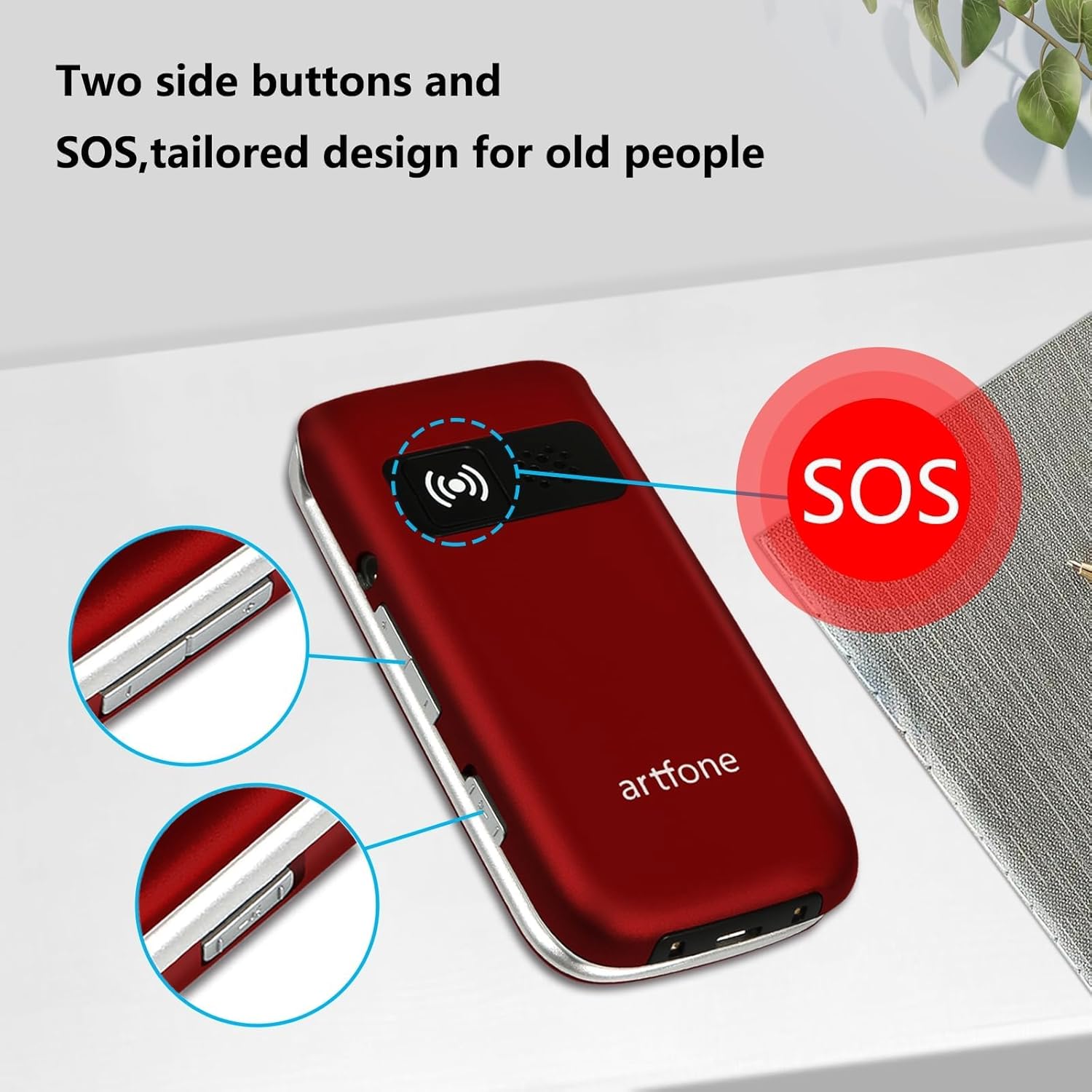
Aworan: Awọn ẹgbẹ profile of the artfone G3, illustrating the location of the SOS emergency button and additional side controls.
The phone features dedicated side buttons for volume control and a prominent SOS button on the back for emergency situations.
4. Eto
4.1 Fifi sori batiri
- Yọ ideri ẹhin foonu kuro.
- Insert the 1300mAh battery into the battery compartment, ensuring the gold contacts align.
- Rọpo ideri ẹhin titi ti o fi tẹ ni aabo sinu aaye.
4.2 Fifi sori kaadi SIM
The artfone G3 supports 4G, 3G, and 2G networks. It is compatible with T-Mobile, MetroPCS, SpeedTalk, Tello, and RedPocket GSMT SIM cards. This phone is not compatible with AT&T, Cricket, or any CDMA networks such as Verizon, Sprint, and Boost Mobile.
- Rii daju pe foonu ti wa ni pipa ati pe o ti yọ batiri kuro.
- Locate the SIM card slot(s) beneath the battery compartment.
- Carefully insert your compatible SIM card(s) into the slot(s) as indicated by the diagram.
- Tun batiri ati ideri ẹhin fi sii.
4.3 Gbigba agbara akọkọ
Ṣaaju lilo akọkọ, gba agbara si batiri foonu ni kikun.
- Connect the USB cable to the charging cradle and a power adapter (not included).
- Place the artfone G3 into the charging cradle, ensuring it is seated correctly. The phone will indicate charging status on its screen.
- Gba foonu laaye lati gba agbara titi ti atọka batiri yoo fi han idiyele ni kikun.
5. Awọn ilana Iṣiṣẹ
5.1 Agbara Tan / Pa
- Lati Fi agbara: Tẹ bọtini pupa 'End Call' ki o si di mu titi iboju yoo fi tan imọlẹ.
- Lati Paarẹ: Press and hold the red 'End Call' button until the power-off option appears, then confirm.
5.2 Ṣiṣe awọn ipe
- Open the flip phone.
- Tẹ nọmba foonu ti o fẹ nipa lilo bọtini foonu.
- Tẹ bọtini 'Ipe' alawọ ewe lati bẹrẹ ipe naa.
5.3 Gbigba awọn ipe
- When the phone rings, open the flip to answer, or press the green 'Call' button.
- To end a call, press the red 'End Call' button or close the flip.
5.4 Titẹ kiakia
The phone supports speed dial for quick access to favorite contacts.
- Dedicated A/B Keys: Assign frequently called numbers to the 'A' and 'B' buttons. Refer to the phone's menu for setup instructions.
- Number Keys 1-9: Assign contacts to number keys 1 through 9. Long-press the assigned number key to dial the contact.
5.5 SOS Emergency Button
The SOS function allows programming up to five emergency contacts. In a crisis, a single press of the SOS button triggers the phone to call each contact sequentially until someone answers.
- Ṣeto: Navigate to the SOS settings in the phone's menu to add up to five emergency contact numbers.
- Muu ṣiṣẹ: In an emergency, press and hold the SOS button on the back of the phone. The phone will automatically dial the programmed contacts.
5.6 Photo Contacts
The phone supports assigning photos to contacts, making it easier to identify callers or dial frequently used numbers visually.

Image: The artfone G3 in hand, illustrating the large keypad and the photo contact feature on the display.
5.7 Talking Numbers
For users with visual impairments, the phone offers a real-time voice broadcast function that reads out the time and dialed numbers.
- Time Broadcast: Long-press the volume button to hear the current time announced.
- Dialed Number Announcement: This feature can be enabled in the phone's settings to audibly announce each number as it is pressed on the keypad.
5.8 iwọn didun tolesese
Use the dedicated volume buttons on the side of the phone to adjust the call volume during a conversation or the ringtone volume when idle.
6. Itọju
- Ninu: Lo aṣọ rírọrùn tí ó gbẹ láti nu ìta fóònù náà. Yẹra fún àwọn ohun èlò ìfọmọ́ omi.
- Itọju Batiri: To prolong battery life, avoid extreme temperatures. Charge the phone regularly, but do not leave it fully discharged for extended periods.
- Ibi ipamọ: Tọ́jú fóònù náà sí ibi gbígbẹ tí ó tutù, tí kò sí ìmọ́lẹ̀ oòrùn àti ọ̀rinrin.
- Gbẹkẹle: The phone is designed for durability, tested to withstand frequent opening and closing.

Image: The artfone G3 flip phone demonstrating its durability through a reliability test of its hinge mechanism.
7. Laasigbotitusita
| Isoro | Owun to le Solusan |
|---|---|
| Foonu ko ṣiṣẹ | Ensure the battery is correctly installed and fully charged. Connect to the charging cradle to check if the charging indicator appears. |
| Ko si ifihan nẹtiwọki | Verify that a compatible SIM card is correctly inserted. Check your location for network coverage. Restart the phone. |
| Ko le ṣe/gba awọn ipe wọle | Check network signal strength. Ensure your SIM card is active and has sufficient credit/plan. Verify the number dialed is correct. |
| Awọn ọran gbigba agbara | Ensure the charging cradle and USB cable are properly connected. Check for debris in the charging port. Ensure the phone is correctly seated in the cradle. |
| Bọtini foonu ko dahun | Restart the phone. Ensure no physical obstruction is preventing button presses. |
8. Awọn pato
| Ẹya ara ẹrọ | Ẹ̀kúnrẹ́rẹ́ |
|---|---|
| Orukọ awoṣe | ARF-G3+001 |
| Brand | artfone |
| Eto isesise | Nucleus OS |
| Awọn ọna ẹrọ Asopọmọra | 4G LTE, 3G, 2G |
| Iwon iboju | 2.4 inches |
| Ipinnu | 320 x 240 |
| Agbara Batiri | 1300 Milionuamp Awọn wakati |
| Foonu Ọrọ Time | Titi di awọn wakati 6 |
| Agbara Ibi ipamọ Iranti | 1 GB |
| Ramu Memory sori iwọn | 48 MB |
| Pataki Awọn ẹya ara ẹrọ | Time reporting function, 4G unlocked, SOS button, Speed Dial, Photo Contact, Talking Numbers |
| Iwọn Nkan | 10.4 iwon |
| Àwọ̀ | Pupa |
9. Atilẹyin ọja ati Support
For warranty information or technical support, please refer to the documentation included with your purchase or contact artfone customer service. Specific warranty terms and support channels may vary by region and retailer.


