Ọrọ Iṣaaju
The Razer BlackShark V3 X HyperSpeed is a wireless esports gaming headset designed for high-performance audio and clear communication across multiple platforms. This manual provides essential information for setting up, operating, maintaining, and troubleshooting your headset.
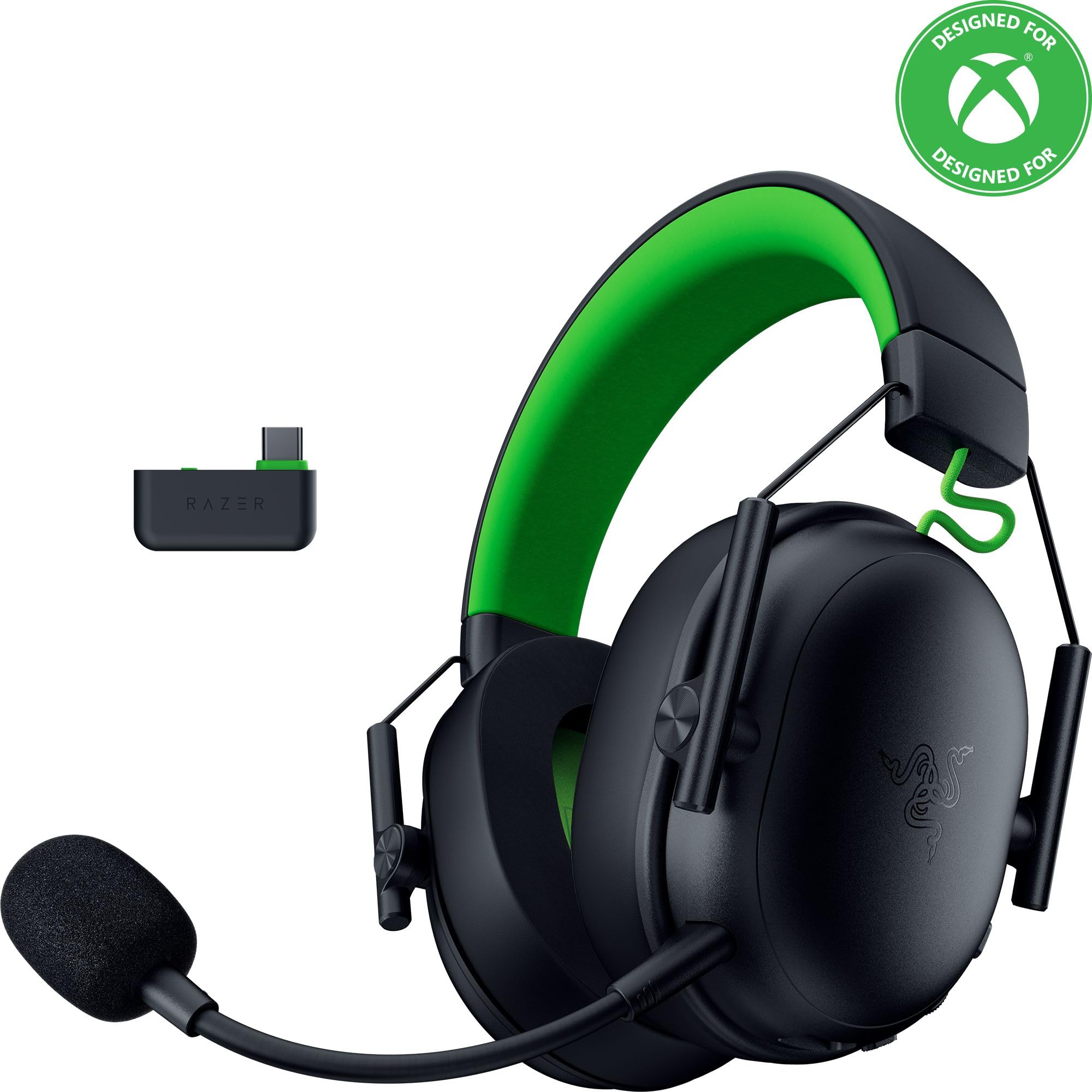
Image: The Razer BlackShark V3 X HyperSpeed Wireless Gaming Headset, showcasing apẹrẹ rẹ̀ àti gbohungbohun tí a lè yọ kúrò.
Ohun ti o wa ninu Apoti
Rii daju pe gbogbo awọn eroja wọnyi wa ninu package rẹ:
- Razer BlackShark V3 X HyperSpeed Wireless Gaming Headset
- USB Iru C Razer HyperSpeed Alailowaya Dongle
- Detachable Razer HyperClear Cardioid 9.9mm Mic
- USB Type A to Type C Cable (for charging and wired connection)
- USB Type A to Type C Adapter Cable
- Afowoyi Olumulo (iwe-ipamọ yii)

Image: The Razer BlackShark V3 X HyperSpeed headset on a stand next to its retail packaging, illustrating the product and its box.
Ṣeto
1. Ngba agbara si Agbekọri
Before initial use, fully charge your headset using the provided USB Type A to Type C cable. Connect the USB-C end to the headset's charging port and the USB-A end to a powered USB port.
2. So gbohungbohun
Insert the detachable Razer HyperClear Cardioid 9.9mm Mic into the microphone port located on the left earcup. Ensure it is securely connected.

Image: Close-up of the Razer BlackShark V3 X HyperSpeed headset showing the detachable HyperClear Cardioid microphone attached.
3. Asopọmọra Aw
The headset supports three modes of connectivity: 2.4 GHz HyperSpeed Wireless, Bluetooth, and wired USB-C.
- 2.4 GHz HyperSpeed Wireless (PC, Mac, PS5, Nintendo Switch, Xbox Series X|S, Xbox One):
Insert the USB Type C Razer HyperSpeed Wireless Dongle into an available USB-C port on your device. If your device only has USB-A ports, use the provided USB Type A to Type C Adapter Cable. Ensure the switch on the dongle is set to 'USB' for PC/Mac/PS5/Switch or 'XBOX' for Xbox consoles. The headset will automatically connect. - Bluetooth (Smartphones, Tablets, Handheld Gaming Devices):
With the headset powered on, press and hold the power button until the LED indicator blinks blue, indicating pairing mode. On your device, search for and select "Razer BlackShark V3 X HyperSpeed" from the list of available Bluetooth devices. - USB-C ti a firanṣẹ:
Connect the headset directly to your device using the USB Type A to Type C Cable. This mode provides audio and microphone functionality without relying on battery power.

Image: The Razer BlackShark V3 X HyperSpeed headset alongside its USB-C wireless dongle, illustrating the wireless connectivity component.

Image: A visual representation of the headset's three connectivity modes: 2.4 GHz Wireless, Bluetooth, and USB, highlighting its versatility.
Ṣiṣẹ Agbekari
1. Awọn iṣakoso Loriview
Agbekọri naa ni awọn iṣakoso ogbon inu ti o wa lori awọn afikọti:
- Bọtini agbara: Press and hold to power on/off. Single press to switch between 2.4 GHz HyperSpeed Wireless and Bluetooth modes.
- Bọ́tìnì Pakẹ́kọ̀ọ́: Tẹ lati dakẹ tabi mu gbohungbohun kuro.
- Kẹkẹ Iwọn didun: Ṣe atunṣe iwọn didun ohun gbogbogbo.
- Kẹ̀kẹ́ Àbójútó Mákírọ́kì: Adjusts the volume of your own voice heard through the headset (sidetone).

Aworan: Apa view of the Razer BlackShark V3 X HyperSpeed headset, highlighting the location of the power button, volume wheel, and mic mute button.
2. Audio Quality and Features
- Razer TriForce 50mm Drivers Gen-2: Experience powerful, clear audio with enhanced positional accuracy for competitive gaming.
- Razer HyperClear Cardioid 9.9mm Mic: The detachable microphone features a unidirectional pickup pattern to focus on your voice and minimize background noise.
- Ohun kaakiri: Enjoy immersive surround sound with Windows Sonic on Xbox and 7.1 Surround Sound on PC for precise audio cues.

Aworan: Ohun exploded view of the Razer TriForce 50mm Drivers Gen-2, illustrating their internal components for powerful and clear audio.

Image: The Razer BlackShark V3 X HyperSpeed headset surrounded by sound waves, representing its advanced surround sound capabilities for Xbox and PC.
3. Itunu ati Oniru
Weighing just 270g, the headset is designed for extended gaming sessions with plush memory foam cushions and a fatigue-free design.

Image: The Razer BlackShark V3 X HyperSpeed headset with an icon representing its ultra-lightweight design, emphasizing comfort for long gaming sessions.
4. Official ọja Video
Video: An official product video from Razer showcasing the BlackShark V3 headset line, highlighting its features and design for esports performance.
Itoju
1. Ninu
- Lo aṣọ rírọrùn tí ó gbẹ láti nu ojú agbekọri náà.
- For earcups, gently wipe with a damp cloth and mild soap if necessary, then dry thoroughly. Avoid excessive moisture.
- Maṣe lo awọn kẹmika lile tabi awọn ohun elo abrasive.
2. Ibi ipamọ
- Tọju agbekari naa ni itura, aye gbigbẹ kuro lati orun taara ati awọn iwọn otutu to gaju.
- When not in use, consider placing it on a headset stand to maintain its shape and prevent damage.
Laasigbotitusita
Ko si Audio/Ko dara Audio Didara
- Ṣayẹwo Iwọn didun: Rí i dájú pé kẹ̀kẹ́ ohùn tó wà lórí agbekọri náà ti wà ní òkè.
- Asopọmọra: Verify the headset is correctly connected via 2.4 GHz dongle, Bluetooth, or USB-C. For 2.4 GHz, ensure the dongle switch is set to the correct platform (USB/XBOX).
- Awọn Eto Ẹrọ: Confirm the headset is selected as the default audio output device in your computer's or console's sound settings.
- Tun-meji: For wireless connections, try re-pairing the headset with your device.
Gbohungbohun Ko Ṣiṣẹ
- Ṣayẹwo Parẹ: Ensure the mic mute button on the headset is not activated.
- Mic Connection: Verify the detachable microphone is securely inserted into the port.
- Awọn Eto Ẹrọ: Confirm the headset microphone is selected as the default input device in your computer's or console's sound settings.
- Abojuto Gbohungbohun: Adjust the mic monitoring wheel to hear your own voice, confirming mic functionality.
Awọn oran Asopọmọra
- Ìjánu: Lọ kuro ni awọn ẹrọ alailowaya miiran ti o le fa kikọlu.
- Ibiti: Ensure you are within the effective range of the wireless dongle or Bluetooth connection.
- Dongle Switch: Double-check that the switch on the USB-C dongle is set to the correct position (USB for PC/Mac/PS5/Switch, XBOX for Xbox).
Battery Life Shorter Than Expected
- Gbigba agbara: Rii daju pe agbekari ti gba agbara ni kikun ṣaaju lilo.
- Lilo: High volume levels or continuous use of certain features can reduce battery life.
Awọn pato
| Orukọ awoṣe | BlackShark V3 X HyperSpeed |
| Nọmba awoṣe | RZ04-05420200-R3U1 |
| Asopọmọra Technology | Bluetooth, USB, 2.4 GHz Wireless |
| Audio Driver Type | Dynamic Driver (Razer TriForce 50mm Drivers Gen-2) |
| Idahun Igbohunsafẹfẹ | 12 Hz - 28 kHz |
| Ifamọ | 106 dB |
| Gbohungbohun | Detachable Razer HyperClear Cardioid 9.9mm Mic |
| Ariwo Iṣakoso | Iyasọtọ ohun |
| Awọn ẹrọ ibaramu | Xbox Series X|S, Xbox One, PS5, PS4, PC, Mac, Nintendo Switch, Smartphones, Tablets |
| Iwọn Nkan | 270 grams (without mic) |
| Awọn batiri | 1 batiri litiumu ion (pẹlu) |
| Ẹya Bluetooth | 5.3 |
Atilẹyin ọja ati Support
Fun alaye atilẹyin ọja, atilẹyin imọ-ẹrọ, tabi iranlọwọ siwaju sii, jọwọ ṣabẹwo si atilẹyin Razer osise webojula. Jeki ẹri rira rẹ fun awọn iṣeduro atilẹyin ọja.
Atilẹyin Ayelujara: www.razer.com/support


