1. Ifihan
Thank you for choosing the LEFANT M3 Max Robot Vacuum and Mop. This device is designed to provide an efficient and automated cleaning experience for your home. Featuring an all-in-one self-cleaning station, powerful suction, advanced navigation, and smart control options, the M3 Max simplifies floor maintenance. Please read this manual thoroughly before use to ensure proper operation and maintenance.
2. Awọn ilana aabo
- Ka gbogbo awọn itọnisọna ṣaaju ṣiṣe ẹrọ.
- Ma ṣe gba awọn ọmọde laaye lati ṣere pẹlu roboti. Ṣe abojuto awọn ọmọde ati awọn ohun ọsin nigbati robot nṣiṣẹ.
- Use only the manufacturer-specified power adapter and charging station.
- Ensure the robot is turned off and unplugged before cleaning or performing maintenance.
- Má ṣe lo robot náà ní àyíká tí ó tutu tàbí nítòsí omi.
- Yọ eyikeyi awọn kebulu alaimuṣinṣin, awọn ohun kekere, tabi awọn nkan ẹlẹgẹ kuro ni ilẹ ṣaaju ṣiṣe mimọ lati ṣe idiwọ ikọlu tabi ibajẹ.
- Má ṣe lo robot láti kó àwọn pàǹtí ńlá, omi, tàbí àwọn nǹkan tí ń jóná.
- Keep the charging contacts and sensors clean to ensure proper functionality.
3. Package Awọn akoonu
Jẹrisi pe gbogbo awọn ohun kan wa ninu package:

Image: All components included in the LEFANT M3 Max package, laid out for clear identification.
- LEFANT M3 Max Robot Vacuum and Mop
- All-in-One Self-Cleaning Station
- Okun Agbara (x1)
- Dust Bags (x2)
- Awọn fẹlẹ ẹgbẹ (x2)
- Mop Holders (x2)
- Washable Mop Pads (x4)
- Àwọn Àlẹ̀mọ́ HEPA (x2)
- Solusan Isọfọ (x1)
- Ohun èlò ìfọmọ́ (x1)
- Itọsọna olumulo (x1)
4. Ọja Ipariview
4.1 Robot Vacuum ati Mop

Aworan: Oke-isalẹ view of the LEFANT M3 Max robot vacuum and mop, showing its sleek design and main sensor.
The LEFANT M3 Max combines powerful vacuuming with effective mopping. Key features include:
- 20,000Pa Ìfàmọ́ra: Provides strong suction for deep cleaning carpets and hard floors, effectively removing dust, debris, and pet hair.
- dToF Laser Navigation: 360° laser scanning for precise mapping and efficient path planning, even in low-light conditions.
- Dual Rotating Mops: Two mop pads rotate at 200 RPM to effectively scrub stubborn stains. Mops automatically lift by 9mm when a carpet is detected.
- 190° PSD Obstacle Avoidance: Precisely recognizes and avoids obstacles like furniture, cables, and shoes, minimizing collisions.

Image: Illustration of the robot's powerful 20,000Pa suction, showing dust and debris being lifted from the floor.

Image: The robot using its dToF laser navigation to map a room with furniture and a pet.
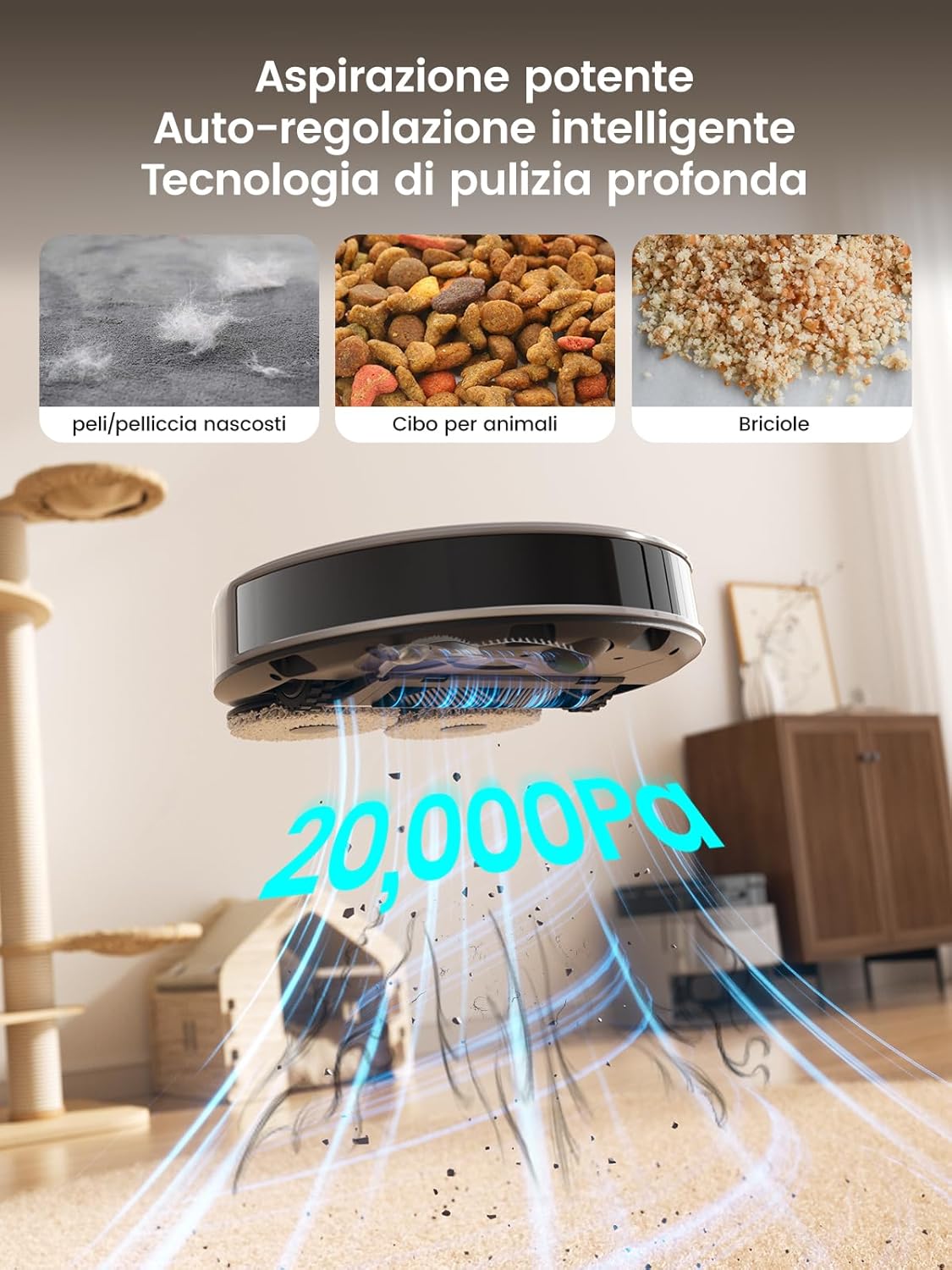
Image: Close-up of the robot's underside showing the two rotating mop pads in action on a hard floor with a spill.

Image: The robot detecting and avoiding various objects on the floor using its 190° PSD sensors.
4.2 All-in-One Self-Cleaning Station

Aworan: Alaye view of the self-cleaning station, highlighting its automatic detergent dispensing, 3.2L dust collection, 45°C hot water mop washing, and air-drying features.
The self-cleaning station automates daily maintenance:
- Automatic Dust Emptying: The 3.2L dust bag allows for weeks of hands-free operation.
- Fífọ omi gbígbóná: Mops are automatically washed with 45°C hot water to ensure hygiene.
- Gbigbe afẹfẹ: Mops are air-dried to prevent odors and mildew.
- Pipinfunni ifọṣọ aifọwọyi: Ensures optimal cleaning performance.
5. Eto
5.1 Station Placement
- Place the self-cleaning station against a wall in an open area, ensuring at least 0.5 meters of clear space on both sides and 1.5 meters in front.
- Connect the power cable to the station and plug it into a power outlet.
- Ensure the station is on a hard, level surface.
5.2 Gbigba agbara akọkọ
Place the robot onto the charging station. The robot will automatically power on and begin charging. For first-time use, fully charge the robot before operation (approximately 3-4 hours).
5.3 App Asopọ
To unlock all smart features, connect your LEFANT M3 Max to the Lefant app:

Image: Step-by-step guide on connecting the LEFANT M3 Max robot to the Lefant mobile application.
- Download the 'Lefant' app from your smartphone's app store.
- Open the app and register or log in.
- Tap 'Add Device' and select 'M3 Max Robot'.
- Power on the robot by pressing and holding the power button for 3 seconds.
- Follow the in-app instructions to connect the robot to your 2.4GHz/5GHz Wi-Fi network.
- Once connected, you can control the robot via the app.
5.4 Voice Assistant Connection (Alexa/Google Assistant)
Integrate your robot with voice assistants for hands-free control:

Image: Step-by-step guide on linking the Lefant account with Amazon Alexa for voice control.
- Open the Lefant app, go to 'Mine' > 'Third-party voice services'.
- Follow the instructions to link your Lefant account.
- Ṣii ohun elo Alexa tabi Google Home.
- Wa fun the 'Smart Life' skill/service and enable it.
- Link your Smart Life account (using the same credentials as your Lefant account).
- Discover devices. You can now control your robot with voice commands like "Alexa, ask Lefant Robot to clean."
6. Isẹ
6.1 Bíbẹ̀rẹ̀/Dídúró/Dídúró mímọ́
- Bẹrẹ: Press the power button on the robot once, or use the 'Start' button in the Lefant app.
- Duro: Press the power button during cleaning, or use the 'Pause' button in the app.
- Duro: Press and hold the power button for 3 seconds, or use the 'Stop' button in the app. The robot will return to the charging station.
6.2 ninu awọn ipo
The Lefant app allows you to select various cleaning modes:
- Mọ Aifọwọyi: The robot intelligently plans a cleaning path for your entire home.
- Ibi Mọ: Cleans a specific area more intensely.
- Mọ agbegbe: Ṣàlàyé àwọn agbègbè pàtó lórí máàpù fún robot láti nu.
- Mimọ ti ara ẹni: Yan awọn yara kan pato lati nu.
- Mop Nikan: The robot will only mop, with vacuuming disabled.
- Igbale Nikan: The robot will only vacuum, with mopping disabled.
6.3 Smart Features via App
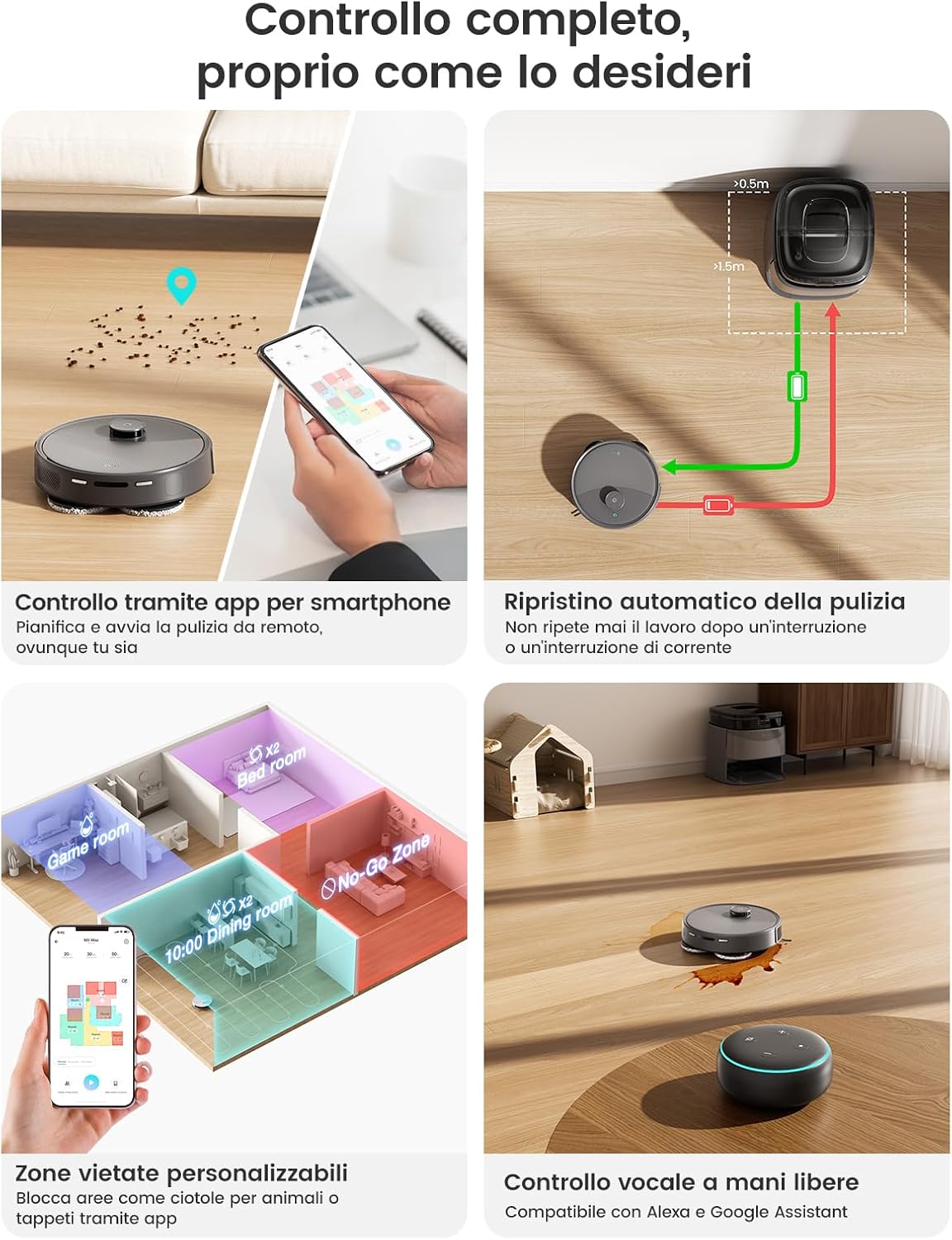
Image: A smartphone displaying the Lefant app interface, showing various control options for the robot vacuum, including scheduling, zone cleaning, and voice control compatibility.
- Iṣeto: Set cleaning times for specific days.
- Àwọn Agbègbè Tí Kò Ní Láti Lọ/Àwọn Ògiri Fíìmù: Define areas the robot should avoid (e.g., pet bowls, fragile items).
- Ṣíṣe Àwòrán Ìpele Púpọ̀: The robot can store maps for up to three different floors.
- Ìtàn Ìmọ́tótó: View past cleaning routes and durations.
- Suction/Water Level Adjustment: Ṣe àtúnṣe bí ìmọ́tótó ṣe le tó.
7. Itọju
Itọju deede ṣe idaniloju iṣẹ ṣiṣe ti o dara julọ ati fa gigun igbesi aye robot rẹ.
7.1 Self-Cleaning Station Maintenance
Image: The self-cleaning station with its removable tray being cleaned under a faucet, demonstrating ease of maintenance.
- Rirọpo Apo Eruku: The 3.2L dust bag typically needs replacement every 8 weeks, depending on usage. The app will notify you when it's full.
- Awọn tanki omi: Regularly empty the dirty water tank and refill the clean water tank. Clean both tanks with fresh water.
- Àwo Fọ Mop: The removable mop washing tray should be cleaned periodically to prevent residue buildup.
7.2 Ìtọ́jú Àwọn Ẹ̀yà Rọ́bọ́ọ̀tì
- Awọn paadi mop: Remove and wash the mop pads after each mopping session. They are machine washable.
- Fẹlẹ akọkọ: Remove the main brush and clean any tangled hair or debris using the provided cleaning tool. Check weekly.
- Awọn brushes ẹgbẹ: Check for tangled hair or debris. Replace if worn or damaged. Check monthly.
- Ajọ HEPA: Tap out dust from the HEPA filter. Do not wash. Replace every 3-6 months.
- Awọn sensọ ati Awọn olubasọrọ gbigba agbara: Wipe all sensors (LIDAR, anti-drop, obstacle avoidance) and charging contacts on both the robot and station with a clean, dry cloth. Clean weekly.
8. Laasigbotitusita
| Isoro | Owun to le Fa | Ojutu |
|---|---|---|
| Robot ko bẹrẹ tabi dahun. | Batiri kekere; pipa agbara; roboti ti di. | Charge the robot; ensure power switch is ON; clear any obstructions. |
| Iṣẹ ṣiṣe mimọ ti ko dara. | Dustbin full; brushes tangled; filter clogged; mop pads dirty. | Empty dustbin; clean/replace brushes; clean/replace filter; wash mop pads. |
| Robot ko le pada si aaye gbigba agbara. | Station obstructed; station not powered; robot too far. | Clear area around station; ensure station is powered; manually place robot near station. |
| App asopọ oran. | Incorrect Wi-Fi password; router issues; robot offline. | Verify Wi-Fi password; restart router; reset robot Wi-Fi and reconnect. |
| Mops not cleaning effectively. | Mop pads dry; water tank empty; detergent low. | Ensure mop pads are wet; refill clean water tank; check detergent level. |
9. Awọn pato
| Ẹya ara ẹrọ | Sipesifikesonu |
|---|---|
| Awoṣe | Iye ti o ga julọ ti M3 |
| Brand | LEFANT |
| Agbara afamora | 20,000 Pa |
| Agbara Batiri | 5200 mAh |
| Max asiko isise | Up to 210 minutes (3 hours 40 minutes) |
| Agbegbe mimọ to pọ julọ | Ti o to 220 m² |
| Lilọ kiri Iru | dToF Laser Navigation (LIDAR) |
| Idena Idena | 190° PSD Sensors (Freemove Tech 3.0) |
| Iyara Yiyi Mop | 200 RPM |
| Mop Auto-Lift Height | 9 mm |
| Eruku Apo Agbara | 3.2 L (Self-Emptying Station) |
| Hot Water Mop Wash | 45°C |
| Asopọmọra | Wi-Fi (App Control), Alexa, Google Assistant |
| Awọn iwọn Ọja (Robot) | 32 x 32 x 9.7 cm (isunmọ.) |
| Awọn iwọn Ọja (ibudo) | 37 x 38.5 x 35.7 cm (isunmọ.) |
| Iwọn | 11.85 kg (total package) |
10. Atilẹyin ọja ati Support
LEFANT products are manufactured to high-quality standards and are covered by a limited warranty from the date of purchase. For specific warranty terms and conditions, please refer to the warranty card included in your package or visit the official LEFANT webojula.
If you encounter any issues or have questions regarding your LEFANT M3 Max, please contact LEFANT customer support through the app or the official website. Our support team is available to assist you with troubleshooting, parts replacement, and general inquiries.
Please have your model number (M3 Max) and purchase information ready when contacting support.


