1. Ọja Ipariview
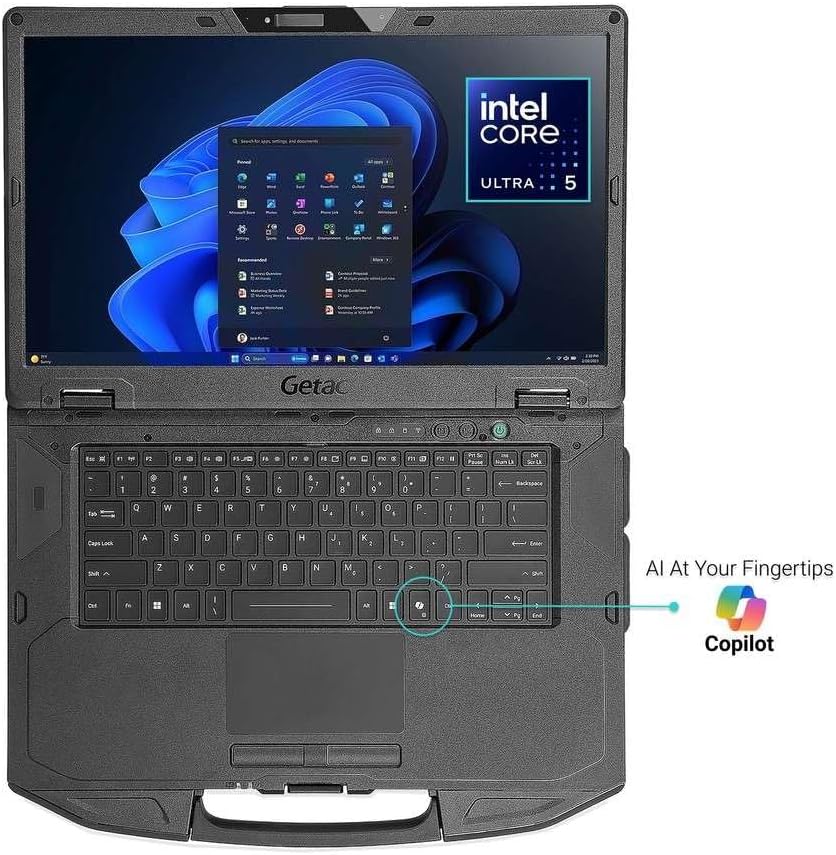
The Getac S510 is a rugged laptop designed for demanding environments, featuring an Intel Core Ultra 5 125U processor, a 15.6-inch Full HD sunlight-readable display, and robust construction meeting MIL-STD-810H and IP53 standards. This manual provides essential information for setting up, operating, and maintaining your device.
Awọn ẹya pataki:
- Intel Core Ultra 5 125U Processor with AI-powered performance
- 15.6-inch TFT LCD FHD Sunlight Readable Display (1,000 nits)
- 32GB DDR5 RAM and 1TB PCIe NVMe SSD for high performance
- MIL-STD-810H and IP53 certified rugged design
- LED Backlit membrane Keyboard with dedicated Copilot key
- Comprehensive connectivity: USB 3.2 x2, Thunderbolt 4, HDMI, LAN, Audio In/Out, Docking Connector
- 5MP Webcam with Windows Hello for secure authentication
Kini o wa ninu apoti:
- Getac S510 Rugged Laptop
- 1x Batiri
- 65W AC Power Adapter
Awọn aworan ọja:


2. Eto
Titan Agbara Ibẹrẹ:
- Connect the provided 65W AC power adapter to the laptop's DC power jack and a power outlet.
- Tẹ bọtini agbara ti o wa lori ẹrọ lati tan-an.
- Tẹle awọn ilana loju iboju lati pari ibẹrẹ Windows 11 Pro setup.
Fifi sori Batiri / Rirọpo:
The Getac S510 features a hot-swappable battery. To install or replace the battery:
- Ensure the laptop is powered off or in a safe state for battery removal.
- Wa yara batiri ni apa isalẹ ti kọǹpútà alágbèéká naa.
- Slide the release latches to unlock the battery.
- Carefully remove the old battery and insert the new battery, ensuring it clicks into place.
- Secure the latches.
Fifi kaadi SIM sori ẹrọ:
To install a SIM card for mobile data connectivity:
- Power off the laptop and disconnect the AC adapter.
- Locate the access panel on the underside of the laptop, typically secured by screws.
- Carefully unscrew and remove the panel.
- Identify the SIM card slot. It may be located near the SSD or other internal modules.
- Insert the SIM card into the slot, ensuring correct orientation.
- Replace the access panel and secure the screws.
- Power on the laptop. The system should detect the SIM card.
3. Awọn ilana Iṣiṣẹ
Ṣe afihan Atunse Imọlẹ:
The 1,000 nits sunlight-readable display ensures visibility in bright conditions. Adjust brightness using the function keys (e.g., Fn + F5/F6) or through Windows display settings.
Ina Back Keyboard:
The LED backlit membrane keyboard allows for typing in low-light environments. Activate or adjust the backlight using the dedicated function key (e.g., Fn + Spacebar or a specific F-key).
Ṣii silẹ Atẹtẹ ika:
Utilize the integrated fingerprint reader for fast and secure login via Windows Hello. Set up your fingerprint in Windows Settings > Accounts > Sign-in options.
Asopọmọra:
- Wi-Fi: Connect to wireless networks via the Windows network settings.
- Bluetooth: Pair Bluetooth devices (e.g., headphones, mouse) through Windows Bluetooth settings.
- Thunderbolt 4: Use the Thunderbolt 4 Type-C port for high-speed data transfer, video output, and power delivery.
- HDMI: Connect to external displays using the HDMI port.
- Lan: Use the RJ45 Gigabit Ethernet port for wired network connections.
Using the 5MP Webkamẹra:
5MP ti a ṣepọ webcam supports Windows Hello face authentication and is suitable for video conferencing. Ensure proper lighting for optimal performance.
4. Itọju
Ninu Ohun elo naa:
Due to its rugged design, the S510 can withstand harsh conditions. Clean the exterior with a soft, damp cloth. For the display, use a microfiber cloth and a screen-safe cleaning solution. Avoid harsh chemicals or abrasive materials.
Itọju Batiri:
To prolong battery life, avoid extreme temperatures and fully discharging the battery frequently. Store the laptop with a partial charge if not used for extended periods.
Imugboroosi Ibi:
The laptop features a 1TB PCIe NVMe SSD. Consult a qualified technician for any storage upgrades or replacements to maintain the device's ruggedness and warranty.
Ruggedness Guidelines:
The S510 is MIL-STD-810H and IP53 certified. While designed to be durable, avoid intentional abuse. Ensure all port covers are securely closed to maintain IP53 water and dust resistance.
5. Laasigbotitusita
| Oro | Owun to le Solusan |
|---|---|
| Kọǹpútà alágbèéká ko ṣiṣẹ | Ensure the AC adapter is securely connected and the battery is charged. Try removing and reinserting the battery. |
| Ifihan ti baìbai tabi imọlẹ pupọ | Adjust display brightness using Fn keys or Windows display settings. |
| Ko si Wi-Fi asopọ | Check Wi-Fi settings in Windows. Ensure Airplane mode is off. Restart the laptop and your router. |
| Ko ri kaadi SIM | Verify the SIM card is correctly installed in its slot. Restart the laptop. Check network settings in Windows. |
| Išẹ eto jẹ o lọra | Close unnecessary applications. Check for background processes. Ensure sufficient free storage space. Run a system diagnostic. |
6. Awọn pato
| Ẹya ara ẹrọ | Ẹ̀kúnrẹ́rẹ́ |
|---|---|
| isise | Intel Core Ultra 5 125U (up to 4.3GHz) |
| Àgbo | 32 GB DDR5 (5600 MHz) |
| Ibi ipamọ | 1 TB PCIe NVMe SSD |
| Ifihan | 15.6-inch TFT LCD FHD (1920 x 1080 pixels), 1,000 nits Sunlight Readable, Non-Touch |
| Awọn aworan | Ese Intel Graphics |
| Eto isesise | Windows 11 Pro |
| Webkamẹra | 5 MP (Windows Hello compatible) |
| Alailowaya Asopọmọra | 802.11ax (Wi-Fi), Bluetooth |
| Awọn ibudo | USB 3.2 x2, Thunderbolt 4 (Type-C), HDMI, LAN (RJ45), Audio In/Out Jack, Docking Connector |
| Awọn iwọn (WxDxH) | 14.8 x 10.9 x 1.5 inches |
| Iwọn | 5.18 lbs (isunmọ) |
| Ruggedness | MIL-STD-810H, IP53 Certified, Vibration & 3ft (0.9m) drop resistant |
| Batiri | 1 batiri litiumu ion (pẹlu) |
7. Atilẹyin ọja ati Support
For warranty information, technical support, or service inquiries, please refer to the official Getac website or contact your authorized Getac reseller. Keep your purchase receipt and product serial number readily available when seeking support.
Note: No official product videos from the seller for the Getac S510 were provided in the available data. Videos for other brands/models were excluded to maintain product relevance and accuracy.


