1. Ifihan
The Flashpoint Zoom Li-Ion V480C is a high-performance on-camera flash designed for Canon cameras, offering advanced features for professional and enthusiast photographers. This flash integrates with the Flashpoint R2 wireless system, providing versatile lighting control. Key features include a Guide Number of GN50, rapid 1.7-second recycle time, TTL auto flash, manual flash modes, and 2.4GHz wireless control.

Image 1.1: Flashpoint Zoom Li-Ion V480C with an overview of its main features.
2. Awọn irinše to wa
Jẹrisi pe gbogbo awọn nkan wọnyi wa ninu package rẹ:
- Flashpoint Zoom Li-on Compact V480 Flash
- VB22 7.2 V / 2200 mAh Rechargeable Li-ion Battery Pack
- Ṣaja batiri
- Iduro Mini
- Ọran Idaabobo
3. Ọja Ipariview
Familiarize yourself with the various parts of your Flashpoint V480C flash unit.

Aworan 3.1: Iwaju ati ẹgbẹ view of the Flashpoint V480C with numbered components.
- Catchlight Panel (White)
- Built-in Wide Angle Diffuser
- Flash Head
- Awoṣe LED Lamp
- Photocell Sensọ
- Titiipa Oruka
- Gbona Bata
- Sync Okun Jack
- Afi ika te
- Ibudo Igbesoke famuwia USB-C
- Bọtini Yipada Agbara
- Ṣeto Bọtini
- Yan Titẹ
- Bọtini idanwo / Atunlo Atọka
- Gbona Bata Fixing mura silẹ
4. Eto
4.1. Fifi sori batiri ati gbigba agbara
The Flashpoint V480C uses a VB22 7.2V / 2200mAh rechargeable Li-ion battery pack. Ensure the battery is fully charged before first use.
- To install the battery, slide open the battery compartment cover located on the side of the flash unit.
- Insert the VB22 Li-ion battery pack, ensuring the contacts align correctly.
- Pa ideri iyẹwu batiri titi ti o fi tẹ ni aabo sinu aaye.
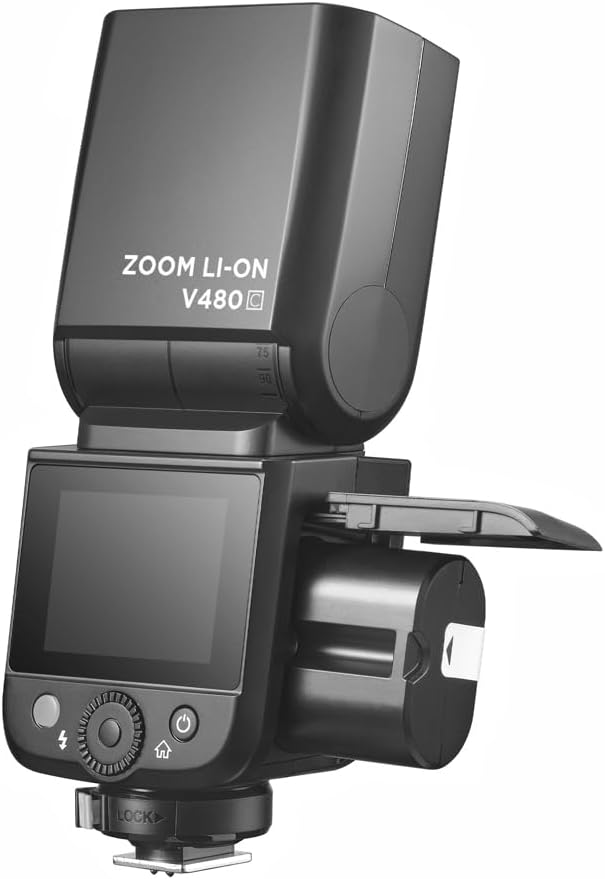
Image 4.1: Battery compartment open for installation.
To charge the battery, use the provided battery charger. Connect the battery to the charger and plug the charger into a power outlet. The indicator light on the charger will show the charging status.
4.2. Mounting the Flash to Your Camera
The V480C is designed to mount onto a camera's hot shoe.
- Rii daju pe kamẹra rẹ ti wa ni pipa.
- Slide the flash's hot shoe (7) into your camera's hot shoe mount.
- Rotate the Hot Shoe Fixing Buckle (15) clockwise to secure the flash firmly in place. Do not overtighten.
5. Ṣiṣẹ Flash naa
5.1. Títan/Pa agbára àti Àwọn Ìṣàkóso Àkọ́kọ́
To power on the flash, press and hold the Power Switch Button (11) until the screen illuminates. To power off, press and hold the same button.
The V480C features a crisp color touchscreen (9) and tactile buttons for intuitive control.

Image 5.1: Touchscreen and button interface for adjusting flash settings.
- Set Button (12): Used to confirm selections or enter menu options.
- Select Dial (13): Rotate to navigate menus and adjust values.
- Test Button / Recycle Indicator (14): Press to fire a test flash. The indicator light shows when the flash is ready to fire.
5.2. Awọn ọna Filaṣi
The V480C supports various flash modes:
- Fíláṣì Àdáni TTL: A ṣe àtúnṣe àgbéjáde fìlásí láifọwọ́ṣe fún ìfarahàn tó tọ́.
- Filaṣi afọwọṣe: Allows manual control over flash power output (1/1 to 1/256 in 1/3 stop increments).
- Filaṣi pupọ (Stroboscopic): Fires a series of rapid flashes during a single exposure to capture multiple movements.
5.3. Wireless Operation (R2 System)
The V480C features built-in 2.4GHz R2 wireless functionality, allowing it to act as a master or slave unit within the Flashpoint R2 system. It supports 4 groups and 32 channels with a transmission range of up to 100m.

Aworan 5.2: Example of 2.4GHz R2 wireless integration in a studio environment.
Refer to the on-screen menu for setting master/slave modes, group assignments, and channel selection.
5.4. Imuṣiṣẹpọ-iyara giga (HSS)
High-Speed Sync allows the flash to synchronize with shutter speeds up to 1/8000s, enabling you to use flash with wide apertures in bright conditions or to freeze fast motion.

Image 5.3: Demonstration of High-Speed Sync (HSS) capability.
Activate HSS through the flash's menu or your camera's flash control settings.
5.5. Awoṣe LED Lamp
The built-in LED Modeling Lamp (4) provides continuous light for focusing in low-light conditions or for previewing lighting effects. Adjust its brightness through the flash's menu.
5.6. Famuwia Update
The Flashpoint V480C supports firmware updates via its USB-C Firmware Upgrade Port (10). Visit the Flashpoint webojú òpó wẹ́ẹ̀bù fún firmware àti ìlànà tuntun.
6. Itọju
6.1. Ninu
To clean the flash unit, use a soft, dry cloth. For stubborn dirt, a slightly damp A le lo aṣọ, lẹ́yìn náà a le lo aṣọ gbígbẹ. Má ṣe lo àwọn ohun ìfọṣọ tó lágbára tàbí àwọn ohun èlò ìfọṣọ.
6.2. Ibi ipamọ
When not in use for extended periods, remove the battery from the flash unit. Store the flash in a cool, dry place, away from direct sunlight and extreme temperatures. Use the provided protective case for storage and transport.
7. Laasigbotitusita
If you encounter issues with your Flashpoint V480C, refer to the following common problems and solutions:
- Filaṣi ko ina:
- Ensure the flash is powered on and securely mounted to the camera's hot shoe.
- Ṣayẹwo ipele batiri; gba agbara pada ti o ba wulo.
- Verify camera and flash settings are compatible (e.g., flash enabled in camera menu).
- If using wireless, ensure master and slave units are on the same channel and group.
- Incorrect exposure (too dark/too bright):
- In TTL mode, check for Flash Exposure Compensation (FEC) settings on both flash and camera.
- In Manual mode, adjust flash power output.
- Ensure flash head zoom matches lens focal length or is set to auto.
- Flash recycle time is slow:
- Battery may be low; recharge or replace.
- High power settings naturally result in longer recycle times.
- Awọn iṣoro asopọ alailowaya:
- Ensure all units are within range (100m).
- Ṣayẹwo fun kikọlu lati awọn ẹrọ 2.4GHz miiran.
- Verify channel and group settings are identical on all units.
If problems persist, consult the Flashpoint support webojula tabi olubasọrọ onibara iṣẹ.
8. Awọn pato
| Awoṣe | V480C |
| Nọmba Itọsọna | GN50 (ISO 100, ni awọn mita) |
| Tunlo Aago | Isunmọ. 1.7 aaya |
| Awọn ọna Filaṣi | TTL, Afowoyi, Pupọ |
| Iṣẹ Iilowaya | Titunto si, Ẹrú, Paa |
| Alailowaya Ibiti | Isunmọ. 100m |
| Awọn ikanni | 32 (1-32) |
| Awọn ẹgbẹ | 4 (A, B, C, D) |
| Imuṣiṣẹpọ iyara-giga | Titi di 1/8000 |
| Orisun agbara | VB22 Li-ion Battery (7.2V / 2200mAh) |
| Awọn iwọn | 6.54" x 2.8" x 1.93" (16.6 x 7.1 x 4.9 cm) |
| Iwọn (pẹlu batiri) | 12.7 iwon (360g) |
| Awọn iṣagbesori ibaramu | Canon |
9. Atilẹyin ọja ati Support
For warranty information, technical support, or service inquiries, please refer to the documentation provided with your purchase or visit the official Flashpoint webojula. Jeki ẹri rira rẹ fun awọn iṣeduro atilẹyin ọja.


