1. Ifihan
The GameSir FX5 Thermoelectric Cooler is engineered to provide maximum heat dissipation for your X5 series controllers, ensuring optimal performance during intense gaming sessions. This manual provides essential information for setting up, operating, and maintaining your FX5 cooler.
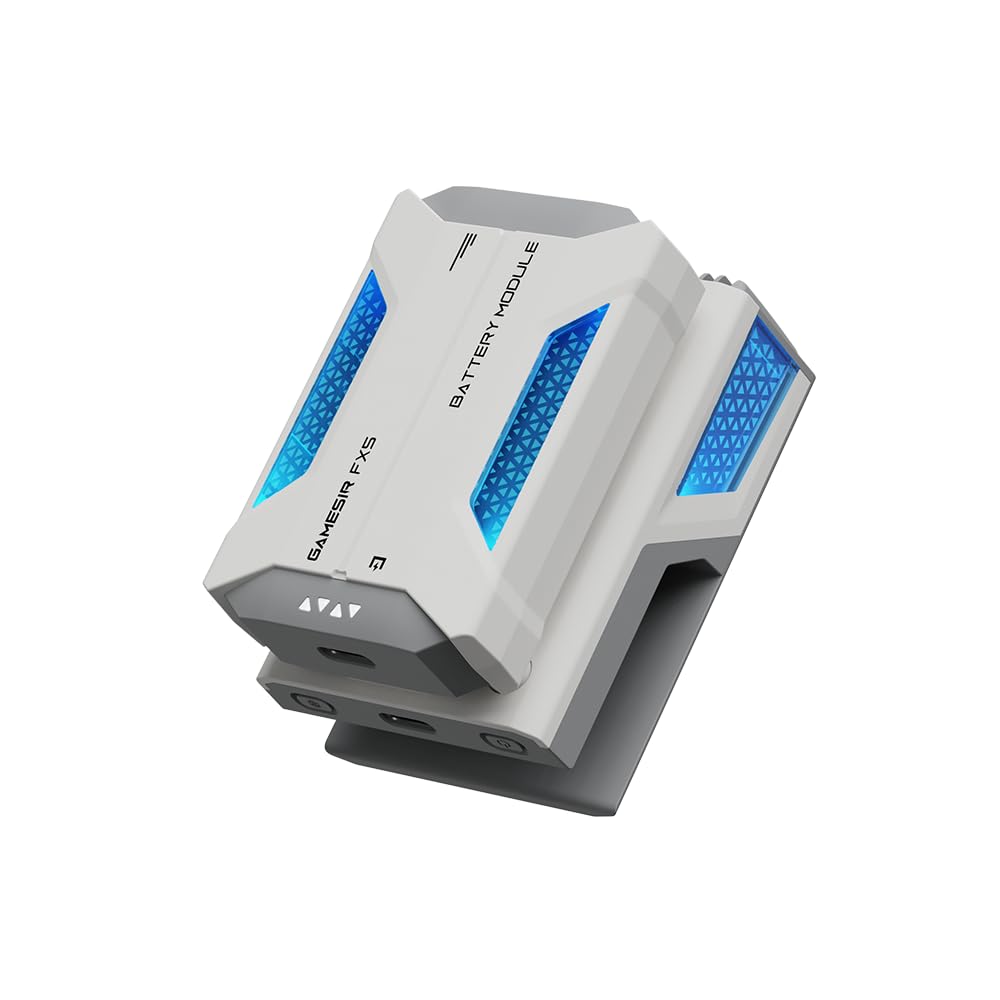
Image: The GameSir FX5 Thermoelectric Cooler, a compact device designed to attach to gaming controllers.
2. Key Awọn ẹya ara ẹrọ
- Designed for X5 Series Controllers: Seamlessly clips onto the telescopic rod for secure, easy, and quick installation.
- Pipadanu Ooru ti o gaju: Equipped with a 25mm x 25mm cooling plate for effective cooling during intense gaming.
- Noise-Free Technology: Ensures a distraction-free gaming experience.
- Three Adjustable Cooling Modes: Silent Mode, Extreme Cold Mode, and Overclocking Mode for tailored heat dissipation.
- Imọlẹ RGB Yiyi: Provides intuitive visual indication of the current cooling mode.
- Awọn aṣayan Agbara Meji: Supports wired operation via a 5V/3A adapter or wireless operation with the included 3000mAh high-capacity magnetic battery.
- Vertical Airflow Design: Prevents heat from blowing directly onto hands, maintaining comfortable grip.
- Awọn iṣakoso ogbon: Independent power button and cooling mode button for smooth operation.
3. Eto
The GameSir FX5 is specifically designed for easy attachment to X5 series controllers. To install:
- Ensure your X5 series controller is powered off.
- Align the FX5 cooler with the telescopic rod of your X5 series controller.
- Gently slide and clip the FX5 onto the controller's rod until it is securely in place. The design ensures a snug fit.

Image: The GameSir FX5 cooler shown attached to the central telescopic rod of a GameSir X5 series mobile gaming controller.
4. Awọn ilana Iṣiṣẹ
The FX5 cooler features independent buttons for power and mode selection, allowing for straightforward operation.
- Titan/Apapa: Press and hold the independent power button located on the cooler to turn the device on or off.
- Changing Cooling Modes: Once powered on, press the mode button to cycle through the three available cooling modes: Silent Mode, Extreme Cold Mode, and Overclocking Mode.
- RGB Indicator: Observe the dynamic RGB lighting, which changes color to visually indicate the currently active cooling mode.

Aworan: A sunmọ-soke view of the GameSir FX5, highlighting the battery indicator lights and the independent power and mode buttons for user-friendly control.
5. Awọn ipo itutu
The FX5 offers three distinct cooling modes to suit various gaming intensities and preferences:
- Ipo ipalọlọ: Provides gentle cooling with minimal fan noise, ideal for casual gaming or quiet environments.
- Extreme Cold Mode: Offers enhanced cooling performance for moderate gaming sessions, balancing efficiency with noise levels.
- Overclocking Mode: Delivers maximum cooling power for the most demanding games, ensuring sustained performance during prolonged, intense gameplay.
The integrated RGB lighting visually confirms the active mode, allowing for quick adjustments without interrupting your game.
6. Awọn aṣayan agbara
The FX5 provides flexible power solutions to ensure continuous cooling:
- Isẹ ti firanṣẹ: Connect the cooler to a 5V/3A power adapter using a compatible USB-C cable. This provides consistent power for extended use.
- Isẹ Alailowaya: Utilize the included 3000mAh high-capacity magnetic battery. Simply attach the battery module to the cooler for untethered cooling.

Image: A visual comparison of the GameSir FX5 operating wirelessly with its magnetic battery and wired via a USB-C connection, illustrating its dual power flexibility.
7. Itọju
To ensure the longevity and optimal performance of your GameSir FX5 Thermoelectric Cooler, follow these maintenance guidelines:
- Ninu: Regularly wipe the exterior of the cooler with a soft, dry cloth to remove dust and debris. Ensure the cooling plate and fan vents are clear of obstructions.
- Ibi ipamọ: Nigbati o ko ba si ni lilo, tọju olutọju ni itura, aye gbigbẹ kuro lati orun taara ati awọn iwọn otutu to gaju.
- Itọju Batiri: If using the magnetic battery, avoid fully discharging it for prolonged periods. Charge it periodically to maintain battery health.
- Yago fun Olomi: Do not expose the device to water or other liquids, as this can cause damage.
8. Laasigbotitusita
If you encounter issues with your FX5 cooler, refer to the following common troubleshooting steps:
- Atutu Ko Tii:
- Rí i dájú pé a tẹ bọ́tìnì agbára náà kí a sì mú un fún ìṣẹ́jú díẹ̀.
- If using wired power, check the USB-C cable connection and the power adapter (ensure it's 5V/3A).
- If using wireless power, ensure the magnetic battery is fully charged and securely attached.
- Itutu agbaiye ti ko to:
- Verify that the cooler is set to Extreme Cold or Overclocking Mode.
- Ensure the cooling plate is making full contact with the controller's surface.
- Check for any obstructions in the fan vents that might impede airflow.
- Awọn imọlẹ RGB Ko Ṣiṣẹ:
- Confirm the cooler is powered on.
- Cycle through the modes to see if the lights respond.
For further assistance, please contact GameSir customer support.
9. Awọn pato
| Brand | GameSir |
| Awoṣe | FX5 |
| Cooling Plate Size | 25mm x 25mm |
| Awọn ipo Itutu | Silent, Extreme Cold, Overclocking |
| Awọn aṣayan agbara | Wired (5V/3A adapter required), Wireless (3000mAh magnetic battery included) |
| Airflow Design | Inaro |
| Imọlẹ RGB | Bẹẹni |
| Iwọn Nkan | 10.2 iwon |
| Package Mefa | 5.79 x 4.49 x 2.24 inches |

Image: A detailed comparison table outlining the features and specifications of the GameSir FX5 versus the FX5 Lite, including contact area, cooling plate, power supply, cooling modes, magnetic battery support, airflow, and RGB lighting.
10. Awọn fidio ọja
GameSir X5s + FX5 - A Complete Gaming Combo
Video: This video demonstrates the GameSir X5s controller combined with the FX5 cooler, showcasing their integrated functionality for an enhanced mobile gaming experience.
GameSir X5s controller thermoelectric Cooler FX5
Video: A detailed look at the GameSir X5s controller and the FX5 thermoelectric cooler, highlighting their features and how they work together to provide efficient cooling during gameplay.
Best gaming experience
Video: A short video demonstrating the GameSir FX5 in action, illustrating how it contributes to an improved gaming experience by keeping the controller cool.
11. Atilẹyin ọja ati Support
For warranty information or technical support, please refer to the documentation included with your product or visit the official GameSir website. You may also contact GameSir customer service directly for assistance with any product-related inquiries.


