1. Ifihan
Thank you for choosing the HTC GT-288 Electric Shaver. This manual provides essential information for the safe and effective operation, maintenance, and care of your new shaver. Please read these instructions thoroughly before first use and retain them for future reference.
2. Alaye Aabo
To reduce the risk of electric shock, injury, or damage, always follow these basic safety precautions:
- Do not immerse the charging cable or power adapter in water or other liquids.
- Jeki ohun elo kuro lati ọdọ awọn ọmọde.
- Ensure the shaver is fully dry before connecting it to the charging cable.
- Do not use the shaver if the blade or foil is damaged, as this may cause injury.
- Lo okun USB gbigba agbara ti a pese nikan.
- This appliance is designed for personal use only.
3. Package Awọn akoonu
Jọwọ ṣayẹwo package fun awọn nkan wọnyi:
- 1 x HTC GT-288 Electric Shaver
- 1 x Okun Ngba agbara USB
- 3 x Precision Combs (1mm, 3mm, 5mm)
- 1 x Fẹlẹ ifọṣọ
- 1 x Epo fífún ni epo
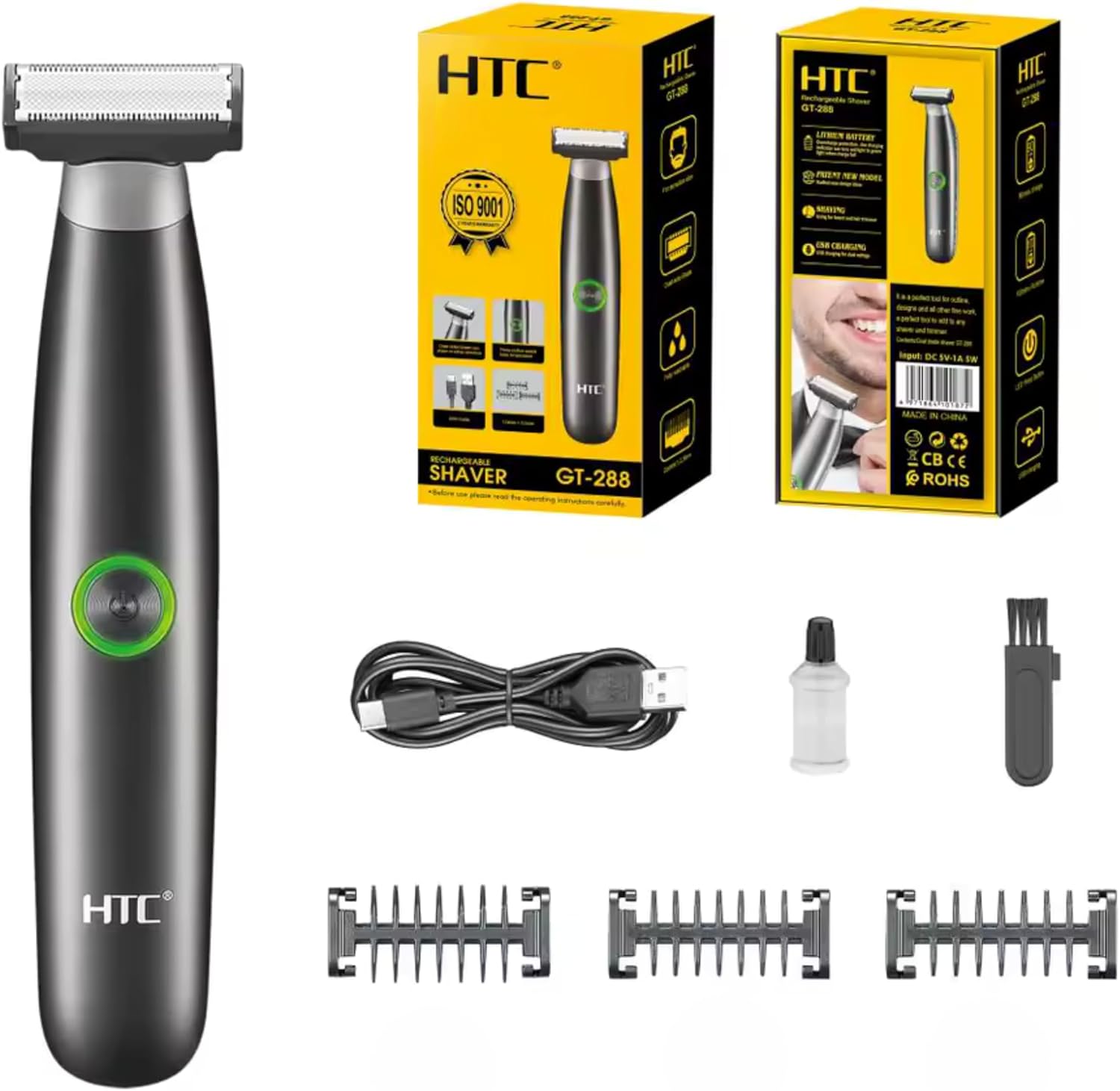
Image 3.1: Contents of the HTC GT-288 Electric Shaver package, including the shaver, USB cable, three precision combs, cleaning brush, and lubricating oil.
4. Ọja Ipariview
The HTC GT-288 Electric Shaver features a sleek design with a dual-sided blade for efficient trimming and shaving. It includes an easy-to-operate press-button switch and is fully washable for convenient cleaning.
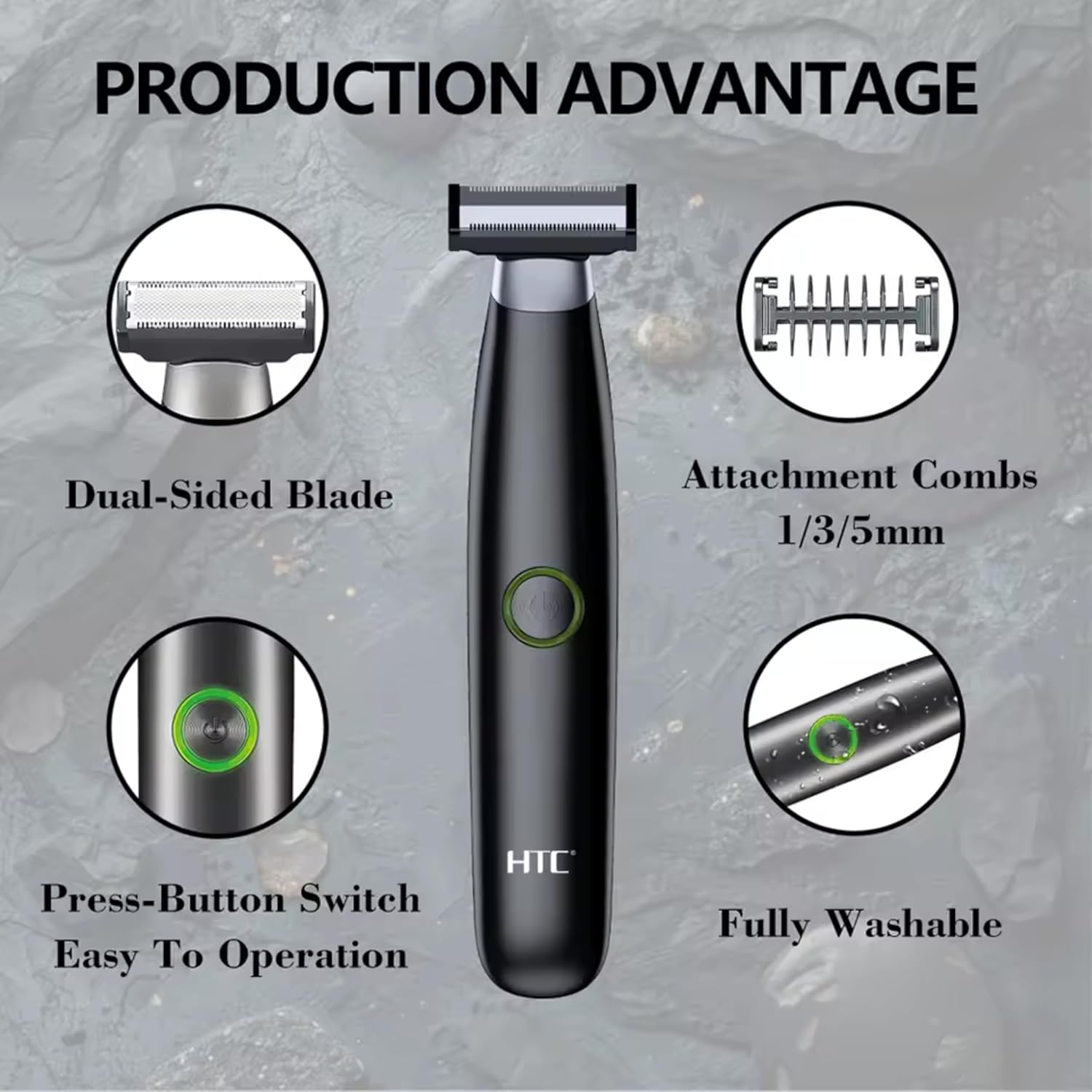
Aworan 4.1: Pariview of the HTC GT-288 Electric Shaver's key features, highlighting the dual-sided blade, attachment combs (1/3/5mm), press-button switch, and fully washable design.

Image 4.2: Detail of the LED press button, which serves as the on/off switch for easy operation.
5. Eto
- Yọọ kuro: Ni ifarabalẹ yọ gbogbo awọn paati kuro ninu apoti.
- Idiyele Ibẹrẹ: Before first use, fully charge the shaver. Refer to Section 6 for charging instructions.
- Attach Comb (Optional): If desired, select one of the three precision combs (1mm, 3mm, or 5mm) and slide it onto the shaver head until it clicks into place. Ensure it is securely attached.
6. Gbigba agbara
The HTC GT-288 Electric Shaver is equipped with a rechargeable battery for cordless operation.
- Rii daju pe o ti wa ni pipa irun-irun.
- Connect the small end of the USB charging cable to the charging port on the shaver.
- Connect the larger end of the USB cable to a compatible USB power source (e.g., computer, USB wall adapter).
- The LED indicator on the shaver will illuminate to show that it is charging.
- Allow the shaver to charge completely before its first use. A full charge typically takes several hours.
- Nígbà tí o bá ti gba agbára tán pátápátá, yọ okùn USB náà kúrò.
7. Awọn ilana Iṣiṣẹ
The HTC GT-288 shaver can be used for both wet and dry shaving.
- Agbara Tan: Press the LED button to turn on the shaver.
- Gbigbe Gbigbe: For dry shaving, ensure your skin is clean and dry. Gently press the shaver against your skin and move it in slow, even strokes against the direction of hair growth.
- Irun omi tutu: For wet shaving, apply shaving foam or gel to your skin. The shaver is waterproof, allowing for use in the shower or with water. Move the shaver in gentle, even strokes.
- Using Precision Combs: Attach the desired 1mm, 3mm, or 5mm comb for trimming beards, sideburns, or other facial hair to a specific length. Move the shaver with the comb attached against the direction of hair growth for an even trim.
- Agbara Pa: Press the LED button again to turn off the shaver after use.
8. Itọju ati Cleaning
Ninu deede ṣe idaniloju iṣẹ ṣiṣe to dara julọ ati fa igbesi aye ti irun ori rẹ pọ.
- Paa: Pa a ifa irun nigbagbogbo ṣaaju ki o to sọ di mimọ.
- Ori Fi omi ṣan: The shaver is fully washable (IPX6 rated). You can rinse the shaver head directly under running water to remove hair clippings.
- Lo Fẹlẹ Mimọ: For more thorough cleaning, use the provided cleaning brush to remove stubborn hair particles from the blade and comb attachments.
- Lubricate Blades: After cleaning and drying, apply a small drop of the provided lubricating oil to the blades. Turn on the shaver for a few seconds to distribute the oil evenly. This helps maintain blade performance.
- Gbẹ Jẹ́ kí afẹ́fẹ́ gbẹ gbogbo rẹ̀ kí o tó tọ́jú rẹ̀ tàbí kí o tún gba agbára padà.

Image 8.1: The HTC GT-288 Electric Shaver being rinsed under a faucet, illustrating its IPX6 fully washable design for easy cleaning.
9. Laasigbotitusita
| Isoro | Owun to le Fa | Ojutu |
|---|---|---|
| Shaver ko ni tan. | Batiri ti dinku. | Gba agbara fun irun ori naa patapata. |
| Shaver does not cut effectively. | Awọn abẹfẹlẹ ti wa ni pipade pẹlu irun tabi ṣigọgọ. | Clean the shaver head thoroughly. Apply lubricating oil. If problem persists, blades may need replacement. |
| Shaver fa irun. | Battery is low or blades are clogged. | Charge the shaver. Clean the shaver head. |
| Shaver duro lakoko lilo. | Batiri ti dinku. | Saji awọn shaver. |
10. Awọn pato
- Brand: Eshitisii
- Orukọ awoṣe: GT-288
- Orisun Agbara: USB gbigba agbara
- Awọn ẹya pataki: USB Cable, Adjustable Combs, Rechargeable, Water Resistant, Wet & Dry Use
- Awọn lilo ti a ṣe iṣeduro: Facial Shaving, Beard Trimming, Daily Use, Travel
- Awọn eroja to wa: Electric Shaver, USB Cable, 3 Precision Combs, Cleaning Brush, Lubricating Oil
- Iwọn Ọja: 250 giramu
- Àwọ̀: Dudu
- Ohun elo abẹfẹlẹ: Irin ti ko njepata
- Ori oriṣi: Konge Trimmer
11. Atilẹyin ọja ati Support
This product is manufactured by HTC. For any questions, technical support, or warranty claims, please contact the seller or manufacturer directly through your purchase platform. Please retain your proof of purchase for warranty purposes.


