1. Ifihan
This manual provides essential information for the safe and effective operation of your Blackstar ID:X-50 High Power Digital Combo 50W Guitar Amplifier. Jọwọ ka iwe afọwọkọ yii daradara ṣaaju lilo amplifier láti rí i dájú pé a ṣètò rẹ̀ dáadáa, ṣiṣẹ́ dáadáa, àti àtúnṣe. Pa ìwé ìtọ́ni yìí mọ́ fún ìtọ́kasí ọjọ́ iwájú.
2. Awọn Ilana Aabo pataki
- Orisun Agbara: Sopọ awọn amplifier only to a power supply of the type described in this manual and marked on the unit. Ensure the power cord is properly grounded.
- Afẹfẹ: Ma ṣe dina eyikeyi awọn ṣiṣi atẹgun. Fi sori ẹrọ ni ibamu pẹlu awọn ilana ti olupese.
- Omi ati Ọrinrin: Maṣe lo ohun elo yii nitosi omi tabi ọrinrin.
- Ooru: Maṣe fi sori ẹrọ nitosi awọn orisun ooru gẹgẹbi awọn imooru, awọn iforukọsilẹ ooru, awọn adiro, tabi awọn ohun elo miiran (pẹlu ampliifiers) ti o gbe ooru jade.
- Ninu: Mọ pẹlu asọ gbigbẹ nikan.
- Ṣiṣẹ: Tọkasi gbogbo iṣẹ si awọn oṣiṣẹ iṣẹ ti o peye. Iṣẹ nilo nigbati ohun elo ba ti bajẹ ni ọna eyikeyi, gẹgẹbi okun ipese agbara tabi plug ti bajẹ, omi ti ta silẹ tabi awọn nkan ti ṣubu sinu ẹrọ, ohun elo naa ti farahan si ojo tabi ọrinrin, ko ṣiṣẹ deede. , tabi ti lọ silẹ.
- Okun Agbara: Dabobo okun agbara lati ma rin lori tabi pin, ni pataki ni awọn pilogi, awọn ohun elo irọrun, ati aaye nibiti wọn ti jade kuro ninu ohun elo naa.
3. Ọja Ipariview
The Blackstar ID:X-50 is a 50W digital combo guitar amplifier designed for versatile tone shaping and performance. It features multiple amp voices, built-in effects, and intuitive controls.

Nọmba 3.1: Igun-iwaju view of the Blackstar ID:X-50 amplifier, showcasing awọn oniwe-iwapọ oniru ati agbọrọsọ grille.
3.1 Iwaju Panel idari
The front panel provides access to all primary sound shaping and effect parameters.
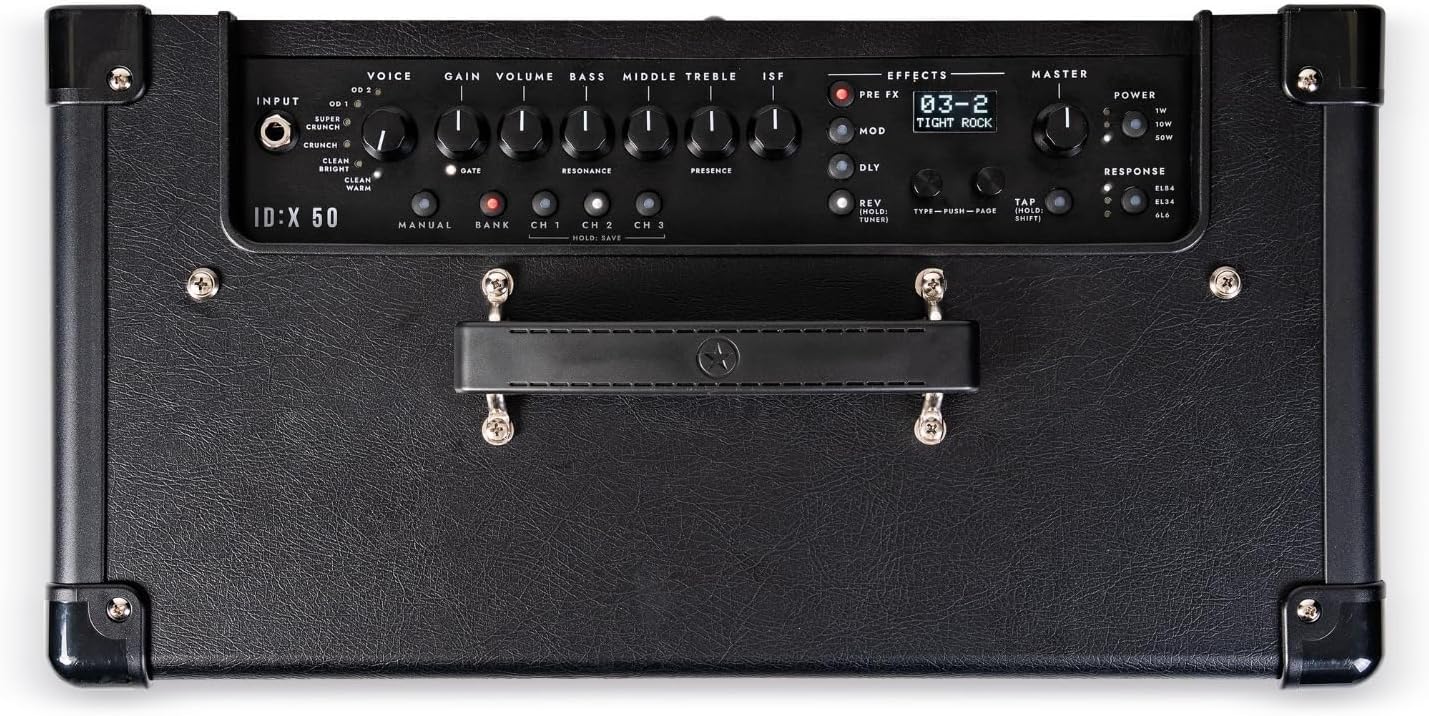
Nọmba 3.2: Alaye view of the ID:X-50 amplifier's top-mounted control panel, showing input, voice, gain, EQ, effects, and master sections.
- Fi sii: So gita rẹ pọ si ibi.
- Ohùn: Yan ọkan ninu awọn mẹfa ti o yatọ amp voices (Clean Warm, Clean Bright, Crunch, Super Crunch, OD 1, OD 2).
- Anfani: Ó ń ṣàkóso iye overdrive tàbí ìyípadà.
- IDAGBASOKE: Adjusts the overall output level of the selected voice.
- BÁSÌ, Àárín, TÍBÉLÌ: Standard 3-band equalizer controls.
- ISF (Ẹ̀yà Àwòrán Aláìlópin): Blackstar's unique tone control, sweeping from a classic British sound to a modern American tone.
- Apá Àwọn Àkóbá: Includes controls for Pre-FX, Modulation, Delay, and Reverb effects.
- Iwọn didun MASTER: Controls the final output volume of the amplifier.
- AGBARA: Selectable power levels (1W/10W/50W).
- ÌDÁHÙN: Emulates different valve amplifier responses (EL84, EL34, 6L6).
- Iboju ifihan: Shows patch names, effect selection, and parameter values.
3.2 Ru Panel Awọn isopọ
The rear panel provides connectivity for power, footswitch, audio output, and USB.
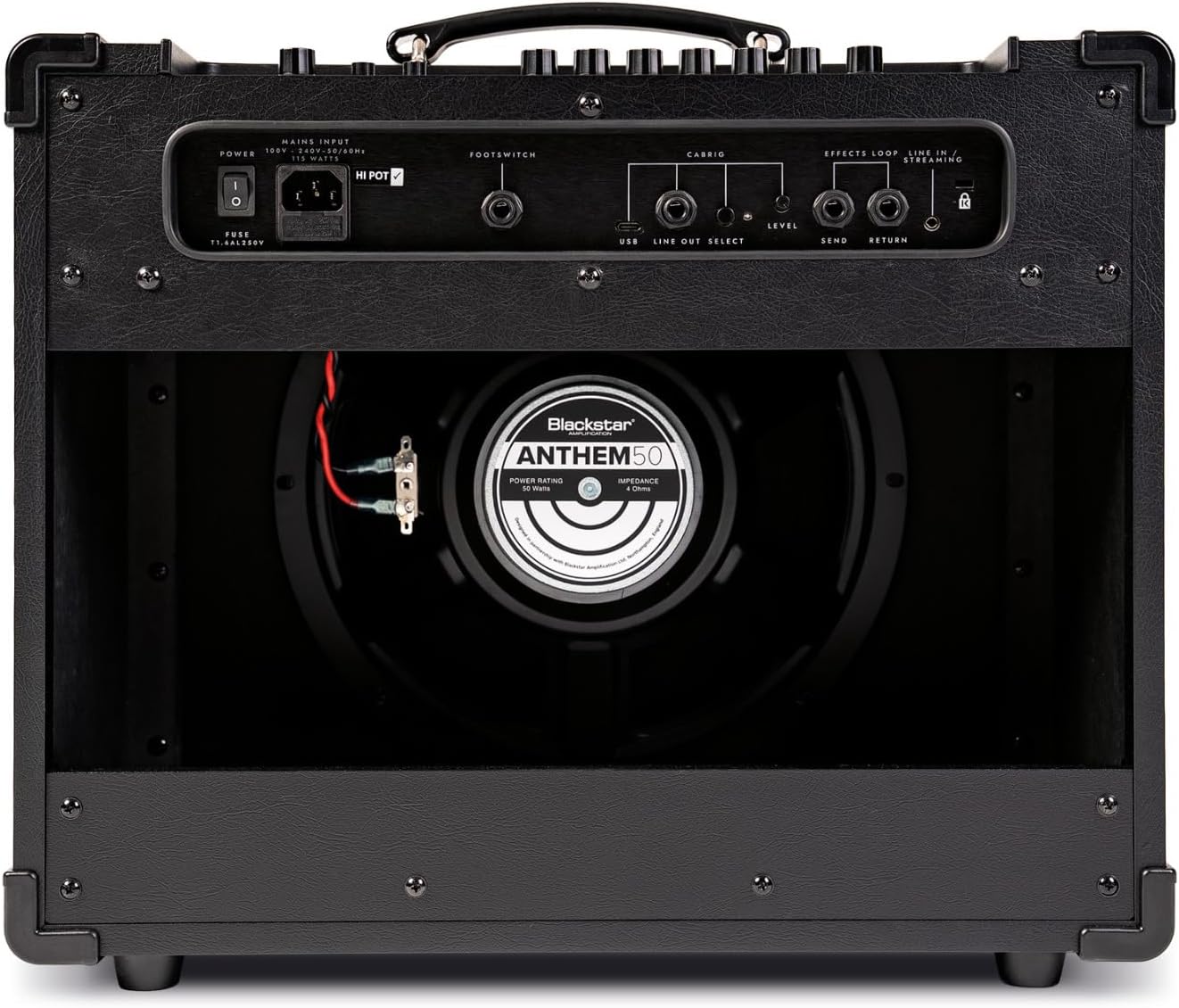
Nọmba 3.3: Ẹyìn view of the ID:X-50 amplifier, detailing the power input, footswitch, USB, line out, and effects loop connections.
- ÀKÒRÒ: So okun agbara ti a pese nibi.
- Ẹsẹ: Connect an optional Blackstar footswitch for remote control of functions.
- USB: For connecting to a computer for recording or software updates.
- LINE OUT / HEADPHONES: For connecting to headphones or an external mixing console/recording interface.
- ÀWỌN ÀṢẸ̀LẸ̀ (RÁNṢẸ́/PADA): For integrating external stompboxes or effects processors.
4. Eto
- Ṣii silẹ: Fara yọ awọn amplífó láti inú àpò rẹ̀. Ṣàyẹ̀wò bóyá àmì ìbàjẹ́ kan wà.
- Ibi: Gbe awọn amplifier on a stable, level surface. Ensure adequate ventilation around the unit.
- Asopọ agbara: Rii daju pe amplifier's power switch is in the OFF position. Connect the supplied power cord to the MAINS INPUT on the rear panel and then to a suitable grounded power outlet.
- Ìsopọ̀ Gítà: Connect your guitar to the INPUT jack on the front panel using a high-quality instrument cable.
- Awọn isopọ iyan:
- If using a footswitch, connect it to the FOOTSWITCH jack on the rear panel.
- For headphones or direct recording, connect to the LINE OUT / HEADPHONES jack.
- For external effects, connect your effects unit to the EFFECTS LOOP (SEND/RETURN) jacks.
5. Awọn ilana Iṣiṣẹ
5.1 Powering On and Basic Sound
- Turn the MASTER volume control to its minimum setting.
- Flip the power switch to the ON position. The display will illuminate.
- Select a VOICE (e.g., Clean Warm).
- Adjust the GAIN and VOLUME controls to achieve your desired level of drive and output for the selected voice.
- Slowly increase the MASTER volume to a comfortable listening level.
5.2 Amp Awọn ohun
The ID:X-50 offers six distinct amp ohun:
- Gbona mimọ: Ohùn mímọ́ tónítóní, tó sì ń yí padà.
- Imọlẹ Mimọ: Brighter clean tone with more sparkle.
- Ìrora: Classic rock crunch with good articulation.
- Ṣíṣe ìparẹ́ púpọ̀: Higher gain crunch for heavier rhythm.
- OD 1: Modern overdrive with tight bass and singing highs.
- OD 2: Aggressive, high-gain lead tone.
Rotate the VOICE knob to cycle through these options. The selected voice will be shown on the display.
5.3 Equalization (EQ) and ISF
Use the BASS, MIDDLE, and TREBLE knobs to fine-tune the tonal characteristics of your sound. The ISF control allows you to shift the amplifier's tonal response between a British-style (counter-clockwise) and American-style (clockwise) sound.
5.4 Built-in Effects
The ID:X-50 includes over 35 effects, categorized into Pre-FX, Modulations, Delays, and Reverbs. Use the dedicated EFFECT section controls and the display to select and adjust parameters.

Nọmba 5.1: A hand demonstrating adjustment of a control knob on the amplifier's front panel, highlighting user interaction with the effects section.
- Awọn ipa yiyan: Use the dedicated buttons or knobs within the EFFECTS section to navigate through effect types and select a specific effect.
- Awọn Iyipada Awọn Atunse: The display will show the selected effect and its parameters. Use the associated controls to modify these parameters. Up to 4 parameters per effect can be fine-tuned.
5.5 Valve Response Emulation
The RESPONSE control allows you to emulate the characteristics of different power amp falifu:
- EL84: Bright, chimey, and dynamic.
- EL34: Classic British rock tone, rich and powerful.
- 6L6: American-style tone, tight low-end and clear highs.
5.6 Patch Saving and Recall
The ID:X-50 allows you to save your custom amp and effect settings as patches for quick recall. Refer to the display and associated controls for specific instructions on saving and recalling patches.
5.7 Power Level Selection
The POWER switch allows you to select between 1W, 10W, and 50W output levels. This is useful for adapting the amplifier's volume and headroom to different environments, from bedroom practice to stage išẹ.
6. Itọju
- Ninu: Ge asopọ na amplifier from the power supply before cleaning. Use a soft, dry cloth to wipe down the exterior. Do not use liquid cleaners or abrasive materials.
- Ibi ipamọ: Nigbati o ko ba wa ni lilo fun awọn akoko ti o gbooro sii, tọju awọn amplifier in a dry, dust-free environment.
- Gbigbe: Nigba gbigbe awọn ampìdènà, rí i dájú pé a gbé e sí ibi tí ó yẹ láti dènà ìbàjẹ́ ara.
7. Laasigbotitusita
| Isoro | Owun to le Fa | Ojutu |
|---|---|---|
| Ko si agbara | Okùn agbára kò sopọ̀ mọ́; Ibùdó agbára kò ní àbùkù; Amppipa agbara lifier. | Ensure power cord is securely connected. Test outlet with another device. Turn power switch ON. |
| Ko si ohun | Guitar cable faulty; Volume controls too low; Incorrect input selected; Speaker disconnected (internal). | Check guitar cable. Increase GAIN, VOLUME, and MASTER controls. Ensure guitar is plugged into INPUT. Contact service if speaker is suspected. |
| Ohun ti o daru | GAIN too high for clean voice; Faulty cable; Speaker damage. | Reduce GAIN. Test with a different cable. If distortion persists at low gain, contact service. |
| Awọn ipa ko ṣiṣẹ | Effect level set to zero; Effect bypassed; Incorrect effect selected. | Check effect parameters on the display. Ensure effect is active and not bypassed. |
If you encounter issues not listed here or if the suggested solutions do not resolve the problem, please contact Blackstar customer support or a qualified service technician.
8. Awọn pato
- Awoṣe: Blackstar ID:X-50
- Ijade Wattage: 50 Watts (selectable 1W/10W/50W)
- Amp Awọn ohun: 6 (Clean Warm, Clean Bright, Crunch, Super Crunch, OD 1, OD 2)
- EQ: 3-Band (Bass, Middle, Treble) + ISF (Infinite Shape Feature)
- Awọn ipa: Over 35 built-in effects (Pre-FX, Modulation, Delay, Reverb)
- Valve Response Emulation: EL84, EL34, 6L6
- Asopọmọra: Guitar Input, Footswitch, USB, Line Out/Headphones, Effects Loop (Send/Return)
- Awọn iwọn: 18.23 x 12.68 x 21.73 inches (Awọn iwọn Ọja)
- Ìwúwo: 33 iwon
- Ohun elo: Irin
- Àwọ̀: Dudu
9. Atilẹyin ọja ati Support
For detailed warranty information, please refer to the warranty card included with your product or visit the official Blackstar Amplification website. For technical support, service, or spare parts, please contact your authorized Blackstar dealer or Blackstar customer support directly.
Blackstar AmpÒṣìṣẹ́ ìfìdíkalẹ̀ Webojula: www.blackstaramps.com


