1. Ifihan
This manual provides detailed instructions for the safe and efficient use of your boAt Rockerz Plus 550 Bluetooth Headphones. Please read this manual thoroughly before using the product and retain it for future reference.
2. Ohun ti o wa ninu Apoti
- boAt Rockerz Plus 550 Headphones
- Ngba agbara USB
- AUX Cable
- Itọsọna olumulo

Image: boAt Rockerz Plus 550 Bluetooth Headphones, showcasing the Blue Psyche color variant and customizable earcups.
3. Ọja Ipariview ati Awọn iṣakoso
Mọ ara rẹ pẹ̀lú onírúurú ẹ̀yà ara àti ìdarí àwọn agbekọri rẹ.

Aworan: Alaye view of the headphone's control buttons and ports, including the charging port and AUX input.
Àwọn Ìṣàkóso Kọ́kọ́rọ́:
- Bọtini agbara: Tẹ mọlẹ lati fi agbara tan/pa a.
- Iwọn didun Up/Orin atẹle: Tẹ kukuru fun iwọn didun soke, tẹ gun fun orin atẹle.
- Iwọn didun isalẹ/Orin ti tẹlẹ: Tẹ kukuru fun iwọn didun isalẹ, gun tẹ fun orin iṣaaju.
- Bọtini iṣẹ-ọpọlọpọ (MFB): Mu ṣiṣẹ/duro, dahun/pari awọn ipe, mu oluranlọwọ ohun ṣiṣẹ.
- Ibudo AUX: Fun asopọ onirin.
- Ibudo gbigba agbara: Fun gbigba agbara awọn agbekọri.
4. Eto
4.1 Ngba agbara si awọn Agbekọri
- Connect the charging cable to the charging port on the headphones.
- So opin okun miiran pọ si ohun ti nmu badọgba agbara USB (kii ṣe pẹlu) tabi ibudo USB ti kọnputa kan.
- Atọka LED yoo fihan ipo gbigba agbara. Yoo paa tabi yi awọ pada nigbati o ba gba agbara ni kikun.
Gbigba agbara kikun yoo gba to wakati 100 ti akoko ere.

Image: The boAt Rockerz Plus 550 headphones highlighting their extended battery life of up to 100 hours.
4.2 Sisopọ Bluetooth
- Rii daju pe awọn agbekọri ti gba agbara ni kikun.
- Tẹ mọlẹ Bọtini Agbara titi ti Atọka LED yoo tan bulu ati pupa, nfihan ipo sisopọ.
- Lori ẹrọ rẹ (foonuiyara, tabulẹti, kọǹpútà alágbèéká), mu Bluetooth ṣiṣẹ ki o wa awọn ẹrọ to wa.
- Select "boAt Rockerz Plus 550" from the list of devices.
- Ni kete ti o sopọ, Atọka LED yoo tan buluu laiyara.
4.3 Dual Pairing
The headphones support dual pairing, allowing connection to two devices simultaneously.
- Pa awọn agbekọri pọ pẹlu ẹrọ akọkọ bi a ti ṣalaye ni apakan 4.2.
- Mu Bluetooth ṣiṣẹ lori ẹrọ akọkọ. Awọn agbekọri naa yoo tun tẹ ipo sisopọ sii.
- Pa awọn agbekọri pọ pẹlu ẹrọ keji.
- Mu Bluetooth ṣiṣẹ lori ẹrọ akọkọ. Awọn agbekọri naa yoo sopọ mọ awọn ẹrọ mejeeji laifọwọyi.
You can now seamlessly switch between audio sources from both connected devices.
Image: Visual representation of the dual pairing functionality, showing a phone and a tablet simultaneously connected to the headphones.
4.4 AUX Asopọ
For a wired connection, use the provided AUX cable.
- Connect one end of the AUX cable to the headphone's AUX port.
- So opin miiran pọ si Jack ohun afetigbọ 3.5mm ẹrọ ohun rẹ.
- The headphones will automatically switch to AUX mode.
5. Awọn ilana Iṣiṣẹ
5.1 Sisisẹsẹhin Orin
- Ṣiṣẹ/Daduro: Tẹ MFB lẹẹkan.
- Orin t’okan: Gun tẹ bọtini didun Up.
- Tẹlẹ Orin: Gun tẹ bọtini Iwọn didun isalẹ.
- Iwọn didun Up: Kukuru tẹ bọtini Iwọn didun Up.
- Iwọn didun isalẹ: Kukuru tẹ bọtini Iwọn didun isalẹ.
5.2 ipe Management
- Idahun/Ipe Ipari: Tẹ MFB lẹẹkan.
- Kọ Ipe: Tẹ mọlẹ MFB fun iṣẹju-aaya 2.
5.3 Iranlọwọ ohun
Activate your device's voice assistant (Siri, Google Assistant) directly from the headphones.
- Mu Oluranlọwọ Ohun ṣiṣẹ: Tẹ MFB lẹẹmeji.
5.4 Customizable Earcups
The boAt Rockerz Plus 550 features customizable earcups, allowing you to change their appearance.
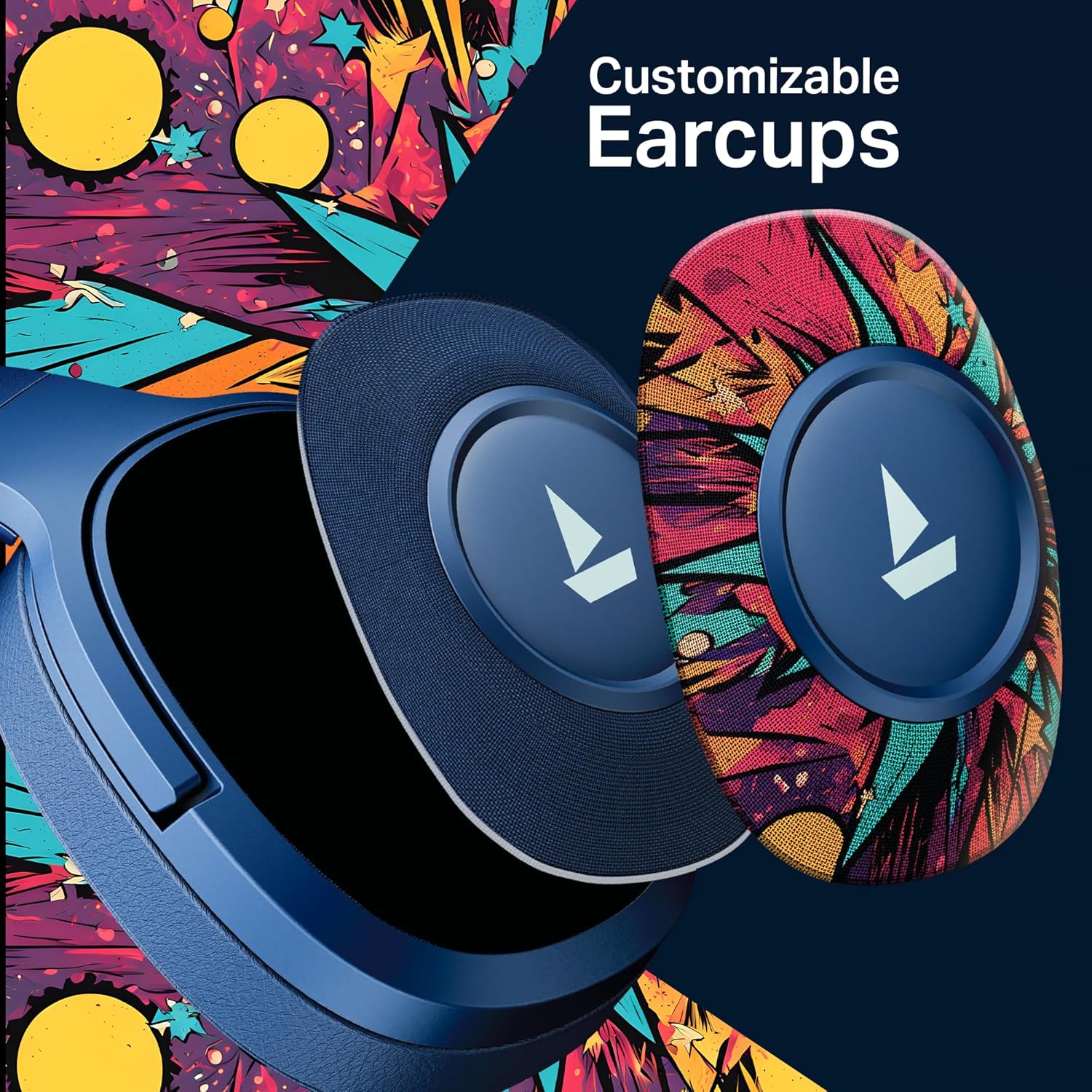
Aworan: A alaye view demonstrating how the customizable earcups can be removed and replaced on the headphones.
5.5 boAt Hearables App Support
Enhance your experience by downloading the boAt Hearables App. The app provides additional features and user guides.

Image: A smartphone showing the boAt Hearables App interface, including a QR code for easy access. Scan the QR code or visit https://l.ead.me/bdAX6k lati gba lati ayelujara awọn app.
6. Itọju
- Ninu: Mu awọn agbekọri nu pẹlu asọ ti o gbẹ. Ma ṣe lo abrasive ose tabi epo.
- Ibi ipamọ: Tọju awọn agbekọri naa ni itura, aye gbigbẹ kuro lati orun taara ati awọn iwọn otutu to gaju.
- Itọju Batiri: To prolong battery life, charge the headphones regularly, even if not in frequent use. Avoid fully discharging the battery for extended periods.
7. Laasigbotitusita
| Isoro | Owun to le Fa | Ojutu |
|---|---|---|
| Awọn agbekọri ko ṣiṣẹ. | Batiri kekere. | Gba agbara si awọn agbekọri ni kikun. |
| Ko le so pọ pẹlu ẹrọ. | Bluetooth not enabled, headphones not in pairing mode, or device too far. | Ensure Bluetooth is on, headphones are in pairing mode (flashing red/blue), and within range (10 meters). Try restarting both devices. |
| Ko si ohun tabi iwọn kekere. | Volume too low on headphones or device, incorrect audio output selected, or loose AUX cable. | Adjust volume on both devices. Check audio output settings. Ensure AUX cable is securely connected. |
| Asopọmọra igba diẹ. | Interference, device too far, or low battery. | Move closer to the device, avoid obstacles, and ensure headphones are charged. Avoid environments with strong Wi-Fi or other Bluetooth signals. |
8. Awọn pato
| Ẹya ara ẹrọ | Ẹ̀kúnrẹ́rẹ́ |
|---|---|
| Orukọ awoṣe | Rockerz ọdun 550 |
| Asopọmọra Technology | Bluetooth v5.4, 3.5 mm Jack |
| Audio Driver Type | Yiyi Awakọ |
| Awakọ Iwon | 50mm |
| Igbesi aye batiri | Titi di awọn wakati 100 |
| Apẹrẹ Akọti | Lori Eti |
| Ariwo Iṣakoso | Passive Sound Isolation |
| Ọna Iṣakoso | Titari Bọtini |
| Iwọn Nkan | 250 giramu |
| Ọja Mefa | 17 x 9 x 20 cm |
| Batiri Iru | Lithium ion (Agba agbara) |
| Olupese | Imagine Marketing Ltd |
| Ilu isenbale | China |

Aworan: inu view highlighting the 50mm audio drivers, responsible for the boAt Signature Sound.
9. Atilẹyin ọja ati Support
Your boAt Rockerz Plus 550 headphones come with a standard manufacturer's warranty. Please refer to the warranty card included in your package for specific terms and conditions.
For technical support, service, or warranty claims, please contact boAt customer service:
- Olupese: Imagine Marketing Ltd
- Imeeli: info@imaginemarketingindia.com
- Atilẹyin Ayelujara: Visit the official boAt webaaye fun FAQs ati awọn orisun atilẹyin.


