Ọrọ Iṣaaju
Welcome to the user manual for your Raycon Essential Open Earbuds. These true wireless open-ear Bluetooth headphones are designed for comfort and awareness, allowing you to enjoy high-quality audio while staying connected to your surroundings. Featuring an ultra-lightweight design, comfort hook, IPX5 water resistance, and up to 36 hours of battery life, these earbuds are perfect for an active lifestyle.

Figure 1: Raycon Essential Open Earbuds (Black)
Package Awọn akoonu
Jọwọ rii daju pe gbogbo awọn nkan wa ninu package rẹ:
- Raycon Essential Open Earbuds (Left and Right)
- Ngba agbara Case
- Okun Ngba agbara USB
- Afowoyi Olumulo (iwe-ipamọ yii)

Àwòrán 2: Àwọn etí inú àpótí gbígbóná
Key Awọn ẹya ara ẹrọ
- Apẹrẹ Eti-Ṣi: Experience crystal-clear sound while staying fully aware of your surroundings. The open-ear design delivers high-quality audio without blocking your environment — perfect for workouts, outdoor runs, or multitasking throughout the day.

Figure 3: Open-Ear Design for Environmental Awareness
- Featherlight Fit: The Essential Open Earbuds are so lightweight and comfortable, you might forget you're even wearing them. The minimalist, ear-hugging design ensures a secure fit that won’t budge during intense movement, all while keeping you stylish and streamlined.

Figure 4: Ultra-Lightweight Design (13.3g)
- Built for On-The-Go (IPX5 Water Resistant): Sweat-resistant and made for motion, these wireless earbuds are ideal for gym sessions, cycling, and daily hustle. They’re pocket-sized and portable – the perfect essential earbuds that fit into your life with zero bulk. The IPX5 rating means they are resistant to splashes and sweat.

olusin 5: IPX5 Omi Resistance
- Long Battery Life + Easy Charging: Stay powered through your day with all-day battery life and a sleek charging case that fits in the palm of your hand. Fast charging means less downtime and more freedom to move. Enjoy up to 8 hours of non-stop playback and a total of 36 hours with the charging case.

olusin 6: Igbesi aye batiri ti o gbooro sii
- Flexible Ear Hook: The ergonomic ear hook bends to fit the shape of any ear, ensuring a secure and comfortable fit.

Figure 7: Flexible Ear Hook Design
- Apẹrẹ Iwapọ: Slide in your pocket or toss in your bag. Portable, fun-sized, and ready for any adventure.

olusin 8: Iwapọ ati Apẹrẹ to šee gbe
- Asopọmọra Multipoint: Connect to two devices and switch between them seamlessly — without the juggling.

Figure 9: Multipoint Connection Capability
Eto Itọsọna
1. Ngba agbara rẹ Earbuds
Before first use, fully charge your Raycon Essential Open Earbuds and their charging case.
- Place both earbuds into the charging case. Ensure they are seated correctly.
- Connect the provided USB charging cable to the charging port on the case and plug the other end into a USB power source (e.g., wall adapter, computer USB port).
- Ina Atọka lori apoti gbigba agbara yoo fi ipo gbigba agbara han. Ni kete ti o ba ti gba agbara ni kikun, ina yoo yipada tabi paa.
Video 1: Demonstrates charging the earbuds and case, as well as wearing them. This video is provided by the seller and is relevant for setup and operation.
2. Sisopọ pẹlu Ẹrọ Rẹ
Awọn agbekọri yoo tẹ ipo isọpọ sii laifọwọyi nigbati o ba jade ninu ọran fun igba akọkọ.
- Ṣii apoti gbigba agbara ki o yọ awọn agbekọri mejeeji kuro. Wọn yoo tan-an laifọwọyi ati tẹ ipo sisopọ pọ sii.
- Lori ẹrọ rẹ (foonuiyara, tabulẹti, kọmputa), lọ si awọn eto Bluetooth.
- Wa fun "Raycon Essential Open Earbuds" in the list of available devices.
- Select the earbuds to connect. You will hear an audible confirmation once connected.
For subsequent connections, the earbuds will automatically connect to the last paired device when removed from the case, if Bluetooth is enabled on the device.
Awọn ilana Iṣiṣẹ
Wọ awọn Earbuds
Gently loop the ear hook over your ear and position the earbud speaker near your ear canal. Adjust for a comfortable and secure fit.
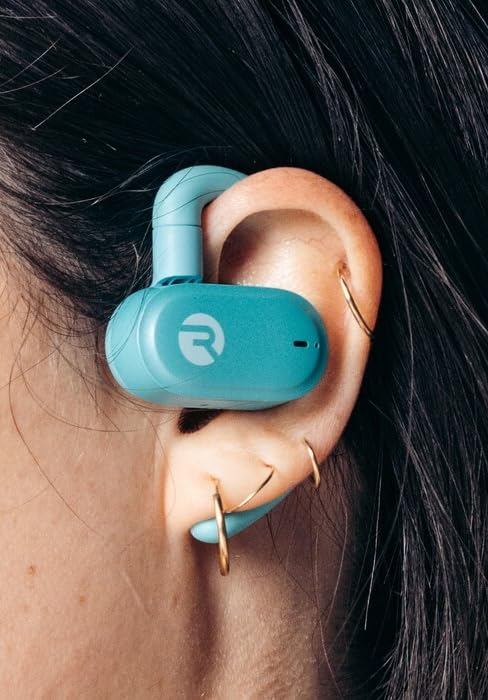
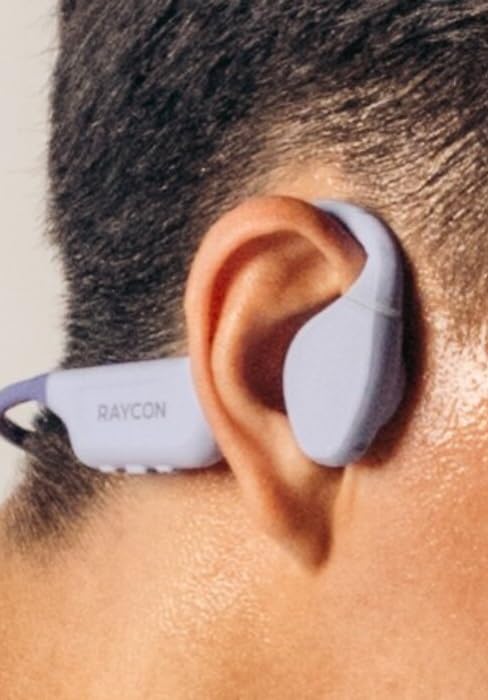
Figure 10: Proper Wearing of Essential Open Earbuds
Awọn iṣakoso ifọwọkan
The Essential Open Earbuds feature touch controls for various functions. Please note that the touch controls are sensitive. Refer to the quick start guide or the Raycon app for a full list of touch control functions, as specific actions (e.g., play/pause, skip track, answer call) are typically managed via taps on the earbud surface.
| Iṣe | Išẹ |
|---|---|
| Fọwọ ba Nikan | Mu orin ṣiṣẹ/Danuduro, Dahun/Pari ipe |
| Tẹ ni kia kia lẹẹmeji (Ẹkọ Atẹti ọtun) | Next Track |
| Tẹ ni kia kia lẹẹmeji (Agbohun Akọkọ osi) | Ti tẹlẹ Track |
| Gun Tẹ | Mu Oluranlọwọ Ohun ṣiṣẹ |
Note: Specific touch control gestures may vary. Consult the official Raycon support resources for the most accurate and up-to-date information.
Itoju
Ninu
Láti lè máa ṣiṣẹ́ dáadáa àti ìmọ́tótó, máa fọ àwọn ètí ìgbọ́rọ̀ rẹ àti àpótí ìgbafẹ́ rẹ déédéé.
- Lo asọ ti o gbẹ, asọ ti ko ni lint lati nu awọn afikọti ati apoti gbigba agbara.
- Fun idoti alagidi, die-die dampen aṣọ pẹlu omi. Yago fun ọrinrin pupọ.
- Ma ṣe lo awọn olutọpa abrasive, awọn nkanmimu, tabi awọn ohun elo aerosol.
- Rii daju pe awọn olubasọrọ gbigba agbara lori mejeeji agbekọri ati ọran naa jẹ mimọ ati gbẹ ṣaaju gbigba agbara.
Ibi ipamọ
Tí o kò bá lò ó, fi àwọn ètí ìgbọ́rọ̀ rẹ pamọ́ sínú àpótí ìgbóná wọn láti dáàbò bò wọ́n kí wọ́n sì máa gba agbára.
- Tọju ni itura, aye gbigbẹ, kuro lati awọn iwọn otutu ti o ga julọ ati oorun taara.
- Yẹra fún títọ́jú rẹ̀ ní àwọn àyíká tí ó tutù.
Itọju Batiri
Lati pẹ igbesi aye batiri:
- Yago fun gbigba batiri ni kikun nigbagbogbo.
- Charge the earbuds regularly, even if not used for extended periods.
- Lo okun gbigba agbara ti a pese nikan tabi iwe-ẹri deede.
Laasigbotitusita
If you encounter issues with your Raycon Essential Open Earbuds, try the following solutions:
| Isoro | Owun to le Solusan |
|---|---|
| Àwọn etí kò ní tan. | Ensure the earbuds and charging case are fully charged. Place earbuds in the case, close it, then open it again. |
| Earbuds kii yoo so pọ pẹlu ẹrọ. |
|
| Sound breaks up or is intermittent. |
|
| Touch controls are too sensitive or unresponsive. |
|
| Agbohungbohun kan ko ni ohun. |
|
Awọn pato
| Ẹya ara ẹrọ | Ẹ̀kúnrẹ́rẹ́ |
|---|---|
| Orukọ awoṣe | Awọn Agbohunsafẹfẹ Ṣii Pataki ti Raycon |
| Nọmba awoṣe | RBO715 |
| Asopọmọra Technology | Ailokun (Bluetooth 6.0) |
| Gbigbe Eti | Ṣii Eti |
| Fọọmù ifosiwewe | Over Ear (with hook design) |
| Iṣakoso Iru | Iṣakoso ifọwọkan |
| Omi Resistance Ipele | IPX5 (Atako omi) |
| Igbesi aye batiri (Earbuds) | Titi di wakati 8 |
| Lapapọ Igbesi aye Batiri (pẹlu Ọran) | Titi di wakati 36 |
| Iwọn Nkan | 5 iwon (earbuds + nla) |
| Iwuwo Earbud | Isunmọ. 13.3g fun agbekọri |
| Olupese | Raycon Global |
| ASIN | B0FHJ7G4WF |
| UPC | 811162032989 |
Atilẹyin ọja ati Support
Alaye atilẹyin ọja
Raycon products typically come with a limited manufacturer's warranty. Please refer to the official Raycon website or the warranty card included with your product for specific terms, conditions, and duration of the warranty.
Onibara Support
For further assistance, technical support, or warranty claims, please contact Raycon customer support:
- Webojula: Visit the official Raycon website for FAQs, support articles, and contact options. (www.rayconglobal.com)
- Imeeli/foonu: Specific contact details can usually be found on the support section of their webojula.
Please have your product model number (RBO715) and purchase information ready when contacting support.


