1. Awọn Ilana Aabo pataki
Jọ̀wọ́ ka gbogbo ìtọ́ni náà dáadáa kí o tó lo ẹ̀rọ yìí. Pa ìwé ìtọ́ni yìí mọ́ fún ìtọ́kasí ọjọ́ iwájú.
- Rii daju voltage specified on the rating label matches your mains voltage.
- Ma ṣe fi afẹfẹ, pulọọgi, tabi okun bọ inu omi tabi awọn olomi miiran.
- Unplug the fan from the outlet when not in use, before cleaning, or before moving.
- Do not operate the fan with a damaged cord or plug. Contact authorized service personnel for repair.
- Keep fingers and other objects away from the fan blades and openings.
- Do not use the fan near windows, in bathrooms, or in wet environments.
- Ohun elo yii kii ṣe ipinnu fun lilo nipasẹ awọn eniyan (pẹlu awọn ọmọde) pẹlu idinku ti ara, imọlara, tabi awọn agbara ọpọlọ, tabi aini iriri ati imọ, ayafi ti wọn ba ti fun wọn ni abojuto tabi itọnisọna nipa lilo ohun elo nipasẹ eniyan ti o ni iduro fun aabo wọn. .
- Awọn ọmọde yẹ ki o wa ni abojuto lati rii daju pe wọn ko ṣere pẹlu ohun elo naa.
2. Ọja Ipariview
The Mistral MFD4389DRW is a 43-inch DC Turbo Tower Fan designed for efficient air circulation. It features a DC brushless motor, 12 speed settings, and multiple operating modes. Control options include a full touch screen, remote control, and Wi-Fi with online voice control capabilities. The fan also offers a unique height conversion feature and 60-degree left-right oscillation.

olusin 2.1: Iwaju view of the Mistral MFD4389DRW DC Turbo Tower Fan, showcasing its sleek design and touch control panel.

olusin 2.2: Apa view of the Mistral MFD4389DRW DC Turbo Tower Fan, highlighting its slim profile.

olusin 2.3: Pada view of the Mistral MFD4389DRW DC Turbo Tower Fan, showing the air intake grille.
3. Package Awọn akoonu
Rii daju pe gbogbo awọn paati wa ninu apoti:
- Mistral MFD4389DRW DC Turbo Tower Fan Unit
- Isakoṣo latọna jijin
- Afowoyi Olumulo (iwe-ipamọ yii)
- Base components (if not pre-assembled)
- Height extension component (for convertible height models)
4. Apejọ
The Mistral MFD4389DRW fan features simple assembly. Typically, this involves attaching the base to the main fan unit. For models with height conversion, an additional extension piece may need to be secured.
- Ni ifarabalẹ yọ gbogbo awọn paati kuro ninu apoti.
- Gbé ẹ̀rọ afẹ́fẹ́ pàtàkì náà sí orí ilẹ̀ rírọ̀ tí ó tẹ́jú kí ó má baà jẹ́ kí ó gbóná.
- Align the base with the bottom of the fan unit. Ensure the power cord passes through the designated opening in the base.
- Secure the base to the fan unit using the provided screws (if applicable).
- For height conversion, insert the extension component between the base and the main unit, ensuring it clicks securely into place or is fastened as per instructions.
- Place the fan upright on a stable, level surface.
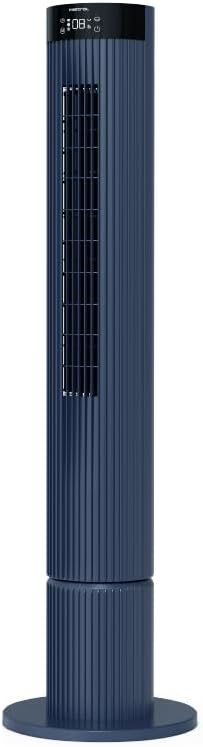
Figure 4.1: The fan demonstrating its convertible height feature, allowing adjustment between two different heights.
5. Eto ati Ibẹrẹ Lilo
After assembly, position the fan in your desired location. Ensure it is on a stable, flat surface and away from curtains or objects that could obstruct airflow.
- Plug the power cord into a suitable electrical outlet (220-240V~, 50-60Hz).
- The fan will enter standby mode. The touch screen display may illuminate briefly.
- To power on, touch the power icon on the control panel or press the power button on the remote control.
6. Awọn ilana Iṣiṣẹ
The fan can be operated via the full touch screen control panel on the unit or the included remote control.
6.1 Iṣakoso Panel Awọn iṣẹ
The touch screen control panel provides access to all fan functions:
- Bọtini agbara: Tan-an tabi Pipa.
- Titunṣe Iyara: Cycles through 12 fan speeds.
- Aṣayan Ipo: Switches between Turbo, One-key Cycle, and Baby modes.
- Oscillation: Activates or deactivates 60-degree left-right oscillation.
- Aago: Sets the pre-set On/Off timer for up to 12 hours.
- Atọka Wi-Fi: Ṣe afihan ipo asopọ Wi-Fi.
6.2 Iṣakoso latọna jijin
The remote control duplicates all functions available on the touch screen panel for convenient operation from a distance.
- Rii daju pe isakoṣo latọna jijin ni awọn batiri ti n ṣiṣẹ.
- Point the remote control towards the fan's control panel for optimal signal reception.
6.3 Awọn ọna ṣiṣe
- Ipò Turbo: Provides maximum airflow for rapid cooling.
- One-key Cycle Mode: Automatically cycles through different fan speeds to simulate natural breeze.
- Ipo Ọmọde: Operates at a gentle, quiet speed suitable for nurseries or light sleeping.
7. Wi-Fi and Online Voice Control
The Mistral MFD4389DRW fan can be connected to your home Wi-Fi network for smart control via a mobile application and online voice commands.
7.1 Wi-Fi Asopọ
- Download the official Mistral smart home application from your device's app store.
- Forukọsilẹ tabi wọle si akọọlẹ rẹ laarin ohun elo naa.
- Rii daju pe ẹrọ alagbeka rẹ ti sopọ si 2.4GHz Wi-Fi nẹtiwọki.
- Follow the in-app instructions to add a new device. This typically involves putting the fan into pairing mode (refer to the app or fan display for specific instructions, often by holding a Wi-Fi button).
- Once connected, the Wi-Fi indicator on the fan's control panel will illuminate steadily.
7.2 Online Voice Control
After successful Wi-Fi connection, you can link your fan to compatible smart home voice assistants (e.g., Google Assistant, Amazon Alexa) through the Mistral app settings.
- Open the Mistral app and navigate to the 'Integrations' or 'Voice Control' section.
- Select your preferred voice assistant and follow the prompts to link your Mistral account.
- Ni kete ti o ti sopọ, o le lo awọn pipaṣẹ ohun bii:
- "Turn on the fan."
- "Set fan speed to 5."
- "Turn off oscillation."
- "Change fan mode to Baby."
8. Itọju
Ṣiṣe mimọ nigbagbogbo ṣe iranlọwọ lati ṣetọju iṣẹ alafẹfẹ ati fa igbesi aye rẹ pọ si.
8.1 Ninu
- Yọọ igbafẹfẹ kuro nigbagbogbo lati iṣan agbara ṣaaju ṣiṣe mimọ.
- Lo asọ, damp asọ lati mu ese awọn ita ita ti awọn àìpẹ. Ma ṣe lo abrasive ose tabi epo.
- Use a vacuum cleaner with a brush attachment to remove dust from the air intake and outlet grilles.
- Rii daju pe afẹfẹ naa ti gbẹ patapata ṣaaju pilọọgi pada sinu ati ṣiṣẹ.
8.2 Ibi ipamọ
If storing the fan for an extended period, unplug it, clean it thoroughly, and store it in its original packaging or a dust-free environment.
9. Laasigbotitusita
Ti o ba pade awọn ọran pẹlu olufẹ rẹ, tọka si awọn iṣoro ati awọn ojutu ti o wọpọ wọnyi:
| Isoro | Owun to le Fa | Ojutu |
|---|---|---|
| Fan ko ni tan-an. | Ko si ipese agbara. | Ṣayẹwo boya okun agbara ti wa ni edidi ni aabo sinu iṣan iṣẹ kan. |
| Afẹfẹ alailagbara. | Air intake/outlet blocked; Fan speed too low. | Clean grilles to remove dust. Increase fan speed. |
| Fan ki asopọ dani ariwo. | Obstruction; Loose parts. | Unplug and check for any foreign objects. Ensure base is securely attached. |
| Isakoṣo latọna jijin ko ṣiṣẹ. | Dead batteries; Obstruction. | Replace remote control batteries. Ensure no objects are blocking the signal path. |
| Wi-Fi asopọ kuna. | Incorrect Wi-Fi password; Router issues; Fan too far from router. | Verify Wi-Fi password. Ensure fan is within range of a 2.4GHz Wi-Fi network. Restart router and fan. |
Ti iṣoro naa ba wa lẹhin igbiyanju awọn iṣeduro wọnyi, jọwọ kan si atilẹyin alabara.
10. Awọn pato
| Ẹya ara ẹrọ | Sipesifikesonu |
|---|---|
| Awoṣe | MFD4389DRW |
| Voltage | 220-240V~, 50-60Hz 1.3A |
| Wattage | 40W |
| Iwọn afẹfẹ | 29.54 m³ / min |
| Max Air sisan | 4.26 m / s |
| Noise Level (Lowest Speed) | 33.2dB |
| Noise Level (Highest Speed) | 68.3dB |
| Awọn iwọn Ọja (L*W*H) | 168 * 300 * 900 OR 1104 mm |
| Apapọ iwuwo | 4.46 KGS |
| Mark Aabo | 250467-11 |
| Pataki Awọn ẹya ara ẹrọ | Remote Controlled, Timer, Wi-Fi Enabled |
| Nọmba ti Awọn iyara | 12 |
11. Atilẹyin ọja ati Support
This Mistral MFD4389DRW DC Turbo Tower Fan comes with a comprehensive warranty:
- Atilẹyin ọja gbogbogbo: 1 Odun lati ọjọ ti o ra.
- Atilẹyin ọja mọto: An additional 3 Years for the motor only, totaling 4 years for the motor.
For warranty claims, technical support, or service inquiries, please contact your local Mistral authorized service center or refer to the contact information provided on the official Mistral webojula.


