Ọrọ Iṣaaju
This manual provides detailed instructions for the setup, operation, and maintenance of your HTC N15 Wireless Clip On Earbuds. Please read this manual thoroughly before using the product to ensure proper function and longevity.
Package Awọn akoonu
Daju pe gbogbo awọn ohun kan wa ninu akopọ ọja rẹ:
- 1 Pair HTC N15 Clip On Earbuds
- 1 Ngba agbara Naa
- 1 USB-C Ngba agbara Cable
- 1 Quick Start Guide (Basic Operations)
Ọja Pariview
The HTC N15 Wireless Clip On Earbuds feature an open-ear design for situational awareness and a lightweight, secure fit. They come with a compact charging case for extended use.
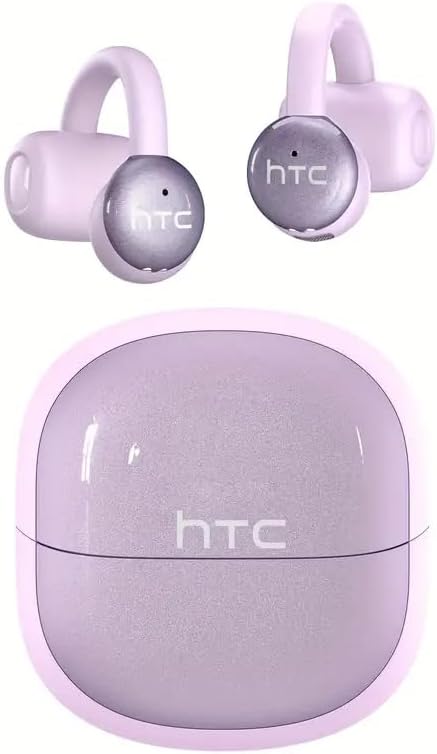
Image: HTC N15 Wireless Clip On Earbuds and Charging Case.

Image: The HTC N15 earbuds and charging case, highlighting battery life features such as 1.5 hours fast charging, 24 hours with the charge case, 8 hours on a single charge, and a Type-C charge port.
Ngba agbara si Earbuds ati Ọran
Before first use, fully charge the earbuds and charging case. The charging case provides additional power for on-the-go charging.
- Gbigba agbara si ọran naa: Connect the provided USB-C cable to the charging port on the case and a power source. The indicator lights on the case will show the charging status.
- Ngba agbara si Earbuds: Place the earbuds into the charging case. Ensure they are correctly seated. The earbuds will begin charging automatically.
A single charge provides approximately 8 hours of playback. The charging case extends total playtime to about 22 hours. Fast charging allows for quick power replenishment.

Image: Visual representation of the HTC N15 earbuds' battery life: 8 hours on a single charge, 24 hours with the charging case, and 1.5 hours for fast charging.
Eto ati Sisopọ
The HTC N15 earbuds utilize Bluetooth 6.0 technology for a stable and low-latency connection. They are compatible with iOS and Android devices.
- Agbara Tan: Ṣii apoti gbigba agbara. Awọn agbekọri yoo tan ina laifọwọyi ati tẹ ipo sisopọ pọ sii.
- Mu Bluetooth ṣiṣẹ: Lori ẹrọ rẹ (foonuiyara, tabulẹti, kọǹpútà alágbèéká), mu Bluetooth ṣiṣẹ.
- Yan Ẹrọ: In your device's Bluetooth settings, search for 'HTC NE15' and select it to pair.
- Ìmúdájú: Once paired, a voice prompt will confirm the connection.

Image: A diagram illustrating the 'Upgraded Bluetooth 6.0 Technology' with a comparison to Bluetooth 5.3 and 5.4, emphasizing low latency and fast connection.

Image: The HTC N15 earbuds and charging case shown with various compatible devices including notebooks, TVs, desktops, watches, phones, and iPads, demonstrating flexible connectivity. A phone screen displays 'HTC NE15 Connected'.
Operating Instructions (Touch Control)
The HTC N15 earbuds feature smart touch controls on both earbuds for easy management of calls and music playback.
- Idahun/Ipe Ipari: Tẹ ọ̀kan lára àwọn etí ìgbọ́rọ̀ lẹ́ẹ̀kan.
- Kọ Ipe: Tẹ mọlẹ boya agbekọri fun iṣẹju 2.
- Mu ṣiṣẹ/Danu Orin duro: Double-click either earbud.
- Orin ti tẹlẹ: Triple-click the left earbud.
- Orin to nbọ: Triple-click the right earbud.
- Iwọn didun Up: Click the right earbud once.
- Iwọn didun isalẹ: Click the left earbud once.
- Oluranlọwọ ohun: Mu agbekọri osi fun iṣẹju meji meji.
- Ipo Ere: Mu agbekọri ọtun fun iṣẹju meji meji.

Image: A diagram illustrating the touch control functions for the HTC N15 earbuds, showing actions for answering/ending calls, rejecting calls, playing/pausing music, skipping tracks, adjusting volume, activating voice assistant, and enabling game mode.
Awọn itọnisọna wiwọ
The HTC N15 earbuds feature an ergonomic open-ear clip design for a secure and comfortable fit, allowing you to remain aware of your surroundings.
- Identify L/R: Confirm the left (L) and right (R) earbuds.
- Ipo: Confirm the direction of the earbud.
- Agekuru Tan: Gently clip the earbud onto the thinnest part of your ear by sliding it down.
- Ṣatunṣe: Adjust the earbud tip to align with your ear canal for optimal sound and comfort.
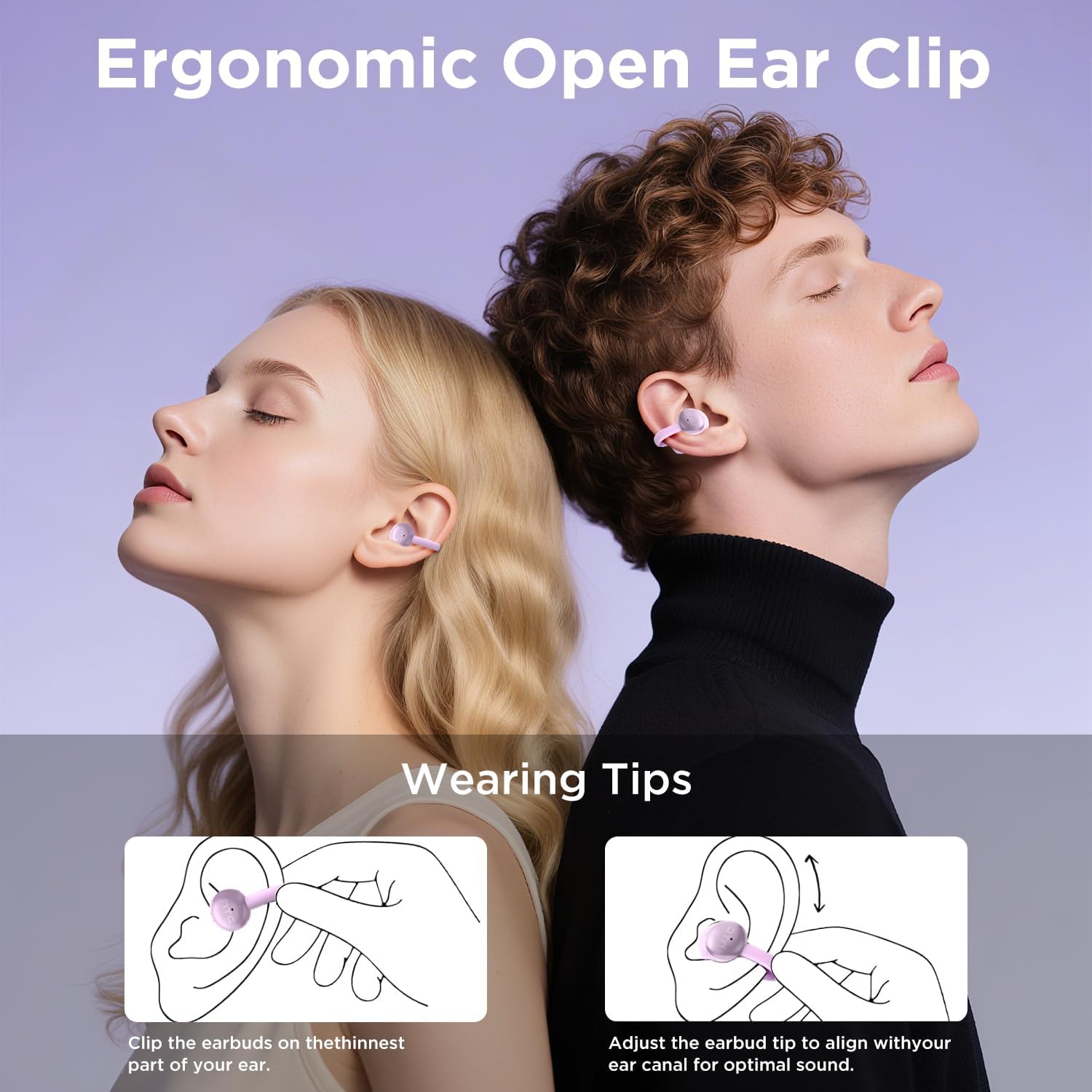
Image: A visual guide demonstrating the ergonomic open-ear clip design and wearing tips for the HTC N15 earbuds, showing how to clip them onto the ear and adjust for optimal sound.

Image: The HTC N15 earbuds emphasizing 'All-Day Comfort' with features like '4.7g Super Light' and a 'Flexible C-Bridge Design' for a secure fit.

Image: A four-step visual guide titled 'HOW TO WEAR?' showing how to correctly position and adjust the HTC N15 earbuds on the ear.
Itoju
To ensure the longevity and optimal performance of your HTC N15 earbuds, follow these maintenance guidelines:
- Ninu: Máa fi aṣọ gbígbẹ tó rọ, tó sì le nu àwọn ètí àti àpótí ìgbóhùnsáfẹ́fẹ́ déédéé. Máa yẹra fún lílo àwọn kẹ́míkà líle tàbí àwọn ohun èlò ìpalára.
- Omi Resistance: The earbuds are IPX4 sweatproof, meaning they are resistant to splashes and sweat. Do not submerge them in water or expose them to heavy rain.
- Ibi ipamọ: Nigbati ko ba si ni lilo, tọju awọn afikọti sinu apoti gbigba agbara wọn lati daabobo wọn lati eruku ati ibajẹ.
- Iwọn otutu: Yago fun ṣiṣafihan awọn agbekọri si awọn iwọn otutu pupọ (gbona tabi otutu) tabi oorun taara fun awọn akoko gigun.
Laasigbotitusita
If you encounter issues with your HTC N15 earbuds, refer to the following common solutions:
- Awọn agbekọri ti ko so pọ: Rí i dájú pé àwọn agbekọri méjèèjì ti gba agbára àti pé wọ́n wà ní ipò ìsopọ̀. Pa á kí o sì tan Bluetooth ẹ̀rọ rẹ, lẹ́yìn náà gbìyànjú láti so pọ̀ mọ́ra lẹ́ẹ̀kan sí i.
- Ko si ohun tabi iwọn kekere: Check the volume levels on both your device and the earbuds. Ensure the earbuds are correctly positioned in your ears. Due to the open-ear design, you may need to increase the volume slightly in noisy environments.
- Awọn agbekọri ti n ṣubu jade: Ensure you are wearing the earbuds correctly as per the wearing instructions. Adjust the clip and earbud tip for a snug fit.
- Awọn idari ifọwọkan ko dahun: Ensure your fingers are clean and dry. Try restarting the earbuds by placing them back in the case and taking them out again.
- Awọn iṣoro gbigba agbara: Verify the USB-C cable and power source are working. Ensure the earbuds are properly seated in the charging case.
Awọn pato
| Ẹya ara ẹrọ | Ẹ̀kúnrẹ́rẹ́ |
|---|---|
| Orukọ awoṣe | Eshitisii NE15 |
| Asopọmọra Technology | Ailokun (Bluetooth 6.0) |
| Apẹrẹ Akọti | Ṣii-Eti |
| Ọna Iṣakoso | Fọwọkan |
| Igbesi aye batiri (Earbuds) | Awọn wakati 8 ( idiyele ẹyọkan) |
| Lapapọ akoko ere (pẹlu Ọran) | Awọn wakati 22 |
| Omi Resistance Ipele | IPX4 (Sweat Resistant) |
| Ohun elo | Ṣiṣu, Silikoni |
| Iwọn Nkan | 4.6 iwon |
| Awọn ẹrọ ibaramu | Awọn foonu alagbeka, Awọn tabulẹti |
| UPC | 768649989703 |
Fidio ọja
Fidio: Unboxing ati loriview of the HTC Wireless Clip On Earbuds N15 Bluetooth 6.0. This video demonstrates the product packaging, contents, and the physical appearance of the earbuds and charging case.
Atilẹyin ọja ati Support
HTC provides customer support for its products. For any questions or assistance, please refer to the contact information provided with your purchase or visit the official HTC support webojula.
Atilẹyin Onibara: 7*24 Live Chat Support is available for assistance with your HTC N15 earbuds.
Jọwọ ṣe idaduro ẹri rira rẹ fun awọn iṣeduro atilẹyin ọja.


