1. Ifihan
Thank you for choosing the GHB ABM720 Baby Monitor Camera. This camera is designed to expand your existing GHB ABM720 Baby Monitor system. Please note that this product is an add-on camera and requires the GHB ABM720 monitor unit (not included) to function. It is not compatible with other baby monitor models.
For optimal performance and to avoid compatibility issues, please ensure your existing GHB ABM720 monitor unit's serial number (S/N) ends with the letter 'E'. If your S/N ends with 'ABCD' (e.g., S/N: 240702C), this camera is not compatible, and you should contact customer service for assistance.
2. Package Awọn akoonu
Ṣaaju ki o to tẹsiwaju pẹlu iṣeto naa, jọwọ rii daju pe gbogbo awọn ohun kan wa ninu package naa:
- GHB ABM720 Baby Monitor Camera
- Adapter agbara
- Mounting Screws and Wall Plugs (for optional wall mounting)
- Ilana Afowoyi (iwe yii)
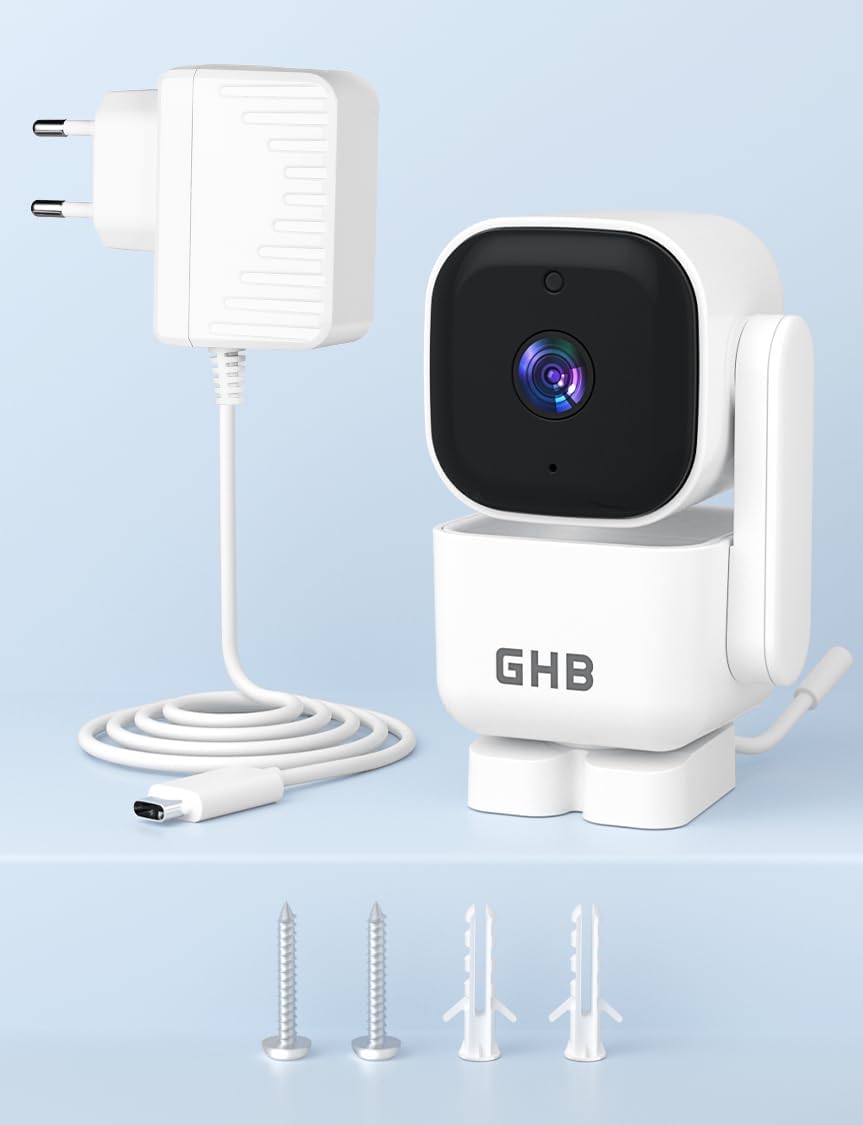
Image: Contents of the GHB ABM720 Baby Monitor Camera package, including the camera unit, power adapter, and mounting hardware.
3. Eto
3.1 Ayẹwo ibamu
It is crucial to confirm the compatibility of your existing GHB ABM720 monitor unit before using this camera. Locate the serial number (S/N) on the back of your monitor unit. This camera is only compatible if the S/N ends with the letter 'E'. If it ends with 'ABCD' (e.g., S/N: 240702C), this camera will not work with your monitor.

Image: Visual representation of compatibility, highlighting that the camera is exclusively for the GHB ABM720 monitor unit.
3.2 Agbara kamẹra
- Connect the small end of the power adapter cable to the power input port on the back of the camera.
- Pulọọgi opin miiran ti ohun ti nmu badọgba agbara sinu iṣan itanna boṣewa kan.
- The camera must always be connected to a power source to function. It does not contain an internal battery.
3.3 Ibi ati iṣagbesori
Place the camera on a flat, stable surface such as a table or shelf, ensuring it has a clear view of the desired area. Alternatively, you can mount the camera to a wall using the provided screws and wall plugs. Ensure the camera is placed out of reach of children.
4. Awọn ilana Iṣiṣẹ
Once the camera is powered on and successfully paired with your GHB ABM720 monitor unit, you can utilize its features:
4.1 Pan and Tilt Functionality (PTZ)
The camera supports remote pan and tilt control via your GHB ABM720 monitor. You can rotate the camera:
- Ni petele: Titi di iwọn 350
- Ni inaro: Titi di iwọn 90
Refer to your GHB ABM720 monitor's manual for specific instructions on how to control the pan and tilt functions.
4.2 Meji-Ona Audio
The camera features a built-in microphone and speaker, enabling two-way audio communication. This allows you to hear sounds from the camera's location and speak back through the monitor unit.
4.3 Night Vision
Kámẹ́rà náà ní ìran alẹ́ infrared aládàáṣe. Ní àwọn ipò ìmọ́lẹ̀ tí kò pọ̀, kámẹ́rà náà yóò yípadà sí ipò ìran alẹ́ láìdáwọ́dúró, èyí tí yóò fúnni ní àwòrán dúdú àti funfun tí ó hàn gbangba ti agbègbè tí a ń ṣàkóso náà.
4.4 HD Resolution
The camera transmits video in 720p HD resolution, providing clear and detailed images on your compatible GHB ABM720 monitor.
5. Itọju
5.1 Ninu
To clean the camera, gently wipe the surface with a soft, dry cloth. Do not use abrasive cleaners, solvents, or chemical agents, as these may damage the camera's finish or internal components.
5.2 Asopọ agbara
Ensure the camera remains continuously connected to its power adapter for uninterrupted operation. Disconnecting the power will turn off the camera.
6. Laasigbotitusita
- Kamẹra ko ṣiṣẹ: Rí i dájú pé ohun tí a fi ń so agbára pọ̀ mọ́ kámẹ́rà àti ibi tí iná mànàmáná ti ń ṣiṣẹ́ dáadáa.
- No video/audio on monitor:
- Rii daju pe kamẹra naa ti wa ni agbara.
- Confirm the camera is correctly paired with your GHB ABM720 monitor unit. Refer to your monitor's manual for pairing instructions.
- Check for any obstructions between the camera and the monitor that might interfere with the wireless signal.
- Incompatibility message: If your monitor displays an incompatibility message, re-check the serial number (S/N) on your monitor. This camera is only compatible if the S/N ends with 'E'. If it ends with 'ABCD', it is not compatible.
- PTZ control not working: Ensure the camera is powered on and properly connected to the monitor. Refer to your monitor's manual for specific PTZ control operations.
If you encounter issues not covered here, or if troubleshooting steps do not resolve the problem, please contact GHB customer service for further assistance.
7. Awọn pato
| Ẹya ara ẹrọ | Ẹ̀kúnrẹ́rẹ́ |
|---|---|
| Orukọ awoṣe | ABM720 |
| Ipinnu Gbigbasilẹ fidio | 720p |
| Imọ-ẹrọ Ibaraẹnisọrọ Alailowaya | 2.4GHz FHSS |
| Awọn iwọn (L x W x H) | 11 x 6.5 x 14 cm |
| Iwọn | 290 giramu |
| Pataki Awọn ẹya ara ẹrọ | Two-way audio, HD Resolution, PTZ Technology, Night Vision |
| Iṣeduro Lilo | Baby Abojuto |
| inu ile / ita gbangba Lo | Ninu ile |
| Orisun agbara | AC Power (Mains Powered) |
| Iṣagbesori Iru | Table Mount |
| Awọn eroja To wa | Camera, Power Adapter, Instruction Manual |
8. Atilẹyin ọja ati Support
8.1 atilẹyin ọja Alaye
Specific warranty details for the GHB ABM720 Baby Monitor Camera may vary based on your region and point of purchase. Please refer to the warranty information provided at the time of purchase or contact GHB customer service for details regarding warranty coverage and terms.
Alaye nipa wiwa awọn ẹya ara ẹrọ fun ọja yii ko si lọwọlọwọ.
8.2 Onibara Support
For any questions, technical assistance, or support regarding your GHB ABM720 Baby Monitor Camera, please contact GHB customer service. You can often find contact information on the GHB official webaaye tabi nipasẹ alagbata ti o ti ra ọja naa.
O tun le ṣabẹwo si GHB Store on Amazon fun alaye siwaju sii ati oro.


