1. Ifihan
Welcome to the user manual for the MARSTEK 63A 110V Automatic/Manual Transfer Switch. This device is engineered to provide seamless power management by automatically or manually switching between primary (L1) and backup (L2) power sources. It features an LED display for real-time monitoring and incorporates comprehensive protection features to ensure the safety and reliability of your electrical system.
This manual provides essential information for the safe and efficient installation, operation, and maintenance of your transfer switch. Please read it thoroughly before installation and use.
2. Alaye Aabo pataki
Always follow basic safety precautions when installing, operating, and maintaining this product to reduce the risk of fire, electric shock, and injury to persons.
- Fifi sori gbọdọ jẹ ṣiṣe nipasẹ onisẹ ina mọnamọna ni ibamu pẹlu gbogbo awọn koodu itanna agbegbe ati ti orilẹ-ede.
- Disconnect all power sources before performing any installation, wiring, or maintenance.
- Do not operate the switch if it appears damaged.
- Rii daju didasilẹ to dara lati ṣe idiwọ mọnamọna.
- This device is designed for indoor use in a dry environment.
- Keep children away from electrical equipment.
3. Package Awọn akoonu
- 1 x MARSTEK 63A 110V Automatic/Manual Transfer Switch
- 1 x DIN Rail
- 1 x Itọsọna olumulo (iwe yii)
4. Ọja Ipariview
The MARSTEK 63A 110V Automatic/Manual Transfer Switch is a compact device designed for reliable power source switching. It features an LED display for real-time voltage and operational status, and offers both automatic and manual control options.
Key Awọn ẹya ara ẹrọ
- Automatic or Manual Switching: Seamless transfer between primary (L1) and backup (L2) power sources.
- Aabo ti o ni kikun: Pẹlu overvoltage, undervoltage, ati overcurrent Idaabobo.
- Abojuto Igba-gidi: High-definition LED display shows voltage ati ipo.
- Fifi sori Rọrun: DIN rail mountable design.
- Ohun elo jakejado: Suitable for commercial, industrial, and residential backup power systems.
Ọja aworan atọka

This image displays the main unit of the transfer switch, highlighting its compact design and the integrated LED display. The DIN rail is also shown, indicating its mounting method.
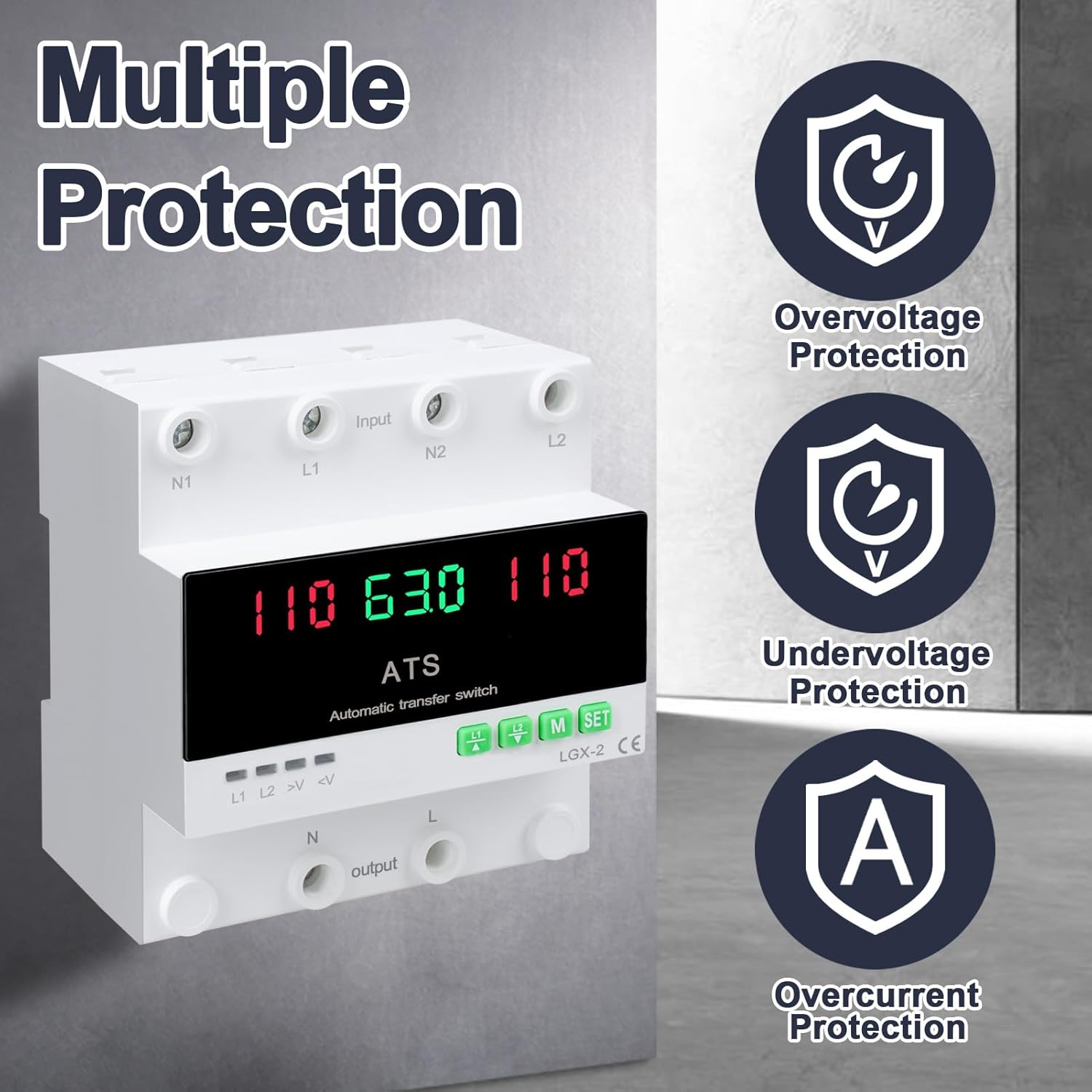
This image illustrates the built-in safety mechanisms of the transfer switch, emphasizing its capability to protect connected devices from electrical instability through overvoltage, undervoltage, and overcurrent safeguards.
5. Awọn pato
| Paramita | Iye |
|---|---|
| Awoṣe | Dual Power 63A |
| Ti isiyi Rating | 63 Amps |
| Awọn ọna Voltage | 120 Volts |
| Ipo Isẹ | ON-AUTO-MANUAL |
| Awọn iwọn Ọja (L x W x H) | 4.3 x 3.5 x 3.3 inches |
| Iwọn | 13.12 iwon |
| Olubasọrọ Iru | Pade deede |
| Asopọmọra Iru | Pulọọgi sinu |
| Ebute | Dabaru |
| Circuit Iru | 2-ọna |
| Ohun elo olubasọrọ | Ejò |
| Ti won won Igbohunsafẹfẹ | 50/60Hz |
| Apọjutage Idaabobo Ala | AC140V |
| Undervoltage Idaabobo Ala | AC90V |
6. Eto ati fifi sori
Proper installation is crucial for the safe and reliable operation of the transfer switch. This device is designed for DIN rail mounting.
Ṣaaju fifi sori
- Ensure all power sources are disconnected at the main breaker before beginning installation.
- Rii daju pe voltage and current ratings of the transfer switch match your electrical system requirements.
- Prepare the installation location, ensuring it is dry, well-ventilated, and easily accessible.
Aworan onirin

This diagram illustrates the correct wiring connections for the transfer switch. It shows the input terminals for primary power (N1, L1) and backup power (N2, L2), and the output terminals (N, L) to the load. The diagram also labels the LED indicators for L1 output, L2 output, overvoltage, ati undervoltage, as well as the menu/reset and manual ON/OFF buttons.
Awọn Igbesẹ fifi sori ẹrọ
- Mount the DIN rail securely in your electrical panel or enclosure.
- Attach the transfer switch onto the DIN rail.
- Connect the primary power source (N1, L1) to the designated input terminals.
- Connect the backup power source (N2, L2) to the designated input terminals.
- Connect the load (N, L) to the output terminals.
- Ṣayẹwo gbogbo awọn asopọ lẹẹmeji fun wiwọ ati titọ.
- Once all wiring is complete and verified, restore power to the system.
7. Isẹ
The MARSTEK transfer switch offers both automatic and manual operation modes.
Ipo Aifọwọyi

In automatic mode, the switch prioritizes the primary power source (L1). If L1 fails or experiences voltage fluctuations (undervoltage tabi overvoltage), the switch will automatically transfer the load to the backup power source (L2). When L1 is restored and stable, the switch will automatically transfer the load back to L1.
Ipo Afowoyi

The transfer switch can be manually operated using the buttons on the front panel.
- To close L1: Press the button labeled "L1" (often indicated by an up arrow or similar icon). Press again to open L1.
- To close L2: Press the button labeled "L2" (often indicated by a down arrow or similar icon). Press again to open L2.
In manual mode, the automatic transfer function is overridden. Ensure you understand the implications of manual switching before use.
LED Display and Indicators
The LED display provides real-time information about the system status.
- The main display shows voltage readings for the active power source.
- L1: Indicates L1 output is active.
- L2: Indicates L2 output is active.
- >V: Apọjutage Atọka imọlẹ.
- <V: Undervoltage Atọka imọlẹ.
- M: Menu selection/Reset button.
- Ṣeto: Manual ON/OFF button.
8. Itọju
The MARSTEK transfer switch requires minimal maintenance.
- Ṣe àyẹ̀wò àwọn ìsopọ̀ wáyà láti rí i dájú pé wọ́n wà ní ààbò àti pé wọn kò ní ìbàjẹ́.
- Keep the device clean and free from dust and debris. Use a dry, soft cloth for cleaning.
- Ma ṣe lo abrasive ose tabi epo.
- Rii daju pe fentilesonu to peye ni ayika ẹyọ lati ṣe idiwọ igbona.
Warning: Always disconnect all power sources before performing any maintenance.
9. Laasigbotitusita
Abala yii n pese awọn ojutu si awọn ọran ti o wọpọ ti o le ba pade.
| Isoro | Owun to le Fa | Ojutu |
|---|---|---|
| Ẹrọ ti ko ni agbara lori. | Kò sí agbára ìtẹ̀síwájú; àwọn wáyà tí kò tọ́; àṣìṣe inú. | Check main breakers and power sources. Verify all wiring connections. If the problem persists, contact support. |
| No automatic transfer. | Device in manual mode; power source within acceptable limits; fault in L1 or L2 detection. | Ensure the device is set to automatic mode. Check voltage levels of both L1 and L2. Contact support if automatic transfer fails despite correct settings. |
| Apọjutage (>V) or Undervoltage (<V) indicator lit. | Iwọn titẹ siitage outside specified range. | Ṣayẹwo voltage of the active power source. The device will automatically switch if the voltage is outside the set parameters (AC140V overvoltage, AC90V undervoltage). Address the power source issue. |
| Overcurrent Idaabobo jeki. | Load exceeds the 63A current rating. | Reduce the connected load. Ensure total current draw does not exceed 63 Amps. |
10. Atilẹyin ọja ati Support
For warranty information and technical support, please refer to the MARSTEK official webojula tabi kan si alagbata rẹ. Tọju iwe-ẹri rira rẹ bi ẹri rira.
Manufacturer: JUXIANG
Brand: MARSEK


