1. Ifihan
Thank you for choosing the WOLFANG WDV01 Portable DVD Player. This manual provides essential information for setting up, operating, and maintaining your device. Please read it carefully before use to ensure optimal performance and longevity of your product.
The WOLFANG WDV01 is designed for portable entertainment, featuring a 9.5-inch unit with a 7.5-inch HD swivel screen, stereo speakers, and a long-lasting battery. It supports various disc and file formats, making it versatile for different media content.
2. Package Awọn akoonu
Jẹrisi pe gbogbo awọn ohun kan wa ninu package:
- WOLFANG WDV01 Portable DVD Player
- Isakoṣo latọna jijin
- Itọsọna olumulo
- Ṣaja AC
- Ṣaja ọkọ ayọkẹlẹ
- 3-ni-1 Okun AV

Image: Contents of the WOLFANG WDV01 package, showing the DVD player, remote control, user manual, AC charger, car charger, and AV cable.
3. Ọja Ipariview
3.1 Key Awọn ẹya ara ẹrọ
- Ifihan: 9.5-inch unit with 7.5-inch HD eye-protection screen.
- Yiyi iboju: 270° horizontal rotation and 180° vertical flip for flexible viewing awọn igun.
- Ohun: Àwọn agbohunsoke sitẹrio tí a ṣepọ.
- Igbesi aye batiri: Up to 6 hours of playback on a full charge.
- Awọn aṣayan agbara: AC power adapter and car charger included.
- Iṣẹ Iranti: Breakpoint memory resumes playback from the last stopped point.
- Ibamu Media: Supports DVD, SVCD, VCD, CD-R/RW discs.
- File Atilẹyin ọna kika: JPEG, WMA, MPG, MP3, DIVX, VOB, AVI.
- Asopọmọra ita: USB port, SD card slot (max 32GB), AV input, AV output, 3.5mm headphone jack.
3.2 Ifilelẹ ẹrọ
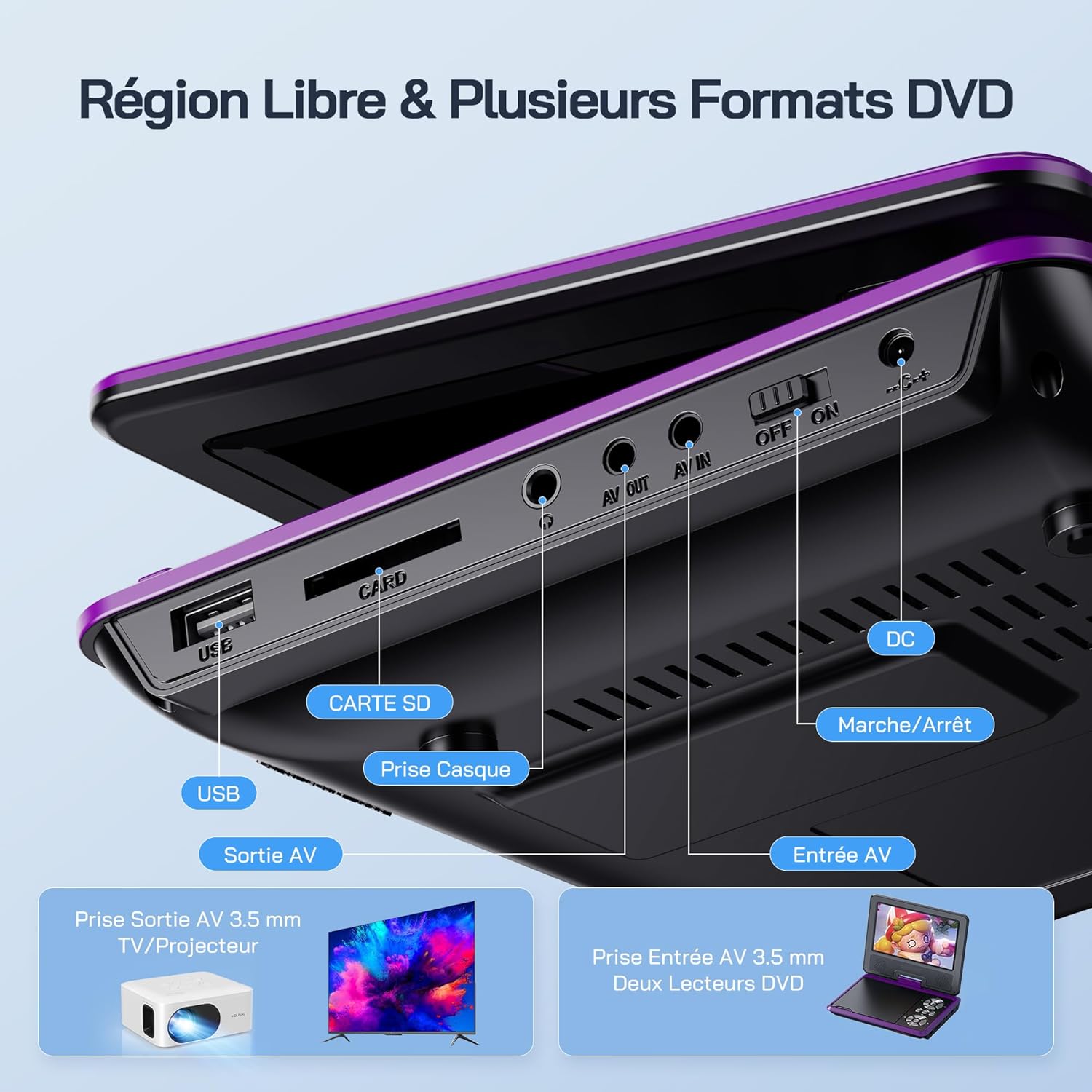
Aworan: Alaye view of the side panel of the WOLFANG WDV01, highlighting the USB port, SD card slot, headphone jack, AV OUT, AV IN, DC power input, and ON/OFF switch.
- Ibudo USB: Fun asopọ awọn awakọ filasi USB.
- Iho kaadi SD: For inserting SD/MMC cards.
- Jack agbekari: Ijade ohun afetigbọ 3.5mm fun awọn agbekọri.
- JADE: Audio/Video output for connecting to a TV or projector.
- AV NI: Audio/Video input for connecting external devices or another DVD player.
- DC NINU: Iṣagbewọle agbara fun ohun ti nmu badọgba AC tabi ṣaja ọkọ ayọkẹlẹ.
- ON/PA Yipada: Iṣakoso agbara fun ẹrọ.
4. Eto
4.1 Gbigba agbara akọkọ
Before first use, fully charge the device. Connect the AC charger to the DC IN port on the player and plug it into a wall outlet. The charging indicator light will illuminate. Once fully charged, the light may change color or turn off, depending on the model.
4.2 Titan / Pa a
To power on the device, slide the ON/OFF switch to the "ON" position. To power off, slide it to the "OFF" position.
4.3 Screen Adjustment
The screen can be rotated 270 degrees horizontally and flipped 180 degrees vertically. Adjust the screen to your preferred viewing angle. This feature is particularly useful for mounting in a car or for shared viewing.

Image: Illustration demonstrating the 270-degree rotation and 180-degree flip capabilities of the WOLFANG WDV01 screen.
5. Awọn ilana Iṣiṣẹ
5.1 Ṣíṣe DVD/CD
- Ṣí ideri disiki náà pẹ̀lẹ́pẹ̀lẹ́.
- Place a compatible DVD or CD onto the spindle, label side up.
- Pa ideri disiki naa.
- The player will automatically detect and begin playback. If not, select "Disc" from the main menu.
Akiyesi: This device supports DVD, SVCD, VCD, CD-R/RW discs. It is not compatible with 1080p, 4K, or Blu-ray discs.
5.2 Playing from USB/SD Card
- Fi kọnputa filasi USB sinu ibudo USB tabi kaadi SD kan sinu iho kaadi SD.
- From the main menu, select "USB" or "SD" depending on your media source.
- Lilọ kiri nipasẹ awọn folda ati files using the control buttons or remote control.
- Yan ohun ti o fẹ file (JPEG, WMA, MPG, MP3, DIVX, VOB, AVI) to begin playback.
Akiyesi: Maximum supported Micro SD card capacity is 32GB. Video files should have a resolution up to 720x480. Image files should have a resolution up to 2650x1440.
5.3 Breakpoint Memory Išė
The player automatically remembers the last playback position. When you power on the device again or re-insert the same disc/media, it will prompt you to resume playback from where you left off. This function may need to be activated in the system settings.

Image: Visual representation of the breakpoint memory feature, illustrating how the player can pause and resume video playback from the exact point of interruption.
5.4 Connecting to an External Display (TV/Projector)
Use the provided 3-in-1 AV cable to connect the player to a TV or projector.
- Connect one end of the AV cable to the AV OUT port on the DVD player.
- Connect the other end of the AV cable to the corresponding AV input ports (Yellow for Video, Red for Right Audio, White for Left Audio) on your TV or projector.
- Select the correct AV input source on your TV or projector.
- The player's screen content will now be displayed on the external screen.

Image: A WOLFANG WDV01 Portable DVD Player connected to a large television screen, displaying content for a family watching together, demonstrating the TV sync feature.
5.5 Connecting to Another DVD Player (AV IN)
The AV IN port allows you to connect another compatible device, such as a second DVD player, to display its content on the WOLFANG WDV01 screen.
- Connect one end of an AV cable to the AV OUT port of the external device.
- Connect the other end of the AV cable to the AV IN port on the WOLFANG WDV01.
- Switch the WOLFANG WDV01 to AV input mode (refer to the on-screen menu or remote control for this option).
6. Itọju
6.1 Ninu ẹrọ naa
- Rii daju pe ẹrọ naa ti wa ni pipa ati yọọ kuro ṣaaju ṣiṣe mimọ.
- Use a soft, dry cloth to wipe the exterior of the player.
- For the screen, use a soft, lint-free cloth specifically designed for electronics screens. Do not use abrasive cleaners or solvents.
- To clean the disc lens, use a specialized DVD lens cleaning disc. Do not attempt to clean the lens manually.
6.2 batiri Itọju
- Yago fun ṣiṣafihan ẹrọ naa si awọn iwọn otutu to gaju (gbona tabi otutu).
- If storing the device for an extended period, charge the battery to approximately 50% to prolong its lifespan.
- Do not attempt to replace the internal battery yourself. Contact customer support if battery issues arise.
6.3 Ibi ipamọ
Store the player in a cool, dry place away from direct sunlight and moisture. Keep it in its original packaging or a protective case when not in use to prevent damage.
7. Laasigbotitusita
| Isoro | Owun to le Fa | Ojutu |
|---|---|---|
| Ko si agbara | Battery drained, power adapter not connected, power switch off. | Charge the battery, ensure power adapter is securely connected, slide power switch to ON. |
| Disiki ko dun | Incompatible disc format, disc dirty/scratched, disc inserted incorrectly. | Check disc compatibility (no Blu-ray/4K), clean disc, insert disc label side up. |
| Ko si ohun | Volume too low, headphones connected, audio settings incorrect. | Increase volume, disconnect headphones, check audio output settings. |
| Ko si aworan lori TV | AV cable loose, incorrect TV input selected. | Ensure AV cable is securely connected, select correct AV input on TV. |
| USB/SD card not recognized | Incompatible format, card/drive damaged, incorrect file eto. | Ensure media is formatted to FAT32, check for damage, try another USB/SD card. Max 32GB SD card. |
If the problem persists after trying these solutions, please contact WOLFANG customer support.
8. Awọn pato
| Ẹya ara ẹrọ | Ẹ̀kúnrẹ́rẹ́ |
|---|---|
| Brand | WOLFANG |
| Awoṣe | WDV01 |
| Iwon iboju | 7.5 inches |
| Iwọn Ẹyọ | 9.5 inches (oni-rọsẹ) |
| Ipinnu iboju | Titi di 800 x 480 awọn piksẹli |
| Ibamu Disiki | DVD, SVCD, VCD, CD-R/RW |
| File Atilẹyin ọna kika | Video: AVI, MPG, MP3, DIVX, VOB; Audio: WMA, MP3; Image: JPEG |
| USB/SD Card Support | Max 32GB (Micro SD) |
| Video Resolution (USB/SD) | Titi di 720 x 480 awọn piksẹli |
| Image Resolution (USB/SD) | Titi di 2650 x 1440 awọn piksẹli |
| Igbesi aye batiri | 4-6 wakati |
| Iwọn Nkan | 1100 giramu |
| UPC | 850067892205 |
9. Atilẹyin ọja ati Support
9.1 Olupese ká atilẹyin ọja
The WOLFANG WDV01 Portable DVD Player comes with a Atilẹyin ọja olupilẹṣẹ oṣu mejila Láti ọjọ́ tí a rà á. Àtìlẹ́yìn yìí bo àwọn àbùkù nínú àwọn ohun èlò àti iṣẹ́ ọwọ́ lábẹ́ lílò déédéé. Kò bo ìbàjẹ́ tí ó wáyé nípasẹ̀ àìlòkulò, jàǹbá, àtúnṣe tí a kò gbà láyè, tàbí ìbàjẹ́ déédé.
Jọwọ ṣe idaduro ẹri rira rẹ fun awọn iṣeduro atilẹyin ọja.
9.2 Onibara Support
For any questions, technical assistance, or warranty claims, please contact WOLFANG customer support. Our team is available to assist you and aims to respond within 24 hours.
Contact information can typically be found on the official WOLFANG webojula tabi nipasẹ rẹ ra Syeed.


