1. Ifihan
Thank you for choosing the OKP Life L1 Lidar Robot Vacuum Cleaner. This manual provides essential information for the safe operation, maintenance, and troubleshooting of your device. Please read it thoroughly before use and retain it for future reference.
2. Awọn Ilana Aabo pataki
Láti dín ewu ìpalára tàbí ìbàjẹ́ kù, ka àwọn ìtọ́ni ààbò wọ̀nyí dáadáa kí o sì jẹ́ kí wọ́n wà ní ọwọ́ rẹ nígbà tí o bá ń ṣètò, lò, àti tí o bá ń tọ́jú robot rẹ.
- Ohun elo yii le ṣee lo nipasẹ awọn ọmọde ti o jẹ ọdun 8 ati ju bẹẹ lọ ati awọn eniyan ti o dinku ti ara, ifarako tabi awọn agbara ọpọlọ tabi aini iriri ati imọ ti wọn ba ti fun wọn ni abojuto tabi itọnisọna nipa lilo ohun elo ni ọna ailewu ati loye awọn eewu ti o kan. .
- Awọn ọmọde yẹ ki o wa ni abojuto lati rii daju pe wọn ko ṣere pẹlu ohun elo naa.
- Ninu ati itọju olumulo ko le ṣe nipasẹ awọn ọmọde laisi abojuto.
- Lo oluyipada agbara atilẹba ti olupese pese.
- Ma ṣe lo roboti ni awọn agbegbe pẹlu ina ti o ṣii tabi awọn nkan ẹlẹgẹ.
- Rí i dájú pé a lo robot náà lórí àwọn ilẹ̀ gbígbẹ nìkan.
- Jeki irun, aṣọ alaimuṣinṣin, awọn ika ọwọ, ati gbogbo awọn ẹya ara kuro lati awọn ṣiṣi ati awọn ẹya gbigbe.
3. Package Awọn akoonu
Jẹrisi pe gbogbo awọn paati wa ninu package:
- OKP Life L1 Robot Vacuum Cleaner
- Ibi iduro gbigba agbara
- Adapter agbara
- Awọn Brushes ẹgbẹ (meji meji)
- HEPA Filter (1 extra)
- Ọpa mimọ
- Itọsọna olumulo
4. Ọja Ipariview
Familiarize yourself with the components of your OKP Life L1 robot vacuum.

Nọmba 4.1: Oke view of the OKP Life L1 Lidar Robot Vacuum Cleaner alongside its mobile application interface. The robot is white with a dark grey Lidar sensor on top and a power button. The app shows cleaning status and control options.
Awọn ohun elo Robot:
- Lidar Sensor: Fún ìtọ́sọ́nà àti àwòrán tí ó péye.
- Bọtini agbara: To start/pause cleaning or power on/off.
- Dustbin: Ó kó àwọn ìdọ̀tí jọ.
- Awọn brushes ẹgbẹ: Sweep debris into the main brush path.
- Main Brush Roll: Agitates and lifts debris from floors.
- Awọn olubasọrọ gbigba agbara: For automatic recharging at the dock.
- Àwọn Sensọ Cliff: Prevent the robot from falling down stairs.
- Bompa: Ó ń ṣàwárí àwọn ìdènà.
5. Eto ati Ibẹrẹ Lilo
5.1 Preparing the Robot
- Yọ gbogbo àwọn fíìmù ààbò àti àwọn sítíkà kúrò nínú ibi ìdúró ọkọ̀ robot àti ibi ìgbara.
- Install the side brushes by pressing them onto the posts until they click.
5.2 Gbígbé Ibùdó Ìgbàlejò
Place the charging dock against a wall in an open, uncluttered area. Ensure there is at least 0.5 meters (1.6 feet) of clear space on both sides and 1.5 meters (4.9 feet) in front of the dock. Plug in the power adapter.
5.3 Ni ibẹrẹ idiyele
Place the robot on the charging dock. The indicator light will show charging status. Fully charge the robot before its first use (approximately 5-6 hours).
5.4 Connecting to the OKP Life App
The OKP Life L1 supports remote control via the OKP Life App. This allows for scheduling, mode customization, and real-time monitoring.
- Download the "OKP Life" app from your mobile device's app store.
- Forukọsilẹ iroyin ati ki o wọle.
- Follow the in-app instructions to add your L1 robot vacuum. Ensure your Wi-Fi network is 2.4GHz.
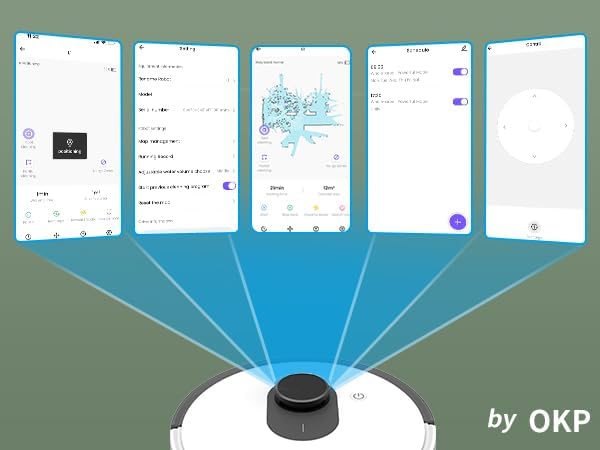
Nọmba 5.1: Various screenshots of the OKP Life mobile application, demonstrating features like device connection, settings, mapping, and remote control options.
5.5 Voice Iṣakoso Integration
The L1 is compatible with Amazon Alexa and Google Assistant for hands-free operation.
- Ensure your robot is connected to the OKP Life App.
- Ṣii ohun elo Alexa tabi Google Home.
- Wa fun the "OKP Life" skill/service and enable it.
- Link your OKP Life account.
- You can now use voice commands such as "Alexa, turn on L1" or "Hey Google, start cleaning with L1."

Nọmba 5.2: The OKP Life L1 robot vacuum on a rug, with an Amazon Echo Dot speaker and a smartphone displaying the control app. This illustrates the voice and app control capabilities.
6. Ṣiṣẹ Robot Vacuum Rẹ
6.1 Àwọn Ọ̀nà Ìmọ́tótó àti Ìlọsíwájú
The L1 utilizes advanced LDS laser radar and SLAM navigation to create accurate real-time maps of your home, optimizing cleaning routes and ensuring comprehensive coverage.

Nọmba 6.1: The OKP Life L1 robot vacuum navigating a living room, with blue lines illustrating its precision LiDAR mapping and navigation path.
The robot offers various cleaning modes accessible via the app:
- Mọ Aifọwọyi: The robot intelligently cleans your entire home.
- Ibi Mọ: Cleans a specific area with concentrated effort.
- Mọ agbegbe: Yan awọn yara tabi awọn agbegbe kan pato lori maapu fun mimọ.
- Mọtoto ti a seto: Ṣeto awọn akoko kan pato fun robot lati nu laifọwọyi.

Nọmba 6.2: The OKP Life L1 robot vacuum next to a smartphone displaying its app, which shows a floor plan map where a user can select a specific zone for vacuuming using the LiDAR sensor data.

Nọmba 6.3: The OKP Life L1 robot vacuum on a rug, with a smartphone displaying the app's features including No-Go Zones, Real-time Mapping, Recharge Resume, Partial Cleaning, and Spot Cleaning.
6.2 Suction Power and Carpet Boost
The L1 features a 4000Pa suction motor for effective cleaning. It automatically increases suction power when detecting carpets for deeper cleaning.

Nọmba 6.4: The OKP Life L1 robot vacuum moving from a hard floor to a carpet, illustrating its ability to boost suction power for effective carpet cleaning.
6.3 No-Go Zones and Invisible Walls
Use the OKP Life App to define "No-Go Zones" or "Invisible Walls" to prevent the robot from entering specific areas or protecting fragile items.

Nọmba 6.5: The OKP Life L1 robot vacuum demonstrating its ability to respect "No-Go Zones" (preventing entry into a pet area) and "Invisible Walls" (blocking access to a specific room entrance).
6.4 Idiwo
Freemove 3.0 obstacle avoidance technology ensures the robot navigates smoothly around furniture, stairs, walls, and pets, minimizing collisions and preventing it from getting stuck.
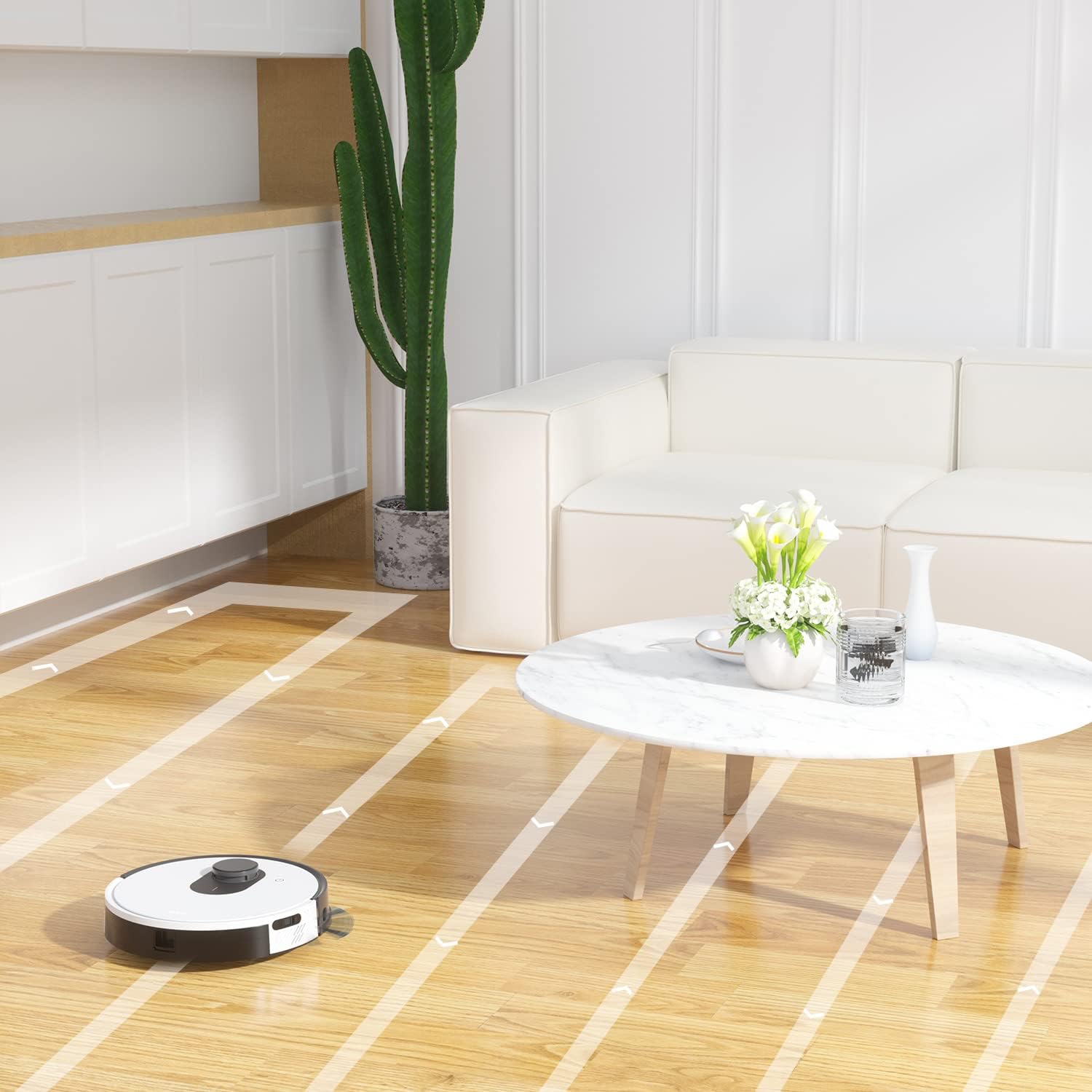
Nọmba 6.6: The OKP Life L1 robot vacuum cleaning a room, illustrating its efficient path planning and obstacle avoidance capabilities.
6.5 batiri Management
The robot features a 4000mAh battery, providing up to 200 minutes of continuous cleaning. When the battery is low or cleaning is complete, the robot automatically returns to its charging dock.
7. Itọju
Itọju deede ṣe idaniloju iṣẹ ṣiṣe to dara julọ ti igbale robot rẹ.
7.1 Ofo Dustbin
Empty the dustbin after each cleaning cycle. Press the dustbin release button, remove the dustbin, and discard collected debris. Clean the filter inside the dustbin.
7.2 Cleaning the Main Brush Roll
The self-cleaning brush roll reduces hair tangles. However, periodically remove the main brush roll and use the provided cleaning tool to remove any tangled hair or debris.
7.3 Cleaning Side gbọnnu
Check side brushes regularly for wear or damage. Remove any tangled hair or debris. Replace worn brushes as needed.
7.4 Awọn sensọ mimọ ati Awọn olubasọrọ gbigba agbara
Wipe the cliff sensors, bumper sensor, and charging contacts on both the robot and the charging dock with a clean, dry cloth to ensure proper function.
7.5 Filter Rirọpo
Replace the HEPA filter every 3-6 months, or more frequently depending on usage, to maintain optimal suction performance.
8. Laasigbotitusita
Tọkasi apakan yii fun awọn ọran ti o wọpọ ati awọn ojutu wọn.
| Isoro | Owun to le Fa | Ojutu |
|---|---|---|
| Robot ko ni tan-an. | Batiri kekere; Pa a agbara. | Gba agbára rọ́bọ́ọ̀tì náà; Rí i dájú pé sáyà agbára náà wà nílẹ̀. |
| Rọ́bọ́ọ̀tì kò le padà sí ibi tí wọ́n ti ń gba agbára. | Charging dock obstructed; Robot too far from dock. | Clear obstacles around the dock; Manually place robot near dock. |
| Agbara afamora ko lagbara. | Àpò ìdọ̀tí kún; Àlẹ̀mọ́ ti dí; Búrẹ́dì pàtàkì ti dí pọ̀. | Da àpò ìdọ̀tí nù; Fọ àlẹ̀mọ́/rọ́pò rẹ̀; Nu búrọ́ọ̀ṣì pàtàkì náà. |
| Robot di nigbagbogbo. | Loose cables/rugs; Small obstacles. | Clear floor of obstructions; Use No-Go Zones. |
| App asopọ oran. | Wi-Fi ti ko tọ (kii ṣe 2.4GHz); Awọn oran olulana. | Ensure 2.4GHz Wi-Fi; Restart router and robot; Re-pair in app. |
9. Awọn pato
| Ẹya ara ẹrọ | Ẹ̀kúnrẹ́rẹ́ |
|---|---|
| Brand | Igbesi aye OKP |
| Orukọ awoṣe | L1 Lidar Robot Vacuum |
| Pataki Ẹya | HEPA Filtration, Vacuums |
| Àwọ̀ | Awọsanma funfun |
| Ọja Mefa | 12"L x 12"W x 3.5"H |
| Awọn irinše to wa | Batiri |
| Igbesi aye batiri | Up to 200 minutes (4000mAh battery) |
| Agbara (Dustbin) | 500 milimita |
| Awọn batiri ti a beere | 1 batiri litiumu ion (pẹlu) |
| Awọn ẹrọ ibaramu | Amazon Echo, Google Home, Àwọn Foonu Alagbeka |
| Iwọn Nkan | 7 iwon |
| Olupese | Igbesi aye OKP |
| Nọmba Awoṣe Nkan | L1 |
10. Atilẹyin ọja ati Support
For warranty information and technical support, please refer to the official OKP Life webojula tabi kan si wọn onibara iṣẹ. Tọju iwe-ẹri rira rẹ bi ẹri rira.
Atilẹyin Ayelujara: Visit the official OKP Life webAaye fun FAQs, awọn itọnisọna laasigbotitusita, ati alaye olubasọrọ.
Iṣẹ onibara: Refer to your product packaging or the OKP Life website for specific customer service contact details.


