1. Ọja Ipariview
The Carsolt Food Warming Mat is an extra-large electric warming tray designed to keep food warm, thaw frozen ingredients, ferment dough, and maintain optimal temperatures for various dishes. It features smart app control, multiple heating modes, and a rollable, dishwasher-safe design for convenience.

Image: The Carsolt Food Warming Mat displayed with multiple food items, showcasing its large surface area and versatility.
2. Eto
-
Yọ Mat naa kuro: Carefully remove the food warming mat and its components from the packaging. Ensure all parts are present: warming mat, detachable controller with power cord, and user manual.

Image: The Carsolt Food Warming Mat unrolled, highlighting its large surface and detachable controller.
-
Gbe Mat: Unroll the mat and place it on a stable, heat-resistant surface. Ensure the elevated base is properly positioned to protect your countertop.
-
Darapọ mọ Alakoso: Attach the detachable controller to the designated port on the warming mat. Ensure it clicks securely into place. Plug the power cord into a standard electrical outlet.

Image: Close-up of the detachable controller and the non-slip silicone columns on the mat's underside.
-
Lilo akọkọ: Before first use, remove any transparent film from the control panel.
3. Awọn ilana Iṣiṣẹ
3.1 Basic Operation (Using Physical Controls)
-
Titan/Apapa: Press the 'Power' button on the controller to turn the mat on or off.
-
Yan Ipo: Press the 'Mode' button to cycle through the preset heating modes: Heat (248°F/4H), Thaw (122°F/1H), and Ferment (95°F/1H). A 'Custom' mode is also available via the app.

Image: A hand interacting with the controller, showing the Heat, Thaw, Ferment, and Custom mode options.
-
Adjust Temperature/Time: After selecting a mode, use the '+' and '-' buttons to adjust the temperature (86°F-248°F) or time (1-99 hours) as needed. Press the 'Timer' button to switch between adjusting temperature and time.
-
Titiipa ọmọ: To engage or disengage the child lock, press and hold the '3S LOCK' button for 3 seconds. When engaged, other buttons are disabled to prevent accidental activation.

Image: Illustration of the child lock feature, showing a locked icon and instructions to double-click to turn on.
3.2 Smart App Iṣakoso
-
Ṣe igbasilẹ ohun elo naa: Download the "Syncker" app from your device's app store. iOS App itaja | Google Play itaja
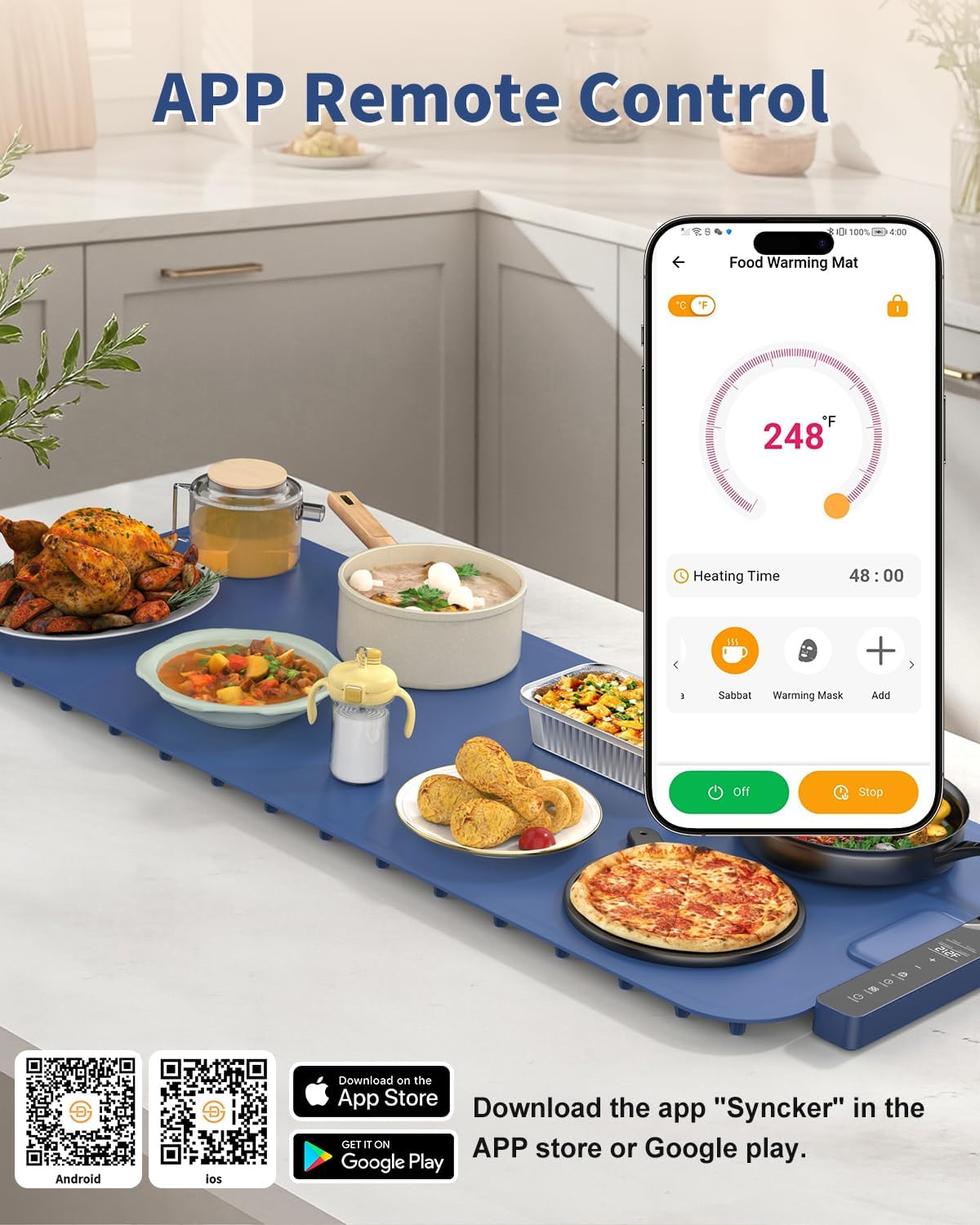
Image: The food warming mat with a smartphone displaying the "Syncker" app interface, showing temperature and time settings.
-
Sopọ nipasẹ Bluetooth: Open the app and follow the instructions to connect to your Carsolt Food Warming Mat via Bluetooth.
-
Isakoṣo latọna jijin: The app allows remote control of all functions, including:
- Switching temperature units (°C/°F)
- Engaging/disengaging child lock
- Setting temperature and heating time
- Selecting preset modes (Heat, Thaw, Ferment)
- Accessing additional APP-exclusive modes (Warm 176°F/8H, Sabbat 248°F/48H, Mask 176°F/0.5H)
- Creating and saving custom modes

Aworan: A alaye view of the app interface, pointing out various control options like temperature units, child lock, heating time, and modes.
3.3 Versatile Functionality
The warming mat can be used for various purposes:
- Keeping cooked food warm for extended periods.
- Defrosting frozen ingredients.
- Heating milk or other beverages.
- Accelerating dough fermentation.
- Warming facial masks.

Image: Visual representation of the mat's versatile uses, including thawing meat, fermenting dough, warming milk, and heating facial masks.
4. Itọju
4.1 Ninu
-
Ge Agbara: Always unplug the mat and detach the controller before cleaning.
-
Ailewu Apoti: The mat is dishwasher safe due to its detachable controller and IPX9 waterproof socket. Place the mat in the dishwasher for thorough cleaning.
-
Fifọ ọwọ: For quick cleaning, wipe the silicone nano-material surface gently with a damp cloth to remove stains. The material is durable and stain-resistant.

Image: Demonstrates the mat being placed in a dishwasher and being wiped clean by hand, highlighting its washable and removable features.
4.2 Ibi ipamọ
The mat features a rollable design for efficient storage and portability. Roll it up and secure it with the provided strap or place it in a storage bag when not in use.
5. Alaye Aabo
- Always ensure the child lock is disengaged before attempting to use the mat. Press and hold the child lock button for 3 seconds to unlock.
- Do not touch the hot surface directly during operation.
- Do not place hot pots or pans directly on the mat without food inside.
- Do not use sharp objects on the mat surface.
- Ensure the mat is placed on a stable, flat, and heat-resistant surface.
- Jeki kuro ni arọwọto awọn ọmọde nigba lilo.
- Unplug the mat when not in use or before cleaning.
6. Awọn pato
| Ẹya ara ẹrọ | Ẹ̀kúnrẹ́rẹ́ |
|---|---|
| Nọmba awoṣe | BW630 |
| Awọn iwọn | 37" x 15" (Extra Large) |
| Ohun elo | Silikoni |
| Àwọ̀ | Buluu |
| Orisun agbara | Itanna |
| Awọn iṣakoso Iru | Touch, Smart App Control |
| Iwọn otutu | 86°F - 248°F |
| Aago | Awọn wakati 1-99 |
| Pataki Awọn ẹya ara ẹrọ | Dishwasher Safe, Temperature Control, Child Lock, Rollable Design, Non-slip Base, Nano-coated panels |
| Iwọn Nkan | 5.24 iwon |
7. Laasigbotitusita
-
Mat not heating: Ensure the power cord is securely plugged in and the controller is firmly attached to the mat. Check if the child lock is engaged (indicated by a lock icon on the controller or app); disengage it by pressing and holding the '3S LOCK' button for 3 seconds.
-
App not connecting: Ensure Bluetooth is enabled on your smartphone and the mat is powered on. Try restarting the app or your phone. Make sure the app has necessary permissions.
-
Awọn bọtini ko dahun: This is often due to the child lock being engaged. Disengage the child lock as described above.
8. Official ọja Video
Watch this video for a visual guide on setting up and using your Carsolt Food Warming Mat.
Video: A demonstration of the Carsolt Food Warming Mat, showcasing its features and ease of use in a kitchen setting.
9. Atilẹyin ọja ati Support
For warranty information and customer support, please refer to the documentation included with your product or visit the official Carsolt website. The product is sold by Carsolt, and fulfilled by Amazon.

