1. Ifihan
Welcome to the DOOGEE Note 56 user manual. This guide provides essential information to help you set up, operate, and maintain your new smartphone. The DOOGEE Note 56 is an unlocked Android 16 smartphone featuring a powerful Octa-Core processor, a large 6150mAh battery, and a vibrant 6.56-inch 90Hz HD+ display. It is designed for efficient daily use, photography, and connectivity.
2. Ohun ti o wa ninu Apoti
Your DOOGEE Note 56 package includes the following items:
- 1 x DOOGEE Note 56 Cell Phone
- 1 x Apoti Iṣakojọpọ
- 1 x Itọsọna olumulo
- 1 x Protective Film (Pre-applied)
- PIN Kaadi SIM 1 x
- 1 x Type-C Port Cable
- 1 x Ṣaja
- 1 x Kaadi atilẹyin ọja
- 1 x TPU Protective Case
3. Ẹrọ Loriview
Familiarize yourself with the physical components and design of your DOOGEE Note 56.
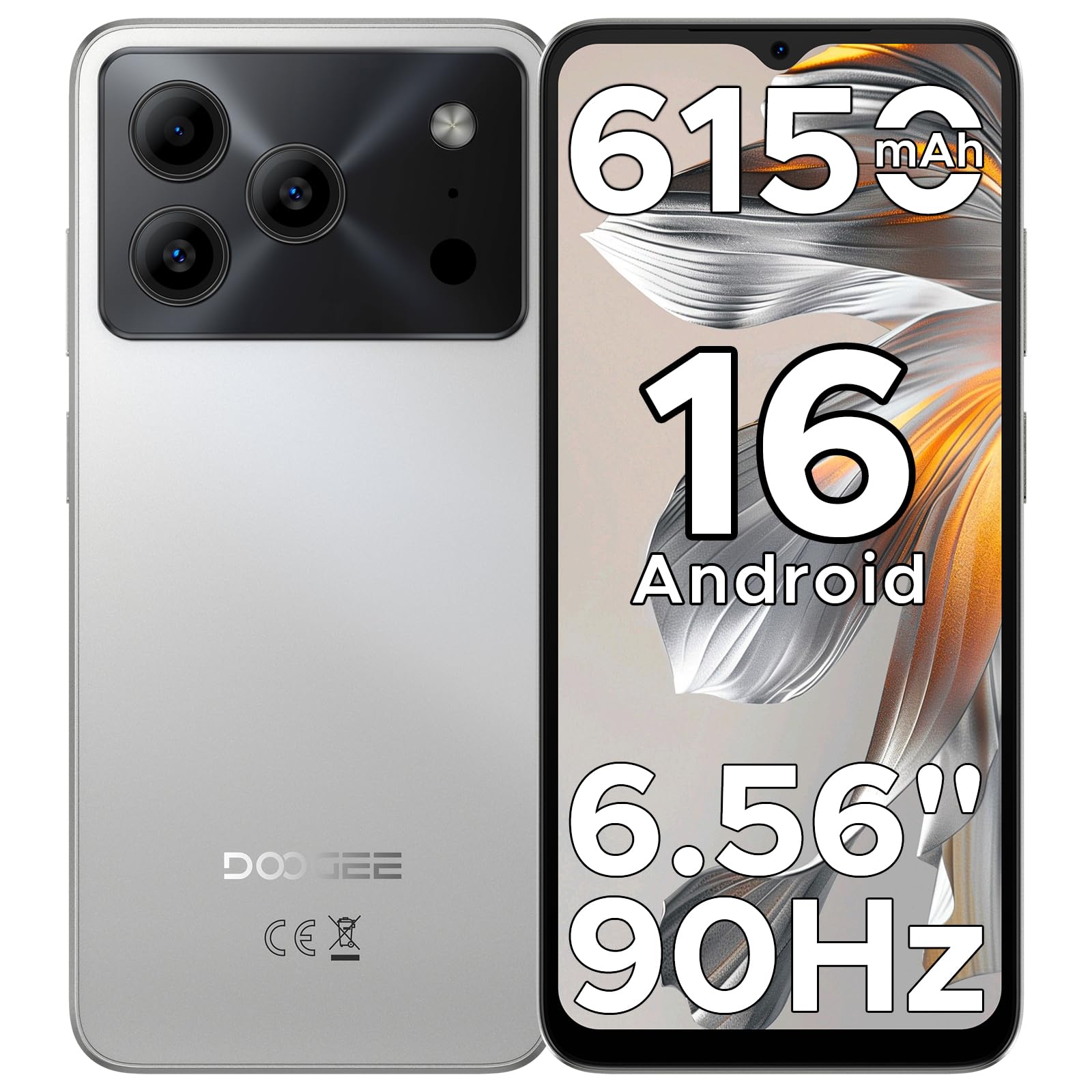
Image: The DOOGEE Note 56 smartphone, showcasing its slim design and key features such as the 8.45mm ultra-slim body, 6150mAh Silicon-Carbon Battery, Up-To-Date Android 16, 6.56" 90Hz Display, AI Scene Recognition, Instant Face Unlock, and 3.5mm Headphone Jack.

Aworan: A sunmọ-soke view of the DOOGEE Note 56 highlighting its ultra-slim 8.45mm profile and lightweight 195g design, emphasizing its pocket-friendly and refined appearance.
Physical Buttons and Ports:
- Bọtini agbara: Ó wà ní ẹ̀gbẹ́, a máa ń lò ó láti tan/pa tàbí jí/sùn ìbòjú ẹ̀rọ náà.
- Awọn bọtini iwọn didun: Ti o wa ni ẹgbẹ, ti a lo lati ṣatunṣe media ati iwọn didun ipe.
- Ibudo Iru-C USB: Ti o wa ni isalẹ, ti a lo fun gbigba agbara ati gbigbe data.
- Jack agbekọri 3.5mm: Ti o wa ni oke, fun asopọ awọn agbekọri onirin.
- Iho kaadi SIM/TF: Located on the side, for inserting SIM cards and a TF (microSD) card.
4. Eto
4.1. Inserting SIM and TF Cards
- Locate the SIM/TF card slot on the side of your phone.
- Insert the provided SIM eject tool into the small hole next to the slot to open the tray.
- Place your Nano-SIM card(s) and/or TF card into the tray according to the diagram on the tray.
- Fi iṣọra Titari atẹ naa pada sinu iho titi ti yoo fi fọ pẹlu ara foonu naa.
4.2. Ibẹrẹ Agbara Tan ati Eto
- Press and hold the Power button until the DOOGEE logo appears.
- Tẹle awọn itọnisọna loju iboju lati yan ede rẹ, sopọ si Wi-Fi, ati ṣeto akọọlẹ Google rẹ.
- Configure security settings, including Face Unlock, for quick and secure access.
5. Awọn ilana Iṣiṣẹ
5.1. Android 16 Awọn ọna System
Your DOOGEE Note 56 runs on the latest Android 16 OS, offering an intuitive and secure user experience. Navigate through apps, customize your home screen, and access various features with ease.

Image: A visual representation of the Android 16 operating system interface on the DOOGEE Note 56, showing various app icons and system settings.
5.2. Ṣíṣí Ojú
For convenient and secure unlocking, your device supports Face Unlock. To set it up:
- Lọ si Eto > Aabo > Ṣii silẹ oju.
- Tẹle awọn ilana loju iboju lati forukọsilẹ oju rẹ.
- Rii daju awọn ipo ina to dara lakoko iforukọsilẹ fun iṣẹ ṣiṣe to dara julọ.

Image: A user demonstrating the Instant Face Unlock feature on the DOOGEE Note 56, highlighting its quick and secure access capabilities.
5.3. Gemini AI Integration
The DOOGEE Note 56 integrates Gemini AI features, enhancing your device's intelligence and responsiveness. This includes smart body sensing, dual system mode, super clipboard, memory expansion, screen optimization, and customizable screen colors.
Video: This video demonstrates how to utilize and upgrade Gemini AI features on a DOOGEE smartphone, showcasing its capabilities within the Android 16 operating system.
6. Awọn ẹya ara ẹrọ kamẹra
Capture memorable moments with the DOOGEE Note 56's advanced camera system.
6.1. Rear Camera (8MP)
The 8MP main camera delivers clear, natural photos. Features include:
- HDR: Enhances dynamic range for balanced exposure in challenging lighting.
- Ipo Pro: Offers manual control over camera settings.
- Ipo Alẹ: Ó mú kí àwòrán dára síi ní àwọn ipò ìmọ́lẹ̀ tí kò tó nǹkan.
- Ìdámọ̀ Ìṣẹ̀lẹ̀ AI: Automatically detects 12 scenes and optimizes settings for stunning shots.
- Ipo Aworan: Creates a depth-of-field effect for professional-looking portraits.
- Gbigba ẹrin: Automatically takes a photo when a smile is detected.
- Panoramas: Capture wide-angle scenic views.
- Burst Shots: Take multiple photos in quick succession.
- Fun Filters: Apply creative filters to your photos.

Image: An illustration of the DOOGEE Note 56's camera capabilities, including AI Scene Recognition icons and various sample photos taken with the 8MP main camera and 5MP front camera.
6.2. Front Camera (5MP)
The 5MP front camera is perfect for selfies and video calls, featuring Beauty Mode and Portrait Effect for bright and natural results.
7. Asopọmọra
Stay connected with a range of network and wireless options.
- SIM Meji 4G: Ṣe atilẹyin fun awọn kaadi SIM meji fun lilo nẹtiwọọki ti o rọ.
- Wi-Fi: Sopọ si awọn nẹtiwọki alailowaya fun iraye si intanẹẹti.
- Bluetooth 4.2: Fun asopọ si awọn ẹya ẹrọ alailowaya.
- GPS: Fun awọn iṣẹ lilọ kiri ati ipo.
- Redio FM: Gbadun awọn ibudo redio ayanfẹ rẹ.
7.1. Supported Network Bands:
- GSM: B2/3/5/8
- WCDMA: B1/2/4/5/8
- TDD: B38 / 40/41
- FDD: B1/2/3/4/5/7/8/18/19/20/25/26/28A/28B/66
- Atilẹyin: EDGE/GPRS
8. Iṣakoso batiri
The DOOGEE Note 56 is equipped with a large 6150mAh Silicon-Carbon battery for extended usage.

Aworan: inu view of the DOOGEE Note 56 highlighting its 6150mAh Silicon-Carbon Battery, emphasizing its longer lifespan, unmatched durability, 1000 charge cycles, 4 years durable battery, 20% smaller size, and 5W reverse charging capability.
Video: This video highlights the 6150mAh Silicon-Carbon Battery of the DOOGEE Note 56, showcasing its capacity and efficiency.
8.1. OTG Reverse Charging
The device supports OTG (On-The-Go) reverse charging, allowing you to use your Note 56 to charge other compatible devices.
8.2. Tips for Extending Battery Life:
- Adjust screen brightness to a lower level.
- Mu Wi-Fi, Bluetooth, ati GPS ṣiṣẹ nigbati o ko ba wa ni lilo.
- Pade awọn ohun elo abẹlẹ.
- Mu ipo fifipamọ batiri ṣiṣẹ ninu awọn eto.

Image: This image illustrates various usage scenarios for the DOOGEE Note 56, demonstrating its extended battery life for web browsing (7 hours), music playing (49.5 hours), video watching (14 hours), and calling (28 hours).
9. Ibi ipamọ ati Performance
The DOOGEE Note 56 is powered by a UNISOC SC9863A Octa-Core processor, ensuring smooth performance for applications and daily tasks.
- Ramu: 24GB (virtual RAM expansion, 8GB physical RAM).
- Ibi ipamọ inu: 64GB.
- Ibi ipamọ ti o gbooro: Supports up to 2TB via TF (microSD) card (TF card needs to be purchased separately).

Image: A visual representation of the DOOGEE Note 56's internal memory and storage, showing 64GB ROM and 24GB RAM (3GB+21GB virtual expansion), emphasizing smooth multitasking and ample aaye.
10. Ifihan
Experience immersive visuals on the 6.56-inch HD+ 90Hz IPS waterdrop screen.
- Iwọn: 6.56 inches
- Ipinnu: 720 x 1612 awọn piksẹli
- Oṣuwọn isọdọtun: 90Hz
- Ipin Ipin: 20:9
- PPI: 269

Image: The DOOGEE Note 56 display showcasing its 6.56-inch HD+ screen with a 90Hz refresh rate, designed for smooth viewing and social media interaction.
11. Itọju ati Itọju
To ensure the longevity and optimal performance of your DOOGEE Note 56, follow these care guidelines:
- Yẹra fún fífi fóònù sí ojú otútù tó le koko, oòrùn tààrà, tàbí ọrinrin tó pọ̀ jù.
- Lo awọn saja ti a fọwọsi nikan ati awọn kebulu.
- Mọ iboju ati ara pẹlu asọ, asọ ti ko ni lint.
- Utilize the provided TPU protective case and pre-applied protective film to guard against scratches and minor impacts.
12. Laasigbotitusita
If you encounter issues with your DOOGEE Note 56, try the following basic troubleshooting steps:
- Ẹrọ ti ko tan: Rii daju pe batiri ti gba agbara. So ṣaja pọ ki o duro fun iṣẹju diẹ ṣaaju igbiyanju lati tan-an lẹẹkansi.
- Iboju ko dahun: Restart the device by pressing and holding the Power button for about 10-15 seconds.
- Awọn oran nẹtiwọki: Check if your SIM card is properly inserted. Verify network settings and ensure you have an active plan with your carrier.
- App jamba: Pa àpò ìpamọ́ ohun èlò tí ó ní ìṣòro náà rẹ́ tàbí kí o tún un ṣe. Rí i dájú pé sọ́fítíwètì ẹ̀rọ rẹ wà ní ìgbàlódé.
For more complex issues, refer to the official DOOGEE support webojula tabi olubasọrọ onibara iṣẹ.
13. Awọn pato
| Ẹya ara ẹrọ | Ẹ̀kúnrẹ́rẹ́ |
|---|---|
| Orukọ awoṣe | AKIYESI56 |
| Eto isesise | Android 16 |
| isise | UNISOC SC9863A Octa-Core (1.6 GHz CPU Speed) |
| Àgbo | 24 GB (8GB ti ara + 16GB foju) |
| Ibi ipamọ inu | 64 GB |
| Expandable Ibi ipamọ | Títí dé 2 TB nípasẹ̀ káàdì TF |
| Iwọn Ifihan | 6.56 inches |
| Ipinnu Ifihan | 720 x 1612 (HD+) |
| Oṣuwọn sọtun | 90 Hz |
| Kamẹra ẹhin | 8 MP |
| Kamẹra iwaju | 5 MP |
| Agbara Batiri | 6150 Milionuamp Hours (Li-Po) |
| Asopọmọra | 4G Dual SIM, Wi-Fi, Bluetooth 4.2, GPS, FM Radio, USB Type-C |
| Jack ohun | 3.5 mm |
| Awọn iwọn | 6.45 x 2.98 x 0.33 inches |
| Iwọn Nkan | 6.9 iwon (195 Giramu) |
| Pataki Awọn ẹya ara ẹrọ | Dual SIM, Expandable Memory, Supports USB OTG, Face Unlock |
14. Atilẹyin ọja ati Support
Your DOOGEE Note 56 comes with a warranty. Please refer to the included Warranty Card in your product package for detailed information on warranty terms, conditions, and duration.
For technical support, service, or further inquiries, please visit the official DOOGEE website or contact their customer service channels. Keep your purchase receipt and warranty card handy for any claims.


