1. Ifihan
Thank you for choosing the CINMOORE Dummy Camera. This indoor security camera is designed to provide reliable surveillance and peace of mind for your home or office. Featuring advanced AI detection, two-way audio, and clear night vision, it offers comprehensive monitoring capabilities. This manual will guide you through the setup, operation, and maintenance of your device.

Aworan: Iwaju view of the CINMOORE Dummy Camera, a white, spherical camera with a dark lens and a blue indicator light, featuring the CINMOORE logo at its base.
2. Kini To wa
Jọwọ ṣayẹwo awọn akoonu package lati rii daju pe gbogbo awọn ohun kan wa:
- CINMOORE Security Camera × 1
- Mounting Bracket Base × 1
- Adaparọ Agbara × 1
- Data Cable × 1
- Screw Anchors × 1
- Afowoyi Olumulo × 1
3. Eto
The CINMOORE Dummy Camera offers flexible installation options for various indoor environments.
3.1 iṣagbesori Aw
The camera can be installed using the following methods:
- Oke Oke: Ideal for wide-angle coverage from above.
- Oke Tabili: Simple placement on any flat surface.
- Odi Odi: Secure installation on a vertical surface.
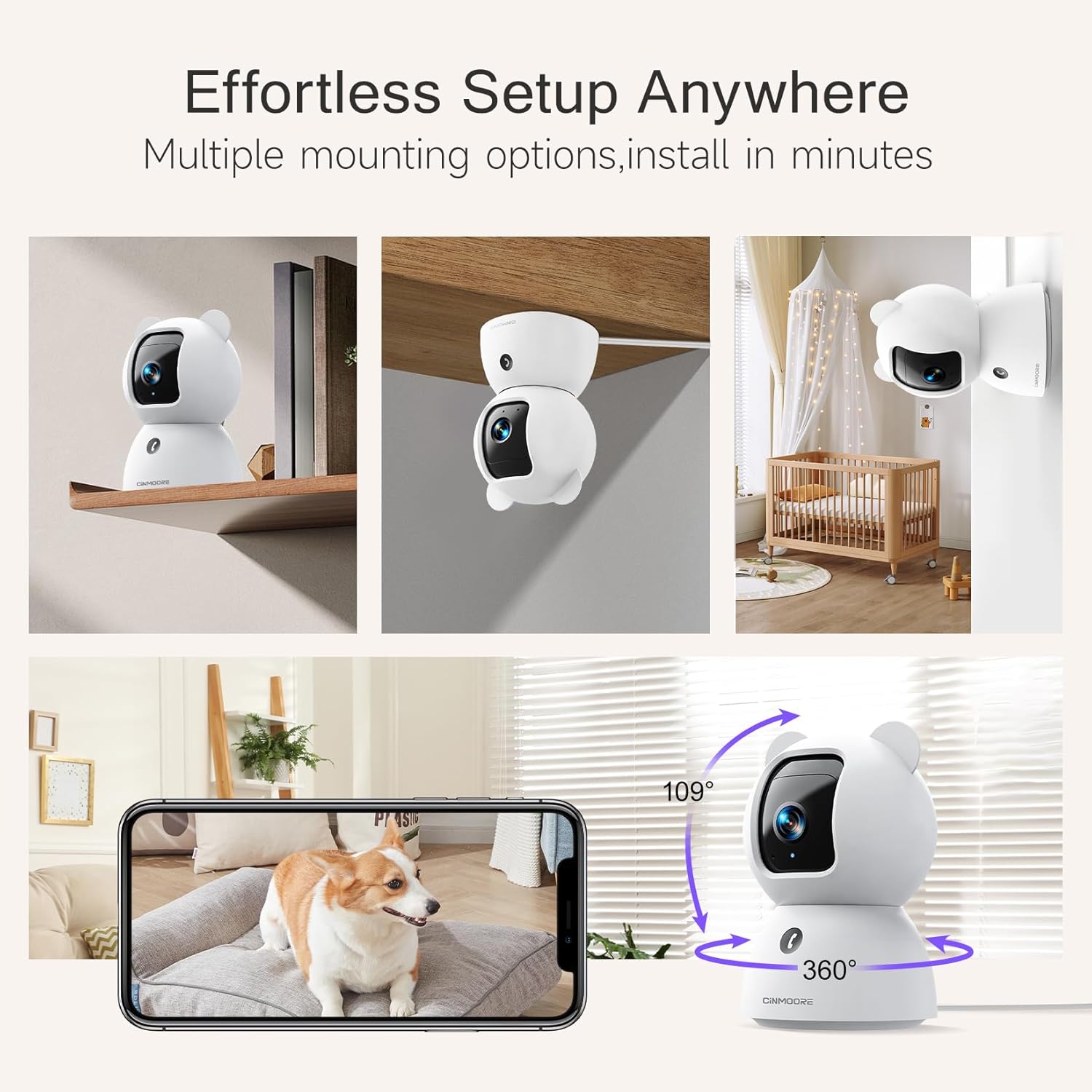
Image: A collage showing the CINMOORE Dummy Camera mounted in various positions: on a shelf, inverted on a ceiling, and on a wall, demonstrating its versatile installation options.
3.2 Awọn Igbesẹ Iṣeto Ibẹrẹ
- Agbara Tan: Connect the camera to the power adapter using the provided data cable and plug it into a power outlet.
- Ṣe igbasilẹ Ohun elo: Download the official CINMOORE app from your smartphone's app store (iOS/Android).
- Iforukọsilẹ akọọlẹ: Ṣii app naa ki o forukọsilẹ fun akọọlẹ tuntun tabi wọle ti o ba ti ni ọkan tẹlẹ.
- Fi ẹrọ kun: Follow the in-app instructions to add your new camera. This typically involves scanning a QR code on the camera or connecting to its temporary Wi-Fi hotspot.
- Asopọ Wi-Fi: Connect the camera to your home Wi-Fi network (2.4GHz recommended).
- Ibi: Position the camera in your desired location, ensuring it has a clear view agbegbe ti o fẹ lati ṣe atẹle.
4. Awọn ilana Iṣiṣẹ
4.1 Video Quality and Viewing
The camera captures video in 2.5K resolution, providing clear and detailed images. You can view the live feed and recorded footage through the CINMOORE app.

Image: A side-by-side comparison demonstrating the superior clarity of 2.5K resolution (left, showing a baby) versus 2K resolution (right, showing a puppy).
4.2 Pan & Tilt (PTZ) Functionality
The camera features PTZ (Pan, Tilt, Zoom) technology, allowing for 360-degree coverage. You can remotely control the camera's viewing angle through the app to monitor different areas of a room.

Image: The CINMOORE Dummy Camera surrounded by icons representing its features: Ultra HD 2.5K, Sound/Crying Alerts, Smart Night Vision, Encrypted Local Storage (up to 256GB), Secure Cloud Storage, Full Duplex Audio, Human/Pet Tracking, One-Touch Call, and Pan & Tilt, emphasizing its 360-degree protection.
4.3 Meji-Ona Audio
Utilize the full-duplex two-way audio feature to communicate with people or pets in the camera's vicinity. This allows for natural, real-time conversations.

Image: A scene depicting a person speaking through a smartphone to a dog via the CINMOORE Dummy Camera, illustrating the two-way audio feature with speech bubbles.
4.4 Night Vision
The camera is equipped with clear IR night vision, providing 2.5K clarity even in low-light or complete darkness, with a range of up to 33 feet.

Aworan: Eniyan viewing a black-and-white night vision feed from the CINMOORE Dummy Camera on their smartphone, showing a baby and a dog in a crib, demonstrating clear IR night vision in a dark room.
4.5 AI Alerts and Detection
The camera supports various AI-powered detection features without monthly fees, including:
- Iwari išipopada: Alerts you to general movement.
- Iwari eniyan: Specifically identifies human figures.
- Ṣiṣawari Ọsin: Recognizes pet activity.
- Iwari igbe: Notifies you of baby crying sounds.

Image: Two children playing near the CINMOORE Dummy Camera, with icons below representing its AI detection capabilities: Person, Pet, Motion, and Crying, highlighting its no-monthly-fee AI alerts.
4.6 Ibi ipamọ Aw
The camera offers flexible and secure storage solutions:
- Ibi ipamọ kaadi SD: Supports local storage via an SD card (not included), expandable up to 512GB. Ensure "SD Card Encryption" is enabled in the app for secure viewing.
- Ibi ipamọ awọsanma: Offers AWS Cloud Storage with a 30-day free trial, providing bank-level encrypted storage for your recordings.

Image: A diagram showing the CINMOORE Dummy Camera with callouts for its storage features: SD card slot (expandable up to 512GB), Reset Button, and AWS Cloud Storage (30-day free trial), emphasizing encrypted and secure flexible storage.
5. Itọju
To ensure optimal performance and longevity of your CINMOORE Dummy Camera, follow these maintenance guidelines:
- Ninu: Fi rọra nu lẹnsi kamẹra ati ara pẹlu asọ ti o gbẹ. Yago fun lilo awọn kẹmika lile tabi awọn ohun elo abrasive.
- Ibi: Ensure the camera is placed in a stable location, away from direct sunlight, extreme temperatures, and high humidity.
- Awọn imudojuiwọn famuwia: Regularly check for and install firmware updates through the CINMOORE app to ensure your camera has the latest features and security enhancements.
- Ibi ti ina elekitiriki ti nwa: Lo oluyipada agbara atilẹba nikan ti a pese pẹlu kamẹra.
6. Laasigbotitusita
If you encounter issues with your CINMOORE Dummy Camera, refer to the following common troubleshooting steps:
- Aisinipo kamẹra: Check your Wi-Fi connection and ensure the camera is within range of your router. Restart the camera by unplugging and re-plugging the power adapter.
- Didara fidio ti ko dara: Ensure the lens is clean and free from dust. Check your internet speed; a stable connection is crucial for high-resolution streaming.
- Ko si Ohun: Verify that the microphone and speaker settings are enabled in the app. Ensure there are no obstructions blocking the microphone or speaker on the camera.
- Detection Not Working: Check the detection sensitivity settings in the app. Ensure the camera's view ó ṣe kedere, kò sì dí i lọ́wọ́.
- Kò le Sopọ̀ mọ́ App: Ensure you have the latest version of the CINMOORE app. Try resetting the camera (using the reset button, if available) and re-adding it to the app.
For further assistance, please contact CINMOORE customer support.
7. Awọn pato
| Orukọ awoṣe | Aabo Abe ile Kame.awo- |
| Nọmba Awoṣe Nkan | CM-C2LU |
| Brand | CINMOORE |
| Asopọmọra Technology | Ti firanṣẹ, Wi-Fi |
| Ipinnu Yaworan fidio | 2.5K |
| inu ile / ita gbangba Lilo | Ninu ile |
| Pataki Awọn ẹya ara ẹrọ | 2 Way Audio, Cry Detection, HD Resolution, PTZ Technology |
| Ibiti Iran Night | 33 Ẹsẹ |
| Iṣagbesori Iru | Ceiling Mount / Tabletop Mount / Wall Mount |
| Ohun elo | Acrylonitrile Butadiene Styrene (ABS) |
| Awọn iwọn Nkan L x W x H | 7.6 x 7.6 x 11.4 centimita |
| Iwọn Nkan | 340 g |
| Omi Resistance Ipele | Mabomire |
| Niyanju Lilo | Baby Monitoring, Pet Monitoring, Indoor Home Security, Office Surveillance |
8. Atilẹyin ọja ati Support
Atilẹyin ọja: The CINMOORE Dummy Camera comes with a 1-year warranty from the date of purchase. Please retain your proof of purchase for warranty claims.
Atilẹyin: For technical support, troubleshooting assistance, or warranty inquiries, please visit the official CINMOORE website or contact their customer service team. Refer to the product packaging or the CINMOORE app for specific contact details.


