1. Ifihan
This manual provides essential instructions for the safe operation, setup, maintenance, and troubleshooting of your DEWALT DCD803B ATOMIC 20V MAX 5-in-1 Brushless Cordless Multi-Head Drill/Driver. Please read this manual thoroughly before using the tool to ensure proper function and to prevent injury.
2. Gbogbogbo Aabo Alaye
Always follow basic safety precautions when using power tools to reduce the risk of fire, electric shock, and personal injury. Keep your work area clean and well-lit. Do not operate power tools in explosive atmospheres, such as in the presence of flammable liquids, gases, or dust. Keep children and bystanders away while operating a power tool. Wear appropriate personal protective equipment, including eye protection, hearing protection, and gloves. Ensure the tool is switched off before making any adjustments, changing accessories, or storing the tool. Use the correct tool for your application.
3. Ọja Ipariview
3.1 to wa irinše
- (1) DCD803 ATOMIC 20V MAX* Multi-Head Drill/Driver
- (1) 1/2" (13mm) Metal Chuck Attachment
- (1) 1/4" Hex Right Angle Attachment
- (1) 1/4" Hex Quick Release Offset Attachment
- (1) 1/4" Hex Quick Release Attachment
- (1) Organizer
- (2) Belt Hooks
3.2 Key Awọn ẹya ara ẹrọ
- Multitasking Capabilities: Includes 1/2 in. (13mm) metal chuck, 1/4 in. hex right angle, 1/4 in. hex quick release offset, and 1/4 in. hex quick release attachments for diverse applications.
- Swift Switching: Designed for effortless transition between tasks using the included attachments.
- Access Tight Spaces: The right angle attachment allows access to hard-to-reach areas.
- Secure Connection Indicator: A yellow collar around the chuck indicates secure attachment.
- Organizational Aid: The included organizer can be mounted on a wall or used with belt hooks for convenient storage of the drill/driver and its heads.
- Iṣe Alagbara: Delivers increased power for demanding applications in confined spaces.
3.3 Ọja Views

Figure 1: DEWALT DCD803B Multi-Head Drill/Driver with the 1/4 inch hex quick release offset attachment installed.

Figure 2: DEWALT DCD803B Multi-Head Drill/Driver with the 1/4 inch hex quick release attachment installed.
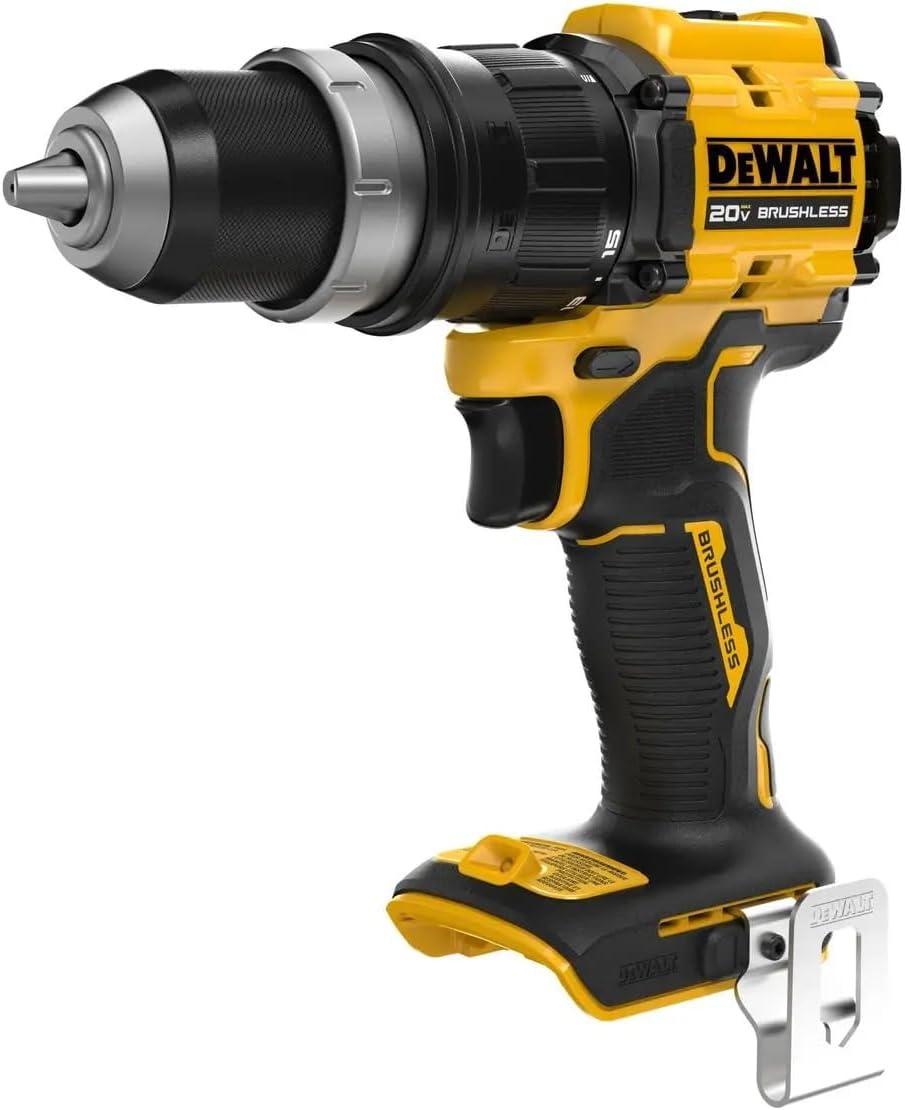
Figure 3: DEWALT DCD803B Multi-Head Drill/Driver with the 1/2 inch (13mm) metal chuck attachment installed.

Figure 4: The included organizer for storing up to four attachment heads. It can be wall-mounted or used with belt hooks.
4. Eto
4.1 Fifi sori batiri
- Ensure the drill/driver is switched off.
- Ṣe deede idii batiri naa pẹlu ibudo batiri ti ọpa.
- Gbe idii batiri naa sinu ọpa titi yoo fi tẹ ni aabo sinu aaye.
- Lati yọ kuro, tẹ bọtini itusilẹ batiri ki o rọra fa idii batiri naa jade.
4.2 Attaching and Removing Heads
- Ensure the drill/driver is switched off and the battery is removed for safety.
- To attach a head: Align the desired attachment head with the tool's output shaft. Push the attachment onto the shaft until the yellow collar indicates a secure connection.
- To remove a head: Grasp the attachment head firmly. Pull the yellow collar back and simultaneously pull the attachment head straight off the tool.
5. Awọn ilana Iṣiṣẹ
The DEWALT DCD803B offers versatility with its interchangeable heads. Always select the appropriate head for the task at hand.
5.1 Using the 1/2" (13mm) Metal Chuck Attachment
- This attachment is suitable for standard drilling and driving applications requiring larger bits or accessories.
- Insert the drill bit or driver bit into the chuck jaws.
- Rotate the chuck collar clockwise to tighten the jaws around the bit until it is securely held.
- To release, rotate the chuck collar counter-clockwise.
5.2 Using 1/4" Hex Quick Release Attachments (Right Angle, Offset, Standard)
- These attachments are designed for quick bit changes with 1/4" hex shank accessories.
- To insert a bit: Pull the quick release collar forward, insert the hex shank bit, and release the collar. The bit will lock into place.
- To remove a bit: Pull the quick release collar forward and pull the bit out.
- Awọn Asomọ igun ọtun is specifically designed for working in extremely tight spaces where a straight drill/driver cannot fit.
- Awọn Offset Attachment provides an alternative angle for driving screws close to edges or in confined corners.
5.3 Gbogbogbo isẹ
- Iṣakoso iyara: The tool features variable speed control via the trigger. Pressing the trigger further increases the speed.
- Iṣakoso itọsọna: Use the forward/reverse selector switch to choose the desired rotation direction. Ensure the switch is in the neutral (locked) position when not in use or when changing attachments.
- Eto idimu: Adjust the clutch collar to the appropriate torque setting for driving screws. Higher numbers indicate higher torque. For drilling, set the collar to the drill icon.
6. Itọju
6.1 Ninu
- Máa fọ àwọn ihò afẹ́fẹ́ tí ó wà nínú ohun èlò náà déédéé láti dènà ìgbóná jù.
- Use a soft brush or dry cloth to remove dust and debris. Do not use water or chemical cleaning agents.
- Keep the chuck and attachment mechanisms free from dirt and grime to ensure smooth operation.
6.2 Ibi ipamọ
- Store the tool and its attachments in a dry, secure location out of reach of children.
- The included organizer can be used for wall-mounting or with belt hooks for convenient storage of the drill/driver and its heads.
- Yọ idii batiri kuro lati ọpa ṣaaju ki o to fipamọ fun awọn akoko ti o gbooro sii.
7. Laasigbotitusita
| Isoro | Owun to le Fa | Ojutu |
|---|---|---|
| Irinṣẹ ko bẹrẹ | Battery not charged or improperly installed; Forward/reverse switch in locked position. | Charge battery and ensure it is fully inserted; Move forward/reverse switch to operating position. |
| Agbara ti o dinku tabi iṣẹ ṣiṣe | Low battery charge; Incorrect clutch setting; Worn or dull bit. | Recharge battery; Adjust clutch to higher setting or drill mode; Replace bit. |
| Attachment head not securing | Debris in connection point; Attachment not fully engaged. | Clean connection points; Ensure attachment is pushed firmly until yellow collar indicates secure connection. |
If you encounter issues not listed here or if solutions do not resolve the problem, contact DEWALT customer support.
8. Awọn pato
| Ẹya ara ẹrọ | Ẹ̀kúnrẹ́rẹ́ |
|---|---|
| Brand | IWỌ |
| Nọmba awoṣe | DCD803B |
| Orisun agbara | Agbara Batiri (20V Max*) |
| Liluho Iru | Combination Drill |
| Awọn irinše to wa | (1) DCD803 ATOMIC 20V MAX* Multi-Head Drill/Driver, (1) 1/2" (13mm) Metal Chuck Attachment, (1) 1/4" Hex Right Angle Attachment, (1) 1/4" Hex Quick Release Offset Attachment, (1) 1/4" Hex Quick Release Attachment, (1) Organizer, (2) Belt Hooks |
| Ohun elo | Irin |
| Liluho Agbara Wood | 0.5 inches |
| Liluho Agbara Irin | 0.5 inches |
| UPC | 885911959919 |
| Ọjọ Akọkọ Wa | Oṣu Kẹjọ Ọjọ 16, Ọdun 2025 |
9. Atilẹyin ọja ati Support
For detailed warranty information, please refer to the warranty card included with your product or visit the official DEWALT website. DEWALT typically offers a limited warranty on its power tools, covering defects in material or workmanship.
Onibara Support
If you have any questions, require technical assistance, or need to arrange for service, please contact DEWALT customer support. You can find contact information and additional resources on the official DEWALT webojula: Ṣabẹwo si Ile-itaja DEWALT lori Amazon or search for "DEWALT official website" online.


