Ọrọ Iṣaaju
Thank you for choosing the Lefant M350 Robot Vacuum and Mop Combo. This device is designed to provide efficient and hands-free cleaning for your home, combining powerful vacuuming with effective mopping. It features advanced navigation, obstacle avoidance, and a self-emptying station for convenience. This manual provides essential information for the safe operation, maintenance, and troubleshooting of your robot vacuum.
Alaye Aabo pataki
Please read all safety instructions carefully before using this appliance and retain them for future reference. Failure to follow these instructions may result in electric shock, fire, or serious injury.
- This appliance is for indoor use only. Do not use it outdoors or on commercial or industrial surfaces.
- Do not allow children to operate the robot vacuum. Supervise children and pets when the robot is operating.
- Ṣe idaniloju agbara voltage ibaamu awọn voltage indicated on the charging station.
- Do not handle the charging station or robot with wet hands.
- Jeki irun, aṣọ alaimuṣinṣin, awọn ika ọwọ, ati gbogbo awọn ẹya ara kuro lati awọn ṣiṣi ati awọn ẹya gbigbe.
- Má ṣe lo robot láti gbé àwọn nǹkan ńlá, àwọn nǹkan mímú, tàbí àwọn ohun èlò tí ń jó/mú.
- Má ṣe lo robot náà lórí ilẹ̀ tí ó tutu tàbí ní àwọn ibi tí omi ti dúró.
- Always remove the water tank before charging the robot.
- Only use the original charging station and power adapter provided by Lefant.
- Ṣaaju ki o to nu, yọ eyikeyi awọn kebulu alaimuṣinṣin, awọn ohun kekere, tabi awọn ohun ẹlẹgẹ lati ilẹ lati ṣe idiwọ ikọlu tabi ibajẹ.
Ohun ti o wa ninu Apoti
Daju pe gbogbo awọn paati wa ati ni ipo ti o dara nigbati ṣiṣi silẹ.
- Lefant M350 Robot Vacuum (x1)
- Self-Emptying Station (x1)
- Mop Holder (x1)
- Okun agbara (x1)
- Itọsọna olumulo (x1)
- Apo eruku (x2)
- Washable Mop Cloth (x1)
- Àlẹ̀mọ́ HEPA (x2)
- Disposable Dry Mop (x1)
- Ohun èlò ìfọmọ́ (x1)
- Fẹlẹ ẹgbẹ (x2)
- Filter Sponge (x2)

Image: All components included in the Lefant M350 package, including the robot, self-emptying station, mop holder, power cord, and various accessories.
Ọja Pariview
Robot Vacuum
The Lefant M350 robot features a compact design with advanced sensors for navigation and obstacle avoidance. It includes a main brush, side brushes, and a dustbin for vacuuming, along with a detachable mop holder and water tank for mopping.
Self-Emptying Station
The self-emptying station automatically transfers collected dust and debris from the robot's dustbin into a large-capacity dust bag, providing up to 40 days of hands-free maintenance.
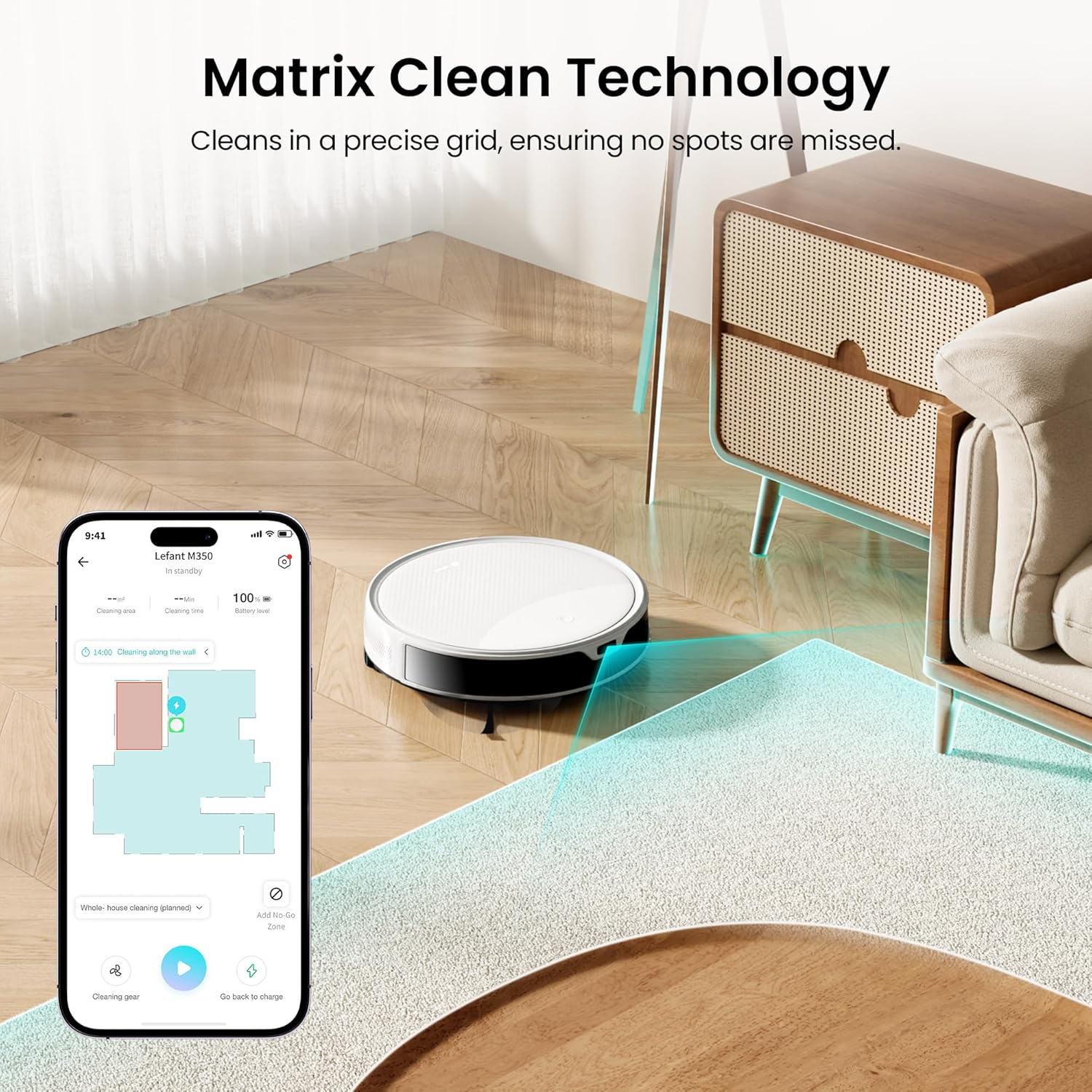
Image: The Lefant M350 robot vacuum positioned next to its self-emptying station.
Ṣeto
1. Unpacking ati Igbaradi
- Remove all packaging materials and protective films from the robot and charging station.
- Install the side brushes by pressing them onto the posts until they click into place.
- Ensure the dustbin and filters are correctly installed in the robot.
2. Gbigbe Ibusọ Ibusọ
- Place the self-emptying station against a wall on a hard, level surface.
- Ensure there is at least 0.5 meters (1.6 feet) of clear space on both sides of the station and 1.5 meters (4.9 feet) in front.
- Plug the power cord into the station and then into a wall outlet.
3. Gbigba agbara akọkọ
- Manually place the robot onto the charging station, ensuring the charging contacts align.
- Gba robot laaye lati gba agbara ni kikun ṣaaju lilo akọkọ rẹ. Ina Atọka lori roboti yoo yipada nigbati o ba gba agbara ni kikun.
4. App Download ati Asopọ
- Download the 'Lefant' app from your mobile app store.
- Tẹle awọn ilana inu-app lati so igbale robot rẹ pọ si nẹtiwọọki Wi-Fi ile rẹ. Note: Only 2.4G WiFi is supported.

Image: A smartphone displaying the Lefant app interface, showing cleaning maps and control options for the robot vacuum.
Ṣiṣẹ Igbale Robot Rẹ
1. Bẹ̀rẹ̀ àti Dídúró símọ́
- Bẹrẹ: Press the power button on the robot or use the 'Start' command in the Lefant app.
- Dúró/Dúró: Press the power button again or use the 'Pause' command in the app.
2. Ninu awọn ipo
The M350 offers 3-in-1 cleaning: sweeping, vacuuming, and mopping.
- Igbale: The robot will sweep and vacuum. Adjust suction levels (Low, Middle, High) via the app.
- Mopping: Attach the mop holder with a wet mop pad and fill the water tank. The robot will automatically mop.
- Papọ: The robot can sweep, vacuum, and mop simultaneously.

Image: The Lefant M350 robot vacuum demonstrating its 3-in-1 cleaning capabilities, showing it cleaning hair, food crumbs, and stains.
3. Carpet Detection & Auto Boost
The robot automatically detects carpets and boosts suction to maximum (6000Pa) for deeper cleaning when the mop holder is removed. When the mop holder is attached, it maintains standard suction (3000Pa) and avoids carpets to prevent wetting them.

Image: The Lefant M350 robot vacuum transitioning from a hard floor to a carpet, illustrating its automatic suction boost feature.
4. Obstacle Avoidance (190° PSD)
Equipped with 190° PSD obstacle avoidance technology, the M350 accurately detects and navigates around furniture, cords, and other objects, preventing collisions and ensuring uninterrupted cleaning.

Image: The Lefant M350 robot vacuum detecting and avoiding various obstacles like toys and slippers on a wooden floor.
5. Smart Navigation (ToF LiDAR)
The ToF LiDAR navigation system scans 360° to create detailed maps of your home, allowing for efficient route planning and comprehensive coverage.
6. Scheduling and No-Go Zones
Use the Lefant app to set cleaning schedules, define specific areas for cleaning, or establish 'no-go zones' to restrict the robot from certain areas like pet bowls or stairs.

Image: A smartphone showing the Lefant app with options for suction adjustment and setting no-go zones on a floor plan.
7. Iṣakoso ohun
The M350 supports voice control via Amazon Alexa and Google Assistant. Connect your robot to your smart home system to issue commands like 'Alexa, ask robot to clean' or 'Hey Google, tell robot to recharge'.
8. Self-Emptying Function
After each cleaning cycle, the robot automatically returns to the self-emptying station to transfer collected debris into the 2.2L dust bag. This provides up to 40 days of hands-free dust disposal.

Image: The Lefant M350 robot vacuum docked at its self-emptying station, with an illustration showing dust being transferred into the 2.2L dust bag.
Itoju
Itọju deede ṣe idaniloju iṣẹ ṣiṣe ti o dara julọ ati fa gigun igbesi aye ti igbale robot rẹ.
1. Emptying Dustbin and Replacing Dust Bag
- The self-emptying station's dust bag should be replaced approximately every 40 days, or when full.
- To replace, open the lid of the self-emptying station, remove the full dust bag, and insert a new one.
- The robot's internal dustbin (150ml) should be emptied manually if not using the self-empty station, or if it becomes full during a cleaning cycle.
2. Cleaning Brushes
- Fẹlẹ akọkọ: Remove the main brush cover and lift out the brush. Use the provided cleaning tool to remove hair and debris. Clean weekly.
- Awọn brushes ẹgbẹ: Pull the side brushes off. Remove any tangled hair or debris. Replace if worn or damaged. Clean monthly.
3. Cleaning Ajọ
- Remove the dustbin from the robot and take out the HEPA filter and filter sponge.
- Tap the filters to remove dust. Do not wash HEPA filters with water. The filter sponge can be rinsed and air-dried.
- Rọpo awọn àlẹ̀mọ́ ní gbogbo oṣù 3-6, ó da lórí bí a ṣe lò ó.
4. Cleaning Sensors
- Wipe the cliff sensors, wall sensors, and charging contacts on the robot and charging station with a clean, dry cloth. Clean monthly.
5. Cleaning Mop Pad and Water Tank
- Remove the mop pad from the mop holder after each use and wash it. Air dry completely before reattaching.
- Empty any remaining water from the water tank after each use and allow it to air dry.
Laasigbotitusita
If your robot vacuum encounters an issue, refer to the following common problems and solutions.
| Isoro | Owun to le Fa | Ojutu |
|---|---|---|
| Robot ko ni tan | Low battery; Power button not pressed | Gbe roboti naa si ibudo gbigba agbara; Tẹ bọtini agbara ki o si dimu fun awọn aaya mẹta. |
| Robot ko le gba agbara | Àwọn olùbáṣepọ̀ gbígbà agbára dọ̀tí; Ibùdó gbígbà agbára kò ní agbára | Nu awọn olubasọrọ gbigba agbara mọ; Rii daju pe ibudo gbigba agbara ti sopọ mọ. |
| Robot di nigbagbogbo | Ju ọpọlọpọ awọn idiwo; Cliff sensosi idọti | Clear floor of clutter; Clean cliff sensors. |
| Iṣẹ ṣiṣe mimọ ti ko dara | Dustbin full; Brushes tangled; Filters clogged | Empty dustbin; Clean brushes; Clean/replace filters. |
| Self-empty station not working | Dust bag full/not installed; Suction port blocked | Replace/install dust bag; Clear any blockages in the suction port. |
| App asopọ oran | Incorrect Wi-Fi (not 2.4G); Router too far | Ensure 2.4G Wi-Fi; Move robot closer to router; Re-pair device. |
Awọn pato
- Orukọ awoṣe: M350
- Brand: Lefant
- Agbara mimu: 6000Pa (Púpọ̀ jùlọ)
- Igbesi aye batiri: 140 iṣẹju
- Dustbin Capacity (Robot): 150ml
- Agbara Omi Omi: 300ml
- Self-Empty Station Dust Bag Capacity: 2.2L (to ọjọ 40)
- Lilọ kiri: ToF LiDAR
- Yẹra fun Idiwo: 190° PSD
- Ọna Iṣakoso: App, Voice (Amazon Echo)
- Atilẹyin Wi-Fi: Wifi 2.4G nìkan
- Awọn iwọn ọja: 13.98"L x 10.24"W x 14.09"H
- Ìwọ̀n Nkan: 3.99 iwon
- Voltage: 14.4 Volts (DC)
Video Itọsọna
Wo fidio osise yii fun wiwo lori oju opo wẹẹbu kanview of the Lefant M350 Robot Vacuum and Mop Combo's features and operation.
Fidio: Ifihan fidio ọja osise kanasing the Lefant M350 Robot Vacuum and Mop Combo, highlighting its features like ToF Laser Mapping, 190° PSD Obstacle Avoidance, Carpet Detection, 3-in-1 cleaning, and the Self-Empty Station.
Atilẹyin ọja ati Support
Lefant provides a standard warranty for its products. For detailed warranty information, please refer to the warranty card included in your product packaging or visit the official Lefant webojula.
If you encounter any issues or have questions regarding your Lefant M350, please contact Lefant Customer Support:
- Webojula: www.lefant.com (for FAQs, support resources, and contact information)
- Imeeli: Refer to your warranty card or product packaging for specific email addresses.
Please have your model number (M350) and purchase information ready when contacting support.


