1. Ifihan
Thank you for choosing the CaDA Master C66005W Japanese Coffee House Building Set. This set allows you to construct a detailed miniature coffee shop model with integrated lighting. Comprising 768 high-precision pieces, this model offers an engaging building experience and results in a decorative display piece. Please read this manual carefully before beginning assembly to ensure a smooth and enjoyable building process.

Image 1.1: The completed CaDA Master C66005W Japanese Coffee House model, showcasing its illuminated interior.
2. Alaye Aabo
IKILO: IDAJO IKU. This product contains small parts and is not suitable for children under 3 years of age. Keep all small components away from young children to prevent accidental ingestion. Adult supervision is recommended during assembly.
3. Package Awọn akoonu
Please verify that all components are present before starting assembly. The package should contain:
- 768 high-precision building bricks
- Integrated LED lighting system (USB lights included)
- Alaye itọnisọna Afowoyi

Image 3.1: Product packaging indicating 768 pieces and included USB lights.
4. Apejọ Awọn ilana
The CaDA Master C66005W set is designed for a smooth and stable assembly experience. Follow the step-by-step instructions provided in the included manual for optimal results. The building process is divided into sections, typically corresponding to numbered bags of bricks.
4.1 Gbogbogbo Apejọ Tips
- Ṣeto Awọn Ẹya: Before starting each section, sort the bricks by color and shape to facilitate identification.
- Tẹle Afowoyi: Adhere strictly to the sequence shown in the instruction manual. Each step builds upon the previous one.
- Awọn isopọ to ni aabo: Ensure all bricks are firmly pressed together to create a stable structure.
- Check Orientation: Pay close attention to the orientation of bricks, especially for detailed elements and windows.
4.2 Modular Construction
The model features a modular design, allowing for easier assembly of sub-sections before combining them into the final structure. This includes separate construction of the main structure, back wall, and roof.

Aworan 4.1: exploded view illustrating the main structural components: Roof, Main structure, and Back wall.
4.3 Key Features During Assembly
During assembly, you will build various detailed features that enhance the model's realism and aesthetic appeal:
- Shop Signboard: The prominent 'CADABUCKS COFFEE' sign.
- Opening Door: A functional door for added playability and display options.
- Ferese ti o han gbangba: Large clear windows providing a view into the detailed interior.
- Rooftop Conditioner Unit: A detailed air conditioning unit on the roof.

Aworan 4.2: alaye views of the shop signboard, opening door, transparent window, and rooftop conditioner unit.
5. Awọn itọnisọna iṣẹ (Awọn imọlẹ LED)
The CaDA Master C66005W model includes an integrated LED lighting system to illuminate the coffee house, creating a vibrant and realistic atmosphere. The lights are powered via a USB connection.
5.1 Connecting the Lights
- During assembly, carefully integrate the LED light strips as indicated in the instruction manual.
- Once the model is assembled, locate the USB connector for the lighting system.
- Plug the USB connector into any standard USB power source (e.g., a USB wall adapter, power bank, or computer USB port).
5.2 Awọn Ipo Imọlẹ
The LED system features multiple lighting modes to enhance the display. Refer to the specific instructions in your manual for details on how to cycle through these modes, typically via a small button or switch on the USB cable or integrated into the model.

Image 5.1: The model illuminated, highlighting the multi-mode LED lighting system.
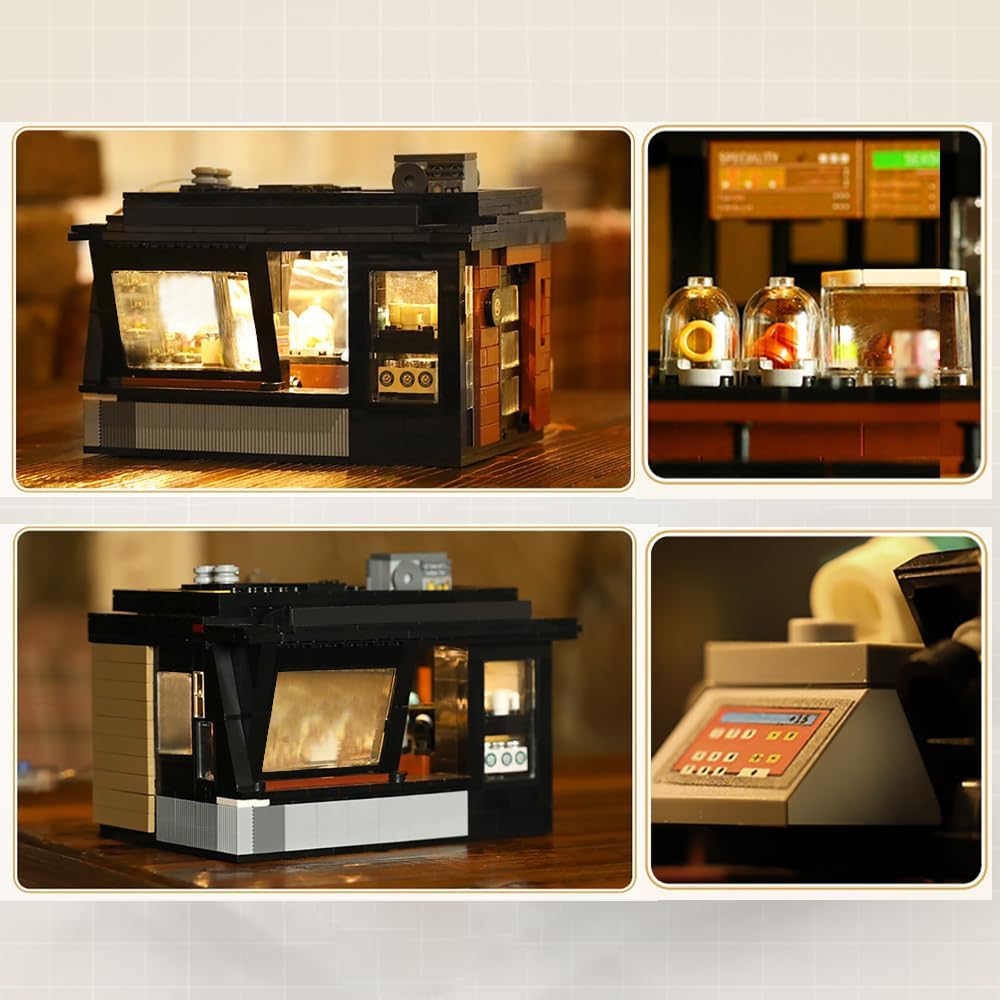
Aworan 5.2: Isunmọ views of the illuminated interior details and the overall lit model.
6. Itọju
To ensure the longevity and appearance of your CaDA Master C66005W model, follow these simple maintenance guidelines:
- Ninu: Fi aṣọ rírọ̀ tàbí búrọ́ọ̀ṣì rírọ̀ nu àwòṣe náà déédéé. Fún ìdọ̀tí líle, fi díẹ̀ sí i.amp A le lo aṣọ, ṣugbọn yẹra fun ọrinrin pupọ.
- Ibi ipamọ: Tọ́jú àwòṣe náà sí ibi gbígbẹ tí ó tutù, tí kò sí ìmọ́lẹ̀ oòrùn tààrà láti dènà àwọ̀ tàbí ìbàjẹ́ ohun èlò.
- Mimu: Handle the model carefully to avoid dislodging pieces. If a piece comes loose, reattach it firmly.
7. Laasigbotitusita
If you encounter any issues during assembly or operation, please refer to the following common solutions:
- Awọn nkan ti o padanu: Double-check all packaging and sorting trays. If a piece is genuinely missing, contact CaDA customer support with the part number from the manual.
- Iṣoro lati sopọ awọn biriki: Ensure bricks are correctly aligned and apply firm, even pressure. If a brick is particularly tight, try wiggling it gently into place.
- Awọn Imọlẹ Ko Ṣiṣẹ: Verify that the USB cable is securely connected to both the model and a functioning power source. Check for any visible damage to the cable or light strips.
- Aisedeede igbekale: Review the assembly steps for the affected section to ensure all connections are correct and firm. Incorrectly placed bricks can lead to instability.
8. Awọn pato
| Nọmba awoṣe | C66005W |
| Nọmba ti Awọn nkan | 768 |
| Ohun elo | Acrylonitrile Butadiene Styrene (ABS) |
| Awọn iwọn ti a kojọpọ (L x W x H) | 18 x 13.2 x 13.5 cm (7.09 x 5.20 x 5.31 inches) |
| Iwọn Ọja | 1.5 kg (3.3 lbs) |
| Niyanju Ọjọ ori | 14 ọdun ati si oke |
| Iye ẹkọ | Creative ero |
| Itanna | Integrated LED (USB powered) |

Image 8.1: Dimensional diagram of the assembled model.
9. Atilẹyin ọja ati Support
CaDA products are manufactured to high-quality standards. For information regarding warranty coverage, replacement parts, or technical support, please refer to the contact information provided on the product packaging or visit the official CaDA webojula. Jọwọ ṣe idaduro ẹri rira rẹ fun eyikeyi awọn ibeere atilẹyin ọja.


