1. Ifihan
This manual provides detailed instructions for the safe and efficient operation of your Blukar Mini Rechargeable LED Flashlight, Model K9183. Please read this manual thoroughly before using the product and retain it for future reference.
The Blukar K9183 is a compact, durable, and versatile LED flashlight designed for everyday carry (EDC). Its small size, multiple lighting modes, and USB-C rechargeable battery make it ideal for various situations, from outdoor activities to emergency lighting.
2. Package Awọn akoonu
Jọwọ ṣayẹwo package fun awọn nkan wọnyi:
- 1 x Blukar Mini Rechargeable LED Flashlight (Model K9183)
- 1 x Okun Ngba agbara USB-C
- 1 x Itọsọna olumulo
3. Awọn ẹya Ọja
- Ultra-Compact EDC Design: Super compact and lightweight, equipped with a keychain for easy attachment to keys, backpacks, or pockets.
- Awọn ọna Imọlẹ mẹta: Offers High, Medium, and Low brightness levels to suit different illumination needs.
- USB-C Gbigba agbara: Features a built-in battery that recharges conveniently via the included USB-C cable.
- Iṣẹ Iranti: Automatically remembers the last used lighting mode when turned off and on again.
- IPX6 Mabomire Rating: Ensures safe operation in wet conditions and rain, making it suitable for outdoor use.
- Ikole ti o tọ: Made from high-quality aluminum alloy, providing a lightweight, durable, and corrosion-resistant housing.
- Atọka Batiri: The power switch illuminates red during charging or when the battery is low, and green when fully charged or in use.
4. Eto
Before initial use, it is recommended to fully charge the flashlight. Refer to the "Charging Instructions" section for details.

Image: The Blukar Mini Rechargeable LED Flashlight K9183, showcasing its compact design and illuminated power button.
Attaching to a Keychain
The flashlight comes with an integrated keychain ring. You can easily attach it to your existing key ring, backpack, or other personal items for convenient access.

Image: Demonstrates various carrying options for the Blukar Mini Flashlight, including with a necklace, keychain, and in a pocket.
5. Awọn ilana Iṣiṣẹ
The Blukar K9183 flashlight features a single button for all operations.

Image: Illustrates the three lighting modes (High, Medium, Low) and the single-button control for switching modes and turning off.
- Turning On/Changing Modes: Press the power button briefly to turn on the flashlight. Each subsequent brief press will cycle through the brightness modes: High > Medium > Low.
- Pipa:
- If the flashlight has been on for more than 8 seconds in any mode, a single brief press of the power button will turn it off.
- To turn off the flashlight quickly at any time (within 8 seconds of turning on or changing modes), press and hold the power button for approximately 3 seconds.
- Iṣẹ Iranti: The flashlight will remember the last used brightness mode. When you turn it on again, it will activate in that mode.
6. Awọn ilana gbigba agbara
The Blukar K9183 flashlight is equipped with a built-in rechargeable battery.
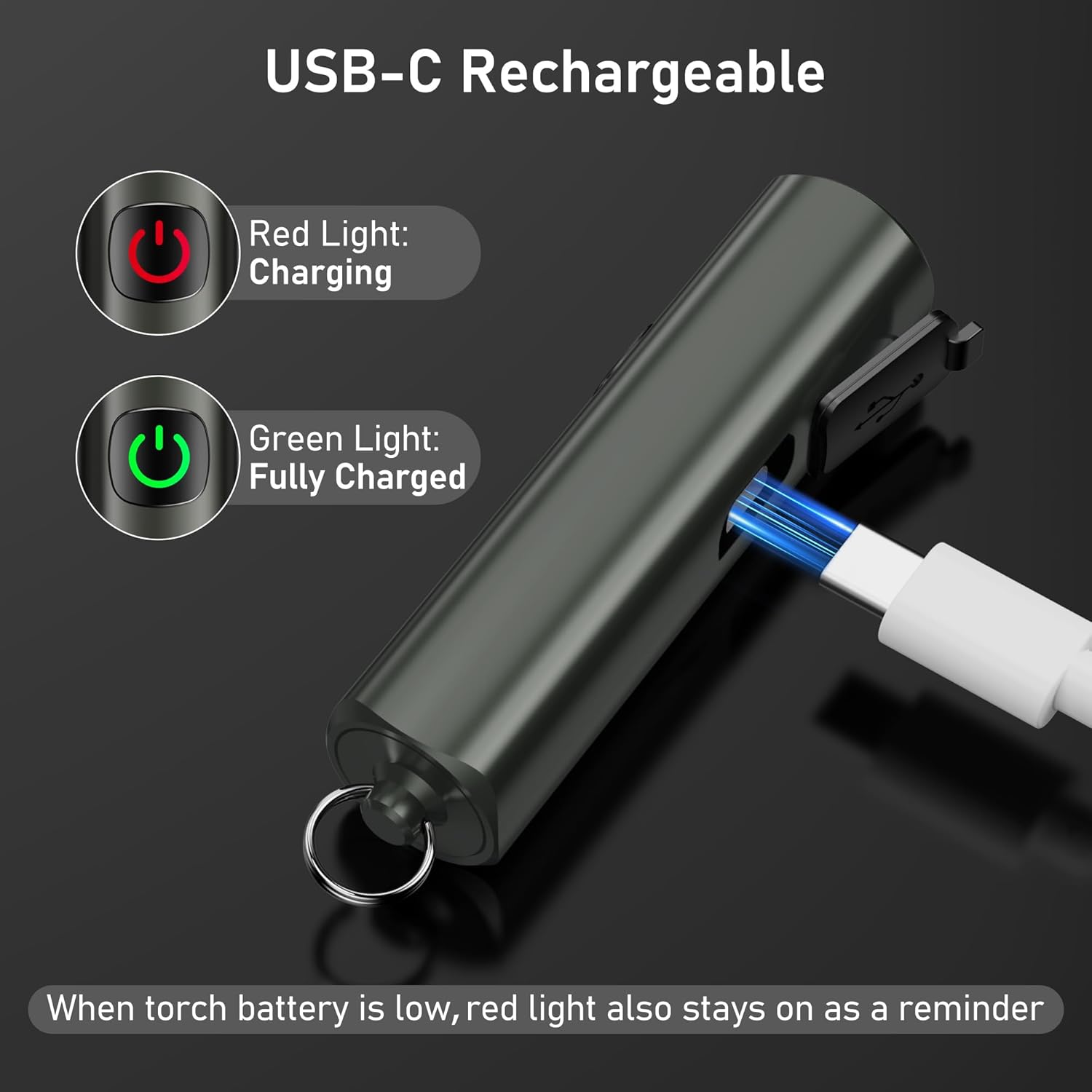
Image: Shows the USB-C charging port and the red/green indicator lights for charging status.
- Locate the USB-C charging port on the side of the flashlight, usually covered by a rubber flap.
- Gently open the rubber flap to expose the port.
- Connect the included USB-C charging cable to the flashlight's port and the other end to a standard USB power source (e.g., computer, wall adapter, power bank).
- Bọtini agbara yoo tan imọlẹ pupa to indicate that the flashlight is charging.
- Once fully charged, the power button will turn alawọ ewe.
- Gbigba agbara ni kikun maa n gba to wakati mẹta.
- When the battery is low during operation, the power button will also illuminate pupa as a reminder to recharge.
A full charge provides up to 5.5 hours of continuous illumination on the low brightness setting.
7. Itọju
Ninu
- Mu ina filaṣi nu pẹlu asọ, damp asọ lati yọ idoti tabi idoti.
- Má ṣe lo àwọn ohun ìfọṣọ tàbí àwọn ohun èlò ìfọṣọ, nítorí pé wọ́n lè ba ìparí tàbí àwọn ohun èlò inú jẹ́.
- Ensure the USB-C port cover is securely closed after charging to maintain its IPX6 waterproof rating.
Ibi ipamọ
- Tọju ina filaṣi naa ni itura, aye gbigbẹ kuro lati orun taara ati awọn iwọn otutu to gaju.
- If storing for an extended period, recharge the battery every 3 months to prevent battery degradation and prolong its lifespan.
8. Laasigbotitusita
| Isoro | Owun to le Fa | Ojutu |
|---|---|---|
| Ina filaṣi ko tan. | Batiri ti dinku. | Gba agbara si ina filaṣi nipa lilo okun USB-C ti a pese. |
| Imọlẹ jẹ baibai tabi flickers. | Batiri kekere. | Saji si flashlight. |
| Ina filaṣi ko gba agbara. | Charging cable or adapter faulty; port not connected properly. | Rí i dájú pé okùn USB-C so pọ̀ dáadáa. Gbìyànjú okùn USB-C mìíràn tàbí adapter agbára. |
| Cannot change brightness modes. | Iṣẹ ṣiṣe ti ko tọ. | Ensure you are pressing the button briefly to cycle modes. |
9. Awọn pato

Image: Visual representation of key specifications including beam distance, drop test, weight, waterproof rating, and length.
| Ẹya ara ẹrọ | Ẹ̀kúnrẹ́rẹ́ |
|---|---|
| Nọmba awoṣe | K9183 |
| Brand | Blukar |
| Awọn iwọn (L x W x H) | 6.64 x 1.58 x 1.58 cm (2.61 x 0.62 x 0.62 inches) |
| Iwọn | 27 giramu (0.95 iwon) |
| Batiri Iru | 1 batiri litiumu-ion (pẹlu) |
| Orisun agbara | Batiri agbara |
| Mabomire Rating | IPX6 (Resistant to powerful water jets) |
| Gbigba agbara Port | USB-C |
| Akoko gbigba agbara | O fẹrẹ to awọn wakati 2 |
| Àkókò Ìṣiṣẹ́ Tó Pọ̀ Jùlọ (Ipò Kéré) | Titi di wakati 5.5 |
| Ijinna tan ina | Titi de awọn mita 48 (157 ẹsẹ) |
| Ju Resistance | 1.5 mita (5 ẹsẹ) |
| Ohun elo | Aluminiomu Alloy Didara to gaju |
10. Alaye Aabo
- Do not shine the flashlight directly into eyes, as the bright light can cause temporary vision impairment.
- Pa kuro ni arọwọto awọn ọmọde. Eyi kii ṣe nkan isere.
- Do not disassemble, modify, or attempt to repair the flashlight yourself. This may void the warranty and pose safety risks.
- Avoid exposing the flashlight to extreme temperatures, open flames, or corrosive liquids.
- While the flashlight is IPX6 waterproof, it is not designed for submersion in water.
- Lo okun USB-C ti a pese nikan tabi iwe-ẹri deede fun gbigba agbara.
11. Atilẹyin ọja ati Support
For warranty information, please refer to the documentation included with your purchase or visit the official Blukar website. If you encounter any issues or require technical assistance, please contact Blukar customer support through their official channels.


