1. Ifihan
This manual provides detailed instructions for the proper setup, operation, and maintenance of your AOC ACW2212 Headset. Designed for PC use, this headset features a noise-cancelling microphone and voice isolation technology to enhance communication clarity in various work environments. Please read this manual thoroughly before using the product to ensure optimal performance and longevity.
2. Package Awọn akoonu
Daju pe gbogbo awọn ohun ti a ṣe akojọ rẹ si isalẹ wa ninu package ọja rẹ:
- AOC ACW2212 Headset
- USB Alailowaya Dongle
- 3.5mm Audio USB
- Okun gbigba agbara (USB-C si USB-A)
- Afowoyi Olumulo (iwe-ipamọ yii)
3. Ọja Ipariview
Familiarize yourself with the components of your AOC ACW2212 Headset:
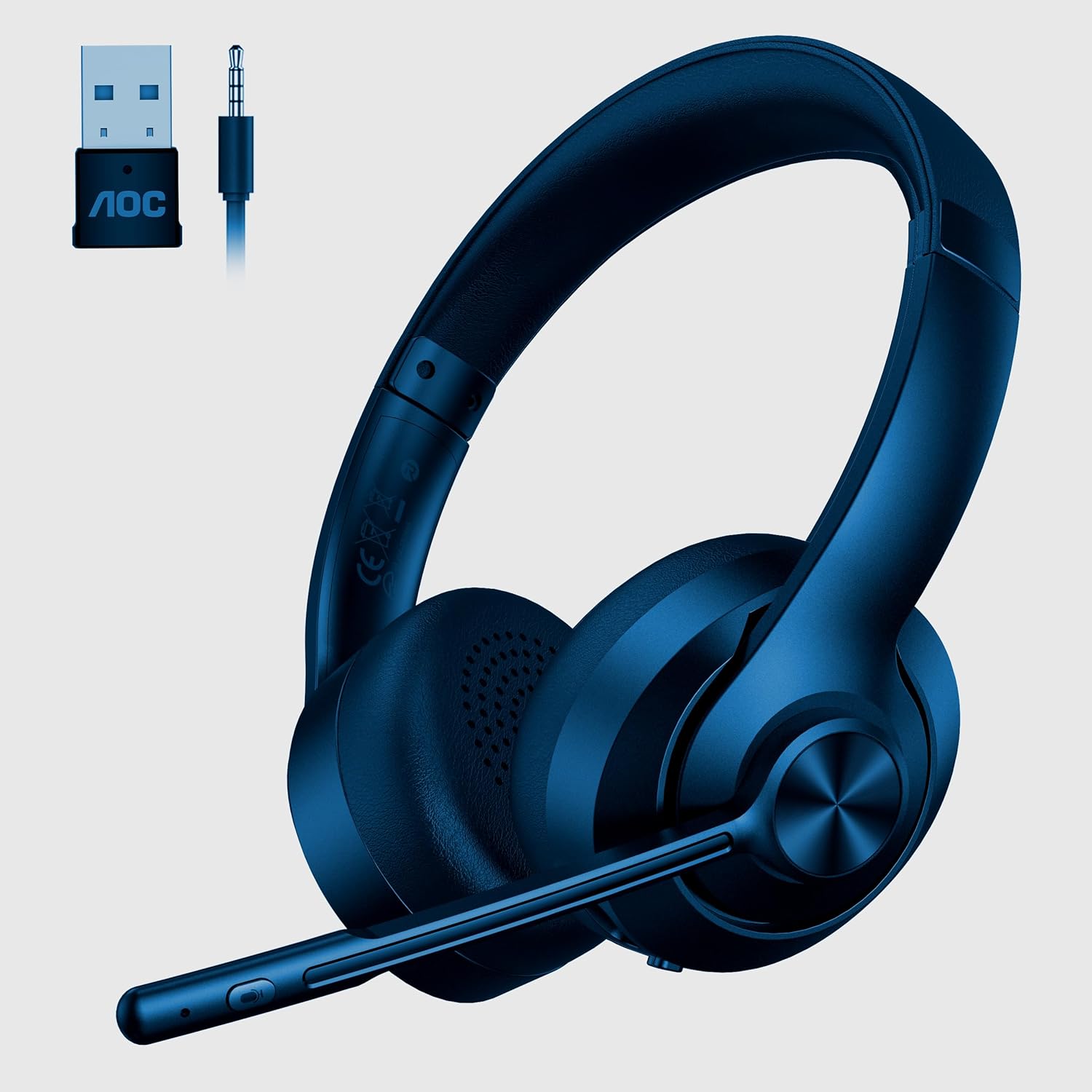
Image 1: AOC ACW2212 Headset with included USB wireless dongle and 3.5mm audio jack. The headset features an adjustable headband, over-ear cups, and a flexible boom microphone with integrated controls.
Àwọn Ẹ̀yà Agbekọrí:
- Akọkọ ti o le ṣatunṣe: Fun ibamu itunu.
- Awọn afikọti: Over-ear design for sound isolation.
- Gbohungbohun Ariwo: Flexible and adjustable, with noise-cancelling capabilities.
- Awọn iṣakoso iwọn didun: Buttons located on the earcup for adjusting audio output.
- Bọ́tìnì dídákẹ́kọ̀ọ́ gbohungbohun: For quick muting/unmuting of the microphone.
- Bọtini agbara: To turn the headset on or off.
- Ibudo Ngba agbara USB-C: Fun gbigba agbara ti abẹnu batiri.
- Jack Audio 3.5mm: Fun asopọ onirin.
4. Eto
4.1 Ìsopọ̀ Onífà (Okùn Ohùn 3.5mm)
- So opin kan ti okun ohun 3.5mm pọ mọ jaketi ohun 3.5mm lori agbekọri naa.
- Connect the other end of the 3.5mm audio cable to the audio output port on your PC or device.
- Ensure your device's audio settings are configured to use the headset as the input and output device.
4.2 Wireless Connection (USB Dongle)
- Insert the USB wireless dongle into an available USB port on your PC.
- Power on the headset by pressing and holding the Power button until the indicator light illuminates.
- The headset and dongle should automatically pair. A solid indicator light on the headset typically signifies a successful connection.
- Adjust your PC's sound settings to select the AOC ACW2212 Headset as the default playback and recording device.
4.3 Bluetooth Asopọ
- Rii daju pe agbekari ti ni agbara ni pipa.
- Tẹ bọtini agbara ki o si di mu fun bii awọn aaya 5-7 titi ti ina ifihan yoo fi tàn ni kiakia, ti o fihan ipo isopọmọ.
- On your device (PC, smartphone, etc.), navigate to the Bluetooth settings and enable Bluetooth.
- Wa fun available devices and select "AOC ACW2212" from the list.
- Once connected, the headset's indicator light will typically become solid or flash slowly.
5. Awọn ilana Iṣiṣẹ
5.1 Agbara Tan / Pa
- Lati Fi agbara: Tẹ mọlẹ bọtini agbara fun iṣẹju 2.
- Lati Paarẹ: Tẹ mọlẹ bọtini agbara fun iṣẹju 3.
5.2 Iṣakoso iwọn didun
- Iwọn didun Up: Tẹ bọtini '+'.
- Iwọn didun isalẹ: Tẹ bọtini '-'.
5.3 Microphone Mute/Unmute
- Press the Microphone Mute button on the boom mic to toggle mute on or off. An indicator light on the mic or headset may show the mute status.
5.4 Ngba agbara si Agbekọri
- Connect the charging cable to the USB-C port on the headset and the other end to a USB power source.
- The indicator light will typically show charging status (e.g., red for charging, green/off for fully charged).
6. Itọju
Láti rí i dájú pé agbekọri rẹ pẹ́ tó àti pé ó ń ṣiṣẹ́ dáadáa, tẹ̀lé àwọn ìlànà ìtọ́jú wọ̀nyí:
- Ninu: Lo aṣọ rírọrùn tí ó gbẹ láti nu agbekọri naa. Fún awọn agolo etí, a fi aṣọ díẹ̀ wẹ̀ ẹ́.amp Aṣọ le ṣee lo, ṣugbọn yago fun ọrinrin pupọ. Maṣe lo awọn kẹmika ti o lewu tabi awọn afọmọ abrasive.
- Ibi ipamọ: Tọju agbekari naa ni itura, aye gbigbẹ kuro lati orun taara ati awọn iwọn otutu to gaju.
- Itọju USB: Avoid bending or twisting cables excessively to prevent damage.
- Batiri: Fún ìgbà tí batiri bá pẹ́ tó, má ṣe jẹ́ kí agbekọri náà máa tú jáde dáadáa. Má ṣe gba agbára rẹ̀ déédéé.
7. Laasigbotitusita
If you encounter issues with your headset, refer to the following table for common problems and solutions:
| Isoro | Owun to le Fa | Ojutu |
|---|---|---|
| Ko si ohun lati agbekari | Headset not powered on; Incorrect audio output selected; Low battery; Loose cable connection. | Ensure headset is on; Check PC audio settings; Charge headset; Reconnect cables securely. |
| Gbohungbohun ko ṣiṣẹ | Microphone muted; Incorrect audio input selected; Loose cable connection. | Unmute microphone; Check PC audio input settings; Reconnect cables securely. |
| Cannot pair via Bluetooth/Wireless | Headset not in pairing mode; Device Bluetooth off; Dongle not properly inserted. | Put headset in pairing mode; Enable Bluetooth on device; Reinsert USB dongle. |
| Didara ohun afetigbọ | Interference; Distance from dongle/device; Low battery. | Move closer to device/dongle; Charge headset; Avoid sources of interference. |
8. Awọn pato
Technical specifications for the AOC ACW2212 Headset:
| Ẹya ara ẹrọ | Ẹ̀kúnrẹ́rẹ́ |
|---|---|
| Orukọ awoṣe | ACW2212 |
| Asopọmọra Technology | Wired (3.5mm), Wireless (USB Dongle), Bluetooth |
| Fọọmù ifosiwewe | Lori Eti |
| Gbigbe Eti | Lori Eti |
| Àwọ̀ | Dudu |
| Olupese | AOC |
| Iwọn Nkan | 331.12 g |
| Awọn batiri | 1 Batiri kan (pẹlu) |
9. Atilẹyin ọja ati Support
This AOC ACW2212 Headset comes with a standard manufacturer's warranty. For specific warranty terms and conditions, please refer to the warranty card included in your product packaging or visit the official AOC website. For technical support, troubleshooting assistance, or service inquiries, please contact AOC customer support through their official channels.


