1. Ifihan
Thank you for choosing the Proscenic P11 Ultra Cordless Vacuum Cleaner. This manual provides essential information for the safe and efficient use, maintenance, and troubleshooting of your new appliance. Please read it thoroughly before first use and retain it for future reference.
The Proscenic P11 Ultra is designed for versatile cleaning across various surfaces, offering powerful suction and convenient features for a cleaner home environment.
2. Awọn Ilana Aabo pataki
Nigbagbogbo tẹle awọn iṣọra aabo ipilẹ nigba lilo awọn ohun elo itanna lati dinku eewu ina, mọnamọna, tabi ipalara.
- Ka gbogbo awọn ilana ṣaaju lilo ohun elo naa.
- Ma ṣe lo ita gbangba tabi lori awọn aaye tutu.
- Maṣe gba laaye lati lo bi nkan isere. Ifarabalẹ sunmọ jẹ pataki nigba lilo nipasẹ tabi sunmọ awọn ọmọde.
- Lo nikan gẹgẹbi a ti ṣalaye ninu itọnisọna yii. Lo awọn asomọ iṣeduro olupese nikan.
- Ma ṣe lo pẹlu okun tabi plug ti o bajẹ. Ti ohun elo ko ba ṣiṣẹ bi o ti yẹ, ti lọ silẹ, bajẹ, fi silẹ ni ita, tabi sọ sinu omi, da pada si ile-iṣẹ iṣẹ kan.
- Ma ṣe fa tabi gbe nipasẹ okun, lo okun bi imudani, ti ilẹkun kan lori okun, tabi fa okun ni ayika awọn egbegbe to mu tabi igun. Maṣe fi ohun elo ṣiṣẹ lori okun. Jeki okun kuro lati awọn aaye ti o gbona.
- Ma ṣe yọọ kuro nipa fifaa lori okun. Lati yọọ, di plug naa, kii ṣe okun naa.
- Ma ṣe mu plug tabi ohun elo pẹlu ọwọ tutu.
- Ma ṣe fi ohun kan sinu awọn ṣiṣi. Maṣe lo pẹlu eyikeyi ṣiṣi dina; pa eruku, lint, irun, ati ohunkohun ti o le dinku sisan afẹfẹ.
- Jeki irun, aṣọ alaimuṣinṣin, awọn ika ọwọ, ati gbogbo awọn ẹya ara kuro lati awọn ṣiṣi ati awọn ẹya gbigbe.
- Maṣe gbe ohunkohun ti o njo tabi ti nmu siga, gẹgẹbi awọn siga, awọn ere-kere, tabi eeru gbigbona.
- Lo itọju afikun nigbati o ba sọ di mimọ lori awọn pẹtẹẹsì.
- Ma ṣe lo lati gbe awọn olomi ina tabi ina, gẹgẹbi petirolu, tabi lo ni awọn agbegbe nibiti wọn le wa.
- Má ṣe gbé àwọn ohun tó léwu (fún àpẹẹrẹ, chlorine bleach, ammonia cleaner, drain cleaner).
- Má ṣe lò ó ní àyè tí a ti há mọ́ níbi tí àwọn èéfín bá ti wá láti inú àwọ̀ epo, àwọ̀ tí ó ti tàn díẹ̀, àwọn ohun tí ó lè dènà ìpalára, eruku tí ó lè jóná, tàbí àwọn èéfín ìbúgbàù tàbí èéfín olóró mìíràn.
- Do not vacuum hard or sharp objects such as glass, nails, screws, or coins.
- Pa ohun elo yii nigbagbogbo ṣaaju asopọ tabi ge asopọ nozzle ti o ni alupupu.
- Tọju ohun elo inu ile. Fi kuro lẹhin lilo lati ṣe idiwọ awọn ijamba.
- Lo ṣaja nikan ti olupese pese lati saji.
- Ma ṣe sun ohun elo naa jo paapaa ti o ba bajẹ pupọ. Awọn batiri le gbamu ninu ina.
- The battery should be fully charged and stored separately if the device is not used for a long time.
3. Package Awọn akoonu
Carefully unpack your Proscenic P11 Ultra and check that all items are present and in good condition. If any items are missing or damaged, please contact customer support.
- Main igbale Unit
- Adjustable Telescopic Rod
- Motorized Floor Brush (Anti-Tangle with Green Light)
- Batiri yiyọ kuro
- Ohun èlò ìbáṣepọ̀ (pẹ̀lú ohun èlò ìfọ́, fẹ́lẹ́ ìfọ́)
- Adapta (Ṣája)
- Charging Dock / Wall Mount
- Afowoyi Olumulo (iwe-ipamọ yii)
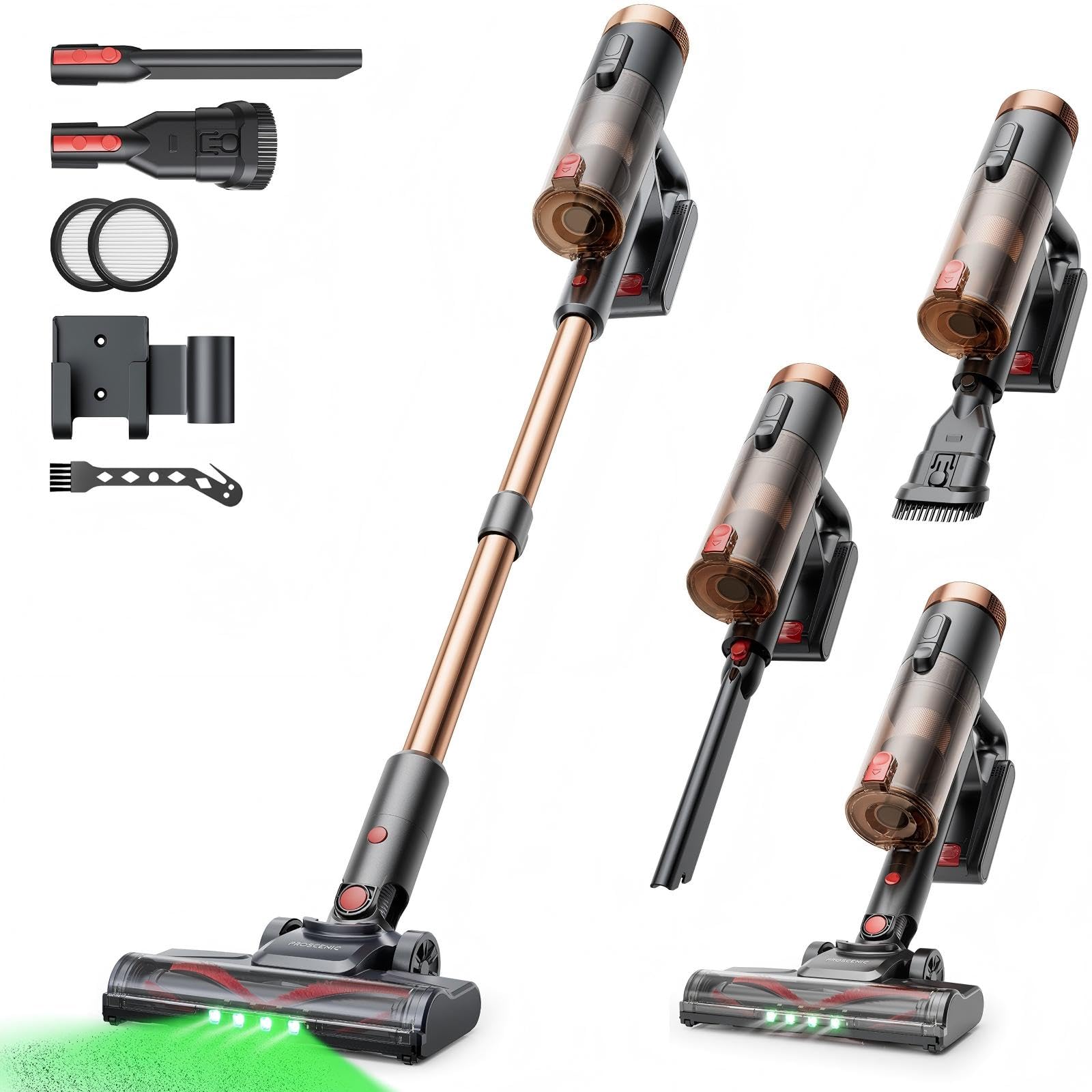
Image 1: Proscenic P11 Ultra main unit and included accessories. This image displays the vacuum cleaner's primary components, including the handheld unit, extension wand, floor brush, and various attachments.
4. Ọja Ipariview
Familiarize yourself with the key components and features of your Proscenic P11 Ultra.
Awọn ẹya pataki:
- Apẹrẹ Ọfẹ: Allows the vacuum to stand upright independently for convenient storage and breaks during cleaning.
- 180° Rotating Floor Brush: Enhances maneuverability, allowing easy access to tight corners and under furniture.
- Adjustable Telescopic Rod: Customize the height for comfortable use by various users.
- Anti-Tangle Brush with Green Detection Light: Prevents hair tangles and illuminates hidden dust particles for thorough cleaning.
- 50 kPa Super Strong Suction Power: Provides powerful cleaning performance for stubborn dirt and debris.
- Intelligent Touchscreen: Displays real-time information on battery life, maintenance status, and suction modes.
- Two Suction Power Modes: Offers versatile cleaning options for different floor types and cleaning needs.
- Batiri yiyọ kuro: Allows for extended cleaning time with an optional spare battery and convenient charging.
Image 2: Close-up of the Proscenic P11 Ultra's intelligent touchscreen. The screen provides visual feedback on the vacuum's status.
5. Eto & Apejọ
Follow these steps to assemble your Proscenic P11 Ultra and prepare it for first use.
5.1 Assembling the Main Unit
- Insert the adjustable telescopic rod into the main handheld vacuum unit until it clicks securely into place.
- Attach the motorized floor brush to the bottom end of the telescopic rod, ensuring it locks firmly.
- Insert the removable battery into the designated slot on the main unit until it clicks.
Image 3: Illustration of assembling the main vacuum unit, showing the connection points for the telescopic rod and floor brush.
5.2 Ngba agbara si Batiri naa
Kí o tó lo ó fún ìgbà àkọ́kọ́, gba agbára bátìrì náà pátápátá. A lè gba agbára bátìrì náà nígbà tí a bá so mọ́ ẹ̀rọ pàtàkì tàbí lọtọ̀.
- Connect the adapter to the charging port on the battery or the charging dock.
- Pulọọgi ohun ti nmu badọgba sinu iṣan agbara kan.
- The touchscreen display will indicate charging status. A full charge typically takes approximately 4-5 hours.
Image 4: The vacuum cleaner connected to its charger, illustrating the charging process. The battery can be charged while installed or removed.
5.3 Asopọmọra Awọn ẹya ẹrọ
To use the crevice tool or dusting brush, detach the telescopic rod and floor brush from the main unit. Insert the desired accessory directly into the main unit's nozzle until it clicks.
6. Isẹ
Learn how to effectively use your Proscenic P11 Ultra for various cleaning tasks.
6.1 Titan / Paa ati Awọn ipo afamora
- Press the power button on the main unit to turn the vacuum cleaner on. It will start in the default suction mode.
- Use the mode selection button on the touchscreen to switch between the two available suction power modes: Standard and Max.
- Tẹ bọtini agbara lẹẹkansi lati pa ẹrọ fifọ ẹrọ naa.
6.2 Cleaning roboto
- Hard Floors & Carpets: Use the motorized floor brush for general cleaning. The green detection light will help identify fine dust.
- Tight Spaces & Corners: Utilize the crevice tool for narrow gaps, edges, and hard-to-reach areas.
- Upholstery & Delicate Surfaces: Attach the dusting brush for cleaning sofas, curtains, and other sensitive items.
- Irun ẹranko: The anti-tangle brush is specifically designed to effectively pick up pet hair without tangling.
Image 5: The Proscenic P11 Ultra in use, demonstrating its maneuverability on a hard floor surface. The green light on the brush head is visible.
6.3 Freestanding Function
The P11 Ultra features a freestanding design. When you need to pause cleaning or store the vacuum temporarily, simply ensure it is balanced and stands upright on its own. This allows for convenient breaks without needing to lean the vacuum against a wall or lay it down.
7. Itọju
Itọju deede ṣe idaniloju iṣẹ ṣiṣe ti o dara julọ ati fa gigun igbesi aye ẹrọ igbale rẹ.
7.1 Ofo Dustbin
Tú àpótí ìdọ̀tí náà sílẹ̀ lẹ́yìn lílò kọ̀ọ̀kan tàbí nígbà tí a bá dé ìlà ìkún MAX.
- Rii daju pe igbale ti wa ni pipa.
- Locate the dustbin release button, usually near the handle.
- Press the button to open the dustbin flap and empty contents into a waste bin.
- Ti ideri apoti naa pa daradara titi ti yoo fi tẹ.
Image 6: A user demonstrating how to empty the transparent dustbin of the Proscenic P11 Ultra into a trash receptacle.
7.2 Ninu Ajọ HEPA
Clean the HEPA filter regularly (e.g., monthly, depending on usage) to maintain suction power.
- Remove the dustbin from the main unit.
- Twist and pull out the HEPA filter assembly.
- Fi pẹ̀lẹ́pẹ̀lẹ́ tẹ àlẹ̀mọ́ náà lórí àpótí ìdọ̀tí láti mú eruku tí ó ti bàjẹ́ kúrò.
- If necessary, rinse the filter under cold running water. Ensure it is completely dry (for at least 24 hours) before reinserting. Do not use detergents.
- Tún so àlẹ̀mọ́ àti àpótí ìdọ̀tí pọ̀.
7.3 Ninu Roll fẹlẹ
Lojoojumọ, ṣayẹwo irun didan fun irun tabi idoti ti o ti dì mọ́ra.
- Turn off the vacuum and detach the motorized floor brush.
- Locate the brush roll release mechanism (refer to the floor brush diagram).
- Remove the brush roll. Use scissors or a cleaning tool to cut and remove any tangled hair or fibers.
- Tún fi ìrọ̀rí búrọ́ọ̀ṣì náà sí i kí o sì so ẹ̀rọ ìtújáde náà mọ́.
8. Laasigbotitusita
If you encounter issues with your Proscenic P11 Ultra, refer to the following common problems and solutions.
| Isoro | Owun to le Fa | Ojutu |
|---|---|---|
| Igbale ko ni tan | Batiri naa ko gba agbara tabi ko fi sori ẹrọ daradara. | Rii daju pe batiri ti gba agbara ni kikun ati fi sii ni aabo. |
| Agbara afamora kekere | Dustbin is full; Filter is clogged; Brush roll is blocked. | Empty dustbin. Clean or replace HEPA filter. Remove blockages from brush roll. |
| Brush roll not rotating | Brush roll is tangled with hair/debris; Floor brush is not properly attached. | Clean brush roll. Reattach floor brush securely. |
| Aye batiri kukuru | Battery not fully charged; Using Max suction mode frequently; Battery degradation. | Ensure full charge. Use Standard mode for longer runtime. Consider replacing battery if significantly degraded. |
| Ariwo ti ko wọpọ | Blockage in nozzle or hose; Damaged brush roll. | Check for and remove any blockages. Inspect brush roll for damage. |
If the problem persists after attempting these solutions, please contact Proscenic customer support.
9. Awọn pato
Technical specifications for the Proscenic P11 Ultra Cordless Vacuum Cleaner.
- Awoṣe: P11 Ultra
- Orisun Agbara: Agbara Batiri
- Voltage: 22.5 Volts
- Agbara mimu: Titi di 50 kPa
- Ìwọ̀n Nkan: 2.68 kilo
- Agbara Dustbin: Approximately 1.0 Liter (1000 Microliters as per data, interpreted as 1.0L)
- Àlẹmọ Iru: Àlẹmọ HEPA
- Okunfa Fọọmu: Upright (Stick Vacuum)
- Ailokun: Bẹẹni
- Niyanju Awọn oju-ilẹ: Carpet, Solid Wood, Upholstery
- Awọn ẹya pataki: Freestanding Design, Touchscreen, Green Detection Light, Anti-Tangle Brush, Adjustable Telescopic Rod, Removable Battery
10. Atilẹyin ọja & Onibara Support
Proscenic provides a 2-odun atilẹyin ọja for the P11 Ultra Cordless Vacuum Cleaner, covering manufacturing defects from the date of purchase.
For any questions, technical assistance, or warranty claims, please contact our customer support team. We offer 7x24 hours customer support lati ran o.
Imeeli: service-de@proscenic.com
Please have your model number (P11 Ultra) and purchase information ready when contacting support.


