Ọrọ Iṣaaju
This manual provides instructions for the Monster Persona 4th ANC Active Noise Canceling Headphones. Please read this manual thoroughly before using the product to ensure proper operation and to understand its features.

Image: Monster Persona 4th ANC Headphones in white, showcasing apẹrẹ gbogbogbo.
Alaye Aabo
Tẹ̀lé àwọn ìlànà ààbò wọ̀nyí láti dènà ìbàjẹ́ sí ẹ̀rọ náà tàbí kí ó ba ara rẹ jẹ́:
- Má ṣe fi àwọn agbekọri náà sí ojú ọjọ́ tàbí ojú ọjọ́ tó le koko.
- Yago fun sisọ tabi tẹriba awọn agbekọri si awọn ipa to lagbara.
- Ma ṣe tuka tabi gbiyanju lati tun awọn agbekọri naa ṣe funrararẹ.
- Clean the headphones with a soft, dry cloth. Do not use harsh chemicals.
- Gbigbọ gigun ni awọn ipele iwọn didun giga le fa ibajẹ igbọran.
Package Awọn akoonu
Jẹrisi pe gbogbo awọn ohun kan wa ninu package:
- 1x Monster Persona 4th ANC Headphones
- 1x Iru-C Ngba agbara USB
- 1x Aux USB
- 1x Itọsọna olumulo

Image: Contents of the product box, including the headphones, charging cable, aux cable, and user manual.
Ọja Pariview ati Awọn iṣakoso
Mọ ara rẹ pẹlu awọn eroja agbekọri ati awọn bọtini iṣakoso.

Image: Diagram illustrating the location and function of the control buttons on the headphones.
- Iwọn didun +: Press once to increase volume. Long press for 2 seconds for next song.
- Iwọn didun -: Press once to decrease volume. Long press for 2 seconds for previous song.
- Bọtini agbara:
- LATI: Tẹ gun fun awọn aaya 3.
- PA: Tẹ gun fun awọn aaya 5.
- Ṣiṣẹ/Daduro: Tẹ lẹẹkan.
- Answer/Hang up call: Tẹ lẹẹkan.
- Kọ ipe: Tẹ gun fun awọn aaya 2.
- Oluranlọwọ ohun: Tẹ gun fun awọn aaya 2.
- ANC Switching Modes: Press once to cycle through modes (Active Noise Canceling, Transparency, Standard).
Ṣeto
Ngba agbara si Awọn Agbekọri
Ṣaaju lilo akọkọ, gba agbara si awọn agbekọri ni kikun.
- So okùn gbigba agbara Iru-C pọ mọ ibudo gbigba agbara lori agbekọri naa.
- So opin okun miiran pọ si orisun agbara USB (fun apẹẹrẹ, ohun ti nmu badọgba ogiri, ibudo USB kọnputa).
- Ina Atọka yoo fihan ipo gbigba agbara. Gbigba agbara ni kikun gba to awọn wakati 2.
Idiyele iṣẹju mẹwa 10 n pese isunmọ awọn wakati 5 ti ṣiṣiṣẹsẹhin.

Image: Visual representation of the headphone's battery life and fast charging capability.
Titan / Paa
- Lati Fi agbara: Gun tẹ bọtini agbara fun awọn aaya 3.
- Lati Paarẹ: Gun tẹ bọtini agbara fun awọn aaya 5.
Asopọ Bluetooth
Lati so agbekọri rẹ pọ mọ ẹrọ nipasẹ Bluetooth:
- Rii daju pe awọn agbekọri ti wa ni pipa.
- Long press the Power button for 3 seconds to power on and enter pairing mode (indicator light will flash).
- Lori ẹrọ rẹ (foonuiyara, tabulẹti, kọmputa), mu Bluetooth ṣiṣẹ ki o wa awọn ẹrọ to wa.
- Select "Monster Persona 4th ANC" from the list of devices.
- Nígbà tí a bá ti so mọ́ ara wọn, ìmọ́lẹ̀ àmì náà yóò dáwọ́ dúró.

Image: Close-up of the internal Bluetooth 6.0 chip, indicating advanced wireless connectivity.
Olona-Point Asopọ
The headphones support connecting to two Bluetooth devices simultaneously.
- Connect the headphones to the first device as described in the Bluetooth Pairing section.
- Disconnect Bluetooth on the first device temporarily.
- So awọn agbekọri pọ si ẹrọ keji.
- So Bluetooth pọ̀ mọ́ ẹ̀rọ àkọ́kọ́. Ó yẹ kí a so agbekọri náà pọ̀ mọ́ ẹ̀rọ méjèèjì báyìí.

Image: Headphones connected simultaneously to a smartphone and a laptop, demonstrating multi-point connection.
Asopọ ti Ha
To use the headphones with a wired connection:
- Connect the included Aux Cable to the 3.5mm audio jack on the headphones.
- Connect the other end of the Aux Cable to your audio source's 3.5mm output.
Note: The wired connection on mobile devices only supports Type-C port input and output if using a Type-C to 3.5mm adapter (not included).
Ṣiṣẹ
Music Playback and Volume
- Ṣiṣẹ/Daduro: Tẹ bọtini agbara lẹẹkan.
- Orin to nbọ: Long press Volume + for 2 seconds.
- Orin ti tẹlẹ: Long press Volume - for 2 seconds.
- Mu iwọn didun pọ si: Press Volume + once.
- Din iwọn didun silẹ: Press Volume - once.
Isakoso Ipe
- Dahun/Firanṣẹ: Tẹ bọtini agbara lẹẹkan.
- Kọ Ipe: Gun tẹ bọtini agbara fun awọn aaya 2.
Oluranlọwọ ohun
- Mu Oluranlọwọ Ohun ṣiṣẹ: Gun tẹ bọtini agbara fun awọn aaya 2.
Sound Modes (ANC, Transparency, Standard)
The headphones offer three listening modes:
- Active Noise Canceling (ANC) Mode: Dinku ariwo ibaramu.
- Ipo akoyawo: Gba ọ laaye lati gbọ agbegbe rẹ lakoko ti o ngbọ ohun.
- Ipo Standard: Balanced sound for everyday listening without noise cancellation or transparency.
To switch between modes, press the ANC Switching Modes button once.
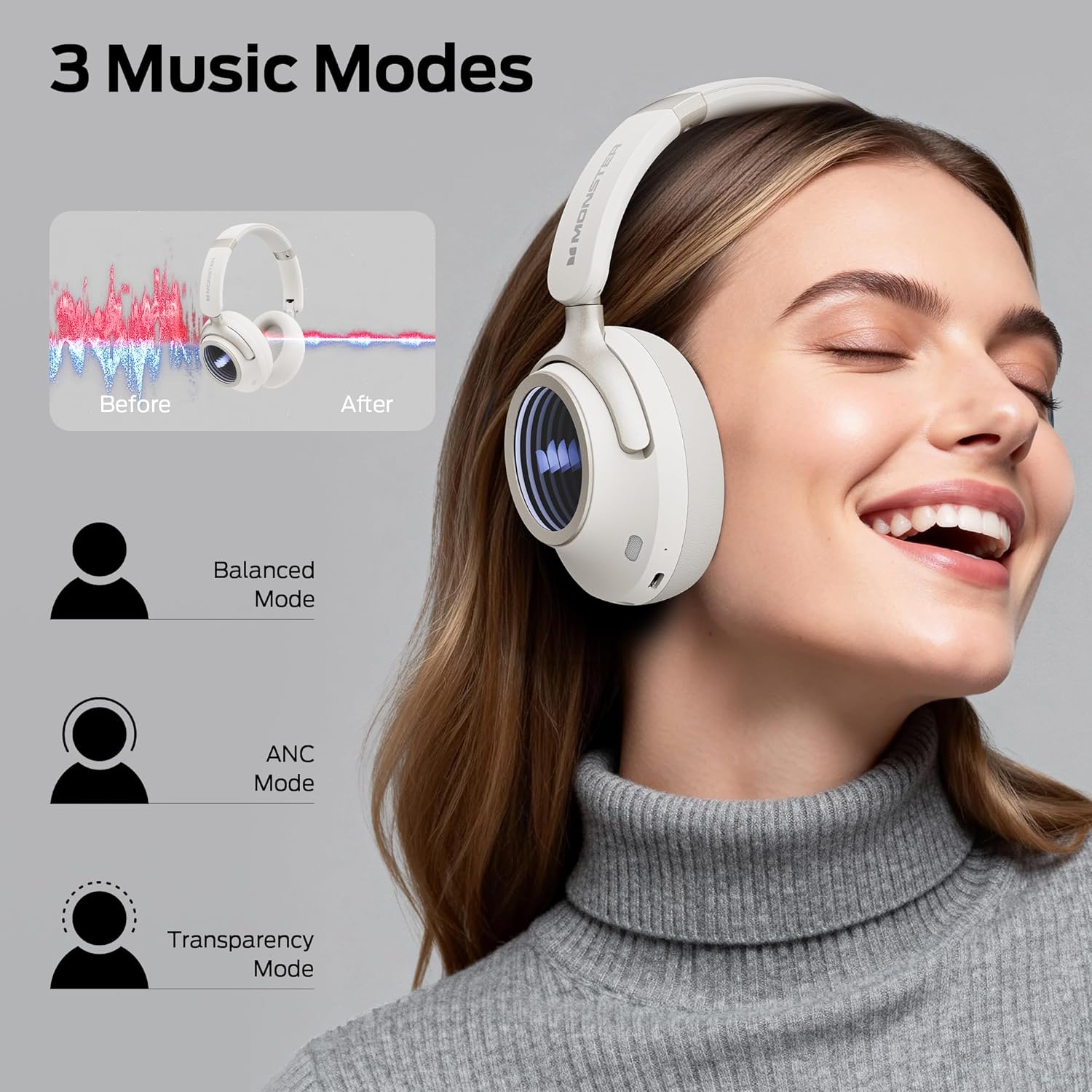
Image: Illustration of the three available music modes: Balanced, ANC, and Transparency, with a user demonstrating the headphones.
Wọ Awọn Agbekọri
Adjust the headband and earcups for a comfortable and secure fit. The earcups rotate for flexible adjustments.

Image: Close-up of an earcup, highlighting the breathable cushion design for comfort.

Image: Diagrams showing the dimensions of the headphones for both wireless and wired configurations.
Itoju
- Ninu: Use a soft, dry, lint-free cloth to clean the headphones. Do not use liquid cleaners or aerosols.
- Ibi ipamọ: Nigbati o ko ba wa ni lilo, tọju awọn agbekọri naa ni itura, aye gbigbẹ, kuro lati orun taara ati awọn iwọn otutu to gaju. Apẹrẹ ti a ṣe pọ gba laaye fun ibi ipamọ iwapọ.
- Itọju Batiri: Lati tọju igbesi aye batiri, gba agbara si awọn agbekọri nigbagbogbo, paapaa ti ko ba lo nigbagbogbo. Yago fun gbigba agbara si batiri ni kikun fun awọn akoko ti o gbooro sii.
Laasigbotitusita
| Isoro | Ojutu |
|---|---|
| Awọn agbekọri ko ṣiṣẹ. | Ensure the headphones are charged. Connect to a power source using the Type-C cable. |
| Ko le so pọ nipasẹ Bluetooth. | Ensure headphones are in pairing mode (flashing indicator light). Turn off and on Bluetooth on your device. Forget previous pairings and try again. Ensure headphones are within range. |
| Ko si ohun tabi iwọn kekere. | Check headphone and device volume levels. Ensure headphones are properly connected (Bluetooth or wired). Try restarting both devices. |
| Active Noise Canceling (ANC) is not effective. | Ensure ANC mode is activated. Check that the earcups form a good seal around your ears. ANC is most effective against low-frequency sounds. |
| Gbohungbohun ko ṣiṣẹ lakoko awọn ipe. | Ensure the headphones are connected via Bluetooth. Check your device's audio input settings to confirm the headphones are selected as the microphone. |
Awọn pato
| Ẹya ara ẹrọ | Ẹ̀kúnrẹ́rẹ́ |
|---|---|
| Orukọ awoṣe | Monster Persona 4th ANC |
| Asopọmọra Technology | Ti firanṣẹ, Ailokun (Bluetooth 6.0) |
| Awọn agbekọri Jack | 3.5 mm Jack |
| Imọ-ẹrọ Ibaraẹnisọrọ Alailowaya | Bluetooth |
| Ohun elo | Awọ, Ṣiṣu |
| Akoko gbigba agbara | Awọn wakati 2 |
| Batiri Apapọ Life | Wákàtí 70 (ANC ti ku), Wákàtí 50 (ANC ti wa ni tan) |
| Iṣakoso Iru | Iṣakoso bọtini |
| Iwọn Nkan | 0.2 kilo |
| Omi Resistance Ipele | Omi sooro |
| Ijinna Ṣiṣẹ ti o pọju | 33 Ẹsẹ |
| Ariwo Iṣakoso | Ti nṣiṣe lọwọ Noise Ifagile |
| Fọọmù ifosiwewe | Lori Eti |
| Ọja Mefa | 17.4 x 8 x 19.5 cm |
Atilẹyin ọja ati Support
Monster products are designed and manufactured to the highest quality standards. For warranty information and customer support, please refer to the warranty card included in your package or visit the official Monster webojula. Jeki ẹri rira rẹ fun awọn iṣeduro atilẹyin ọja.
If you encounter any issues not covered in this manual, please contact customer support for assistance.


