1. Ọja Ipariview
The LEFANT M2 Pro is an advanced robot vacuum and mop designed to provide efficient and comprehensive floor cleaning. It features dToF laser navigation for precise mapping, powerful 6000Pa suction, and a smart 2-in-1 sweeping and mopping function. The device also includes an automatic dust collection station for hands-free maintenance and can be controlled via a dedicated app or voice commands.
Awọn ẹya pataki:
- dToF Laser Navigation & PSD Obstacle Avoidance: Maps your home with high precision and detects obstacles in real-time.
- 6000Pa Agbara gbigba: Effectively removes dust, pet hair, debris, and crumbs from various surfaces.
- 2-in-1 Sweeping and Mopping: Cleans and mops simultaneously with an electronic water tank for adjustable flow.
- Customized Cleaning & Multi-Floor Mapping: Create up to 3 floor maps, set no-go zones, and customize cleaning schedules via the app.
- 2.5L Automatic Dust Emptying Station: Provides up to 90 days of hands-free dust collection.
- Ohun elo Smart & Iṣakoso ohun: Compatible with Alexa, Google Home, and the Lefant app for convenient control.
2. Package Awọn akoonu
Before setup, ensure all items are present in the package:
- Robot Vacuum Isenkanjade x 1
- Automatic Emptying Station x 1
- Mop Holder x 1
- Agbara USB x 1
- Ilana olumulo x 1
- Awọn apo eruku x 2
- Washable Mop Cloth x 1
- Ajọ HEPA x 4
- Dry Mop Cloth x 1
- Ohun elo fifọ x 1
- Fẹlẹ ẹgbẹ x 2
- Filter Sponge for Dustbin x 2

3. Eto Itọsọna
3.1 Initial Placement and Charging
- Place the automatic emptying station against a wall in an open area, ensuring there are no obstacles within 1 meter to either side and 1.5 meters in front.
- Connect the power cable to the station and plug it into a power outlet.
- Place the robot onto the charging contacts of the station to begin initial charging. Ensure the robot is fully charged before its first use.
3.2 Connecting to the Lefant App
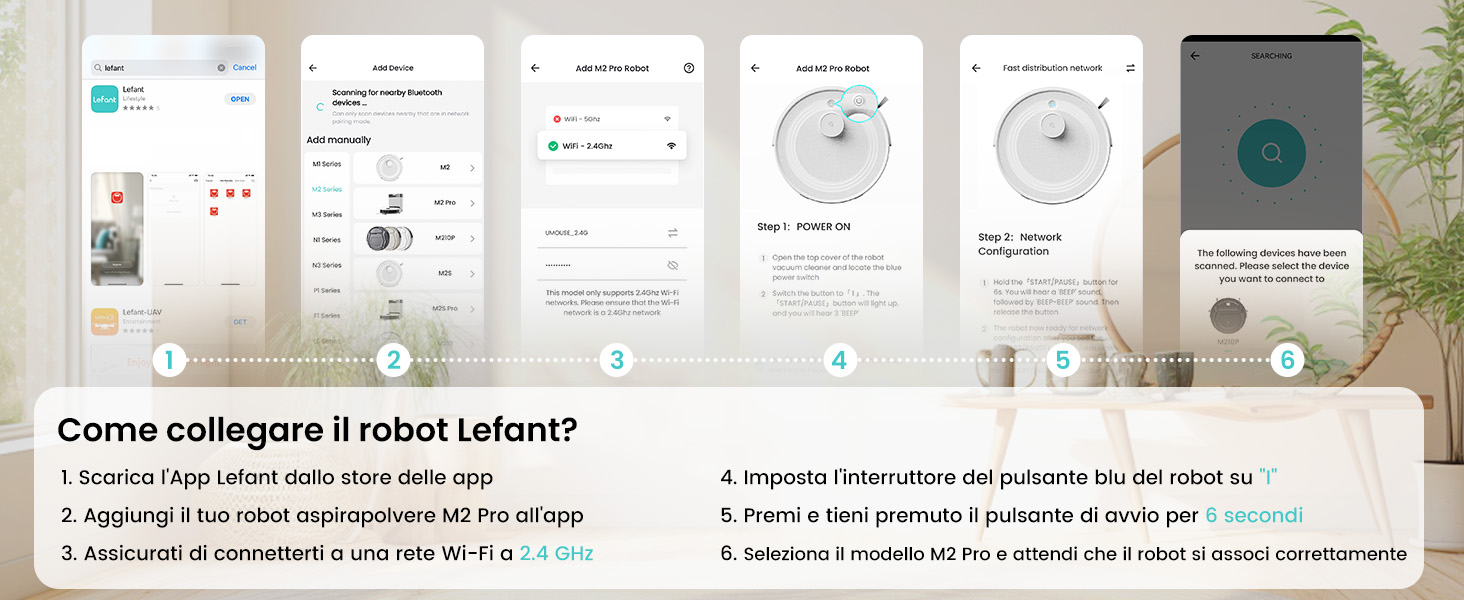
The Lefant app allows for full control and customization of your robot vacuum. Follow these steps to connect:
- Download the 'Lefant' app from your mobile device's app store (App Store for iOS or Google Play Store for Android).
- Ṣii app naa ki o forukọsilẹ tabi wọle si akọọlẹ rẹ.
- Add your M2 Pro robot vacuum to the app by following the on-screen instructions.
- Ensure your mobile device is connected to a 2.4 GHz Wi-Fi network. The robot only supports 2.4 GHz Wi-Fi.
- Turn on the robot by setting the blue power button to 'I'.
- Press and hold the start button on the robot for 6 seconds until you hear a voice prompt indicating network configuration mode.
- Select the M2 Pro model in the app and wait for the robot to pair successfully.

3.3 Connecting to Voice Assistants (Alexa/Google Home)
For hands-free control, integrate your M2 Pro with Amazon Alexa or Google Home:
- Open the Lefant App. Navigate to Profile > Third-party assistance for voice commands.
- Register your voice account and password within the Lefant app.
- Open the Alexa App (or Google Home App). Go to 'More' > 'Skills & Games' (or 'Works with Google').
- Wa fun 'Smart Life'.
- Click 'Enable to Use'.
- Select your region and enter the voice account and password from step 2.
- Wait for the connection to complete. You can now use voice commands like "Alexa, ask robot to clean."
4. Awọn ilana Iṣiṣẹ
4.1 ninu awọn ipo
M2 Pro nfunni ni ọpọlọpọ awọn ipo mimọ lati baamu awọn iwulo rẹ:
- Fifọ aifọwọyi: The robot intelligently navigates and cleans your entire home.
- Isọdọmọ Aami: Focuses on a specific dirty area for intensive cleaning.
- Isọfọ eti: Fọ pẹlú Odi ati aga egbegbe.
- Iseto di mimọ: Ṣeto awọn akoko kan pato fun robot lati nu laifọwọyi.
- Isọmọ agbegbe: Define specific rooms or areas to be cleaned.

4.2 App Iṣakoso
The Lefant app provides comprehensive control over your M2 Pro:
- Bẹ̀rẹ̀/Dáwọ́ ìfọmọ́: Initiate or stop cleaning cycles.
- Ṣatunṣe Agbara Imudani: Choose from multiple suction levels (Low, Medium, High).
- Ṣatunṣe Sisan Omi: Control the water output for mopping (Low, Medium, High).
- Ṣeto Awọn agbegbe Ko Lọ: Ṣeto awọn agbegbe ti robot yẹ ki o yago fun.
- View Cleaning Map: Monitor the robot's progress and cleaned areas in real-time.
- Iṣeto Iṣeto: Program daily or weekly cleaning tasks.
- Ìyàwòrán Ilẹ̀ Pàkà púpọ̀: Store maps for up to 3 different floors.

4.3 Iṣakoso ohun
Once connected to Alexa or Google Home, use simple voice commands:
- "Alexa, ask robot to clean."
- "Alexa, ask robot to recharge."
- "Alexa, ask robot to stop cleaning."

5. Itọju
5.1 Automatic Dust Emptying
The M2 Pro's automatic emptying station collects dust for up to 90 days, minimizing manual intervention. The station uses 2.5L dust bags for hygienic disposal.

5.2 Ìmọ́tótó Àpò Ìdọ̀tí àti Àlẹ̀mọ́
While the automatic station handles most dust, regular inspection and cleaning of the robot's internal dustbin and filters are recommended to maintain optimal performance. The M2 Pro's improved dustbin design ensures 98% debris removal during emptying.

5.3 Mop Cloth and Side Brush Maintenance
- Remove and clean the washable mop cloth after each mopping session.
- Regularly check the side brushes for tangled hair or debris and clean or replace them as needed.
6. Laasigbotitusita
If you encounter issues with your LEFANT M2 Pro, refer to the following common problems and solutions:
| Isoro | Owun to le Fa | Ojutu |
|---|---|---|
| Robot ko bẹrẹ tabi dahun. | Batiri kekere; Pa agbara; Robot di. | Ensure robot is charged; Check power switch; Clear any obstructions. |
| Iṣẹ ṣiṣe mimọ ti ko dara. | Full dustbin; Clogged filters; Worn brushes. | Dá àpótí ìdọ̀tí sílẹ̀; Fọ/rọ́pò àwọn àlẹ̀mọ́; Fọ/rọ́pò àwọn búrọ́ọ̀ṣì. |
| Robot di nigbagbogbo. | Obstacles (cables, small items); Uneven surfaces. | Clear floor of obstacles; Use no-go zones for problematic areas. |
| Ko le sopọ si Wi-Fi/App. | Incorrect Wi-Fi band (not 2.4GHz); Incorrect password; Robot not in pairing mode. | Ensure 2.4GHz Wi-Fi; Verify password; Re-enter pairing mode (hold start button for 6s). |
| Automatic emptying not working. | Dust bag full; Obstruction in emptying duct. | Replace dust bag; Check and clear emptying duct. |
For more detailed troubleshooting, refer to the full user manual or contact customer support.
7. Awọn pato
| Ẹya ara ẹrọ | Ẹ̀kúnrẹ́rẹ́ |
|---|---|
| Brand | LEFANT |
| Orukọ awoṣe | M2 Pro |
| Àwọ̀ | M2 Pro-black |
| Ọja Mefa | 32 x 32 x 9.4 cm |
| Iwọn Nkan | 6.24 kilo |
| Dustbin Agbara | 2.5 Liters (Auto-empty station) |
| Voltage | 19 Volts |
| Ohun elo | Ṣiṣu |
| Pataki Awọn ẹya ara ẹrọ | Smart Mapping, dToF Laser Navigation, PSD Obstacle Avoidance, Carpet Boost, App/Voice Control |
| Awọn ẹrọ ibaramu | Smartphone (2.4GHz Wi-Fi), Alexa, Google Home |
| Niyanju Awọn ipele | Hard floor, Carpet, Parquet, Tiles |
| Max asiko isise | 140 iṣẹju |
8. Atilẹyin ọja ati Support
LEFANT products are designed for reliability and performance. For warranty information, please refer to the documentation included with your product or visit the official LEFANT website. If you require technical assistance, have questions about your product, or need to report an issue, please contact LEFANT customer support through the following channels:
- Lefant App: Access support features directly within the application.
- Osise Webojula: Ṣabẹwo www.lefant.com fun FAQs, awọn itọsọna laasigbotitusita, ati alaye olubasọrọ.
- Imeeli Atilẹyin: Tọkasi apoti ọja rẹ tabi osise naa webojú-òpó wẹ́ẹ̀bù fún àdírẹ́sì ìmeeli ìrànlọ́wọ́ tí a yà sọ́tọ̀.
Please have your product model number (M2 Pro) and purchase details ready when contacting support to ensure efficient service.


