1. Ifihan
O ṣeun fun riraasing the Monster S350 Bluetooth Speaker. This portable wireless speaker features a touch screen, Bluetooth 6.0 connectivity, and support for TF cards, offering a versatile audio experience. This manual provides detailed instructions for setup, operation, maintenance, and troubleshooting to ensure optimal performance and longevity of your device.
2. Alaye Aabo
- Ma ṣe fi agbọrọsọ si awọn iwọn otutu to gaju, imọlẹ orun taara, tabi ọriniinitutu giga.
- Yago fun sisọ tabi tẹriba agbọrọsọ si awọn ipa to lagbara.
- Pa agbohunsoke kuro lati omi ati awọn olomi miiran.
- Má ṣe gbìyànjú láti tú agbọ̀rọ̀sọ náà, láti tún un ṣe, tàbí láti ṣe àtúnṣe rẹ̀ fúnra rẹ. Kàn sí àwọn òṣìṣẹ́ iṣẹ́ tó péye tí ó bá yẹ.
- Lo okun gbigba agbara ti a pese nikan tabi iwe-ẹri deede.
- Má ṣe sun àwọn bátìrì ní ìbámu pẹ̀lú òfin àdúgbò. Má ṣe sun iná.
3. Package Awọn akoonu
Jọwọ ṣayẹwo package fun awọn nkan wọnyi:
- Aderubaniyan S350 Bluetooth Agbọrọsọ
- Okun Ngba agbara USB
- Itọsọna olumulo
4. Ọja Ipariview
Familiarize yourself with the components of your Monster S350 speaker.

Nọmba 4.1: Iwaju view of the Monster S350 Bluetooth Speaker, showcasing its retro design and touch screen.

Nọmba 4.2: Close-up of the speaker's top controls, illustrating the long press function for power and swipe gestures for volume adjustment.
Awọn iṣakoso ati awọn ibudo:
- Bọlu Agbara/Iwọn didun: Long press to turn on/off. Swipe up to increase volume, swipe down to decrease volume.
- Ifihan iboju Fọwọkan: For navigation, settings, and displaying information.
- Iho Kaadi TF: Insert a TF (microSD) card for local music playback.
- Ibudo Ngba agbara USB-C: Fun gbigba agbara si agbọrọsọ.
5. Eto
5.1 Gbigba agbara si Agbọrọsọ
- Connect the USB charging cable to the speaker's USB-C port.
- So opin okun miiran pọ si ohun ti nmu badọgba agbara USB (kii ṣe pẹlu) tabi ibudo USB ti kọnputa kan.
- The charging indicator on the screen will show the charging status. A full charge typically takes approximately 2-3 hours.
5.2 Titan / Pa a
- Lati Fi agbara: Long press the Power/Volume knob until the screen lights up.
- Lati Paarẹ: Long press the Power/Volume knob until the screen turns off.
5.3 Sisopọ Bluetooth
Pair your Monster S350 with a Bluetooth-enabled device.
- Ensure the speaker is powered on and within range of your Bluetooth device (e.g., smartphone, tablet).
- Lori ẹrọ Bluetooth rẹ, mu Bluetooth ṣiṣẹ ki o wa awọn ẹrọ to wa.
- Yan "Aderubaniyan S350" lati inu akojọ awọn ẹrọ ti a ri.
- Nígbà tí a bá so wọ́n pọ̀, agbọ́hùnsọ̀ náà yóò fi hàn pé ìsopọ̀ náà ti yọrí sí rere, o sì lè bẹ̀rẹ̀ sí í gbọ́ ohùn.

Nọmba 5.1: The speaker displaying its Bluetooth connection status alongside a smartphone's Bluetooth settings.
5.4 Sisisẹsẹhin Kaadi TF
Play music directly from a TF (microSD) card.
- Rii daju pe agbọrọsọ ti wa ni pipa.
- Insert a TF card (up to 32GB, formatted to FAT32) into the TF card slot until it clicks into place.
- Power on the speaker. The speaker will automatically detect the TF card and switch to local music playback mode, or you can select it from the touch screen menu.

Nọmba 5.2: Demonstrating the insertion of a TF card into the speaker's dedicated slot for local music playback.
6. Awọn ilana Iṣiṣẹ
6.1 Ipilẹ Audio Sisisẹsẹhin
- Ṣiṣẹ/Daduro: Tap the play/pause icon on the touch screen.
- Orin t’okan: Swipe right on the touch screen or tap the next track icon.
- Tẹlẹ Orin: Swipe left on the touch screen or tap the previous track icon.
- Iṣakoso iwọn didun: Swipe up on the Power/Volume knob to increase volume, swipe down to decrease volume. Alternatively, adjust volume via the connected Bluetooth device.
6.2 Lilo awọn Fọwọkan iboju
The full-color touchscreen display allows for intuitive navigation and access to various features.
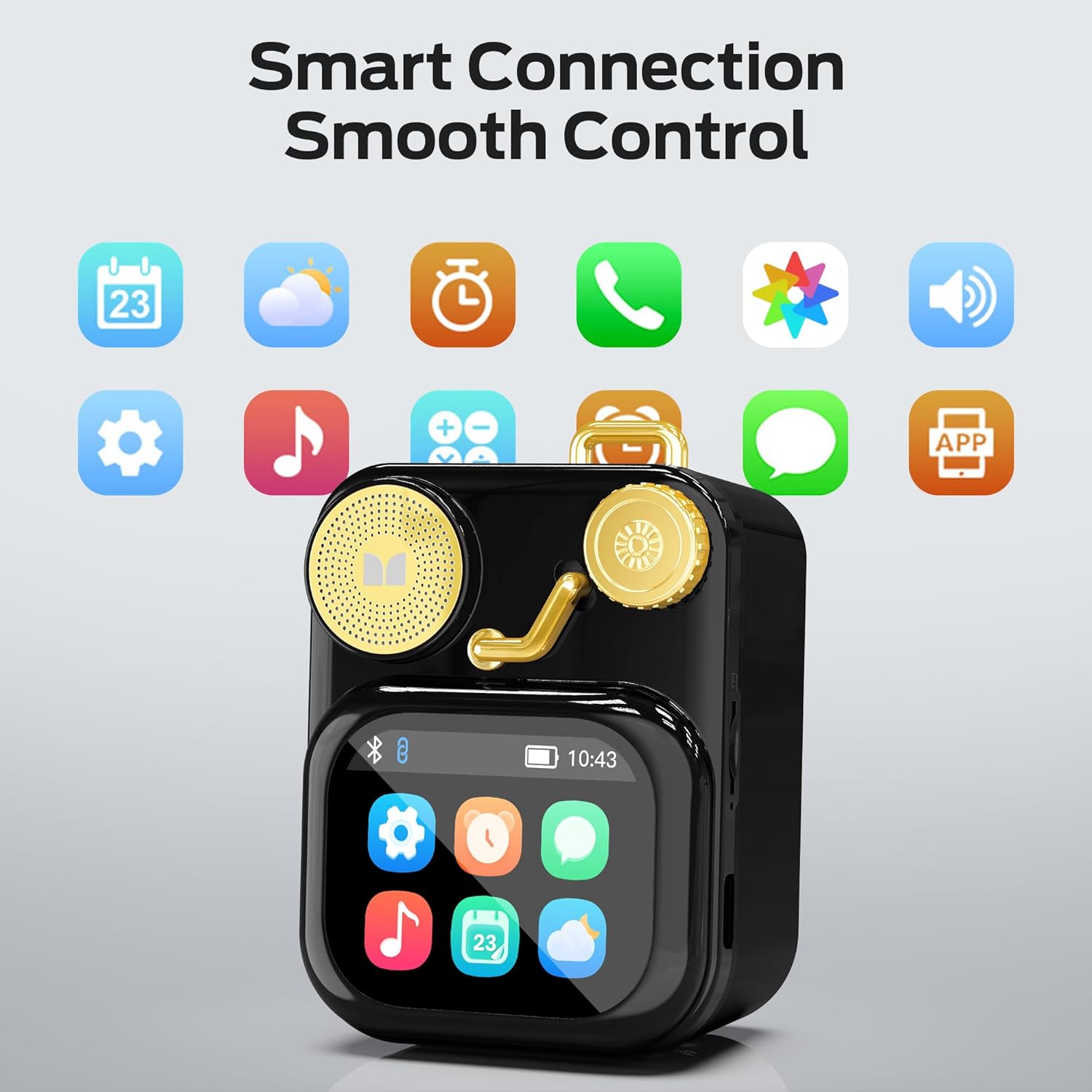
Nọmba 6.1: The speaker's touch screen displaying various application icons for smart features.
- Lilọ kiri: Swipe left/right or up/down to browse through menus and options.
- Aṣayan: Fọwọ ba aami kan tabi aṣayan lati yan.
- Eto: Access system settings, Bluetooth options, display preferences, and more through the settings icon.
6.3 Smart Awọn ẹya ara ẹrọ
When connected to a compatible smartphone via Bluetooth and the companion app (if available), the speaker can display various smart features:

Nọmba 6.2: Examples of smart features displayed on the speaker's screen, including notifications, weather, lyrics, and Bluetooth call information.
- Mobile Notifications: Receive alerts for messages and other app notifications.
- Alaye Orin: Display song titles and artist information during playback.
- Awọn itaniji: Set and manage alarms directly from the speaker.
- Awọn imudojuiwọn oju ojo: View alaye oju ojo gidi-akoko.
- Ariwo funfun: Access soothing white noise sounds for relaxation.
7. Itọju
7.1 Ninu
- Wipe the speaker's surface with a soft, dry, lint-free cloth.
- Má ṣe lo àwọn ohun ìfọṣọ, ọtí líle, tàbí àwọn ohun èlò ìfọ́mọ́ra kẹ́míkà, nítorí pé wọ́n lè ba ìparí rẹ̀ jẹ́.
- Jẹ́ kí àwọn èbúté má ṣe sí eruku àti ìdọ̀tí.
7.2 Ibi ipamọ
- Tọju agbohunsoke ni itura, aye gbigbẹ kuro lati orun taara ati awọn iwọn otutu to gaju.
- If storing for an extended period, charge the battery to approximately 50% every three months to preserve battery life.
8. Laasigbotitusita
If you encounter issues with your Monster S350 speaker, refer to the following solutions:
| Isoro | Owun to le Fa | Ojutu |
|---|---|---|
| Agbọrọsọ ko ni agbara lori. | Batiri ti dinku. | Gba agbara si agbọrọsọ nipa lilo okun USB ti a pese. |
| Ko si ohun lati agbọrọsọ. | Iwọn didun naa kere ju tabi o ti dakẹ. Ẹrọ naa ko so pọ mọ. | Increase speaker volume. Ensure Bluetooth device is paired and playing audio. |
| Kò le sopọ̀ mọ́ ara wọn nípasẹ̀ Bluetooth. | Speaker is not in pairing mode. Device is out of range. Interference. | Ensure speaker is on and Bluetooth is enabled. Move devices closer. Turn off other Bluetooth devices. |
| TF kaadi orin ko dun. | A ko fi kaadi sii daradara. A ko ni atilẹyin file ìṣètò. Káàdì tí ó bàjẹ́. | Tun TF kaadi sii. Rii daju orin files are in a supported format (e.g., MP3). Try a different TF card. |
| Smart features not working. | Not connected to companion app. App issues. | Ensure the speaker is connected to the companion app on your smartphone. Check app permissions and updates. |
9. Awọn pato
Technical details of the Monster S350 Bluetooth Speaker:
- Orukọ awoṣe: S350
- Brand: Aderubaniyan
- Ohun elo: Irin
- Àwọ̀: Dudu
- Awọn iwọn ọja: 12.5D x 10.5W x 5.4H sẹntimita (isunmọ 4.9 x 4.1 x 2.1 inches)
- Ìwọ̀n Nkan: 160 Giramu (isunmọ 0.35 lbs)
- Imọ-ẹrọ Asopọmọra: Bluetooth 6.0
- Agbara Ijade ti o pọju Agbọrọsọ: 10 Wattis
- Ipo Ijade Ohun: Sitẹrio
- Iru fifi sori: Tabili
- Batiri: 1 batiri litiumu ion (pẹlu)
- Atilẹyin Kaadi TF: Yes (up to 32GB, FAT32 format recommended)

Nọmba 9.1: Diagram illustrating the internal woofer for deep bass and tweeter for crisp highs, contributing to the speaker's audio quality.
10. Atilẹyin ọja ati Support
For warranty information or technical support, please refer to the documentation included with your purchase or contact Monster customer service. Keep your proof of purchase for warranty claims.
Olubasọrọ Iṣẹ Onibara: Please visit the official Monster website or refer to your product packaging for the most current support contact information.


