Ọrọ Iṣaaju
The JBL GRIP is a compact, portable Bluetooth speaker designed to deliver powerful JBL Pro Sound. It features AI Sound Boost technology for optimized audio output with minimal distortion. With its durable, dustproof, and waterproof design, the JBL GRIP is suitable for various environments and activities. This manual provides essential information for the proper use and maintenance of your speaker.

Image: The JBL GRIP speaker lineup in different colors, highlighting its portability.
Ohun ti o wa ninu Apoti
Upon unboxing your JBL GRIP speaker, please ensure all components are present:
- JBL GRIP Portable Bluetooth Speaker
- Quick Bẹrẹ Itọsọna
- USB-C Charging Cable (Note: USB charging cable is not included in some regions, please check packaging)

Image: A purple JBL GRIP speaker, representing the main product.
Ọja Pariview
Familiarize yourself with the key features and components of your JBL GRIP speaker.
Awọn iṣakoso ati awọn ibudo
- Bọtini agbara: Located on the top panel.
- Bọtini Pipọpọ Bluetooth: Located on the top panel, for connecting to devices.
- Bọ́tìnnì Ṣíṣe/Sánu duro: Located on the top panel.
- Iwọn didun Up / isalẹ Awọn bọtini: Located on the top panel.
- Ibudo Ngba agbara USB-C: Located on the side panel, protected by a cover.
- Imọlẹ Ibaramu: Integrated on the side panel, offering customizable lighting effects.

Aworan: Oke view of the JBL GRIP speaker, highlighting the control buttons.
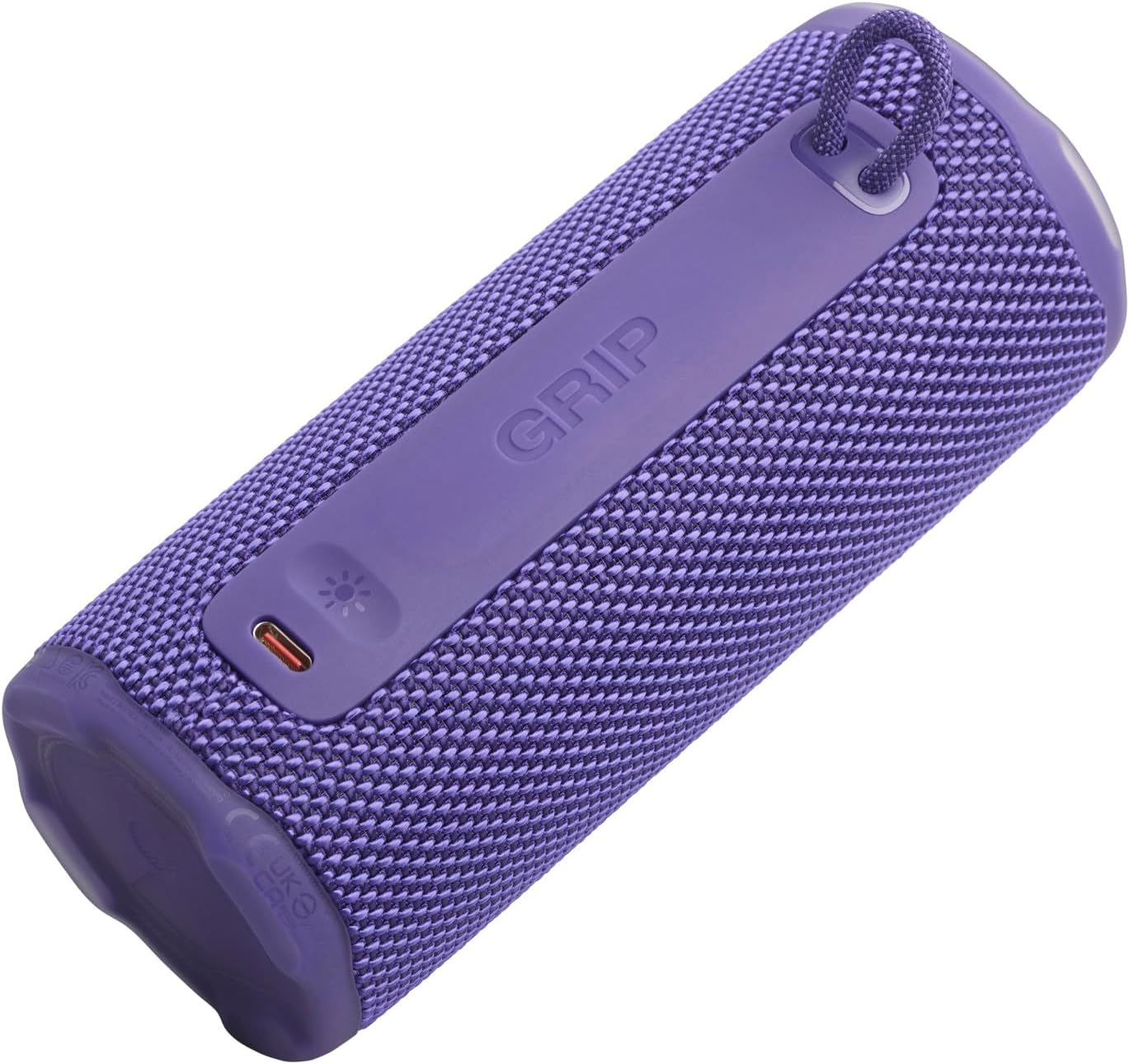
Aworan: Apa view of the JBL GRIP speaker, showing the USB-C charging port and the ambient light strip.
Key Awọn ẹya ara ẹrọ
- AI Sound Boost: Real-time music analysis algorithm optimizes output and suppresses distortion for enhanced sound quality.
- IP68 Dustproof ati Mabomire: Designed to withstand immersion in water and protect against dust ingress.
- Imọlẹ Ibaramu: Customizable LED light on the speaker's rear panel to set the mood.
- Akoko Sisisẹsẹhin Gigun: Up to 12 hours of continuous playback, extendable by an additional 2 hours with Playtime Boost.
- Aura Cast Multi-Speaker Connection: Connect multiple JBL GRIP speakers for a wider sound experience.
- JBL Portable App Compatibility: Control settings, customize ambient light, and manage features via the dedicated app.

Image: An internal diagram of the JBL GRIP speaker, illustrating the AI Sound Boost chip and dual passive radiators for enhanced bass.
Ṣeto
Gbigba agbara si Agbọrọsọ
- Wa ibudo gbigba agbara USB-C ni ẹgbẹ agbọrọsọ naa.
- Open the protective cover of the USB-C port.
- Connect one end of the USB-C charging cable to the speaker and the other end to a compatible USB power adapter (not included).
- Atọka LED yoo fihan ipo gbigba agbara. Gbigba agbara ni kikun gba to awọn wakati 3.
- Once fully charged, disconnect the cable and securely close the protective cover to maintain IP68 rating.
Asopọ Bluetooth
- Power on the JBL GRIP speaker by pressing the Power button.
- Press the Bluetooth button on the top panel. The LED indicator will flash, indicating pairing mode.
- On your device (smartphone, tablet, etc.), go to Bluetooth settings and select "JBL GRIP" from the list of available devices.
- Once connected, the LED indicator on the speaker will turn solid.
Awọn ilana Iṣiṣẹ
Sisisẹsẹhin ipilẹ
- Ṣiṣẹ/Daduro: Tẹ bọtini Play/Sinmi ni ẹẹkan.
- Iṣakoso iwọn didun: Lo awọn bọtini Iwọn didun Up (+) ati Iwọn didun isalẹ (-) awọn bọtini.
- Rekọja Orin: Tẹ bọtini Play/Duro lẹẹmeji fun orin ti o tẹle. Tẹ mẹta-mẹta fun orin ti o ti kọja.
Ibaramu Light Iṣakoso
The JBL GRIP features an ambient light that can be customized to match your mood.
- Àwọn Ìgbékalẹ̀ Àìyípadà: Cycle through pre-set light themes by pressing the dedicated light button (if available, otherwise use app).
- Isọdi: For advanced customization of brightness and color, download and use the JBL Portable app.

Image: A JBL GRIP speaker displaying its customizable ambient light feature.
Aura Cast Multi-Speaker Connection
Aura Cast allows you to connect multiple JBL GRIP speakers for a synchronized audio experience.
- Ensure all JBL GRIP speakers are powered on and in pairing mode.
- Follow the instructions in the JBL Portable app to initiate Aura Cast pairing.
- Once connected, audio will play simultaneously across all linked speakers.

Image: A visual representation of multiple JBL speakers connected using Aura Cast for multi-room audio.
JBL Portable App
Download the JBL Portable app from your device's app store to unlock additional features and control options for your JBL GRIP speaker. The app allows you to:
- Ṣatunṣe awọn eto oluṣeto.
- Customize ambient light themes and brightness.
- Manage Aura Cast connections.
- Ṣe imudojuiwọn famuwia agbọrọsọ.

Image: A screenshot of the JBL Portable app interface, showing customization options for sound and lighting.
Itoju
Mabomire ati Eruku (IP68)
The JBL GRIP speaker is rated IP68, meaning it is dust-tight and protected against continuous immersion in water up to 1.5 meters for up to 30 minutes. To maintain this rating:
- Rí i dájú pé a ti pa ideri ibudo USB-C dáadáa kí a tó fi agbọ́hùnsọ̀ náà hàn sí omi tàbí eruku.
- Má ṣe fi omi iyọ̀ tàbí àwọn kẹ́míkà míràn sí agbọ́rọ̀sọ náà. Tí ó bá fara hàn, fi omi tútù fọ̀ ọ́ kí o sì gbẹ ẹ́ dáadáa.
- Avoid using the speaker in extreme temperatures.

Image: A JBL GRIP speaker in water, demonstrating its IP68 waterproof capability.
Ninu
Lati nu agbọrọsọ rẹ nu, lo asọ, damp asọ. Ma ṣe lo abrasive ose tabi epo.
Laasigbotitusita
| Isoro | Owun to le Solusan |
|---|---|
| Agbọrọsọ ko ni agbara lori. | Rii daju pe batiri ti gba agbara. So agbohunsoke pọ si orisun agbara nipa lilo okun USB-C. |
| Ko le so pọ nipasẹ Bluetooth. |
|
| Ko si ohun tabi iwọn kekere. |
|
| Ambient light not working. | Check settings in the JBL Portable app. Ensure the speaker is powered on. |
Awọn pato
| Ẹya ara ẹrọ | Ẹ̀kúnrẹ́rẹ́ |
|---|---|
| Orukọ awoṣe | JBL GRIP |
| Nọmba awoṣe Ọja | JBLGRIPPUR |
| Agbọrọsọ Iru | Agbọrọsọ Gbigbe |
| Alailowaya Technology | Bluetooth |
| Igbohunsafẹfẹ Band | 2400MHz - 2483.5MHz |
| Idahun Igbohunsafẹfẹ | 20 kHz |
| Agbara Ijade ti o pọju | 16 W |
| Orisun agbara | Batiri (Lithium ion) |
| Igbesi aye batiri | Up to 12 hours (extendable by 2 hours with Playtime Boost) |
| Akoko gbigba agbara | O fẹrẹ to awọn wakati 3 |
| Mabomire / Dustproof Rating | IP68 |
| Awọn iwọn Ọja (D x W x H) | 6.5 x 6.4 x 15.3 cm |
| Iwọn Ọja | 385 giramu |
| Ọna Iṣakoso | App |
| Awọn irinše to wa | Quick Bẹrẹ Itọsọna |

Image: A diagram illustrating the dimensions and weight of the JBL GRIP speaker.
Atilẹyin ọja ati Support
The JBL GRIP speaker comes with a limited warranty. Please refer to the included Quick Start Guide or visit the official JBL webaaye fun alaye atilẹyin ọja alaye ati awọn olubasọrọ atilẹyin.
For technical assistance, troubleshooting, or to register your product, please visit www.jbl.com/support.