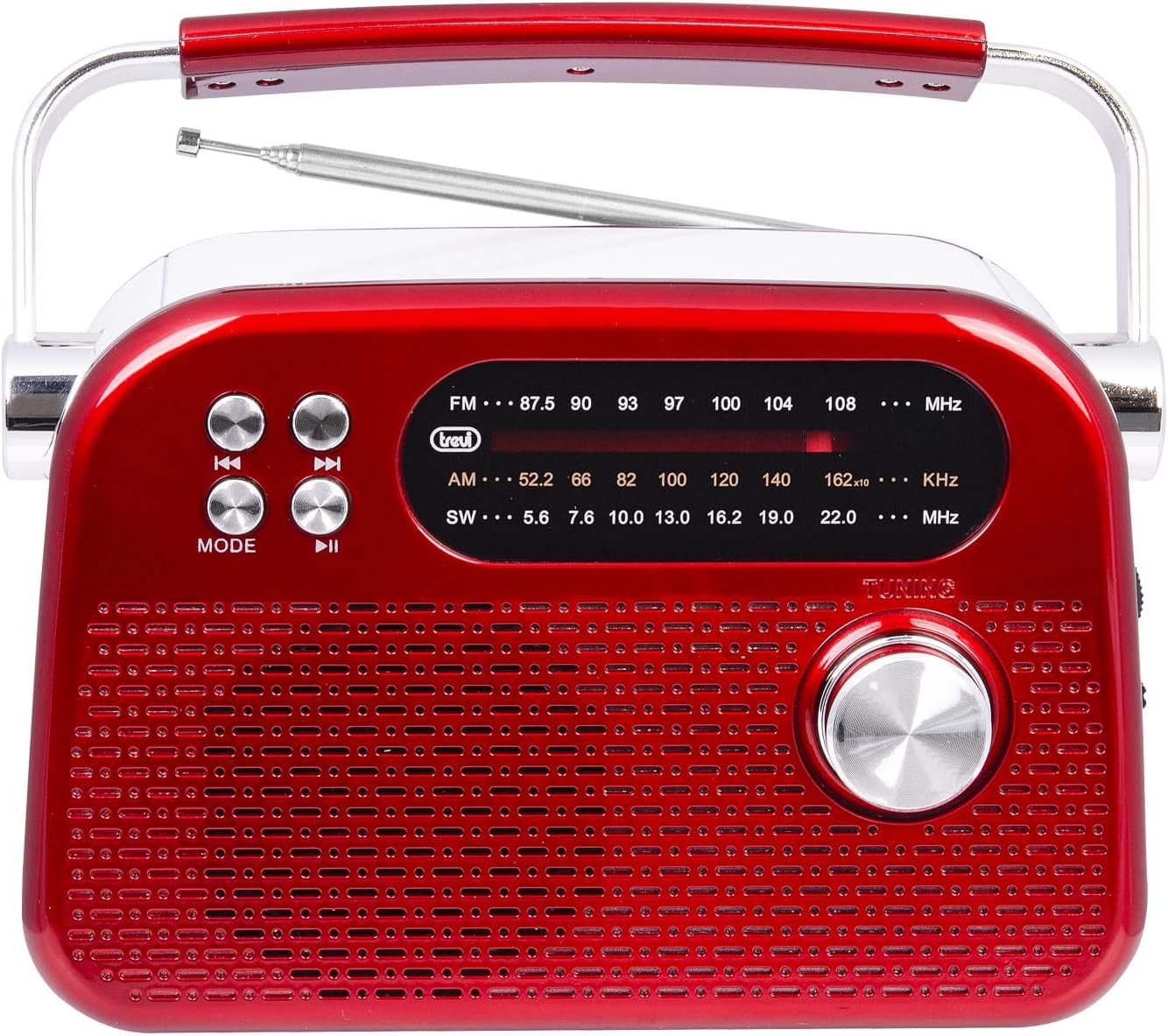
Trevi RDA 70 BR Portable Multiband Radio User Manual
Model: RDA 70 BR | Brand: Trevi
Ọrọ Iṣaaju
The Trevi RDA 70 BR is a compact and versatile portable wireless radio designed to provide a complete audio experience. It combines traditional radio reception with modern digital functions, making it ideal for listening to music or news anywhere. This radio supports FM, AM, and SW bands, offering access to a wide variety of local and international stations. Additionally, it features a wireless audio connection for streaming from smartphones or tablets, and an integrated MP3 player for direct playback from USB drives or Micro SD cards. Powered by a rechargeable lithium battery with convenient USB Type-C charging, the Trevi RDA 70 BR ensures maximum portability and continuous use.
Alaye Aabo pataki
Ka gbogbo awọn ilana ni pẹkipẹki ṣaaju lilo ẹrọ naa.
Jeki iwe afọwọkọ yii fun itọkasi ọjọ iwaju.
Ma ṣe fi ẹrọ naa han si ojo, ọrinrin, tabi awọn iwọn otutu to gaju.
Yago fun gbigbe ẹrọ naa si nitosi awọn orisun ooru gẹgẹbi awọn imooru, awọn iforukọsilẹ ooru, awọn adiro, tabi awọn ohun elo miiran (pẹlu ampliifiers) ti o gbe ooru jade.
Lo awọn asomọ/awọn ẹya ara ẹrọ ti a sọ pato nipasẹ olupese.
Dabobo okun agbara lati ma rin lori tabi pin, ni pataki ni awọn pilogi, awọn ohun elo irọrun, ati aaye nibiti wọn ti jade lati ẹrọ naa.
Yọọ ẹrọ yii kuro lakoko iji manamana tabi nigba lilo fun igba pipẹ.
Refer all servicing to qualified service personnel. Servicing is required when the device has been damaged in any way.
Package Awọn akoonu
Jọwọ ṣayẹwo pe gbogbo awọn nkan wa ati ni ipo to dara:
Trevi RDA 70 BR Portable Multiband Radio
Okun Ngba agbara USB/Iru-C
Afowoyi Olumulo (iwe-ipamọ yii)
Ọja Pariview
Iwaju Panel
Aworan 1: Iwaju view of the Trevi RDA 70 BR radio. This image displays the main speaker grille, the frequency display for FM, AM, and SW bands, the tuning knob on the right, and control buttons (Mode, Play/Pause, Skip) on the left.
Ifihan Igbohunsafẹfẹ: Shows the current radio frequency for FM, AM, and SW bands.
Bọtini Ipo: Switches between radio (FM/AM/SW) and MP3 playback modes.
Awọn bọtini Iṣakoso Sisisẹsẹhin: For MP3 mode, these buttons control previous track, play/pause, and next track.
Knob Tuntun: Used to manually tune radio frequencies.
Agbọrọsọ Grille: Main audio output.
Ẹ̀gbẹ́ Pánẹ́lì àti Àwọn Ìbùdó
Aworan 2: Apa view of the Trevi RDA 70 BR radio. This image highlights the side panel where the volume control, power switch, USB port, Micro SD card slot, and the USB Type-C charging port are located.
Bọtini Iwọn didun: Ṣe atunṣe ipele iṣelọpọ ohun.
Yipada Agbara (PA/ON): Yi redio si tan tabi pa.
DC 5V IN (Type-C Port): Connect the provided USB Type-C cable for charging the internal battery.
Ibudo USB: Fi awakọ filasi USB sii fun ṣiṣiṣẹsẹhin MP3.
Micro SD Card Slot (TF): Fi kaadi Micro SD sii fun ṣiṣiṣẹsẹhin MP3.
Ru Panel
Aworan 3: Ẹyìn view of the Trevi RDA 70 BR radio. This image shows the telescopic antenna, the battery compartment with an "OPEN" indicator, and the product information label.
Eriali telescopic: Extend for improved radio reception.
Abala Batiri: Houses the rechargeable lithium battery.
Ṣeto
1. Ngba agbara si Batiri naa
Locate the USB Type-C charging port on the side of the radio (refer to Image 2).
Connect one end of the provided USB Type-C cable to the radio's charging port.
So opin keji okun USB pọ mọ adapter agbara USB deede (ko si ninu rẹ) tabi ibudo USB kọmputa kan.
The charging indicator light (if present) will illuminate to show that the battery is charging.
Allow the radio to charge fully before first use. A full charge typically takes a few hours.
2. Ṣíṣe àtúnṣe sí Antenna
For optimal radio reception, especially for FM and SW bands, fully extend the telescopic antenna located on the rear panel of the radio (refer to Image 3). You may adjust its angle and direction to improve signal strength.
Awọn ilana Iṣiṣẹ
1. Agbara Tan / Paa
To turn the radio ON, slide the Power switch (located on the side panel, refer to Image 2) to the "ON" position. To turn it OFF, slide the switch to "OFF".
2. Siṣàtúnṣe iwọn didun
Rotate the Volume knob (located on the side panel, refer to Image 2) clockwise to increase the volume and counter-clockwise to decrease it.
3. Radio Tuning (FM/AM/SW)
Rii daju pe redio wa ni titan.
Tẹ awọn MODE button (on the front panel) repeatedly until the desired radio band (FM, AM, or SW) is selected. The selected band will be indicated on the frequency display.
Fa eriali telescopic naa siwaju fun gbigba to dara julọ.
Yiyi awọn TUNTUN knob (on the front panel) to search for radio stations. The frequency will change on the display.
Stop tuning when you find a clear signal for your desired station.
4. MP3 Playback (USB/Micro SD)
Insert a USB flash drive into the USB port or a Micro SD card into the TF slot on the side panel (refer to Image 2).
Tẹ awọn MODE button (on the front panel) repeatedly until the MP3 playback mode is activated. The radio will automatically detect and begin playing MP3 files lati media ti a fi sii.
Use the playback control buttons (Previous, Play/Pause, Next) on the front panel to manage your music.
To remove the USB drive or Micro SD card, first switch to a different mode or power off the radio, then gently pull out the media.
5. Wireless Audio Connection
The Trevi RDA 70 BR features a wireless audio connection, allowing you to stream audio from compatible devices like smartphones or tablets. While in MP3 mode, the radio may automatically enter a pairing state or you may need to press the MODE button to switch to the wireless audio input. Refer to your external device's manual for pairing instructions. Once connected, the radio acts as a wireless speaker for your device.
Itoju
Ninu: Lo aṣọ rírọrùn tí ó gbẹ láti nu ìta rédíò náà. Má ṣe lo àwọn ohun ìfọṣọ, epo tàbí àwọn ohun olómi.
Itọju Batiri: To prolong battery life, avoid fully discharging the battery frequently. Recharge the radio regularly, especially if it will be stored for an extended period.
Ibi ipamọ: When not in use, store the radio in a cool, dry place away from direct sunlight and extreme temperatures.
Laasigbotitusita
Isoro
Owun to le Fa
Ojutu
Redio ko ṣiṣẹ.
Batiri ti wa ni idasilẹ.
Connect the radio to a power source using the USB Type-C cable and allow it to charge.
Gbigba redio ti ko dara.
Eriali ko gbooro sii tabi agbegbe ifihan ti ko dara.
Fully extend the telescopic antenna and adjust its position. Try moving the radio to a different location.
No sound from USB drive or Micro SD card.
Incorrect mode selected or unsupported file ọna kika.
Ensure the radio is in MP3 playback mode. Verify that the audio files are in MP3 format. Check if the USB drive/Micro SD card is properly inserted.
Wireless audio connection issues.
Ẹrọ ko so pọ tabi ko si ni ibiti o ti le.
Ensure the radio is in wireless audio mode. Check your external device's Bluetooth settings and re-pair if necessary. Keep devices within close range.
Awọn pato
Awoṣe: RDA 70 BR
Brand: Trevi
Awọn ẹgbẹ redio: FM, AM, SW
Sisisẹsẹhin ohun: USB, Micro SD (MP3 format)
Asopọmọra: Alailowaya Audio Asopọ
Orisun Agbara: Batiri litiumu gbigba agbara
Ibudo gbigba agbara: USB Type-C (DC 5V)
Awọn iwọn (L x W x H): Isunmọ 18.5 cm x 7 cm x 12.5 cm
Ìwúwo: O fẹrẹ to 600 g
Awọn eroja to wa: Okun Ngba agbara USB/Iru-C
Ilu isenbale: China
Atilẹyin ọja ati Support
For warranty information and technical support, please refer to the warranty card included with your product or visit the official Trevi webojula. Tọju iwe-ẹri rira rẹ bi ẹri rira fun eyikeyi awọn ibeere atilẹyin ọja.