1. Alaye Aabo pataki
Please read and understand all safety instructions before assembly, installation, or use of this product. Failure to follow these instructions may result in injury or damage to the product.
- Always unplug the vanity before assembly or disassembly.
- Ṣọ́ra fún àwọn etí mímú àti àwọn àmì ìfàmọ́ra nígbà tí a bá ń kó wọn jọ.
- Do not exceed the weight limit of 72.75 pounds on the vanity surface.
- Keep electrical components dry and away from heat sources.
- Always supervise children around the vanity.
- Rii daju pe gbogbo awọn isopọ wa ni aabo ṣaaju lilo.
- Use the provided anti-tip anchors to secure the vanity to a wall to prevent tipping.
2. Ọja Ipariview
The Driftalia Vanity Desk with Mirror and Lights (Model IF240040) is designed to provide a functional and organized space for personal grooming. It features a large mirror with adjustable LED lighting, ample storage options, and a built-in power hub for convenience.

Aworan 2.1: Iwaju view of the Driftalia Vanity Desk, showcasing the mirror with lights, central drawer, and side cabinet.
Awọn ẹya pataki:
- Integrated Mirror with LED Lights: 11 LED bulbs offer 3 color modes (Cool White, Warm White, Warm Yellow) and 10 brightness levels.
- Ibi ipamọ to pọ: Includes a large storage drawer, 5 open shelves, a hidden 3-tier cabinet, and a dedicated hairdryer holder.
- Ibudo Agbara ti a ṣe sinu rẹ: Features 2 AC outlets and 2 USB ports for charging devices and powering styling tools.
- Ikole ti o tọ: Made with engineered wood, scratch-resistant surfaces, and equipped with anti-tip anchors and adjustable feet for stability.
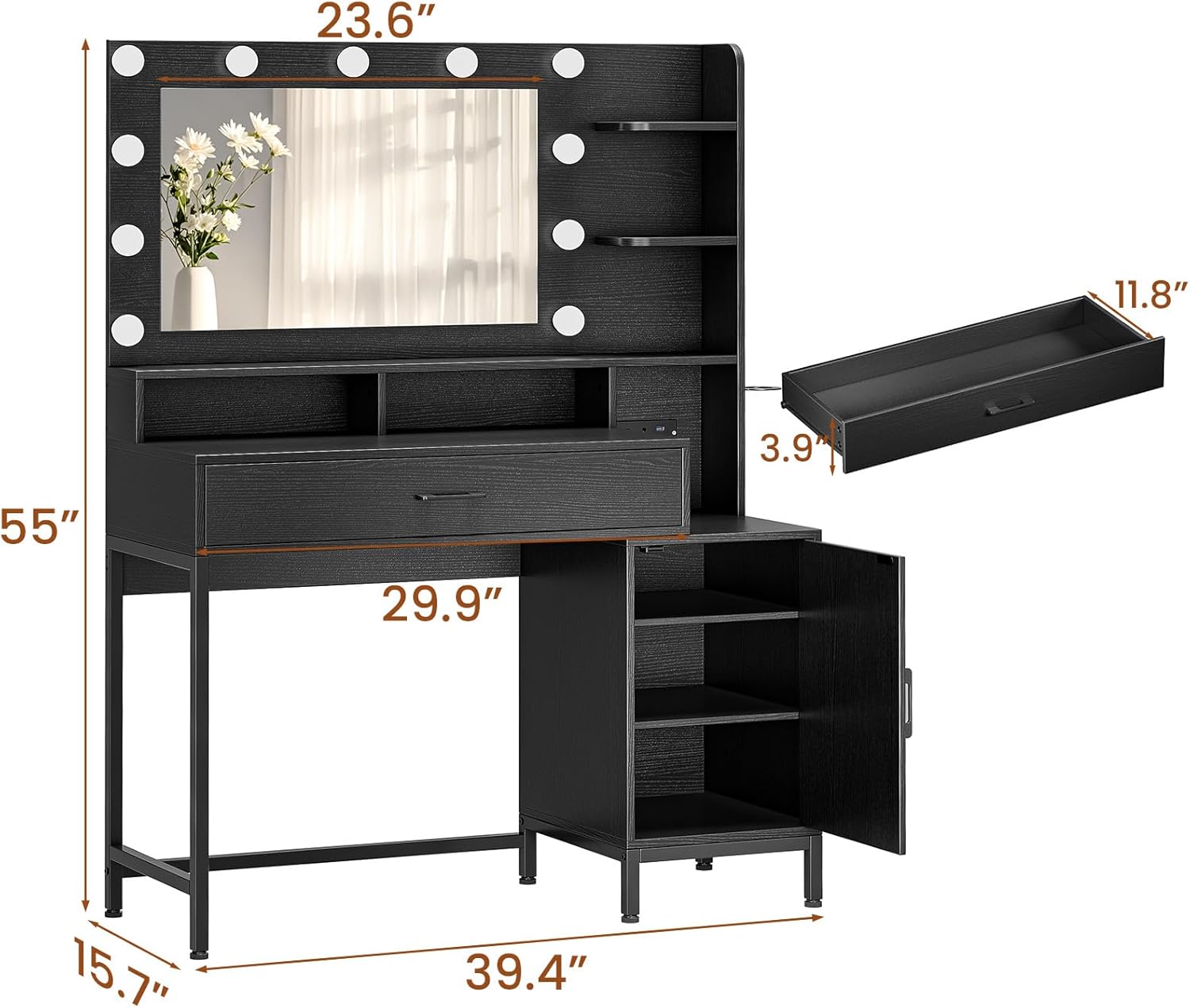
Aworan 2.2: Onisẹpo view of the vanity desk, showing overall measurements of 39.4"W x 15.7"D x 55"H.
3. Package Awọn akoonu
Before beginning assembly, please verify that all components listed below are present and undamaged. If any parts are missing or damaged, contact customer support.
- Awọn panẹli Iduro Asan (awọn titobi oriṣiriṣi)
- Digi pẹlu Integrated LED imọlẹ
- Drawer Components and Glides
- Cabinet Door and Hinges
- Power Outlet Unit with USB Ports
- Dimu irun togbe
- Hardware Apejọ (skru, dowels, awọn titiipa kamẹra, ati bẹbẹ lọ)
- Anti-Tip Anchors
- Awọn Ẹsẹ Atunṣe
- Ilana Afowoyi (iwe yii)
4. Eto ati Apejọ
Assembly typically requires two adults and basic household tools (e.g., screwdriver, hammer). Follow the step-by-step instructions provided in the separate assembly guide included with your package. Ensure you have adequate space and a clean, flat surface for assembly.
Awọn Igbesẹ Apejọ Gbogbogbo:
- Yọọ gbogbo awọn paati ati rii daju lodi si atokọ akoonu package.
- Pejọ fireemu tabili akọkọ ni ibamu si awọn aworan atọka.
- Install the drawer glides and assemble the drawer.
- Attach the side cabinet and install the door.
- Mount the mirror unit to the desk.
- Install the power outlet unit and hairdryer holder.
- Attach the adjustable feet to the base of the vanity.
- Secure the vanity to the wall using the provided anti-tip anchors.
Refer to the detailed graphical instructions in your assembly guide for specific part identification and fastening methods.
5. Awọn ilana Iṣiṣẹ
5.1. Ètò Ìmọ́lẹ̀ Dígí

Image 5.1: Illustration of the three lighting modes: Cool White, Warm White, and Warm Yellow, with 10 brightness levels.
The vanity mirror is equipped with 11 LED bulbs offering adjustable lighting for various needs.
- Titan/Apapa: Locate the touch button on the mirror surface. Tap once to turn the lights on or off.
- Yi Ipo Awọ pada: With the lights on, tap the touch button repeatedly to cycle through the 3 color modes: Cool White (6000K), Warm White (4000K), and Warm Yellow (3000K).
- Ṣatunṣe Imọlẹ: With the lights on, press and hold the touch button to smoothly adjust the brightness level. Release when the desired brightness is achieved. There are 10 distinct brightness levels.
5.2. Built-in Power Hub

Aworan 5.2: Isunmọ view of the built-in power station with 2 AC outlets and 2 USB ports.
The integrated power hub provides convenient access to electrical outlets and USB charging ports.
- Awọn iṣan AC: Two 125V/12A AC outlets are available for powering hair tools, small appliances, or other electrical devices.
- Awọn ibudo USB: Awọn ebute USB 5V/2A meji ni a pese fun gbigba agbara awọn fonutologbolori, awọn tabulẹti, ati awọn ẹrọ USB miiran.
- Lilo: Simply plug your devices into the appropriate ports. Ensure the vanity is plugged into a wall outlet for the power hub to function.
5.3. Awọn ẹya ara ẹrọ ipamọ

Aworan 5.3: Pariview of the vanity's storage capabilities, including the large drawer, open shelves, and cabinet.
- Large Storage Drawer: Utilize the spacious central drawer for cosmetics, accessories, and other items. The smooth glide rails ensure easy opening and closing.
- Ṣii awọn iyẹfun: Five open shelves provide accessible storage for frequently used items, decorative pieces, or skincare products.
- Hidden 3-Tier Cabinet: The side cabinet offers concealed storage with three adjustable tiers, ideal for larger items or keeping clutter out of sight.
- Dimu Irun irun: A dedicated holder keeps your hairdryer or other styling tools neatly organized and easily accessible.
6. Itọju ati Itọju
Proper care will ensure the longevity and appearance of your vanity desk.
- Ninu Awọn ẹya ara ẹrọ: Mu awọn oju ilẹ pẹlu asọ, damp asọ. Yago fun abrasive ose tabi simi kemikali ti o le ba awọn ipari.
- Digi Ninu: Lo ohun ìfọmọ́ gilasi kan tí a ṣe pàtó fún àwọn dígí àti aṣọ tí kò ní ìfọ́n. Fọ́n ohun ìfọmọ́ sori aṣọ náà, kìí ṣe taara sí ara dígí náà, kí omi má baà yọ́ wọ inú ẹ̀gbẹ́ rẹ̀.
- Awọn ohun elo itanna: Ensure the power hub and light connections remain dry. Do not expose to excessive moisture.
- Mu Hardware: Máa ṣàyẹ̀wò gbogbo àwọn skru àti àwọn ohun tí a fi so mọ́ ara wọn lẹ́ẹ̀kọ̀ọ̀kan kí ó lè dúró ṣinṣin.
- Yago fun ikojọpọ pupọ: Do not exceed the recommended weight capacity for any part of the vanity.
7. Laasigbotitusita
Ti o ba pade awọn ọran pẹlu tabili asan rẹ, tọka si awọn iṣoro ti o wọpọ ati awọn ojutu wọnyi.
| Isoro | Owun to le Fa | Ojutu |
|---|---|---|
| Awọn imọlẹ ko tan. | Vanity not plugged in; loose connection; faulty bulb/wiring. | Ensure the vanity's main power cord is securely plugged into a working wall outlet. Check all internal wiring connections. If individual bulbs are replaceable, check them. |
| Awọn imọlẹ ko yipada awọ tabi imọlẹ. | Incorrect operation of touch button. | Tap the touch button to cycle modes. Press and hold to adjust brightness. Refer to Section 5.1. |
| Awọn ọna agbara / awọn ebute oko USB ko ṣiṣẹ. | Vanity not plugged in; overloaded circuit; faulty power hub. | Verify the vanity is plugged in. Unplug other devices to check for overload. Test with a different device. |
| Drawer is stiff or not closing smoothly. | Misaligned glides; obstruction; loose hardware. | Check that the drawer glides are properly aligned and free of debris. Ensure all drawer hardware is tightened. |
| Asán dàbí ohun tí kò dúró ṣinṣin. | Uneven floor; loose hardware; anti-tip anchors not installed. | Adjust the leveling feet on the bottom of the vanity. Tighten all assembly hardware. Ensure anti-tip anchors are correctly installed and secured to a wall stud. |
If the problem persists after attempting these solutions, please contact Driftalia customer support.
8. Awọn pato
| Ẹya ara ẹrọ | Ẹ̀kúnrẹ́rẹ́ |
|---|---|
| Nọmba awoṣe | IF240040 |
| Brand | Driftalia |
| Awọn iwọn Ọja (Lapapọ) | 39.4"W x 15.7"D x 55"H (Approximate) |
| Iwọn Nkan | 72.8 iwon |
| Ohun elo | Onigi Igi |
| Àwọ̀ | Dudu |
| Itanna | 11 LED Bulbs, 3 Color Modes (6000K, 4000K, 3000K), 10 Brightness Levels |
| Awọn iṣan Agbara | 2 Awọn iṣan AC (125V/12A) |
| Awọn ibudo USB | 2 Awọn ibudo USB (5V/2A) |
| UPC | 850062367616 |
9. Onibara Support
For further assistance, missing parts, or warranty inquiries, please contact Driftalia customer support. Refer to your purchase documentation for specific contact details or visit the official Driftalia webojula.
Olupese: Driftalia
Ọjọ Akọkọ Wa: Oṣu Kẹsan Ọjọ 10, Ọdun 2025
