1. Ifihan
This manual provides essential information for the safe and efficient use of your Fossibot F107 Pro 5G Rugged Smartphone. Please read it thoroughly before operating your device.
Ohun ti o wa ninu Apoti
- Fossibot F107 Pro 5G Smartphone
- USB Iru-C USB
- Adaparọ agbara (66W)
- SIM Ejector Ọpa
- Itọsọna olumulo
- Kaadi atilẹyin ọja
2. Awọn ẹya Ọja
The Fossibot F107 Pro is engineered for durability and high performance, offering a range of advanced features:
- Massive 28000mAh Battery with 66W Fast Charge: Experience extended usage with a large battery and rapid charging capabilities. The OTG function allows charging of other devices.
- Eto Kamẹra To ti ni ilọsiwaju: Features a 200MP AI main camera for detailed photos, a 2MP Night Vision Camera for clear low-light imaging, and a 50MP front camera for high-quality selfies. Supports 4K video recording and various modes including underwater, HDR, and 360° panorama.
- Robust Performance and Storage: Equipped with 12GB RAM (expandable up to 18GB virtual RAM for a total of 30GB) and 512GB internal storage, utilizing DDR5 technology for faster performance and lower power consumption.
- Immersive 6.95" FHD+ Display: A 2.4K display with 2400x1080 resolution and a 120Hz Smart Dynamic Refresh Rate provides smooth visuals and responsive interaction.
- 5G Network Connectivity: Supports 5G networks (T-Mobile compatible; Verizon and AT&T are not supported). Please verify local frequency band compatibility before purchase.
- Apẹrẹ alagidi: Built to MIL-STD-810H standards, with IP68 and IP69K ratings for water, dust, and drop resistance.
- Ina Filaṣi ti a dapọ: A powerful flashlight with a 50-meter beam distance for outdoor activities and emergencies.
- Aabo ati Irọrun: Includes NFC for contactless payments, Face ID, and Fingerprint unlock for secure and quick access.

Aworan: Pariview of Fossibot F107 Pro's main features, highlighting its large battery, memory, camera, and rugged certifications.
3. Device Ìfilélẹ
Familiarize yourself with the physical components of your Fossibot F107 Pro.

Aworan: Iwaju ati ẹhin view of the Fossibot F107 Pro, showcasing apẹrẹ lile ati modulu kamẹra rẹ.

Aworan: Ẹgbẹ profile of the Fossibot F107 Pro, indicating the location of the power button, volume rocker, and SIM/TF card slot.
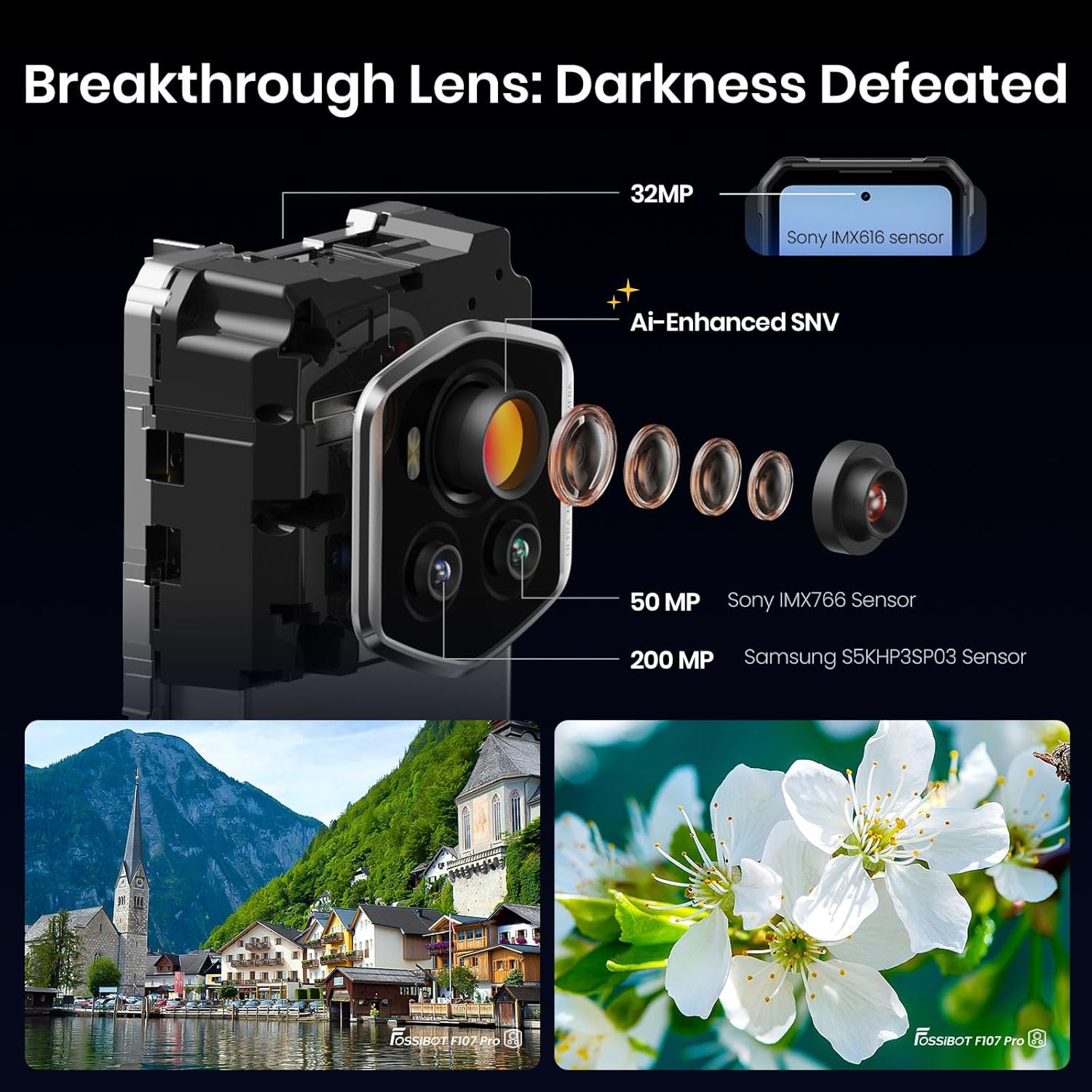
Aworan: Alaye view of the Fossibot F107 Pro's multi-lens camera system, including the 200MP main sensor and night vision lens.
4. Eto
4.1 Kaadi SIM ati TF Kaadi fifi sori
- Wa atẹ kaadi SIM/TF ni ẹgbẹ ẹrọ naa.
- Fi ohun elo SIM ejector sii sinu iho kekere ti o tẹle atẹ naa ki o tẹ rọra titi ti atẹ naa yoo fi jade.
- Place your Nano-SIM card(s) and/or TF card (microSD) into the designated slots on the tray. Ensure the gold contacts face downwards.
- Fi iṣọra tun fi atẹ sii sinu foonu titi ti o fi tẹ sinu aaye.
4.2 Gbigba agbara akọkọ
Before first use, fully charge your device. Use the provided 66W power adapter and USB Type-C cable for optimal charging speed.
- So okun USB Iru-C pọ si ibudo gbigba agbara ni isalẹ foonu naa.
- So opin keji USB pọ mọ oluyipada agbara.
- Pulọọgi ohun ti nmu badọgba agbara sinu iṣan ogiri kan.
- Atọka gbigba agbara yoo han loju iboju.
4.3 Titan / Pa a
- Lati Fi agbara: Press and hold the Power button (located on the side) until the Fossibot logo appears.
- Lati Paarẹ: Tẹ ki o si mu awọn Power bọtini, ki o si yan "Power pipa" lati awọn aṣayan loju iboju.
- Lati Tun bẹrẹ: Tẹ bọtini agbara ki o si dimu, lẹhinna yan "Tun bẹrẹ" lati awọn aṣayan ti o wa lori iboju.
4.4 Ni ibẹrẹ Oṣo
Upon first power-on, follow the on-screen prompts to configure your device, including language, Wi-Fi connection, Google account, and security settings.
5. Awọn ilana Iṣiṣẹ
5.1 Basic Navigation (Android 15)
Your Fossibot F107 Pro runs on Android 15. Navigate using gestures or the traditional three-button navigation bar (configurable in Settings).
- Iboju ile: Swipe left/right to access app pages.
- Drawer App: Ra soke lati isalẹ iboju si view gbogbo awọn ohun elo ti a fi sori ẹrọ.
- Awọn iwifunni & Eto Yara: Ra isalẹ lati oke iboju lati wọle si awọn iwifunni ati awọn eto iyara toggles.
5.2 kamẹra Lilo
The Fossibot F107 Pro features a versatile camera system.
- Ṣii ohun elo kamẹra.
- Select your desired mode (Photo, Video, Night Vision, Portrait, etc.).
- Fọwọ ba bọtini titiipa lati ya fọto kan tabi bẹrẹ/da gbigbasilẹ fidio duro.

Aworan: Exploded view of the camera module, showing the 200MP Samsung S5KHP3SP03 sensor, 50MP Sony IMX766 sensor, and 32MP Sony IMX616 sensor.

Image: Demonstrates the difference between Starlight Night Vision (full-color) and traditional Infrared Night Vision (black and white).
5.3 Flashlight isẹ
The powerful integrated flashlight can be accessed via Quick Settings or a dedicated button (if configured).

Image: The Fossibot F107 Pro's flashlight illuminating a path, highlighting its 50-meter beam distance.
5.4 OTG Iṣẹ
The On-The-Go (OTG) feature allows your phone to act as a power bank to charge other devices or connect USB accessories.
- Connect an OTG adapter (not included) to your phone's USB-C port.
- Connect the device you wish to charge or the USB accessory to the OTG adapter.
- Ensure OTG is enabled in your phone's settings if it doesn't activate automatically.
5.5 Security Features (Face ID, Fingerprint)
Set up Face ID or Fingerprint unlock for convenient and secure access to your device.
- Lọ si Eto > Aabo & Aṣiri > Ṣii silẹ ẹrọ.
- Follow the on-screen instructions to register your face or fingerprint.
5.6 Ifihan Eto
Customize your display experience, including the 120Hz refresh rate.

Image: Visual representation of the Fossibot F107 Pro's display specifications, including resolution, refresh rate, and brightness.
6. Itọju
To ensure the longevity and optimal performance of your Fossibot F107 Pro, follow these maintenance guidelines:
- Omi ati Eruku Resistance: The device is IP68/IP69K rated. Ensure all port covers are securely closed before exposing the phone to water or dust. Do not intentionally submerge the phone in corrosive liquids or extreme temperatures.
- Ninu: Lo asọ, damp cloth to clean the phone's surface. Avoid harsh chemicals or abrasive materials.
- Itọju Batiri: Avoid extreme temperatures. Do not fully discharge the battery regularly. Use the original charger for optimal battery health.
- Idaabobo iboju: While the screen is durable, consider using a screen protector for added scratch resistance.
- Iwọn otutu: Ṣiṣẹ ẹrọ naa laarin awọn iwọn otutu ti a ṣeduro (nigbagbogbo 0°C si 35°C).
7. Laasigbotitusita
If you encounter issues with your Fossibot F107 Pro, refer to the following common solutions:
7.1 Foonu Ko Ṣiṣẹ
- Rí i dájú pé batiri náà ti gba agbára. So foonu náà mọ́ ẹ̀rọ amúṣẹ́ náà fún o kere ju ìṣẹ́jú mẹ́ẹ̀ẹ́dógún lọ.
- Tẹ bọtini agbara ki o si mu fun awọn aaya 10-15 lati fi agbara mu lati tun bẹrẹ.
7.2 Awọn ọran gbigba agbara
- Rí i dájú pé okùn gbigba agbara àti adapter náà so pọ̀ dáadáa láìsí ìbàjẹ́.
- Try using a different compatible charger and cable.
- Clean the charging port gently with a dry, soft brush to remove any debris.
7.3 Network Asopọmọra isoro
- Ṣàyẹ̀wò bóyá a ti fi kaadi SIM rẹ sí i dáadáa.
- Rii daju pe data alagbeka ti ṣiṣẹ ni Eto.
- Tun foonu bẹrẹ.
- Verify that your carrier (T-Mobile) has coverage in your area. Remember, Verizon and AT&T are not supported.
7.4 Kámẹ́rà Kò Ṣiṣẹ́
- Restart the Camera app or the phone.
- Check app permissions for the Camera app in Settings.
- Rí i dájú pé kò sí ìdènà ara lórí àwọn lẹ́ńsì kámẹ́rà.
7.5 o lọra Performance
- Pa awọn ohun elo abẹlẹ ti ko wulo.
- Ko data kaṣe kuro fun awọn ohun elo ti a lo nigbagbogbo.
- Rii daju pe aaye ipamọ to wa.
- Ronú nípa àtúntò ilé iṣẹ́ gẹ́gẹ́ bí ohun tó máa jẹ́ àtúnṣe ìkẹyìn (ṣe àtìlẹ́yìn fún àwọn dátà rẹ ní àkọ́kọ́).
8. Awọn pato
| Ẹya ara ẹrọ | Sipesifikesonu |
|---|---|
| Brand | FOSSIBOT |
| Orukọ awoṣe | fossibot f107 pro |
| Eto isesise | Android 15 |
| Iwon iboju | 6.95 inches |
| Ipinnu | 2400 x 1080 |
| Oṣuwọn sọtun | 120 Hz |
| Ramu Memory sori iwọn | 12 GB (expandable to 30GB virtual RAM) |
| Agbara Ibi ipamọ Iranti | 512 GB |
| Agbara Batiri | 28000 Milionuamp Awọn wakati |
| Awọn ọna ẹrọ Asopọmọra | 5G, NFC, OTG, GPS |
| Àtìlẹ́yìn Olùgbéjáde Aláìlókùn | T-Mobile (Verizon and AT&T not supported) |
| Ruggedness | MIL-STD-810H, IP68, IP69K |
| Iwọn Nkan | 3.04 iwon |
| Package Mefa | 9.25 x 8.19 x 2.4 inches |
| Ọjọ Akọkọ Wa | Oṣu Kẹsan Ọjọ 17, Ọdun 2025 |
9. Atilẹyin ọja ati Support
Your Fossibot F107 Pro comes with a standard manufacturer's warranty. For detailed warranty information, please refer to the warranty card included in your product packaging or visit the official FOSSIBOT webojula.
For technical support, troubleshooting assistance, or service inquiries, please contact FOSSIBOT customer support through their official channels. Keep your purchase receipt and product serial number handy when contacting support.
10. Ọja Video Loriview
Fidio: Ipariview of the Fossibot F107 Pro, showcasing its features, ruggedness, and battery life in various usage scenarios.


