1. Ọja Ipariview
The Aninerel ANJ-12KP-SP-WIFI is a 12000W solar hybrid inverter designed for both on-grid and off-grid solar power systems. It converts 48V DC power to 120V single-phase or 240V split-phase AC power, providing a continuous output of 12,000W and a peak output of 24,000W. This inverter features two built-in MPPT solar charging controllers, supporting up to 6,000W + 6,000W PV input with a maximum DC voltage of 500V and a maximum PV charging current of 220A. It is suitable for various applications including RVs, homes, cabins, and workshops.

Aworan 1.1: Iwaju view of the Aninerel ANJ-12KP-SP-WIFI 12000W Solar Hybrid Inverter, showing the display screen and indicator lights.

Image 1.2: Diagram illustrating a typical single-phase hybrid inverter system setup, showing power flow from solar panels, grid, and battery to household loads.
2. Key Awọn ẹya ara ẹrọ
- Ijade Agbara giga: 12,000W continuous, 24,000W peak output, 48V DC to 120V/240V AC split-phase conversion.
- Dual MPPT Solar Charging: Two built-in MPPT controllers support up to 6,000W + 6,000W PV input with a maximum DC voltage of 500V and a maximum PV charging current of 220A.
- Agbara Parallel: Supports parallel connection of up to 6 units for a maximum output power of 72kW. Can achieve 120V single-phase, 240V split-phase, or 208V three-phase output with appropriate configurations.
- Smart LCD Monitoring: Features an LCD screen and indicator LEDs for real-time monitoring of power input/output, battery status, and system alerts. Allows configuration of charging current, voltage thresholds, and priority modes.
- Gbigba agbara Rọ & Awọn ọna Ijade: Four charging modes (Solar Only, AC Priority, Solar Priority, Hybrid Charging) and three output modes (Mains Priority, PV Priority, Inverter Output) for diverse scenarios.
- Ibamu Batiri: Compatible with AGM, GEL, Lead-acid, Li-ion, and LiFePO4 48V batteries. Supports no-battery mode for direct solar-to-load applications.
- Apẹrẹ ti o lagbara: IP65-rated enclosure for dustproof and durable operation in various environments. Features intelligent cooling with a variable speed fan.
- Awọn aabo to peye: Built-in protections against overvoltage, undervoltage, reverse polarity, and short circuits.
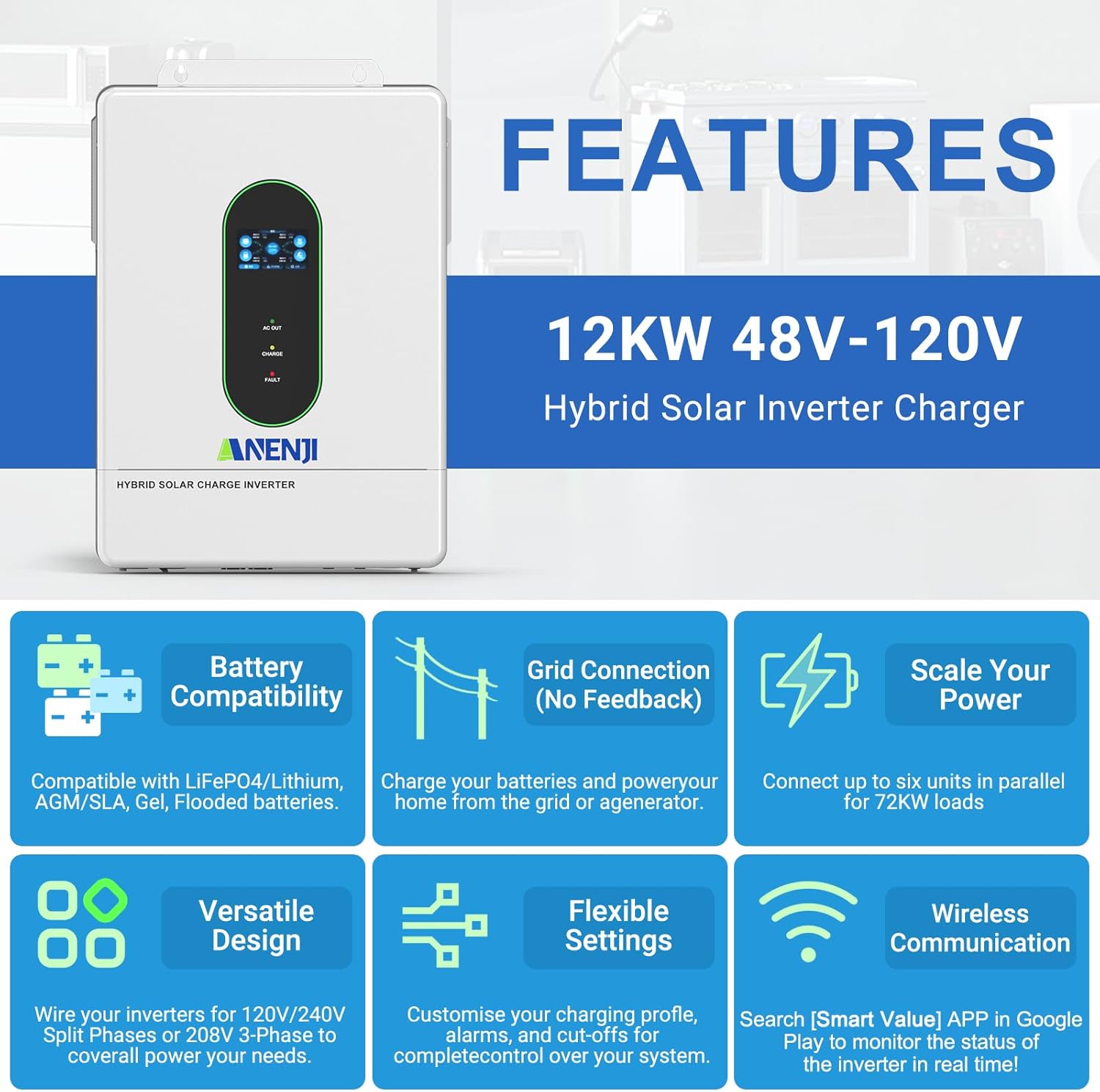
Aworan 2.1: Pariview of key features including battery compatibility, grid connection, scalability, versatile design, flexible settings, and wireless communication.
3. Ọja irinše ati awọn ẹya ẹrọ
The following items are typically included with your Aninerel ANJ-12KP-SP-WIFI Hybrid Solar Inverter:
- Aninerel ANJ-12KP-SP-WIFI Hybrid Solar Inverter Unit
- Ilana itọnisọna
- Ohun èlò ìfisílé
- Parallel Cable (x1)
- Anti-reverse current CT (x2)
- WiFi Module (x1)
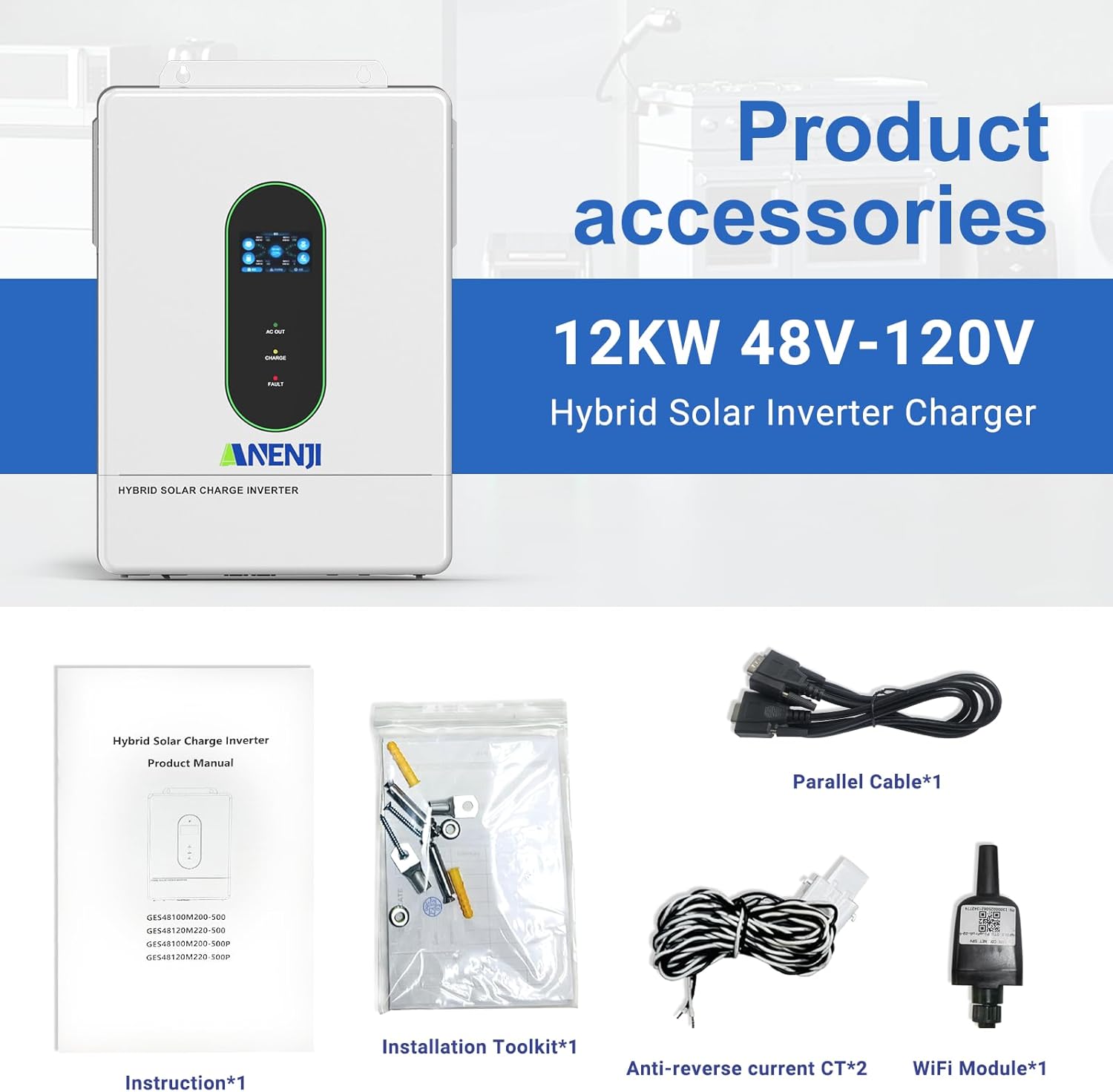
Image 3.1: Contents of the product package, including the inverter, manual, installation tools, cables, CTs, and WiFi module.
4. Eto ati fifi sori
4.1. Fifi sori ti ara
Ensure the inverter is mounted in a well-ventilated area, protected from direct sunlight and moisture. The IP65 rating allows for indoor or semi-outdoor use. Refer to the included instruction manual for detailed mounting procedures and clearances.
4.2. Connection Ports Overview
Familiarize yourself with the various connection ports on the inverter. Proper connection is crucial for safe and efficient operation.

Aworan 4.1: alaye view of the inverter's connection panel, labeling each port for display, pilot lamp, AC output, AC input, WiFi port, USB, communication ports (RS485-1, RS485-2/CAN), dry contact, CT sensing, ON/OFF switch, PV parameters, battery parameters, parallel communication, AC input breaker, and grounding screw hold.
- Iboju ifihan
- Awakọ ofurufu lamp
- Ohun elo Ọja AC
- AC input ibudo
- WiFi port (optional)
- USB ibaraẹnisọrọ ibudo
- RS485-1 ibaraẹnisọrọ ibudo
- RS485-2/CAN communication port
- Gbẹ olubasọrọ ibudo
- CT sensing for self-consumption (optional)
- PA / PA atẹlẹsẹ yipada
- Photovoltaic (PV) parameters
- Awọn paramita batiri
- Ibudo ibaraẹnisọrọ ti o jọra (Module parallel nikan)
- Fifọ AC input
- Grounding dabaru idaduro
4.3. Itanna Awọn isopọ
All electrical wiring should be performed by a qualified electrician in accordance with local electrical codes and regulations.
- Iṣawọle PV: Connect your solar panel arrays to the PV input terminals. The inverter supports dual MPPT inputs, each up to 6000W. Ensure the PV array voltage wa laarin awọn pàtó kan ibiti o (90-450VDC).
- Asopọ batiri: Connect a 48V battery bank (AGM, GEL, Lead-acid, Li-ion, or LiFePO4) to the battery terminals. Observe correct polarity.
- Ìwọlé AC (Ilo/Ẹ̀rọ-ẹ̀rọ-ìmúṣiṣẹ́): Connect the grid or a generator to the AC input port.
- Ijade AC: Connect your household loads to the AC output port. The inverter provides 120V (L1/N, L2/N) or 240V (L1/L2) split-phase output.
- Ilẹ: Ensure the inverter is properly grounded using the grounding screw hold.

Image 4.2: Detailed wiring diagram showing connections for PV input, utility/generator input, battery, and inverter output to household loads.
4.4. Parallel Asopọ
The inverter supports parallel connection of up to 6 units to increase total power output and surge capacity. This allows for flexible configurations including single-phase, split-phase, or three-phase systems.

Image 4.3: Diagrams illustrating various parallel connection configurations for single-phase and split-phase systems, showing how multiple inverters can be combined.

Image 4.4: Illustration of maximum 6 parallel connections for 120V single-phase/240V split-phase residential systems, delivering up to 72kW of power.
4.5. WiFi Monitoring Setup
The inverter includes a WiFi module for real-time monitoring of its operating status via a mobile application. Install the WiFi module into the designated port. Download the "Smart Value" app from the Google Play Store or Apple App Store to configure and monitor your system.
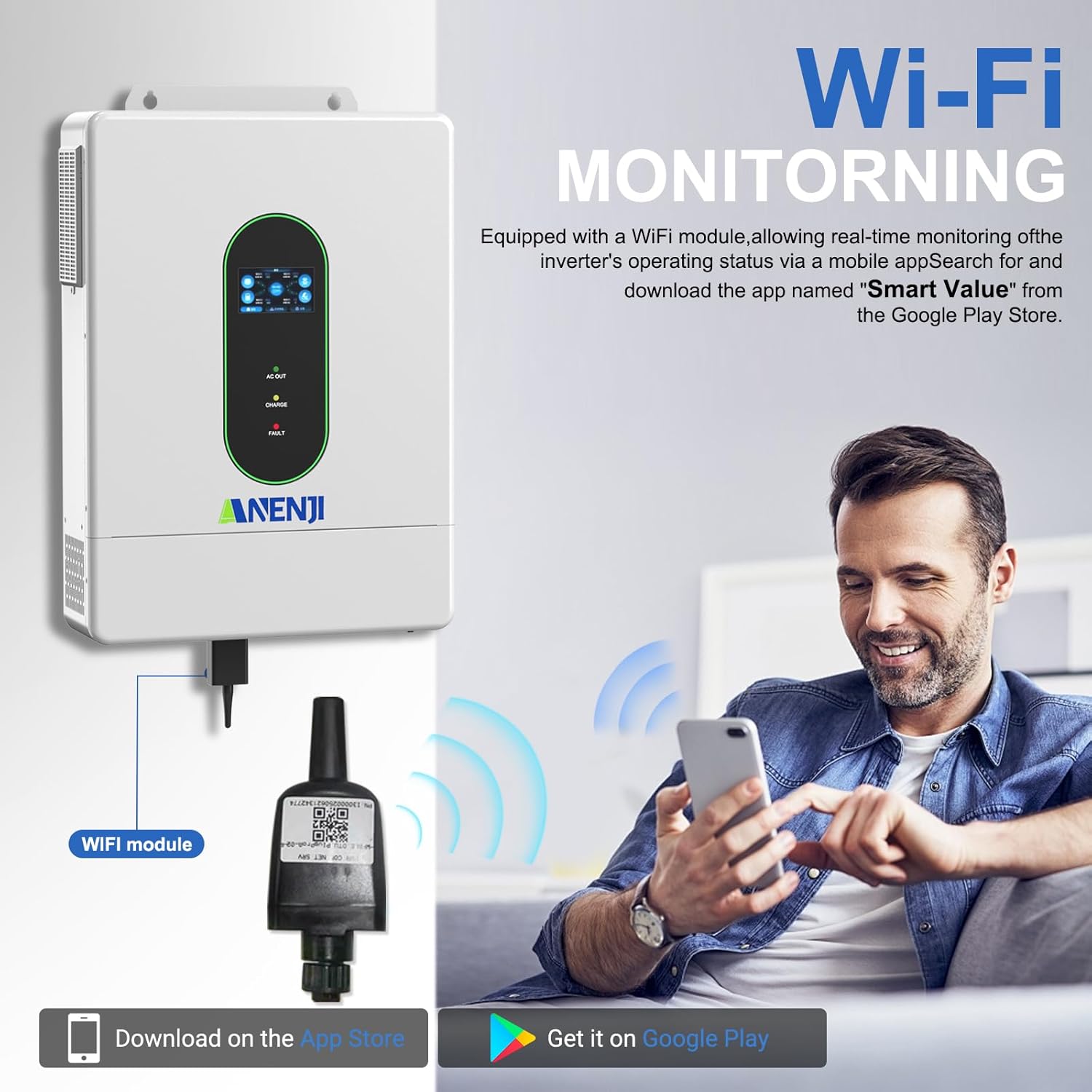
Image 4.5: Diagram showing the WiFi module connection to the inverter and a user monitoring the system via a smartphone app. The app "Smart Value" is available on Google Play and the App Store.
For detailed instructions on connecting the WiFi module and setting up the monitoring application, refer to the specific instructions provided with the WiFi module or contact customer support.
5. Awọn ilana Iṣiṣẹ
5.1. LCD Screen and Indicator LEDs
The inverter features an LCD screen and indicator LEDs to provide real-time status updates. The LCD allows for configuration of various system settings.
- AC OUT LED: Indicates AC output status.
- LED gbigba agbara: Ó fi hàn pé ó ní ipò agbára batiri.
- LED PATAKI: Indicates system errors or faults.
Use the control buttons adjacent to the LCD screen to navigate menus and adjust settings such as charging current, voltage thresholds, and operational priority modes.
5.2. Charging Priority Modes
The inverter offers four charging modes to control how the battery bank is charged from different power sources:
- Iyanju Oorun: The inverter prioritizes solar power for charging. AC input will only charge the battery when solar power is insufficient.
- Iwọle oorun ati AC: The inverter charges the battery bank from both solar and AC power simultaneously.
- Oorun Nikan: The inverter charges the battery bank exclusively from available solar power.
- Gbigba agbara arabara: (Details typically configured via settings, balancing solar and AC based on battery level and load).
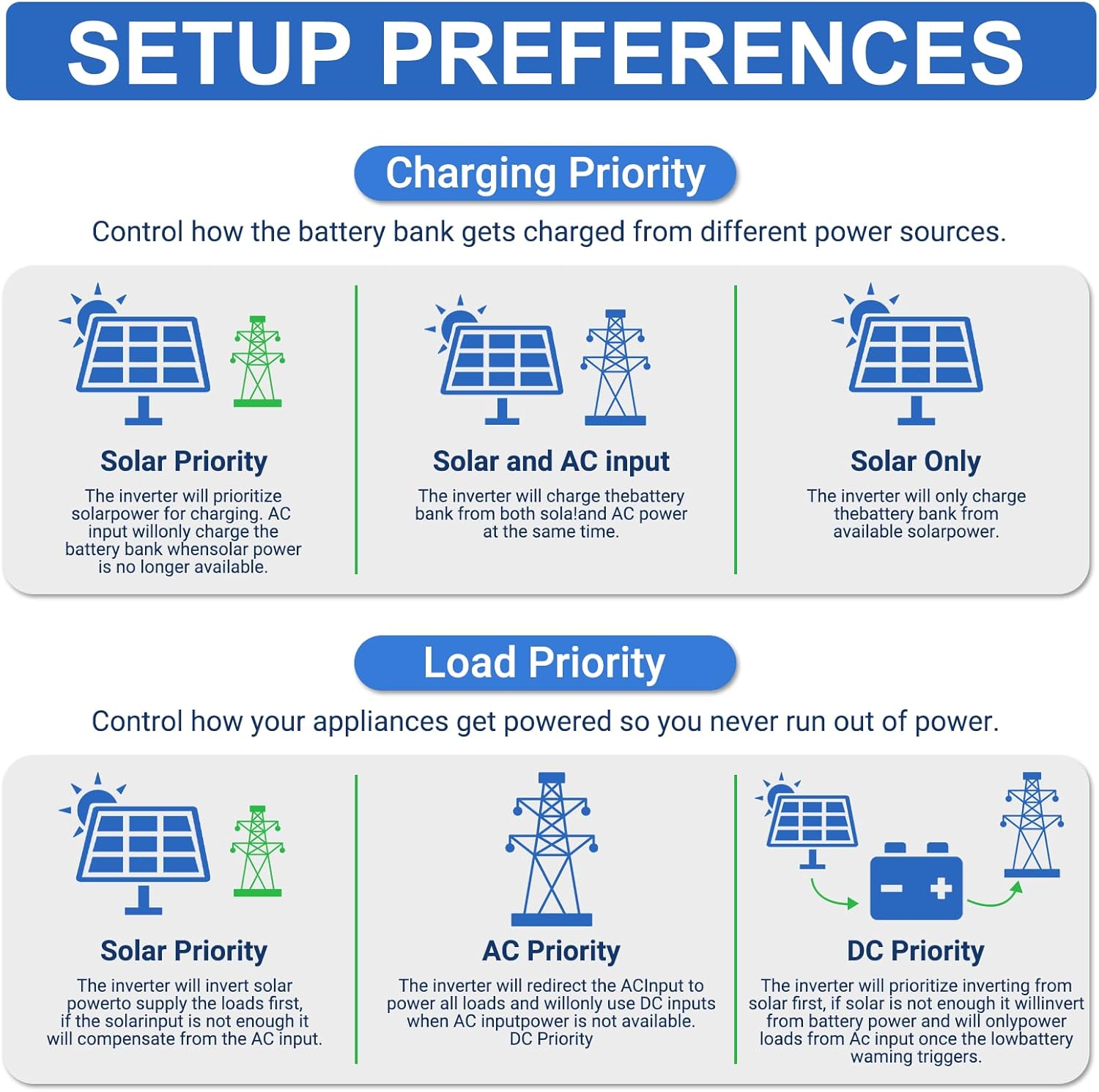
Image 5.1: Diagrams illustrating the different charging priority modes (Solar Priority, Solar and AC input, Solar Only) and load priority modes (Solar Priority, AC Priority, DC Priority).
5.3. Output Priority Modes
The inverter provides three output modes to manage how appliances are powered:
- Mains Priority (AC Priority): The inverter will redirect AC input to power all loads. If AC input is not available, it will switch to inverter output from batteries/solar.
- PV Priority (Solar Priority): The inverter will use solar power to supply the load first. If solar power is insufficient, it will draw from AC input or batteries.
- Inverter Output (DC Priority): The inverter prioritizes drawing power from the battery. If the battery level is low, it will switch to AC input.
5.4. No-Battery Operation
The inverter supports operation without a connected battery bank for direct solar-to-load applications. In this mode, the inverter will directly power loads from solar PV input. Ensure proper configuration for this mode as per the detailed manual.
6. Itọju
Regular maintenance helps ensure the longevity and optimal performance of your inverter. Always disconnect all power sources before performing any maintenance.
- Ninu: Máa fọ ìta inverter náà lẹ́ẹ̀kọ̀ọ̀kan pẹ̀lú aṣọ gbígbẹ. Rí i dájú pé àwọn ihò afẹ́fẹ́ kò ní eruku àti ìdọ̀tí.
- Awọn isopọ: Lododun ṣayẹwo gbogbo awọn asopọ itanna fun wiwọ ati awọn ami ti ipata.
- Ilera Batiri: If using a battery bank, monitor battery health and perform maintenance as recommended by the battery manufacturer.
- Awọn imudojuiwọn famuwia: Ṣayẹwo awọn olupese ká website or app for any available firmware updates for the inverter or WiFi module.
7. Laasigbotitusita
This section provides general guidance for common issues. For detailed troubleshooting, refer to the complete instruction manual or contact technical support.
| Isoro | Owun to le Fa | Ojutu |
|---|---|---|
| Oluyipada ko titan | No DC input from battery/PV; AC input breaker tripped; ON/OFF switch off. | Ṣayẹwo awọn asopọ batiri ati voltage; ensure PV input is sufficient; reset AC input breaker; turn ON/OFF switch to ON. |
| Ko si AC jade | Overload; battery low; fault condition; output mode setting. | Reduce load; check battery charge; check fault codes on LCD; verify output mode settings. |
| Batiri ko ngba agbara | PV input insufficient; charging mode setting; battery fault. | Check solar panel connections and sunlight; verify charging mode (e.g., Solar Only); inspect battery health. |
| Abojuto WiFi ko ṣiṣẹ | WiFi module not installed correctly; network issues; app configuration. | Ensure WiFi module is securely connected; check local WiFi network; reconfigure app settings. |

Image 7.1: Diagram illustrating the various built-in protections of the inverter, including overcharge, overload, overcurrent, overvoltage, short circuit, overheat, overspeed, and undervoltage Idaabobo.
8. Awọn pato
Detailed technical specifications for the Aninerel ANJ-12KP-SP-WIFI Hybrid Solar Inverter.
| Paramita | Iye |
|---|---|
| Awoṣe | ANJ-12KP-SP-WIFI |
| Won won Power o wu | Split phase 12000VA/12000W (Single phase: 7200VA/7200W limited by wiring terminals) |
| O pọju. Agbara ti o ga julọ | Split phase 18000VA, Single phase 18000VA |
| Won won wu Voltage | 120Vac (L1/N, L2/N)/240Vac (L1/L2) |
| Fifuye Agbara ti Motors | 6HP |
| Won won AC Igbohunsafẹfẹ | 50Hz/60Hz |
| Agbara afiwe | 1~6 units |
| O wujade Voltage Waveform | Igbi ese mimọ |
| Apọju Idaabobo | (102%<load<125%) +10% report error, turn off output after 5 minutes; (125%<load<150%) +10% report error, turn off output after 10 seconds; load>150% +10% report error, turn off output after 5 seconds. |
| Batiri Iru | Lithium/Lead-acid batteries |
| Ti won won Batiri Voltage | 51.2V (Ibẹrẹ ti o kere ju voltage44V) |
| Mains/Generator Input Range | (90Vac ~ 140Vac) ± 2% |
| Ijẹrisi aabo | UL STD.1741 |
| O pọju. MPPT Gbigba agbara lọwọlọwọ | 160A |
| Agbara Agbara To pọ julọ/Ẹrọ Agbára | 160A |
| Max. Hybrid Charge Current | 220A |
| Nọm. ti MPP Awọn olutọpa | 2 |
| O pọju. PV orun agbara | 6000W × 2 |
| O pọju. lọwọlọwọ input | 22A × 2 |
| O pọju. Voltage ti Open Circuit | 500Vdc |
| MPPT Voltage Ibiti | 90Vdc ~ 500Vdc |
| Max. Bypass Phase Overload Current | 2P, 63A/63A (L1/L2) |
| MPPT Ipasẹ ṣiṣe | 95% |
| Support Communication | WiFi Modules/RS485/CAN/USB/Dry contact |
| Awọn iwọn | 24.39 x 17.72 x 5.19 inches (61.95 x 45.01 x 13.18 cm) |
| Iwọn | 62.9 poun (28.53 kg) |

Image 8.1: A table summarizing the detailed technical specifications of the ANJ-12000W-LVP-WIFI model.
9. Atilẹyin ati Alaye olubasọrọ
For technical assistance, warranty inquiries, or further information, please contact Aninerel customer support.
- Imeeli: anenji168@outlook.com
- Foonu: +86 188 0375 9233
- Awọn wakati iṣẹ: PDT: 9 AM - 6 PM

Image 9.1: Contact details for Aninerel customer support, including email, phone number, and operating hours.