1. Ifihan
The BLUETTI Elite 10 Mini Portable Power Station is a compact and versatile power solution designed for various applications, including camping, travel, and emergency backup. Featuring a 128Wh LiFePO4 battery and a 200W AC outlet, it provides reliable power for small electronic devices. Its lightweight and airline-friendly design makes it an ideal companion for on-the-go power needs.

Figure 1: BLUETTI Elite 10 Mini Portable Power Station, showcasing its compact design and front panel.
2. Awọn ilana aabo
Please read and understand all safety instructions before operating the BLUETTI Elite 10. Failure to follow these instructions may result in electric shock, fire, or serious injury.
- Maṣe ṣe titu, tunṣe, tabi yipada ẹya.
- Pa ẹrọ kuro lati ina, omi, ati awọn iwọn otutu to gaju.
- Yago fun gbigbe silẹ tabi tẹriba ẹyọ si awọn ipa to lagbara.
- Lo awọn ohun elo ti a fọwọsi ati awọn okun gbigba agbara nikan.
- Rii daju pe fentilesonu to dara lakoko lilo ati gbigba agbara.
- Jeki kuro ni arọwọto awọn ọmọde.
3. Awọn ẹya Ọja
- Versatile Power Output: Equipped with a 200W AC outlet, 100W USB-C fast charging, and multiple DC ports to power various devices.
- Iwapọ & Gbigbe: Weighs approximately 4.0 lbs (1.8 kg) with an ergonomic handle, making it easy to carry.
- Airline-Friendly Capacity: 128Wh battery capacity falls within the 100–160Wh range, allowing it to be carried on most major airlines with prior approval (limit 2 per passenger).
- Ipese Agbara Ailopin (UPS): Features a built-in 10ms UPS and 350W bypass output for seamless power during outages.
- Awọn aṣayan gbigba agbara lọpọlọpọ: Supports 150W AC charging (full in 70 mins), 100W solar charging, and 100W car charging.
- Ohun elo Smart Iṣakoso: Connect via Bluetooth to customize charging modes, adjust lighting, and monitor power status in real time.
- Imọlẹ LED ti a ṣepọ: Offers 3 lighting modes (warm/cool light, SOS) for up to 50 hours of illumination.
4. Getting Started & Setup
4.1. Unboxing ati Package Awọn akoonu
Ni ṣiṣi package, rii daju pe gbogbo awọn paati wa:
- BLUETTI Elite 10 Mini Power Station
- Okun gbigba agbara AC
- Okun Ngba agbara ọkọ ayọkẹlẹ
- Itọsọna olumulo

Figure 2: Contents of the BLUETTI Elite 10 package.
4.2. Gbigba agbara akọkọ
Before first use, fully charge the BLUETTI Elite 10. Connect the AC charging cable to the AC input port on the unit and then to a wall outlet. The display will indicate charging status. A full charge via AC takes approximately 70 minutes.
5. Ọja Ipariview
5.1. Igbimọ iwaju
The front panel features the main display, control buttons, and various output ports:
- DC Output (12V/5A): For compatible DC devices.
- Iboju ifihan: Shows input/output wattage, ogorun batiritage, àti àkókò ìṣiṣẹ́ tó kù.
- Bọtini DC: Activates DC output ports.
- Bọtini agbara: Tan/pa a kuro.
- Bọtini AC: Activates the AC output outlet.
- USB-C 100W Output: Fun awọn ẹrọ USB-C ti o baamu gbigba agbara iyara.
- USB-A 15W Outputs (x2): Standard USB-A ports for charging.
- USB-C 15W Output: Additional USB-C port.
Figure 3: Front panel layout of the BLUETTI Elite 10.
5.2. Side and Rear Panels
The side and rear panels house additional input/output ports and the LED light:
- DC/PV Input (12-28V/8A, 100W Max): For solar or car charging.
- Ijade AC (120V/200W): Standard wall outlet for AC-powered devices.
- Iṣawọle AC: For charging the unit via wall outlet.
- Imọlẹ LED: Multi-mode light for illumination.

Figure 4: Rear panel showing AC output and LED light.
5.3. Awọn iwọn ati iwuwo
The Elite 10 is designed for portability:
- Awọn iwọn: Isunmọ 7.8"L x 5.7"W x 4.3"H (19.8cm x 14.5cm x 11cm)
- Ìwúwo: Isunmọ 4.0 lbs (1.8 kg)

Figure 5: Visual representation of the Elite 10's compact size.
6. Awọn ilana Iṣiṣẹ
6.1. Agbara lori / Paa
Press and hold the main power button on the front panel to turn the unit on or off. The display will illuminate upon activation.
6.2. Lilo awọn ibudo AC
To use the AC outlet, press the 'AC' button on the front panel. The AC icon on the display will light up. Plug your AC-powered device into the AC output port on the rear panel. Ensure your device's power consumption does not exceed 200W.
6.3. Using DC Outputs
To use the DC output ports (USB-C, USB-A, 12V/5A), press the 'DC' button on the front panel. The DC icon on the display will light up. Connect your devices to the appropriate USB or 12V DC output ports.
6.4. Charging the Elite 10
The Elite 10 supports three charging methods:
- Gbigba agbara AC: Connect the AC charging cable to the AC input port and a wall outlet. Max 150W, full charge in approximately 70 minutes.
- Gbigba agbara Oorun: Connect a compatible solar panel (e.g., BLUETTI PV60L/PV60F/PV100) to the DC/PV input port. Max 100W.
- Gbigba agbara ọkọ ayọkẹlẹ: Connect the car charging cable to the DC/PV input port and your vehicle's cigarette lighter socket. Max 100W.

Figure 6: Various charging methods for the Elite 10.
6.5. Iṣẹ́ Ipèsè Agbára Tí Kò Lè Dídúró (UPS)
When the Elite 10 is connected to an AC wall outlet and has devices plugged into its AC output, it can function as a UPS. In case of a power outage, the unit will automatically switch to battery power within 10 milliseconds, providing continuous power to connected devices up to 350W bypass output.
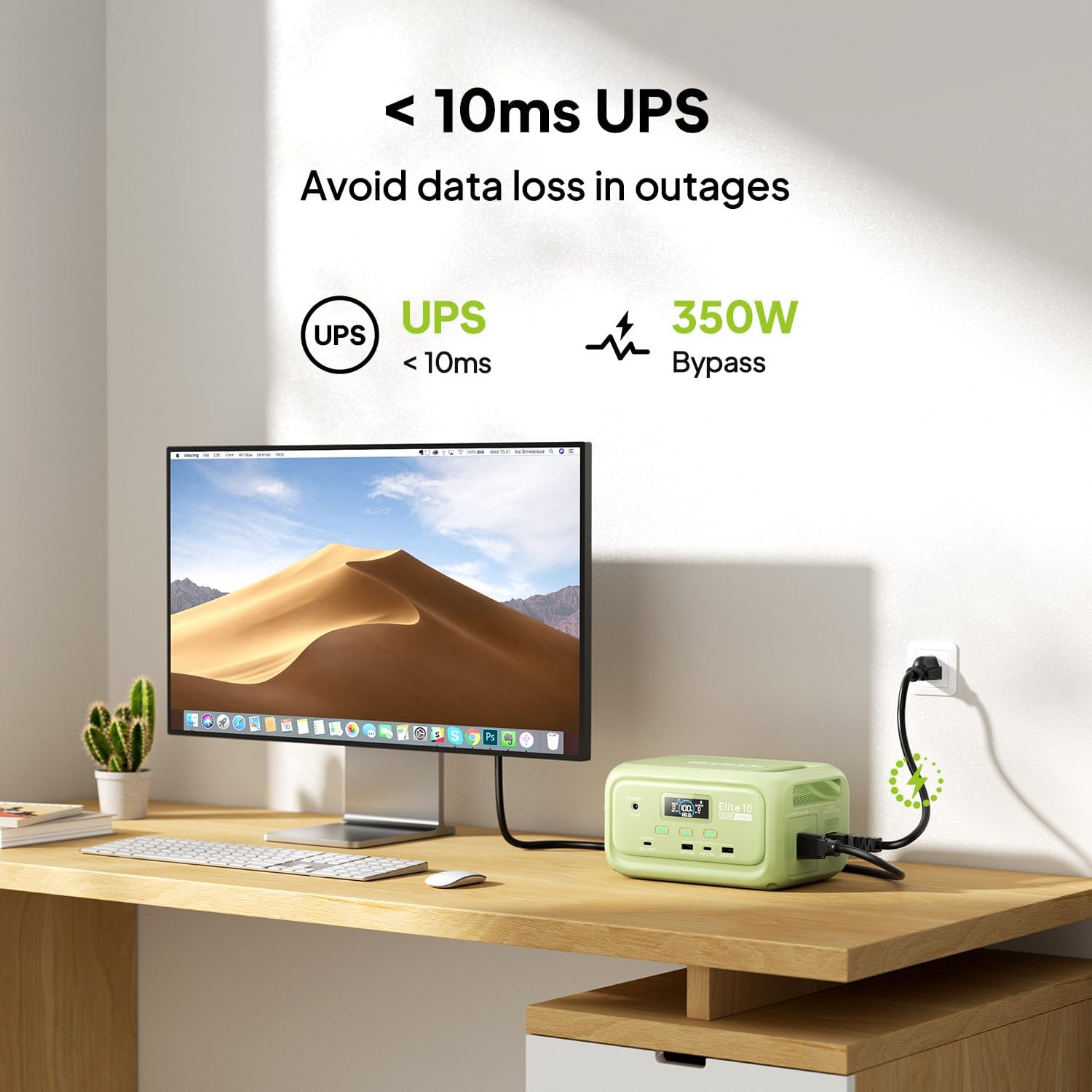
Figure 7: Illustration of the Elite 10's UPS capability.
6.6. Imọlẹ LED
The LED light on the rear panel offers three modes: warm light, cool light, and SOS. Press the dedicated light button to cycle through modes or turn it off. The light can provide up to 50 hours of illumination.
6.7. Smart App Iṣakoso
Download the BLUETTI app and connect to your Elite 10 via Bluetooth. The app allows you to monitor power status, customize charging modes, and adjust lighting settings remotely.

Figure 8: Managing the Elite 10 via the BLUETTI mobile application.
7. Itọju ati Ipamọ
- Ninu: Use a dry, soft cloth to clean the unit. Do not use abrasive cleaners or solvents.
- Iwọn otutu: Store and operate the unit within the recommended temperature range (typically 0°C to 40°C or 32°F to 104°F).
- Ibi ipamọ igba pipẹ: If storing for extended periods, charge the unit to 50-80% every 3-6 months to prolong battery life. Store in a cool, dry place.
8. Laasigbotitusita
If you encounter issues with your BLUETTI Elite 10, refer to the following common solutions:
- Ẹka Ko Tii: Rí i dájú pé batiri náà ti gba agbára. Tí kò bá rí bẹ́ẹ̀, so mọ́ ẹ̀rọ AC láti gba agbára.
- Ko si Ijade lati Awọn ibudo: Verify that the respective DC or AC output buttons are pressed and their indicators are lit. Check if the device connected requires more power than the unit can provide.
- Gbigba agbara lọra: Ensure you are using the original BLUETTI charging cables. Check the power source for adequate output.
- Idaabobo Apọju: If the unit shuts down, it may be due to an overload. Disconnect some devices and restart the unit.
For persistent issues, contact BLUETTI customer support.
9. Awọn pato
| Ẹya ara ẹrọ | Ẹ̀kúnrẹ́rẹ́ |
|---|---|
| Awoṣe | Gbajumo 10 |
| Agbara Batiri | 128Wh LiFePO4 |
| Ijade AC | 120V/200W (Pure Sine Wave) |
| USB-C o wu | 1 x 100W, 1 x 15W |
| Ṣiṣejade USB-A | 2 x15W |
| DC Iṣelọpọ | 12V/5A |
| DC/PV Input | 12-28V / 8A, 100W Max |
| Aago gbigba agbara AC | Approx. 70 minutes (150W Max) |
| Iṣẹ-ṣiṣe UPS | 10ms switchover, 350W bypass |
| Awọn iwọn (L x W x H) | 7.8" x 5.7" x 4.3" (19.8cm x 14.5cm x 11cm) |
| Iwọn | 4.0 lbs (1.8 kg) |
10. Atilẹyin ọja ati Support
The BLUETTI Elite 10 Mini Portable Power Station comes with a standard manufacturer's warranty. Please refer to the warranty card included in your package or visit the official BLUETTI webAaye fun alaye atilẹyin ọja ofin ati ipo.
For technical support, troubleshooting assistance, or any product-related inquiries, please contact BLUETTI customer service through their official channels.


