Ọrọ Iṣaaju
Welcome to the PUSUN PT-Smart Pro Tennis Ball Machine user manual. This guide provides essential information for the safe and effective use of your new tennis training equipment. Please read this manual thoroughly before operating the machine to ensure proper setup, operation, and maintenance. This machine is designed to enhance your tennis skills, offering various training modes and control options.

Image: The PUSUN PT-Smart Pro Tennis Ball Machine, showcasing its compact design and ball capacity.
Alaye Aabo pataki
To prevent injury or damage to the machine, always observe the following safety precautions:
- Ka ati loye gbogbo awọn ilana ṣaaju lilo.
- Keep hands, feet, and clothing clear of the ball throwing wheels and other moving parts during operation.
- Rí i dájú pé a gbé ẹ̀rọ náà sí orí ilẹ̀ tí ó dúró ṣinṣin, tí ó tẹ́jú kí ó tó ṣiṣẹ́.
- Use only standard tennis balls. Do not use wet, damaged, or non-standard balls, as this may cause jamming or damage.
- Tọju awọn ọmọde ati awọn ohun ọsin ni ijinna ailewu lati ẹrọ lakoko iṣẹ.
- Do not attempt to open or repair the machine yourself. Contact customer support for assistance.
- Use only the provided charger and battery. Improper charging can lead to fire or electric shock.
- Ge asopọ agbara naa ṣaaju ki o to nu tabi ṣe itọju eyikeyi.
Ohun ti o wa ninu Apoti
Lẹhin ṣiṣi silẹ, rii daju pe gbogbo awọn paati wa:
- PUSUN PT-Smart Pro Tennis Ball Machine
- External 25.6V 6AH Lithium Battery
- Latọna jijin Adarí
- Power Adapter / Ṣaja
- Afowoyi Olumulo (iwe-ipamọ yii)
Eto Itọsọna
1. Ṣíṣí àwọn ohun èlò ìkópamọ́ àti ìtòjọpọ̀ àkọ́kọ́
Carefully remove all components from the packaging. The PT-Smart Pro features a detachable ball hopper and movable wheels for easy transport and storage. Attach the hopper securely to the main unit if it is not already assembled. Extend the retractable handle for mobility.
2. Battery Connection and Charging
Connect the external 25.6V 6AH lithium battery to the machine using the provided cable. Ensure a secure connection. Before first use, fully charge the battery using the supplied power adapter. A full charge provides up to 6 hours of continuous use.

Image: Connecting the external 25.6V 6AH lithium battery to the machine.
3. Ball Loading
Open the ball hopper and load up to 115+ standard tennis balls. Ensure balls are dry and clean to prevent machine malfunction.
4. Fifi sori App ati Sisopọ
Download the official PUSUN app from your smartphone's app store (available for iPhone/Android). Follow the in-app instructions to pair your device with the PT-Smart Pro machine via Bluetooth. This enables advanced control and programming features.
Awọn ilana Iṣiṣẹ
1. Agbara lori / Paa
Locate the power switch on the machine. Flip it to the 'ON' position to power on. The machine will perform a brief self-check. To power off, flip the switch to the 'OFF' position.
2. Awọn ọna Iṣakoso
The PT-Smart Pro offers three convenient ways to control its functions:
- Ohun elo Foonuiyara: Provides comprehensive control over all settings, including AI Smart Generate functions and custom programming.
- Adarí Latọna jijin: A 15-key remote allows for quick adjustments to basic settings during play.
- iWatch Control: For seamless control directly from your iWatch, offering convenience during practice.

Aworan: Pariview of the smartphone app, remote controller, and iWatch control options.
3. Siṣàtúnṣe Eto
Customize your training experience by adjusting the following parameters:
- Bọọlu Iyara: Adjustable up to 75 mph (120 km/h).
- Igbohunsafẹfẹ: Custom intervals from 1.8 to 8 seconds per ball.
- Elevation Angle: Adjust the trajectory of the ball.
- Yipada: Apply topspin or backspin to balls for varied practice.
4. Àwọn Ìgbésẹ̀ Ìdánilẹ́kọ̀ọ́
The PT-Smart Pro offers 12 professional training modes to enhance your skills:
- Fixed Spot: Delivers balls to a consistent location.
- Laileto: Sends balls to various unpredictable locations across the court.
- Lob: High trajectory shots.
- Topspin: Balls with forward rotation.
- Backspin: Balls with backward rotation.
- AI Smart Generate: Creates unpredictable ball routines mimicking real match scenarios.
- And other specialized modes for comprehensive training.
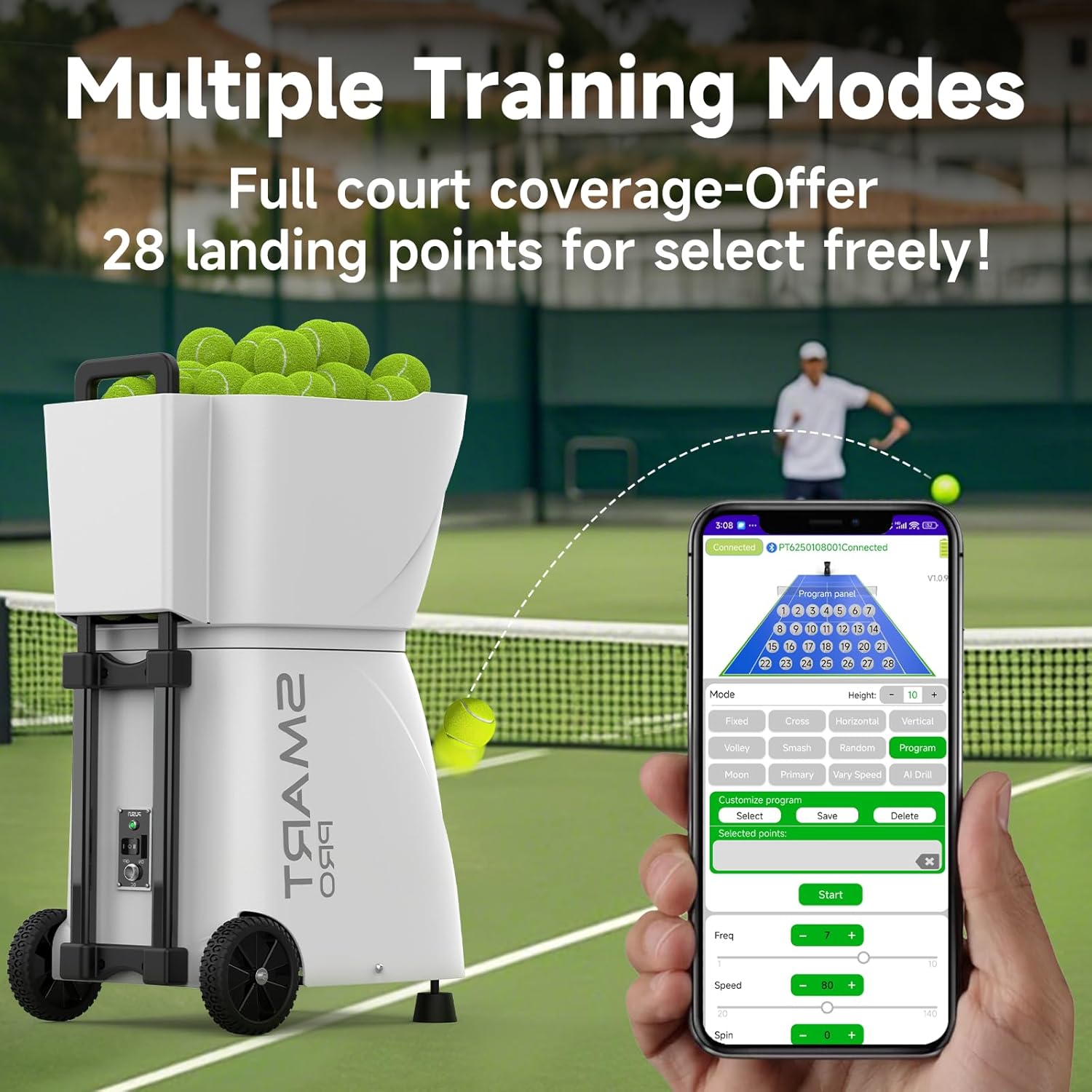
Image: The smartphone app interface showing various training modes and court landing points.
Itoju
1. Ninu
Regularly clean the machine to ensure optimal performance. Use a soft, dry cloth to wipe down the exterior. For the ball throwing wheels, ensure they are free of dirt or debris. Do not use abrasive cleaners or solvents.
2. Itọju batiri
To prolong battery life, fully charge the battery after each use. If storing the machine for an extended period, charge the battery to approximately 50% and store it in a cool, dry place. Recharge every 3-6 months to prevent deep discharge.
3. Ibi ipamọ
The PT-Smart Pro's detachable ball hopper and movable wheels allow for compact storage. Detach the hopper and store the machine in a dry, protected area when not in use. Avoid extreme temperatures.
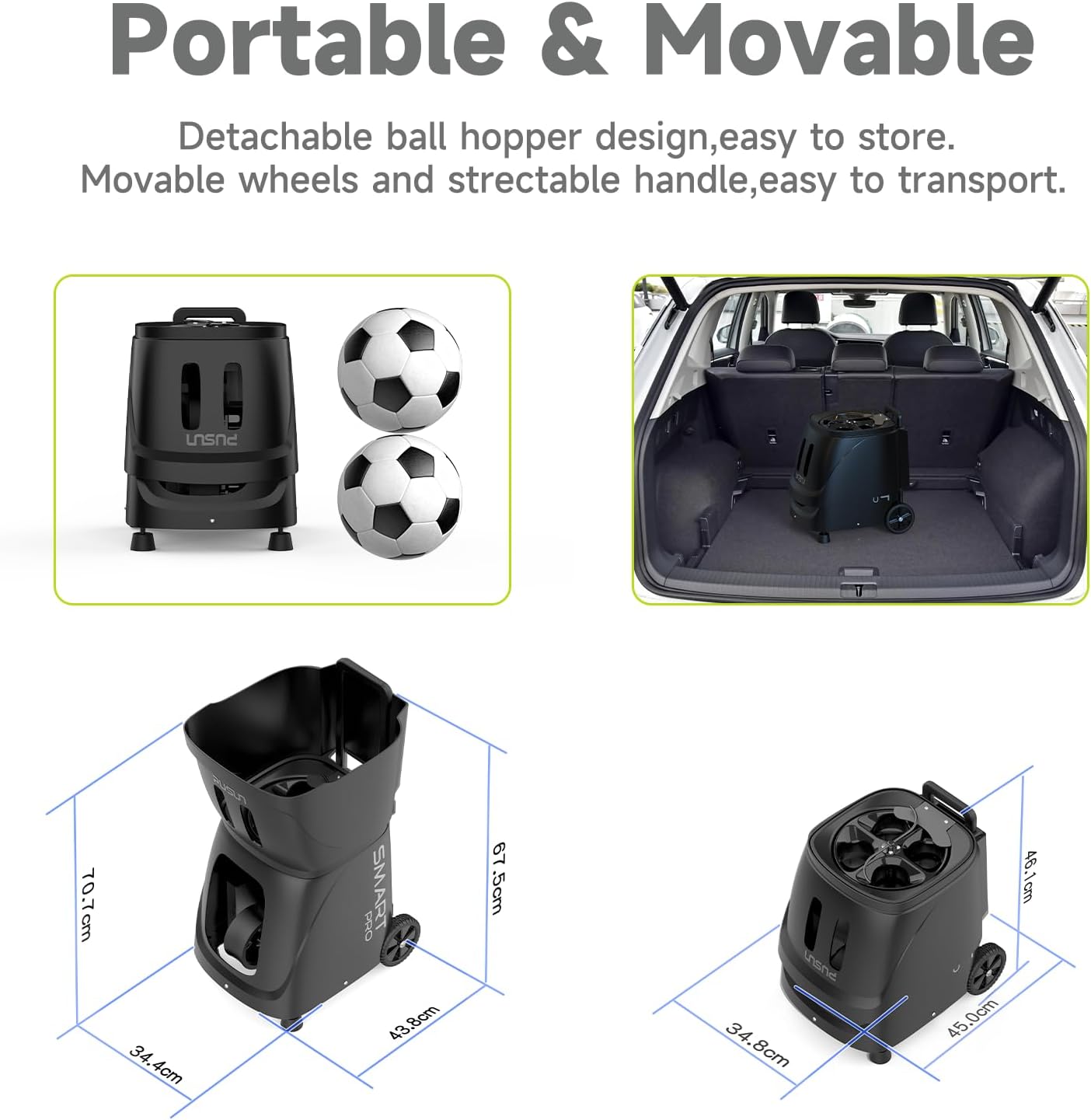
Image: Diagrams showing the machine's dimensions and its compact storage configuration.
Laasigbotitusita
If you encounter issues with your PT-Smart Pro, refer to the following common solutions:
- Ẹrọ ko ṣiṣẹ lori: Ensure the battery is fully charged and properly connected. Check the power switch position.
- Balls not feeding: Verify that the ball hopper is not empty and that balls are not jammed. Use only dry, standard tennis balls.
- Inconsistent ball delivery: Check for debris on the throwing wheels. Ensure the machine is on a stable surface.
- Remote/App not connecting: Ensure the machine is powered on and within range. Re-pair the device if necessary. Check battery levels in the remote.
- Igbesi aye batiri kukuru: Ensure the battery is fully charged before use. Battery performance can decrease over time; consider replacement if significantly degraded.
Fun awọn ọran ti o tẹsiwaju, jọwọ kan si atilẹyin alabara.
Awọn pato
| Ẹya ara ẹrọ | Ẹ̀kúnrẹ́rẹ́ |
|---|---|
| Orukọ awoṣe | PT-SMART PRO |
| Brand | PUSUN |
| Awọn iwọn Nkan (LxWxH) | 17.2 x 13.5 x 27.8 inches |
| Iwọn Nkan | 33 iwon |
| Idiwon Iwọn (LxWxH) | 24.3 x 20.7 x 15.9 inches |
| Package iwuwo | 48.5 iwon |
| Ohun elo | ABS+METAL |
| Àwọ̀ | Dudu |
| Agbara Bọ́ọ̀lù | 115+ balls |
| Igbesi aye batiri | Up to 6 hours (25.6V 6AH Lithium Battery) |
| Max Ball Speed | 75 MPH (120 km/h) |
| Feed Interval | 1.8 - 8 seconds per ball |
| Awọn ọna Iṣakoso | App (iPhone/Android), Remote Controller, iWatch |
| Awọn ipo Ikẹkọ | 12 professional modes (fixed spot, random, lob, topspin, backspin, AI Smart Generate, etc.) |
| Awọn olumulo ti o ni imọran | Unisex-agbalagba |
Alaye atilẹyin ọja
The PUSUN PT-Smart Pro Tennis Ball Machine comes with a 3-odun atilẹyin ọja. This warranty covers manufacturing defects and ensures the product meets its specified performance standards under normal use. Please retain your proof of purchase for warranty claims.
Onibara Support
If you have any questions, require technical assistance, or need to make a warranty claim, please contact PUSUN customer service directly. We are committed to providing a satisfactory response within 12-24 hours.
Please refer to the contact information provided with your purchase or visit the official PUSUN webojula fun support awọn alaye.


