1. Awọn Ilana Aabo pataki
Please read this manual carefully before using the LEFANT M330Pro Robot Vacuum and Mop and keep it for future reference. Failure to follow these instructions may result in electric shock, fire, or serious injury.
- Ohun elo yii le ṣee lo nipasẹ awọn ọmọde ti o jẹ ọdun 8 ati ju bẹẹ lọ ati awọn eniyan ti o dinku ti ara, ifarako tabi awọn agbara ọpọlọ tabi aini iriri ati imọ ti wọn ba ti fun wọn ni abojuto tabi itọnisọna nipa lilo ohun elo ni ọna ailewu ati loye awọn eewu ti o kan. .
- Awọn ọmọde yẹ ki o wa ni abojuto lati rii daju pe wọn ko ṣere pẹlu ohun elo naa.
- Ninu ati itọju olumulo ko le ṣe nipasẹ awọn ọmọde laisi abojuto.
- Maṣe lo roboti ni agbegbe tutu tabi nitosi omi.
- Ensure the charging base is placed on a level surface against a wall, with adequate clear space around it.
- Remove any loose cables, small objects, or fragile items from the floor before operation to prevent entanglement or damage.
- Do not allow the robot to pick up large objects, liquids, or burning/smoking materials.
- Use only the original power adapter and charging base provided with the robot.
- Turn off the robot and unplug the charging base before performing any maintenance or cleaning.
2. Ọja Ipariview
The LEFANT M330Pro is a versatile 3-in-1 robot vacuum and mop designed for efficient cleaning of various floor types, including carpets and hard floors. It features powerful suction, intelligent navigation, and smart control options.
Awọn ẹya pataki:
- 3-in-1 Fifọ: Combines vacuuming, sweeping, and mopping functions.
- 5000Pa Agbara gbigba: Strong suction for dirt, crumbs, and pet hair.
- Brushless Design: Reduces hair tangles, simplifying maintenance.
- dToF Laser Navigation: 360° precise mapping and intelligent path planning.
- PSD Obstacle Avoidance: 190° detection to avoid furniture, cables, and objects.
- Ìdámọ̀ Kápẹ́ẹ̀tì Àìfọwọ́ṣe: Adjusts cleaning mode and suction power on carpets.
- Ṣíṣe àwòrán onípele púpọ̀: Supports mapping for up to 3 floors.
- Asiko to gbooro: Up to 150 minutes, covering up to 150 square meters.
- Ngba agbara laifọwọyi: Returns to base when battery is low and resumes cleaning.
- Omi omi 200 milimita: Provides consistent water distribution for mopping.
- 450ml Dustbin: Large capacity reduces frequency of emptying.
- Iṣakoso Smart: Via Lefant App, compatible with Alexa, Google Assistant, and Apple Watch.
Awọn Irinṣẹ Ọja:
Familiarize yourself with the main parts of your LEFANT M330Pro robot vacuum.

Image: The LEFANT M330Pro robot vacuum demonstrating its 3-in-1 cleaning capabilities (sweeping, vacuuming, mopping) with a 200ml water tank and 99% cleaning efficiency indicated.
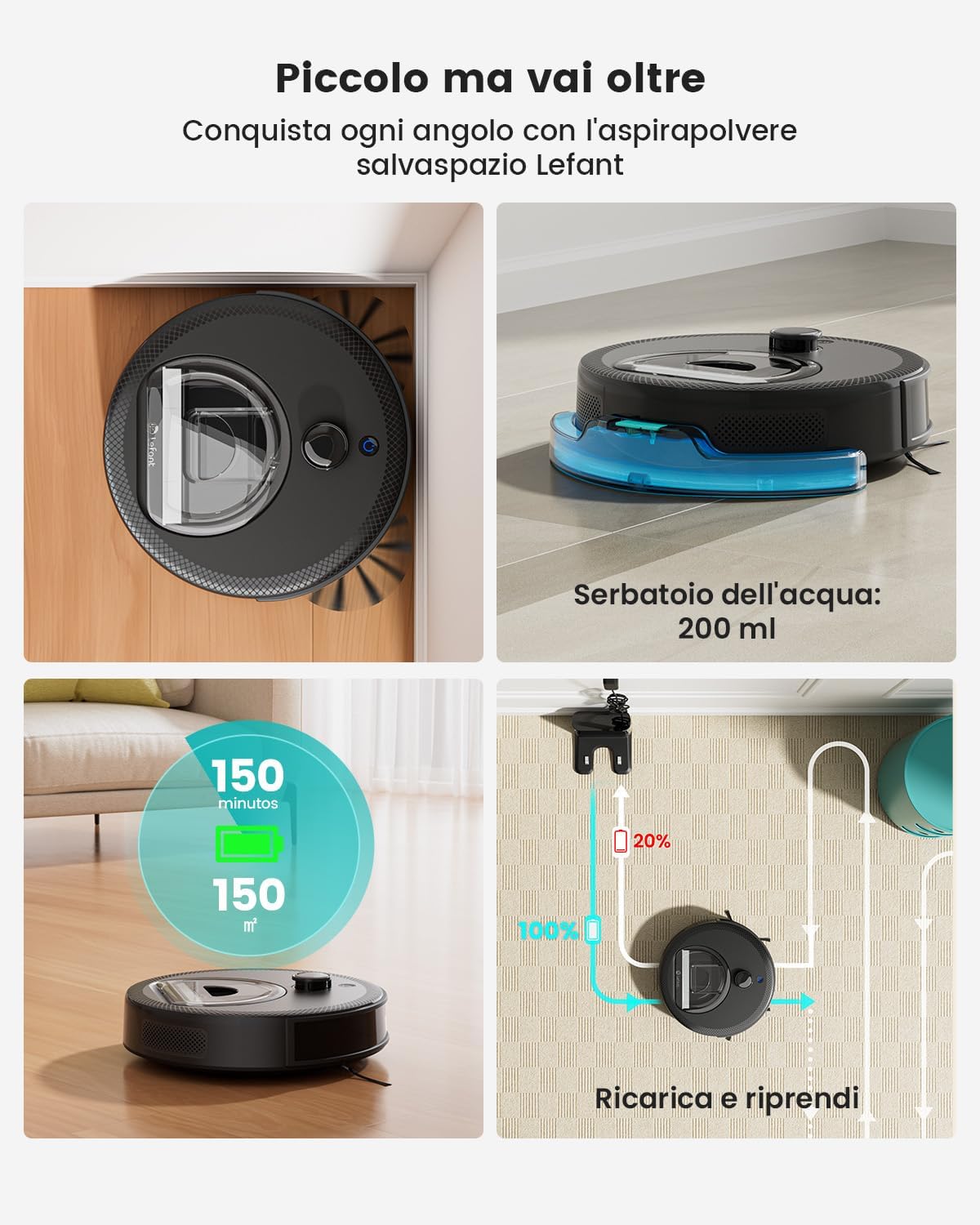
Image: A visual representation of the LEFANT M330Pro's features, including its 200ml water tank, 150 minutes of runtime covering 150 square meters, and automatic recharge and resume function.

Image: The compact design of the LEFANT M330Pro allows it to clean effectively under beds, tables, and sofas, reaching difficult areas.
3. Eto
3.1 Ṣiṣii silẹ
Carefully remove the robot vacuum, charging base, power adapter, and all accessories from the packaging. Remove any protective films or packing materials from the robot and charging base.
3.2 Ipò Ipìlẹ̀ Gbigba agbara
- Place the charging base against a wall on a hard, level surface.
- Ensure there is at least 0.5 meters (1.6 feet) of clear space on both sides of the charging base and 1.5 meters (4.9 feet) in front of it.
- Keep the area clear of obstacles, such as power cords, rugs, or furniture, that could block the robot's path to the charging base.
- So ohun tí a fi ń gbé agbára náà mọ́ ibi tí a ti ń gba agbára, lẹ́yìn náà, so ibi tí a ti ń gbé agbára náà mọ́ inú ibi tí a ti ń gbé agbára jáde láti ògiri.
3.3 Ni ibẹrẹ idiyele
Place the robot onto the charging base, ensuring the charging contacts align. The robot will begin charging automatically. For first-time use, fully charge the robot for at least 6 hours.
3.4 App Connection and Smart Home Integration
To unlock the full potential of your M330Pro, download the Lefant App on your smartphone. The app allows for advanced control, scheduling, and monitoring.
- Download the "Lefant" app from the App Store (iOS) or Google Play Store (Android).
- Forukọsilẹ iroyin ati ki o wọle.
- Follow the in-app instructions to add your M330Pro robot. Ensure your phone is connected to a 2.4GHz or 5GHz Wi-Fi network during setup.
- Once connected, you can link your robot to voice assistants like Amazon Alexa or Google Assistant through their respective apps for voice control.
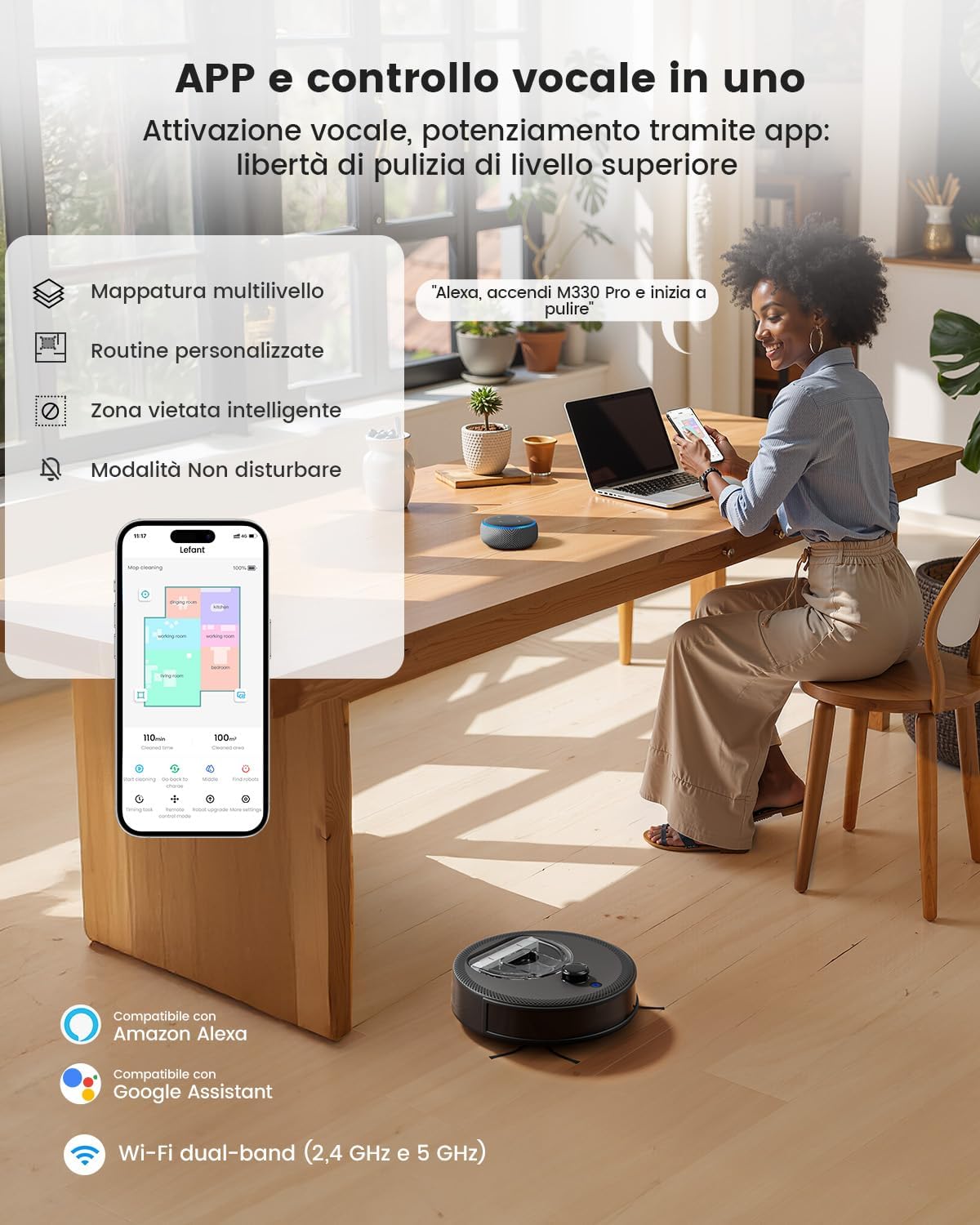
Image: The Lefant App interface showing multi-level mapping, custom routines, intelligent no-go zones, and Do Not Disturb mode. The robot is compatible with Amazon Alexa and Google Assistant, supporting dual-band Wi-Fi (2.4 GHz and 5 GHz).
4. Awọn ilana Iṣiṣẹ
4.1 Bibẹrẹ ati idekun Cleaning
- Bẹrẹ: Press the power button on the robot or use the "Start Cleaning" option in the Lefant App. The robot will begin cleaning in automatic mode.
- Duro: Press the power button again or use the "Pause" option in the app to temporarily stop cleaning.
- Pada si ipilẹ gbigba agbara: Press the home button on the robot or select "Recharge" in the app.
4.2 ninu awọn ipo
Select different cleaning modes via the Lefant App to suit your needs:
- Fifọ aifọwọyi: Rọ́bọ́ọ̀tì náà fi ọgbọ́n ṣe àgbéyẹ̀wò gbogbo ilé rẹ, ó sì ń fọ gbogbo rẹ̀ mọ́.
- Isọdọmọ Aami: Fọ agbegbe kan pato pẹlu afamora ogidi.
- Ìmọ́tótó Yàrá: Select specific rooms to clean from your mapped layout.
- Iṣakoso Afowoyi: Use the app's directional controls to guide the robot.
4.3 Carpet Recognition and Surface Adaptation
The M330Pro automatically detects carpets and adjusts its cleaning mode and suction power for optimal performance. It increases suction on carpets for deeper cleaning and maintains balanced operation on hard floors.

Image: The robot intelligently adapts to surfaces, detecting carpets and boosting power for deeper cleaning, while maintaining standard operation on hard floors.
4.4 Mopping Išė
Attach the mop cloth and fill the 200ml water tank with clean water. The robot will distribute water consistently for effective mopping on hard surfaces. Do not use the mopping function on carpets.
4.5 Advanced Mapping and Navigation
The dToF laser navigation system creates precise maps of your home, allowing for efficient cleaning paths and advanced features.
- Customizable Maps: View and edit your home's map in the Lefant App.
- Ṣíṣe àwòrán onípele púpọ̀: The robot can store maps for up to 3 different floors.
- Awọn iṣe deede: Set specific cleaning schedules and areas for different times.
- Awọn agbegbe Ko-lọ: Define areas the robot should avoid, such as pet bowls or fragile items.

Image: The dToF navigation system enables precise laser mapping for hands-free cleaning, supporting custom routines and multi-level mapping for up to 3 floors.

Image: The Lefant M330Pro allows users to define custom no-go zones on the map, ensuring the robot cleans exactly where desired and avoids specific areas like pet feeding stations.
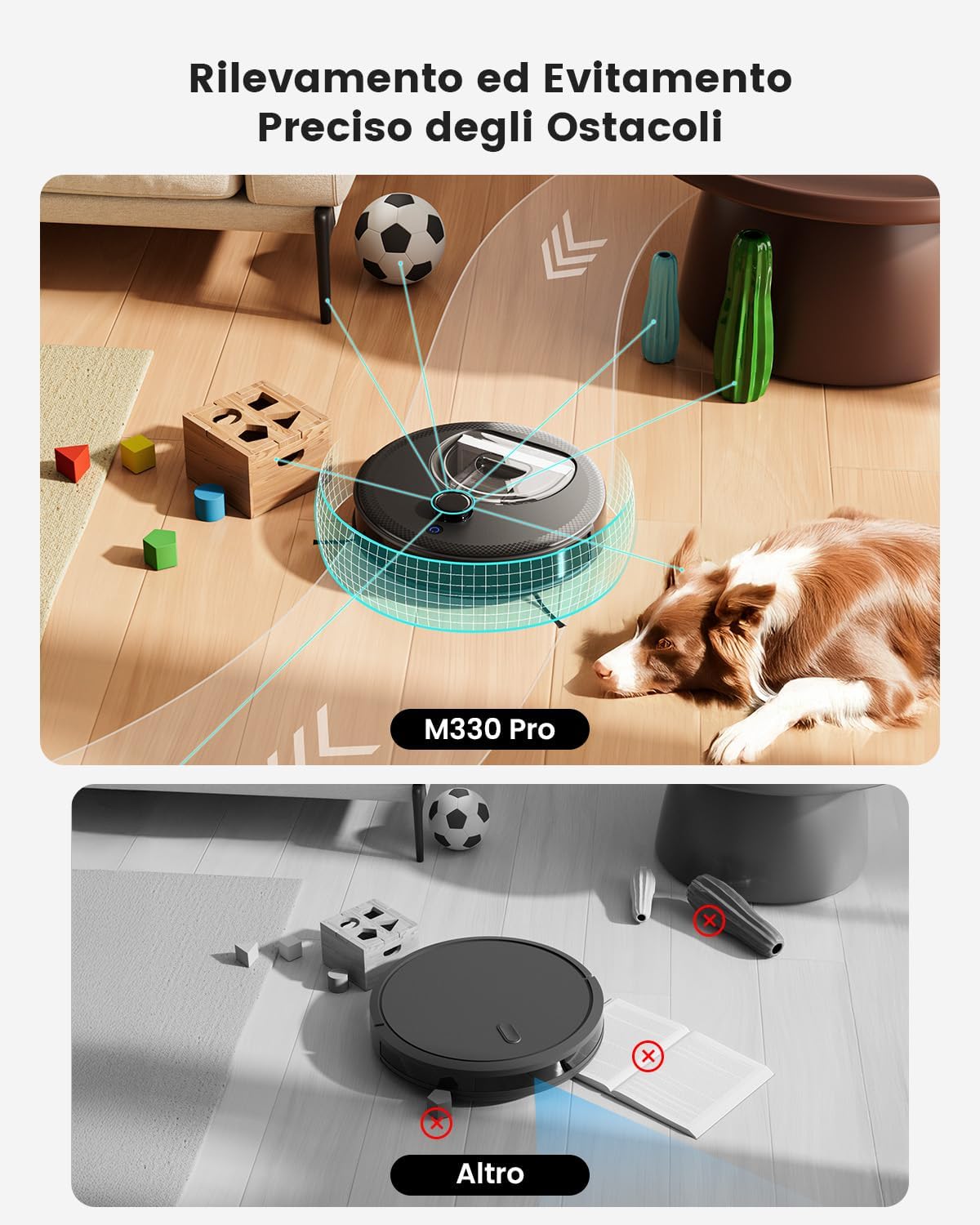
Image: The M330Pro features precise obstacle detection and avoidance, using its PSD system to navigate around objects like toys, cables, and furniture, preventing collisions and ensuring smooth operation.
5. Itọju
Regular maintenance ensures optimal performance and extends the lifespan of your LEFANT M330Pro. Always turn off the robot and unplug the charging base before performing maintenance.
5.1 Ofo Dustbin
The 450ml dustbin should be emptied after each cleaning cycle or when full.
- Ṣí ideri òkè ti robot náà.
- Yọ apoti eruku kuro nipa fifa soke.
- Ṣii ideri eruku ki o sọ awọn akoonu rẹ sinu apo idọti kan.
- Clean the filter inside the dustbin with the provided cleaning tool or a small brush.
- Fi omi fọ àpótí ìdọ̀tí náà bí ó bá ṣe pàtàkì (rí i dájú pé ó gbẹ pátápátá kí o tó tún fi sínú rẹ̀).
- Reinsert the dustbin and close the top cover.

Image: The LEFANT M330Pro features a transparent 450ml dustbin, allowing easy visual inspection of collected debris and less frequent emptying compared to smaller dustbins.
5.2 Fífọ aṣọ mop àti ojò omi
- After each mopping session, remove the mop cloth from the water tank.
- Rinse the mop cloth thoroughly with water and allow it to air dry completely before reuse.
- Tú omi tó bá kù nínú àpò omi náà kí o sì fi omi fọ̀ ọ́. Jẹ́ kí ó gbẹ nínú afẹ́fẹ́.
5.3 Awọn sensọ mimọ ati Awọn olubasọrọ gbigba agbara
Wipe the following components with a clean, dry cloth:
- Àwọn Sensọ Cliff: Located on the bottom of the robot.
- Awọn olubasọrọ gbigba agbara: On the bottom of the robot and on the charging base.
- dToF Laser Sensor: On the top of the robot.
- PSD Obstacle Avoidance Sensors: On the front bumper of the robot.
5.4 Side Brush Maintenance
Inspect the side brushes regularly for tangled hair or debris. Use scissors to cut away any tangled hair and pull out debris. Replace worn-out side brushes as needed.
6. Laasigbotitusita
If you encounter issues with your LEFANT M330Pro, refer to the following common problems and solutions:
| Isoro | Owun to le Fa | Ojutu |
|---|---|---|
| Robot ko ni tan-an. | Low battery; power switch off. | Charge the robot fully; ensure the main power switch is ON. |
| Rọ́bọ́ọ̀tì kò le padà sí ipò gbigba agbara. | Charging base obstructed; robot too far from base. | Clear obstacles around the charging base; manually place the robot closer to the base. |
| Iṣẹ ṣiṣe mimọ ko dara. | Dustbin full; filters clogged; side brushes tangled. | Empty dustbin; clean/replace filters; clean side brushes. |
| Robot di nigbagbogbo. | Awọn kebulu alaimuṣinṣin, awọn ohun kekere, tabi awọn ala ti o ga. | Clear the cleaning area; use No-Go Zones in the app. |
| App asopọ oran. | Incorrect Wi-Fi password; robot not in pairing mode; router issues. | Verify Wi-Fi password; reset robot's Wi-Fi; restart router; ensure 2.4GHz/5GHz network is used. |
If the problem persists, please contact LEFANT customer support for assistance.
7. Awọn pato
| Ẹya ara ẹrọ | Ẹ̀kúnrẹ́rẹ́ |
|---|---|
| Brand | LEFANT |
| Orukọ awoṣe | M330 Pro |
| Agbara afamora | Titi di 5000Pa |
| Lilọ kiri Iru | dToF Laser Navigation (360°) |
| Idena Idena | PSD (190°) |
| Batiri Runtime | Titi di iṣẹju 150 |
| Agbegbe Agbegbe | Up to 150 square meters per charge |
| Dustbin Agbara | 450 milimita |
| Omi ojò Agbara | 200 milimita |
| Asopọmọra | Wi-Fi 2.4G/5G, App Control, Alexa, Google Assistant, Apple Watch |
| Niyanju Awọn ipele | Hard floor, Carpet, Parquet, Tiles |
| Àwọ̀ | Dudu |
8. Atilẹyin ọja ati Support
LEFANT provides a limited warranty for the M330Pro Robot Vacuum and Mop. Please refer to the warranty card included in your product packaging for specific terms and conditions, including warranty duration and coverage.
For technical support, troubleshooting assistance, or warranty claims, please contact LEFANT customer service. You can find contact information on the official LEFANT website or through the Lefant App.
Awọn orisun Ayelujara: For additional support, FAQs, and video tutorials, visit the official LEFANT webojula: www.lefant.com


