1. Alaye Aabo pataki
Please read and understand all instructions before assembling and using this bunk bed. Retain this manual for future reference.
- Agbara iwuwo: The top bunk is designed for a maximum weight of 250 lbs. The lower bunk has a weight capacity of 400 lbs. The ladder supports up to 250 lbs.
- Ihamọ ọjọ-ori: Gbébù òkè kò yẹ fún àwọn ọmọdé tí kò tíì pé ọmọ ọdún mẹ́fà.
- Awọn ibeere matiresi: Use only a Full size mattress (54" W x 75" L) with a thickness between 4-6 inches for both upper and lower bunks. Ensure the mattress surface is at least 5 inches below the upper edge of the guardrails.
- Awọn oju opopona: Nigbagbogbo lo awọn ẹṣọ ni ẹgbẹ mejeeji ti oke oke.
- Isubu Isubu: Do not allow children to play on or under the bunk bed. Prohibit jumping on the bed.
- Apejọ: Rí i dájú pé gbogbo ìsopọ̀ mọ́ ara wọn dáadáa kí wọ́n tó lò ó. Máa ṣàyẹ̀wò kí o sì mú gbogbo ìsopọ̀ mọ́ra nígbàkúgbà.
- Afẹfẹ: Do not obstruct the ventilation openings of the LED lighting system.
- Aabo Itanna: Only use the built-in outlets for devices within their specified voltage àti ààlà ìsanwó. Má ṣe pọ̀ jù àwọn ibi ìtajà náà lọ.
2. Ọja Ipariview
The advwin Full Over Full Bunk Bed is designed for space-saving and functionality, featuring a solid wood frame, integrated LED lighting, a convertible side desk with built-in outlets, and two storage drawers.
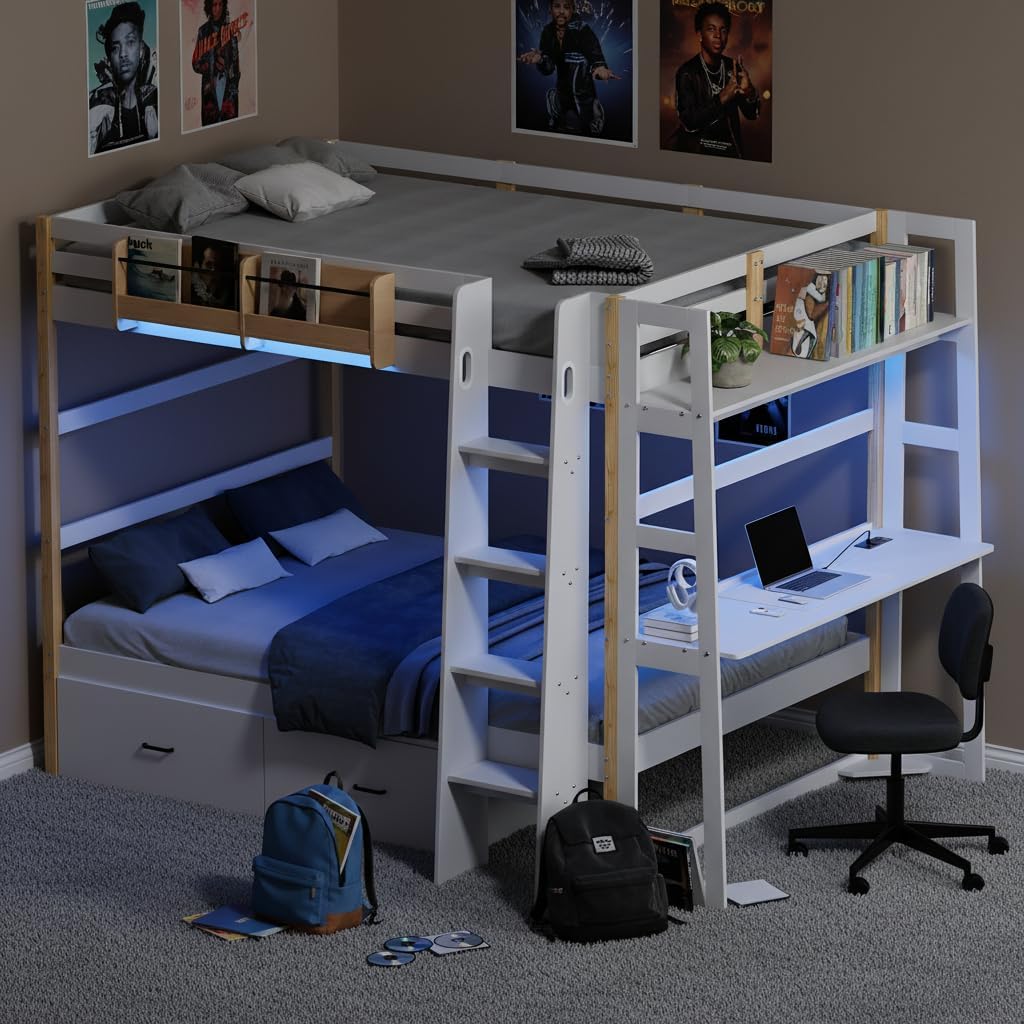
Nọmba 2.1: Lapapọ view of the advwin Full Over Full Bunk Bed. This image displays the complete bunk bed unit, highlighting the upper and lower sleeping areas, the integrated desk, ladder, and storage drawers.

Nọmba 2.2: Product Dimensions. This diagram provides detailed measurements of the bunk bed, including length, width, height, and internal component dimensions. It also indicates a lower bed weight capacity of 400 lbs.
3. Eto ati Apejọ
The advwin bunk bed is designed for straightforward assembly. All necessary hardware and tools are included. It is recommended to assemble the bed with at least two adults.
3.1 Ṣiṣii silẹ
- The product typically ships in two separate boxes, which may be delivered on different days.
- Carefully unpack all components and verify against the parts list provided in the physical manual.
- Place all parts on a soft, clean surface to prevent scratches during assembly.
3.2 Apejọ Igbesẹ
Follow the step-by-step instructions provided in the physical assembly manual included with your product. Ensure all bolts, screws, and connectors are securely fastened at each stage.

Nọmba 3.1: Solid Wood Frame. This image illustrates the robust solid wood construction of the bunk bed, emphasizing its durability and stability.
3.3 Convertible Side Desk Installation
The side desk unit is versatile and can be installed on either the left or right side of the bunk bed to best suit your room layout. Refer to the assembly manual for specific instructions on how to attach the desk and ensure it is securely mounted.

Nọmba 3.2: Versatile Side Desk. This image demonstrates the flexibility of the side desk, which can be positioned on either side of the bunk bed to adapt to various room configurations.
4. Awọn ilana Iṣiṣẹ
4.1 LED ina System
The bunk bed features integrated multicolor adjustable LED lighting. This system is typically controlled via a dedicated app on your smartphone or a remote control (if included). Refer to the separate LED lighting guide for detailed instructions on pairing and operation.
- Titan/Apapa: Use the app or remote to turn the LED lights on or off.
- Ṣatunṣe Awọ: Select from a wide range of colors and brightness levels.
- Awọn ọna: Explore custom styles, music synchronization, and timing modes for personalized ambiance.

Nọmba 4.1: LED Lighting with App Control. This image demonstrates the bunk bed's LED lighting system in operation, controlled via a smartphone application, offering various customization options.
4.2 Built-in Charging Outlets
The side desk includes a power strip with built-in outlets for convenient charging of electronic devices.
- Awọn pato: 2 AC outlets (125V/12A), 1 USB port (5V/2A), 1 Type-C port (5V/2A).
- Okun Agbara: The unit is equipped with a 5-foot power cord.
- Lilo: Plug the power cord into a standard wall outlet. Connect your devices to the appropriate ports.

Nọmba 4.2: Convenient Charging Outlets. This image provides a close-up view of the integrated power strip on the desk, featuring AC outlets, a USB port, and a Type-C port for charging electronic devices.
4.3 Ibi ipamọ Drawers
The bunk bed includes two under-bed storage drawers designed for easy access and organization.
- Isẹ: The drawers are equipped with smooth-rolling casters, allowing them to glide open and close effortlessly.
- Agbara: Use for storing clothes, toys, books, or other essentials.
- Asiri: The hidden design helps protect privacy and prevent dust accumulation.

Nọmba 4.3: Under-Bed Storage Drawers. This image illustrates the spacious storage drawers beneath the lower bunk, showcasing their smooth-gliding casters and hidden design for discreet storage.
4.4 Ergonomic Angled Ladder
The ladder is designed with an ergonomic angle for safer and more comfortable access to the top bunk.
- Wiwọle: The slanted design provides easier climbing compared to traditional straight ladders.
- Aabo: Includes a built-in handle for added safety and stability during ascent and descent.

Nọmba 4.4: Angled Ladder Design. This image highlights the ergonomic angled design of the ladder, which facilitates easier and safer climbing to the upper bunk, and includes a built-in handle.
4.5 Integrated Bookshelves
The bunk bed incorporates several shelving options for convenience.
- Top Bunk Shelf: A shelf on the upper bunk is ideal for magazines and books, keeping reading materials within easy reach.
- Desk Bookshelf: The side desk includes a top bookshelf for displaying photos, decor, or small essentials.

Nọmba 4.5: Magazine and Book Shelf. This image focuses on the convenient shelf located on the upper bunk, designed to hold magazines and books for easy access.
5. Itọju
- Ninu: Nu awọn oju igi naa pẹlu asọ ti o rọ, damp asọ. Yẹra fun awọn kẹmika lile tabi awọn olutọpa abrasive ti o le ba ipari jẹ.
- Awọn ohun mimu: Periodically check all bolts, screws, and other fasteners to ensure they remain tight. Re-tighten as necessary to maintain structural integrity.
- Awọn imọlẹ LED: If the LED lights become dusty, gently wipe them with a dry, soft cloth. Do not use liquids directly on the LED strips or electrical components.
- Awọn ayaworan: Jeki awọn orin duroa di mimọ ati laisi idoti lati rii daju pe iṣẹ ṣiṣe dan.
6. Laasigbotitusita
- Wobbly Bed: If the bed feels unstable, check all assembly connections. Ensure all bolts are tightened securely. Refer back to the assembly instructions.
- Awọn duroa duro: Check for any obstructions in the drawer tracks. Ensure the casters are clean and free of debris.
- Awọn imọlẹ LED ko ṣiṣẹ: Verify that the power cord for the bunk bed is securely plugged into a functional wall outlet. Check the connection of the LED strip to its power source. Ensure the control app or remote has fresh batteries (if applicable) and is properly paired.
- Outlets Not Functioning: Confirm the main power cord is plugged in. Test the wall outlet with another device. Check for any tripped circuit breakers.
Tí o bá pàdé àwọn ìṣòro tí a kò kọ síbí tàbí tí o nílò ìrànlọ́wọ́ síwájú sí i, jọ̀wọ́ kan sí ìrànlọ́wọ́ oníbàárà.
7. Awọn pato
| Ẹya ara ẹrọ | Sipesifikesonu |
|---|---|
| Nọmba awoṣe | wood bunk bed |
| Iwọn | Full over Full |
| Awọn iwọn Ọja (L x W x H) | 77.9" x 57.1" x 65.7" |
| Ohun elo fireemu | Igi kedari |
| Iwọn Nkan | 208 iwon |
| Upper Bunk Weight Capacity | 250 lbs |
| Lower Bunk Weight Capacity | 400 lbs |
| Agbara Ìwúwo Àkàbà | 250 lbs |
| Niyanju matiresi Iwon | Full Size (54" W x 75" L), 4-6 inches thickness |
| Built-in Outlets | 2 AC (125V/12A), 1 USB (5V/2A), 1 Iru-C (5V/2A) |
| Agbara Okun Ipari | 5 Ẹsẹ |
| Pataki Awọn ẹya ara ẹrọ | LED Lighting, Convertible Desk, Storage Drawers, Angled Ladder |

Nọmba 7.1: Recommended Mattress Size. This image specifies the ideal mattress dimensions and thickness for both the upper and lower bunks to ensure safety and proper fit.
8. Atilẹyin ọja ati Support
For warranty information, please refer to the documentation included with your purchase or contact the seller directly. Warranty terms may vary.
If you require technical support, have questions about assembly, or need replacement parts, please contact advwin customer service. You can typically find contact information on the advwin brand store on Amazon or through your purchase order details.
Atilẹyin Ayelujara: Ṣabẹwo si advwin itaja lori Amazon fun alaye siwaju sii ati olubasọrọ awọn aṣayan.


