


CipherLab RK96 Mobile Computer

Awọn pato
- Awoṣe: RK96 Mobile Kọmputa
- Previous Generation Comparison (RK95 vs. RK96):
- 1.1 cm longer base for effortless hold.
- Honeycomb-patterned rubber boot for superior shock resistance.
- Innovative e-paper display for property numbers, employee IDs, or other essential information.
- Ibi ti ina elekitiriki ti nwa:
- Igbewọle: AC 100-240V, 50/60 Hz
- Ijade: DC 5V, 2A
- CipherLab approved power adapter required.
- Batiri Batiri:
- Capacity: 3.6V, 6800mAh
- Working Hours (Minimum): 14 hours
- Akoko Gbigba agbara: O fẹrẹ to. wakati 4
- Cold Chain Battery:
- Capacity: 3.7V, 5500mAh
- Akoko Gbigba agbara: O fẹrẹ to. wakati 4
- Idaabobo Ibẹrẹ: IP65/1000 (1m) Tumbles
- Atako Ipa: 1.8m / 2.4m with Rubber Boot, multiple drops onto concrete. Operating temperature down to 1.5m.
- Charging & Communication: Can be charged and connected for data communication using either the Snap-on Cable or a USB Type-C cable.
Compared to the previous generation RK95, the new RK96 features 1) 1.1 cm longer base for effortless hold; 2) A honeycomb-patterned rubber boot for superior shock resistance; 3) an innovative e-paper display to showcase property numbers, employee IDs, or other essential information.
Ṣii Apoti Rẹ
- RK96 Mobile Kọmputa
- Batiri Li-ion gbigba agbara
- Quick Bẹrẹ Itọsọna
- Rubber Boot (Optional)
- Adapter AC (Aṣayan)
- Okùn Ọwọ (Aṣayan)
- Pistol Grip (Optional)
- Ngba agbara ati okun Ibaraẹnisọrọ (Aṣayan)
Ẹrọ ti pariview
- Kamẹra iwaju
- Ambient light & Proximity Sensors
- NFC Detection Area 1
- Olugba
- Status LED (Right)
- Agbọrọsọ (Ọtun)
- Afi ika te
- Ibudo USB-C pẹlu Ideri
- Side Trigger (Right)
- Battery Release Latch (Right)
- Bọtini agbara
- Gbigba agbara & Ibaraẹnisọrọ Pinni
- Gbohungbo iwaju
- Bọtini ọlọjẹ
- Status LED (Left)
- Kamẹra ẹhin
- Filaṣi kamẹra kamẹra
- Wiwo Window
- Ru Gbohungbo
- Sensọ iwọn otutu
- Agbọrọsọ (osi)
- E-Paper Ifihan
- Iho okun Ọwọ (Ideri)
- Side Trigger (Left)
- Battery Release Latch (Left)
- Batiri
- Ọwọ okun Iho
- NFC Detection Area 2 (For e-paper only)

Install& Remove Battery
Fifi batiri sii
Igbesẹ 1:
Insert the battery into the battery chamber from the top, then press down the lower end to secure it A click sound is made once the battery is in place.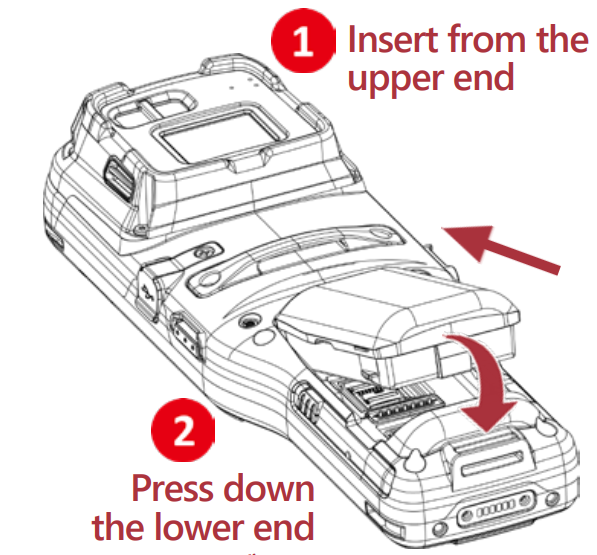
Yiyọ batiri kuro
Igbesẹ 1:
Press the release bottoms on both sides of the device at the same time.
The battery will tilt up slightly, ready to be removed.
Igbesẹ 2:
Lift the battery from the bottom while pressing the release buttons.
Batiri Alaye

Fi SD Kaadi
Fifi kaadi SD sii
- Igbesẹ 1 : Yọ batiri kuro.
- Igbesẹ 2: Open the black inner lid using the notch on the right side.
Opening the inner lid reveals the card socket and its hinge cover.
- Igbesẹ 3: Push the socket’s hinge cover forward to unlock it, then lift the cover open.
- Igbesẹ 4: Insert the microSD card into the socket.
- Igbesẹ 5: Close the hinge cover, then push it back until it locks in place.
- Igbesẹ 6: Close the inner lid and secure the battery back in place.

Gbigba agbara & Ibaraẹnisọrọ
The RK96 Mobile Computer can be charged and connected for data communication using either the Snap-on Cable or a USB Type-C cable.

FCC Ṣọra
AMẸRIKA (FCC):
Ẹrọ yii ni ibamu pẹlu Apá 15 ti Awọn ofin FCC. Iṣiṣẹ jẹ koko-ọrọ si awọn ipo meji wọnyi:
- Ẹrọ yii le ma fa kikọlu ipalara, ati
- Ẹrọ yii gbọdọ gba kikọlu eyikeyi ti o gba, pẹlu kikọlu ti o le fa isẹ ti ko fẹ.
Ohun elo yii ti ni idanwo ati rii lati ni ibamu pẹlu awọn opin fun ẹrọ oni-nọmba Kilasi B kan, ni ibamu si Apá 15 ti Awọn ofin FCC. Awọn opin wọnyi jẹ apẹrẹ lati pese aabo to tọ si kikọlu ipalara ni fifi sori ibugbe kan. Ẹrọ yii n ṣe ipilẹṣẹ, nlo ati pe o le tan agbara ipo igbohunsafẹfẹ redio ati, ti ko ba fi sii ati lo ni ibamu pẹlu awọn ilana, o le fa kikọlu ipalara si awọn ibaraẹnisọrọ redio. Sibẹsibẹ, ko si iṣeduro pe kikọlu ko ni waye ni fifi sori ẹrọ kan pato. Ti ohun elo yii ba fa kikọlu ipalara si redio tabi gbigba tẹlifisiọnu, eyiti o le pinnu nipasẹ titan ohun elo naa ni pipa ati tan, a gba olumulo niyanju lati gbiyanju lati ṣatunṣe kikọlu naa nipasẹ ọkan ninu awọn iwọn wọnyi:
- Reorient tabi tun eriali gbigba pada.
- Mu iyatọ pọ si laarin ẹrọ ati olugba.
- So ohun elo pọ si ọna iṣan lori Circuit ti o yatọ si eyiti olugba ti sopọ.
- Kan si alagbawo oniṣowo tabi redio ti o ni iriri / onimọ-ẹrọ TV fun iranlọwọ.
Iṣọra FCC: Eyikeyi iyipada tabi awọn iyipada ti ko fọwọsi ni pato nipasẹ ẹgbẹ ti o ni iduro fun ibamu le sọ aṣẹ olumulo di ofo lati ṣiṣẹ ohun elo yii.
Atagba yii ko gbọdọ wa ni ipo tabi ṣiṣẹ ni apapo pẹlu eyikeyi eriali miiran tabi atagba
Alaye Ifihan RF (SAR)
- Ẹrọ yii jẹ apẹrẹ ati iṣelọpọ lati ma kọja awọn opin itujade fun ifihan si agbara igbohunsafẹfẹ redio (RF) ti a ṣeto nipasẹ Federal Communications Commission ti Amẹrika.
- During SAR testing, this device was set to transmit at its highest certified power level in all tested frequency bands, and placed in positions that simulate RF exposure in usage against the head with no separation, and near the body with the separation of 10 mm. To support body-worn operation, choose the belt clips or holsters, which do not contain metallic components, to maintain a separation of 10 mm between this device and your body. Although the SAR is determined at the highest certified power level, the actual SAR level of the device while operating can be well below the maximum value.
- Iwọn ifihan fun awọn ẹrọ alailowaya ti n gba wiwọn kan ni a mọ ni Oṣuwọn Gbigba Pataki, tabi SAR.
- Iwọn SAR ti FCC ti ṣeto jẹ 1.6W/kg.
- FCC ti funni ni Aṣẹ Ohun elo fun ẹrọ awoṣe pẹlu gbogbo awọn ipele SAR ti a royin ti a ṣe ayẹwo bi ni ibamu pẹlu awọn itọsona ifihan FCC RF.
Canada (ISED):
Ẹrọ yii ni ibamu pẹlu awọn RSS ti ko ni iwe-aṣẹ ISED. Iṣiṣẹ jẹ koko-ọrọ si awọn ipo meji wọnyi:
- Ẹrọ yii le ma fa kikọlu ipalara, ati
- Ẹrọ yii gbọdọ gba kikọlu eyikeyi ti o gba, pẹlu kikọlu ti o le fa isẹ ti ko fẹ.
Gbólóhùn Ifihan Radiation IC
This EUT is compliance with SAR for general population/uncontrolled exposure limits in IC RSS-102 and had been tested in accordance with the measurement methods. This equipment should be installed and operated with minimum distance 10 mm between the radiator and your body. This device and its antenna(s) must not be co-located or operating in conjunction with any other antenna or transmitter.
Devices shall not be used on aircraft, except for the low-power indoor access points, indoor subordinate devices, low power client devices, and very low-power devices operating in the 5925-6425 MHz band, that may be used on large aircraft as defined in the Canadian Aviation Regulations, while flying above 3,048 meters (10,000 feet).
- Awọn ẹrọ ko ṣee lo lori awọn ọkọ ayọkẹlẹ.
- Awọn ẹrọ ko ṣee lo lori awọn ọkọ oju irin.
- Awọn ẹrọ ko ṣee lo lori awọn ọkọ oju omi okun.
EU Declaration of ibamu
EU / UK (CE/UKCA):
Nipa bayi, CIPHERLAB CO., LTD. n kede pe iru ohun elo redio RK96 wa ni ibamu pẹlu Ilana 2014/53/EU.
Ọrọ kikun ti ikede ibamu ti EU wa ni adirẹsi intanẹẹti atẹle yii: www.cipherlab.com
The device is restricted to indoor use only when operating in the 5250 to 5350 MHz, 5945 to 6425MHz (WIFI 6E LPI)
igbohunsafẹfẹ ibiti o.
UK Declaration of ibamu
Nipa bayi, CIPHERLAB CO., LTD. n kede pe iru ohun elo redio RK96 wa ni ibamu pẹlu awọn ibeere pataki ati awọn ipese miiran ti o yẹ ti Awọn Ilana Ohun elo Redio 2017.
Ẹ̀kúnrẹ́rẹ́ ọ̀rọ̀ ìkéde ti UK ni a lè rí ní h ní àdírẹ́sì Íńtánẹ́ẹ̀tì ìsàlẹ̀ yìí: www.cipherlab.com
In accordance with the relevant statutory requirements in UK, the 5250 to 5350 MHz, 5945 to 6425MHz (WIFI 6E LPI) frequency range is restricted to indoor use only in the United Kingdom
Ikilọ Ifihan RF
Ẹrọ yii pade awọn ibeere EU (2014/53/EU) lori aropin ti ifihan ti gbogbogbo si awọn aaye itanna nipasẹ ọna aabo ilera.
The limits are part of extensive recommendations for the protection of the general public. These recommendations have been developed and checked by independent scientific organizations through regular and thorough evaluations of scientific studies. The unit of measurement for the European Council’s recommended limit for mobile devices is the “Specific Absorption Rate” (SAR). This equipment should be installed and operated with minimum distance 5 mm between the radiator and your body. and the SAR limit is 2.0 W/Kg averaged over 10 grams of body tissue. It meets the requirements of the International Commission on Non-Ionizing Radiation Protection (ICNIRP).
Fun iṣẹ atẹle-si-ara, ẹrọ yii ti ni idanwo ati pade awọn itọnisọna ifihan ICNRP ati European Standard EN 50566 ati EN 62209-2. SAR jẹ iwọn pẹlu ẹrọ ti o kan si ara taara lakoko ti o ntan kaakiri ni ipele agbara iṣẹjade ti o ga julọ ni gbogbo awọn ẹgbẹ igbohunsafẹfẹ ti ẹrọ alagbeka.

Ṣọra
- Ewu bugbamu ti batiri ba rọpo nipasẹ iru ti ko tọ.
- Sọ awọn batiri ti a lo ni ibamu si awọn ilana.
Gbogbo awọn ọna ṣiṣe:

FAQ
- Where can I find the regulatory label?
The regulatory label can be found in your device from the path: Settings > Legal Information > Electronic authentication. - What are the key improvements of the RK96 over the RK95?
The RK96 features a 1.1 cm longer base for effortless hold, a honeycomb-patterned rubber boot for superior shock resistance, and an innovative e-paper display to showcase property numbers, employee IDs, or other essential information. - What type of SD cards are supported?
The device supports SD/SDHC/SDXC microSD cards. - Bawo ni MO ṣe gba agbara si ẹrọ naa?
The RK96 can be charged using either the Snap-on Cable or a USB Type-C cable, connected to a CipherLab approved power adapter.
Awọn iwe aṣẹ / Awọn orisun
 | RK96 Mobile Kọmputa |
Awọn itọkasi
- cipherlab.comwww.cipherlab.com
- Itọsọna olumulomanual.tools