

Python Programming Computer Course
Awọn pato
| Dajudaju | Computer Science Level 1 – Python |
|---|---|
| Ẹyọ | Unit 2 – Lesson 2 |
| Koko-ọrọ | Driving for Distance – Moving Forward and in Reverse |
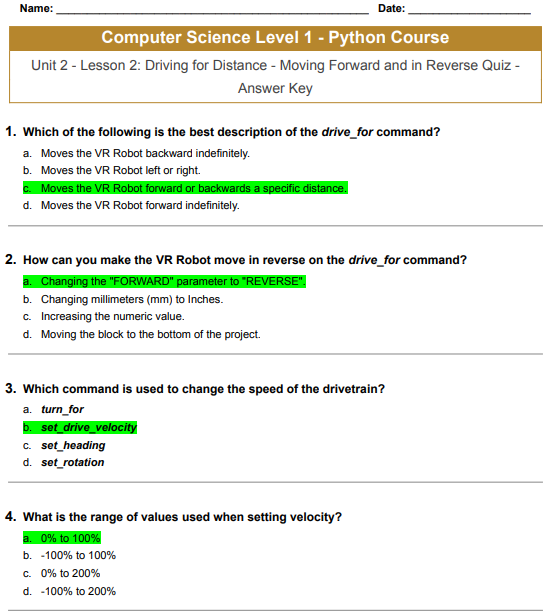
Computer Science Level 1 – Python Course
Unit 2 – Lesson 2: Driving for Distance – Moving Forward and in Reverse Quiz – Answer Key
Which of the following is the best description of the drive_ for command?
- Moves the VR Robot backward indefinitely.
- Moves the VR Robot left or right.
- Moves the VR Robot forward or backwards a specific distance.
- Moves the VR Robot forward indefinitely.
How can you make the VR Robot move in reverse on the drive_ for command?
- Changing the “FORWARD” parameter to “REVERSE”.
- Changing millimeters (mm) to Inches.
- Alekunasing the numeric value.
- Moving the block to the bottom of the project.
Which command is used to change the speed of the drivetrain?
- turn_ for
- set_ drive_ velocity
- set_ heading
- set_ rotation
What is the range of values used when setting velocity?
- 0% si 100%
- -100% si 100%
- 0% si 200%
- -100% si 200%
Awọn iwe aṣẹ / Awọn orisun
 | Programming Computer Course |
Awọn itọkasi
- Copyright Notice | VEX Robotics - VEX Roboticscopyright.vex.com
- Itọsọna olumulomanual.tools
Published: June 10, 2026
Imudojuiwọn: Okudu 11, 2026